
This page walks through the MACD Trend Following Strategy for EURUSD on H4: what it is, the tools used, the entry and exit rules, and a small example. Everything below is framed as a framework you can backtest and adapt — not a fixed recipe.
For more like this, browse the more strategy indicators for forex or jump to the full forex strategy hub.
Strategy overview
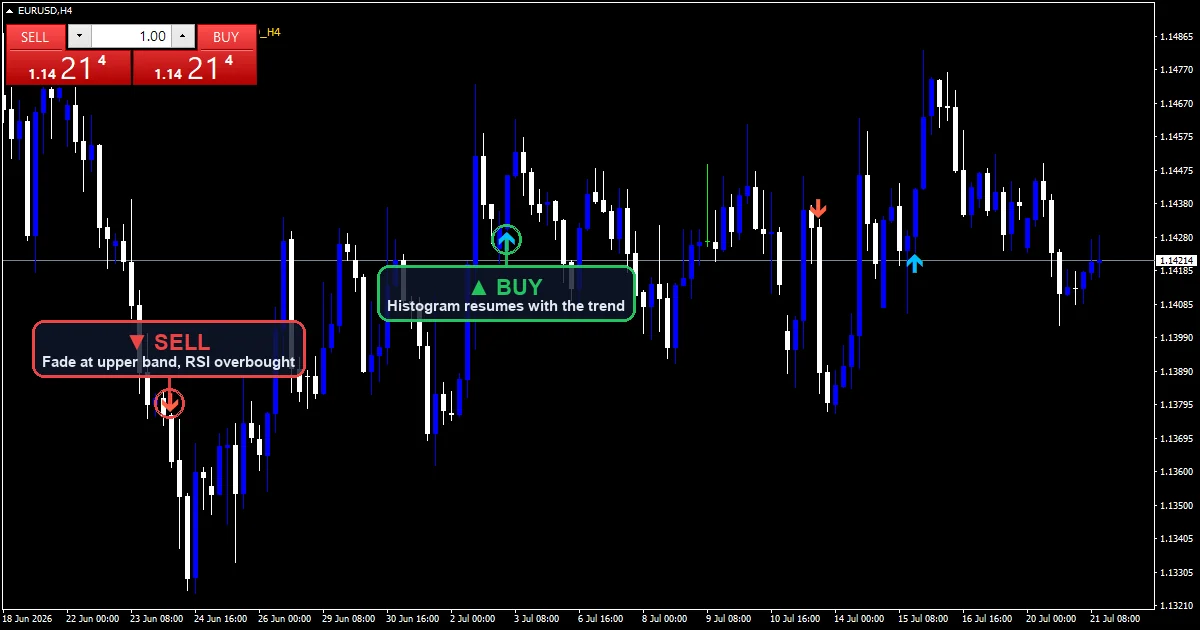
The MACD Trend Following Strategy keeps decisions simple. Read the conditions. Take only the trades that match. Skip the rest. Patience is part of the edge.
This MACD Trend Following Strategy trades EURUSD on the H4 chart. EURUSD carries the tightest spreads of the majors, which suits tight-stop rules. It suits traders who want a clear, repeatable framework. It is not a black-box system.
Tools used
- MACD (12, 26, 9) histogram
- EMA50 trend baseline on the trading timeframe
- Swing structure for the trailing stop
- MT4 and MT5 for chart, alerts, and order placement.
A short note on tool choice: every line in this section is a building block. The strategy works because the tools confirm each other, not because any single one of them is special.
Setup checklist
Before you take a trade, run through this list:
- Higher-timeframe bias is clear on EURUSD (check the D1 chart)
- Price sits near the setup zone described below, not in the middle of nowhere
- There are no red-folder news releases for the pair’s currencies in the next 60 minutes
- The instrument is liquid during your trading session.
- You have written down your stop loss and your position size.
If any item fails, skip the trade. Patience is part of the MACD Trend Following Strategy.
Entry rules
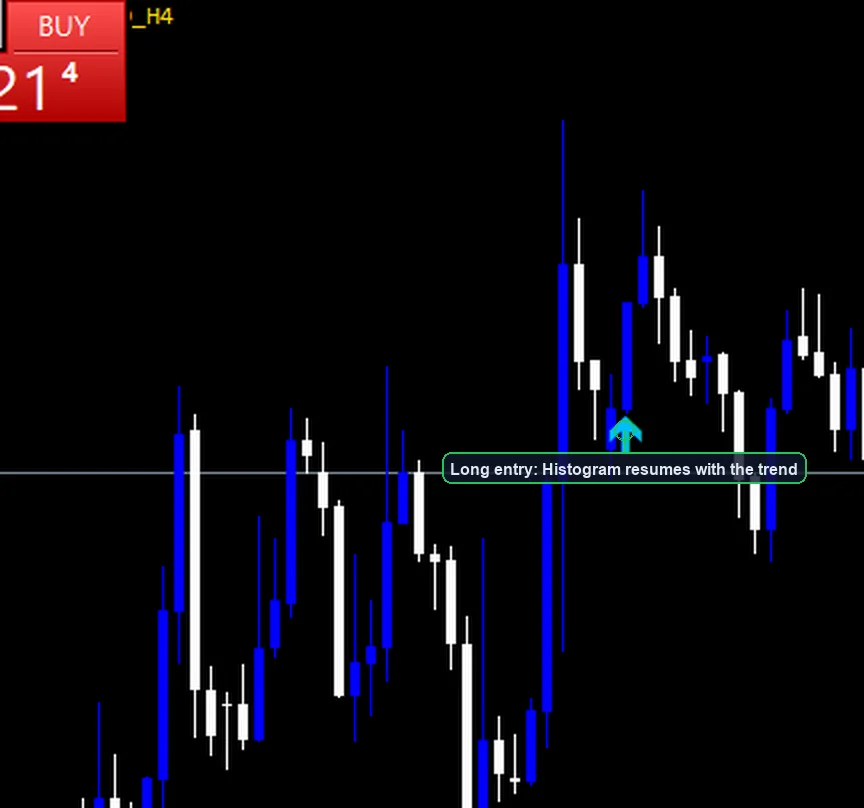
The indicator marks every valid setup with an arrow, so you can check each step against the chart image above.
Long entry:
- Confirm the trend: price holds above the EMA50 and the MACD line sits above zero.
- Wait for the histogram to shrink toward zero — a pullback in momentum, not a reversal.
- The trigger is the first bar where the histogram expands again in the trend direction.
- Enter at the open of the next bar. The indicator prints a deep-sky-blue arrow under the trigger bar.
Short entry: mirror the long rules. Price holds below the EMA50, the MACD line sits below zero, and the histogram resumes falling. The indicator prints a tomato arrow above the bar.
Exit rules

- Trail. Trail the stop behind the EMA50 or behind each new swing low. A trend-following exit rides the move instead of capping it.
- Stop loss. The initial stop sits below the pullback low. On EURUSD H4 that usually lands 40–80 pips out.
- Time stop. If the histogram flips against the trade and stays flipped for 3 bars, exit at market.
Filters that improve the setup
- Only trade when the EMA50 slope and the MACD zero-side agree. Flat baseline means no trend to follow.
- The indicator waits at least 3 bars between same-side signals.
- Each H4 bar spans a full session, so session timing matters less. Focus on the daily bias instead.
- Skip entries right before red-folder news for the pair’s currencies.
Example trade walkthrough
Walk through the entry example image above.
- Price rides above the EMA50 and the MACD line holds above zero. The histogram fades for three bars, then expands again.
- The indicator prints a deep-sky-blue arrow on the expansion bar. You enter at the open of the next bar.
- The stop sits below the pullback low — on EURUSD H4, typically 40–80 pips from entry.
- You trail behind the EMA50 and exit when a close breaks it.
These numbers are illustrative. They are not a forecast and they are not a promise. Run the rules on your own historical data first.
Risk management ideas
- Risk no more than 0.5–1% of account equity per trade while you are validating the strategy.
- Track every trade in a journal, including the screenshot, your reasoning, and the outcome.
- H4 stops run 40–80 pips. Halve your position size compared with an H1 setup at the same account risk.
- Take a break after three consecutive losses. Decision quality drops with consecutive losses; rules should hold up to that.
Indicator settings
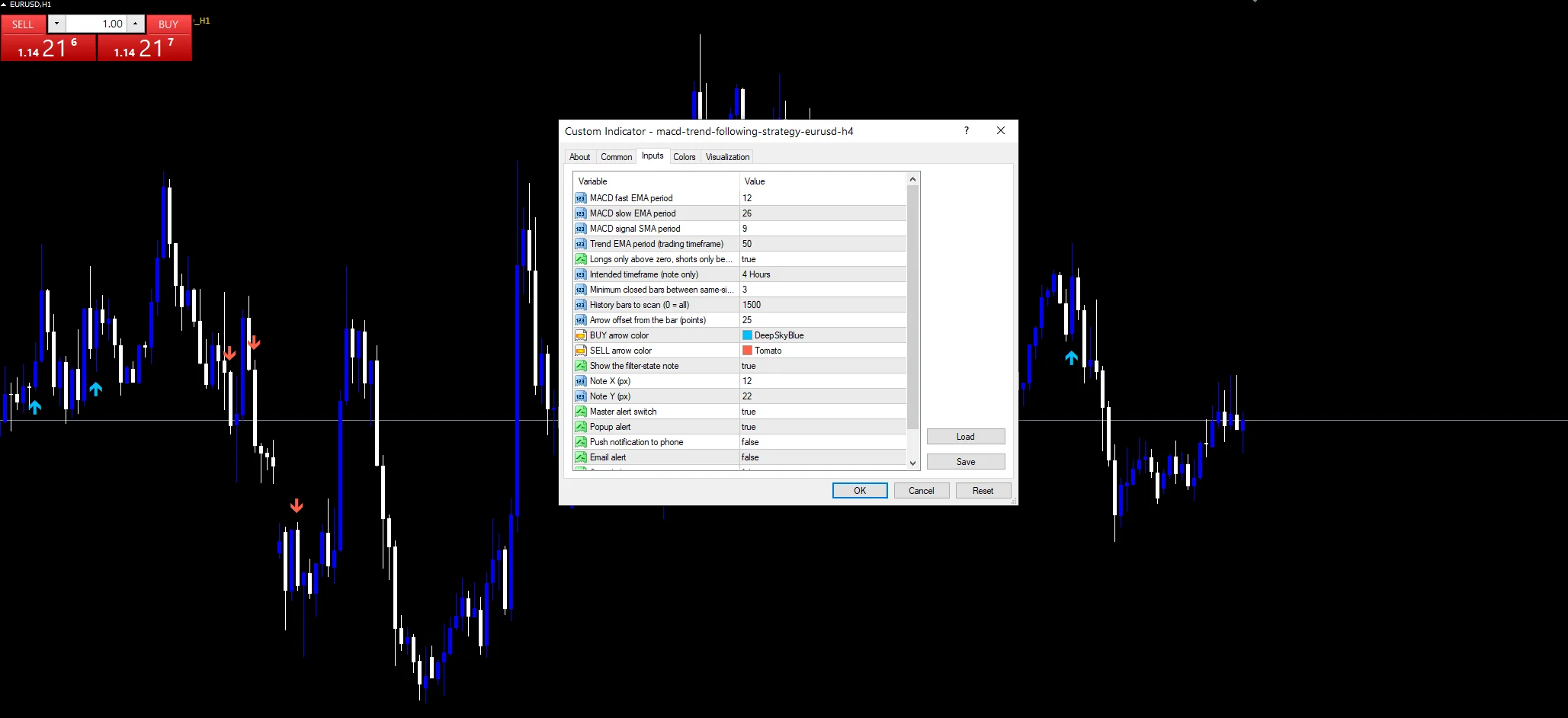
The download ships with these defaults. Every input is adjustable from the indicator’s settings panel.
| Input | Default | Purpose |
|---|---|---|
| FastEma / SlowEma / SignalPeriod | 12 / 26 / 9 | Standard MACD engine |
| TrendEmaPeriod | 50 | Trend baseline on the trading timeframe |
| RequireZeroSide | true | Longs only above zero, shorts only below |
| MinBarsBetween | 3 | Cooldown bars between same-side signals |
How this strategy was tested
The signal indicator behind this page is our own build. We compile it for MT4 and MT5 and check both versions on live charts before release. Signals print once per closed bar and stay fixed after the close — the arrow does not repaint. Alerts fire once per bar.
Download the MACD Trend Following Strategy template
Download the complete MACD Trend Following Strategy package for MT4 and MT5 below. The zip contains the compiled signal indicator for both platforms, a ready chart template for each, a STRATEGY-RULES.txt file with the exact rule list, and a README with install steps.
Download this strategy free
Enter your email and the file is yours. You also get the full MT4 and MT5 library.
You will receive the package by email after a one-step confirmation. If you are new to MetaTrader, follow the step-by-step MT4 and MT5 indicator install guide to load the indicator and the chart template.
Related on forexmt4systems.com: MACD Trend Following Strategy for EURUSD on M15 · MACD Trend Following Strategy for EURUSD on H1 · DAT MACD Indicator MT4 + MT5.
FAQ
Is this MACD Trend Following Strategy suitable for beginners?
It is approachable for traders who already know the basics of order types and risk per trade. If you are completely new to MT4 or MT5, work through a few weeks of demo before live capital.
What account size do I need?
Account size depends on your risk per trade and your stop distance. Most traders running this style risk between 0.5% and 1% per trade while validating the rules.
Can I use this strategy on other pairs?
Yes — this exact rule set ships for several pairs and timeframes. Use the variant links in the Related section, or backtest your own pair first.
How many trades does it produce?
On the H4 chart of EURUSD, expect a few valid setups per month. Strong trends produce chains of resumption signals; ranges produce none.
Reading the signals
Do I need a paid platform or feed?
No paid feed is required. Your standard MT4 or MT5 broker feed is enough. If your broker has unusual session hours, adjust the session filter accordingly.
For external background reading, see the Babypips forex school.
Are results guaranteed?
No. Trading involves risk. Results are not guaranteed. Past performance is not indicative of future results. The MACD Trend Following Strategy is a framework. Test it and adapt it to your risk tolerance before live capital.
Authoritative references
- Learn more about the MACD.
- General background on technical indicators.

About the author
Written by Dominic Walsh, a Forex trader and MT4/MT5 indicator, Expert Advisor and script developer. Every tool on forexmt4systems.com is tested on live charts before release and ships with ready-to-use compiled MT4 (.ex4) and MT5 (.ex5) files. Learn more about the trader and developer behind this site.