
The All ADX indicator is a clean ADX system – aqua ADX strength line plus lime +DI and orange-red -DI direction lines with a 25 level – that alerts on the DI cross when ADX confirms a trending market.
For more like this, browse the more signal-forecast indicators for forex or jump to the full free MT4 and MT5 indicators.
What the All ADX Indicator does on the chart
The All ADX indicator is a clean ADX system in a separate window – an aqua ADX line for strength plus lime-green +DI and orange-red -DI lines for direction, with a 25 reference level.
It alerts on the +DI/-DI cross when ADX confirms a trending market.
Key features and settings
- Aqua ADX + lime +DI + orange-red -DI lines
- 25 trend reference level
- BUY/SELL alerts on confirmed DI crosses
- Adjustable period and level
- Separate-window oscillator
- Full alert system: popup, push notification to mobile MetaTrader, email, and sound — all four channels toggle independently from the inputs panel. Alerts fire once per closed bar so you never get spammed mid-tick.
- Built for both MT4 and MT5; works on every timeframe and every symbol your broker offers.
- Lightweight code that does not slow down the chart.
| Setting | Description | Default |
|---|---|---|
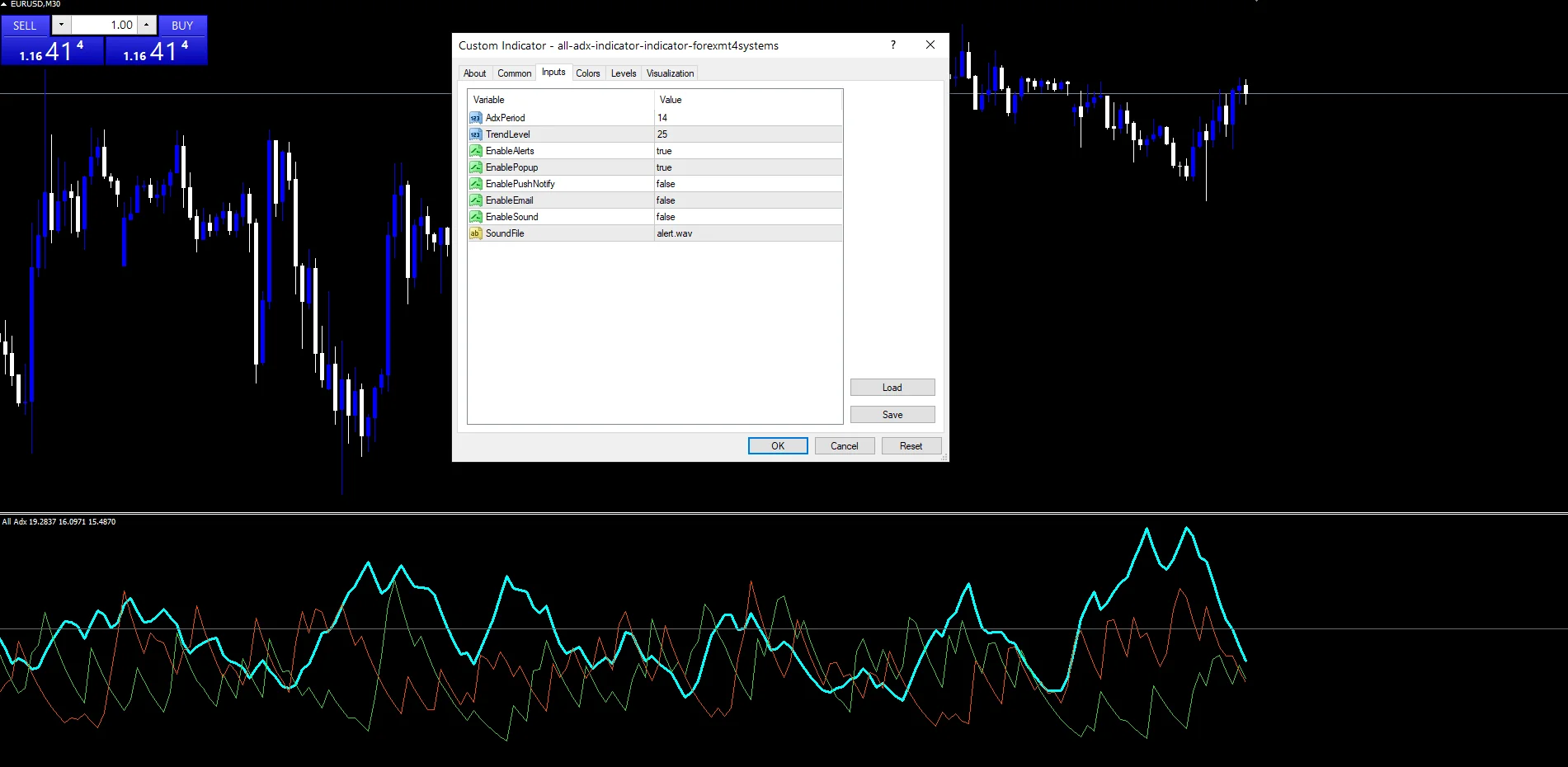
AdxPeriod |
ADX / DI period | 14 |
TrendLevel |
ADX trend threshold | 25 |
EnableAlerts |
Master toggle for the alert system | true |
EnablePopup |
MT4/MT5 popup dialog on signal | true |
EnablePushNotify |
Mobile push notification (configure MetaQuotes ID first) | false |
EnableEmail |
SMTP email (configure Tools -> Options -> Email) | false |
EnableSound |
Play .wav from MT4/Sounds on signal | false |
How to read signals from the All ADX Indicator
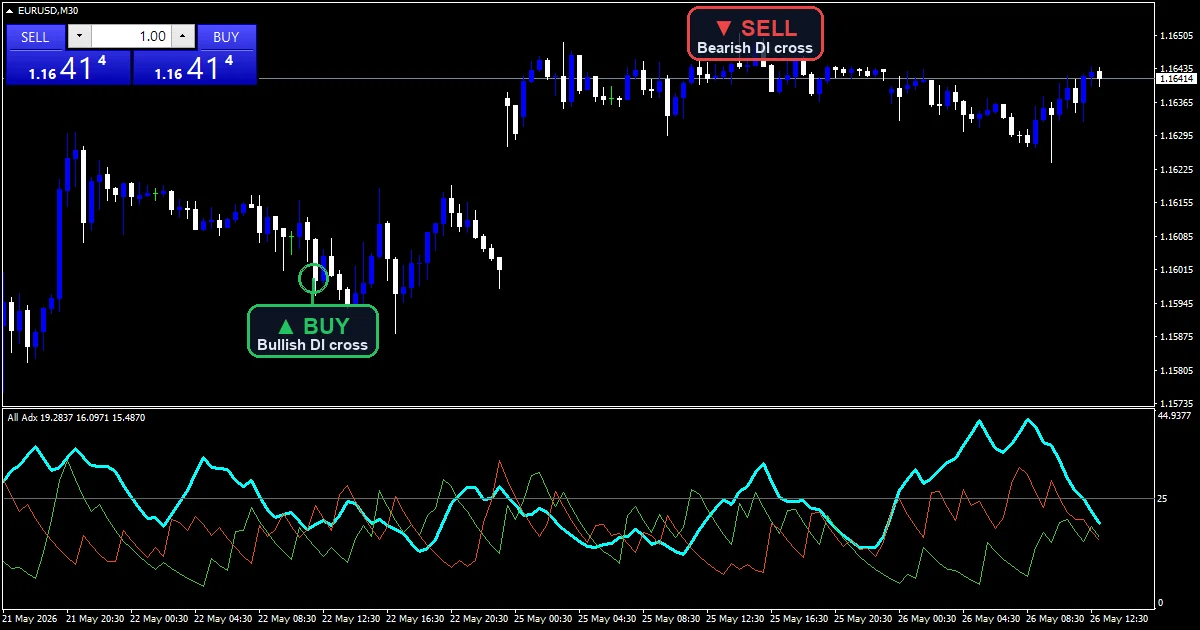
ADX for strength, DI lines for direction.
Entry idea (long). +DI over -DI with ADX above 25.
Entry idea (short). -DI over +DI with ADX above 25.
Exit idea. Exit as ADX peaks and falls.
Tuning the All ADX Indicator inputs
Start with the defaults, then tune for your market. Also, AdxPeriod (default 14) sets the averaging length — raise it for smoother, slower signals or lower it for faster, more sensitive ones; TrendLevel (default 25) is the threshold a reading must clear before it counts as a signal. Every alert channel — pop-up, sound, email and mobile push — toggles independently in the same inputs panel, and alerts fire once per closed bar.
Recommended timeframes and instruments
This indicator reads best on the higher timeframes, where direction is cleaner and false turns are fewer.
- H1 and H4 for intraday trend trading.
- Daily for the dominant bias and swing setups.
On M5 to M15 expect more whipsaw, so raise the period to compensate. Also, it suits trending majors such as EURUSD and USDJPY and indices like US30 and NAS100.
How to install on MT4 and MT5
Installation is the same for every indicator on this site. Also, still, unzip the download, copy the compiled .ex4 into your MT4 MQL4/Indicators folder (or the .ex5 into MT5 MQL5/Indicators), refresh the Navigator, then drag it onto the chart. For the full step-by-step with alert setup and troubleshooting, see our guide to installing MT4 and MT5 indicators.
Best practices and tips
- Trade in the direction of the higher-timeframe trend and avoid counter-trend signals.
- Use the strength filter to skip weak, ranging conditions.
- Wait for the bar to close before acting on a signal.
- Backtest your configuration on at least 200 closed bars before trading live.
- Keep position sizing small while you learn how the tool behaves on your instrument.
- Review your results weekly and prune settings that underperform.
Get the All ADX for MT4 and MT5
One email unlocks the full library. This The tool plus the other 1,382 free MT4, MT5 and TradingView indicators we publish and maintain. In practice, no paywall, no upsell, same opt-in for all of them – you give an email once and you can grab every tool we ship.
Download this indicator free
Enter your email and the file is yours. You also get the full MT4 and MT5 library.
Enter your email and the file lands in your inbox right after. The download is free.
Built by forexmt4systems.com
This It is one of 1,383 free MT4, MT5 and TradingView indicators we publish and maintain. Thus, every tool ships with ready-to-use compiled MT4 (.ex4) and MT5 (.ex5) files, a 4-channel alert system (popup + mobile push + email + sound), and is loaded on EURUSD H1 before release to confirm it draws cleanly without repainting. As a result, the same one-step email opt-in below unlocks the entire library – not just this one indicator.
FAQ
What does the All ADX measure?
It plots a clear signal layer that the All ADX computes from recent price and volume on the chart.
Is the indicator non-repaint?
By default the indicator only confirms a signal on the bar close, so the printed signal locks in once that bar closes. Also, still, hence, some users prefer the early intra-bar mode for faster signals — both options are in the inputs.
Which timeframe should I use?
There is no single best timeframe. Next, typically, m15 to H1 is a common starting point for intraday traders, and H4 to D1 works for swing traders. Backtest the configuration on the timeframe you actually trade.
Does it work on instruments other than forex?
It works on any instrument MT4 and MT5 supports — forex majors, gold (XAUUSD), indices like US30 and NAS100, and major cryptos. Then, fast-moving instruments may need a smaller period setting.
Can I add alerts?
Yes. Thus, yet, pop-up, sound, push, and email alerts live in the inputs panel. On MT4 and MT5 the alert plays on the bar close that triggers the signal. Also, hence, truly, this indicator ships with full alert functionality built in: popup alerts on the chart, push notifications to mobile MetaTrader, email alerts, and a sound alert with a configurable .wav file. you toggle each channel independently from the inputs panel (EnableAlerts, EnablePopup, EnablePushNotify, EnableEmail, EnableSound). Alerts trigger once per closed bar.
For external background reading, see the technical indicator basics. Are results guaranteed?
No. Trading involves risk. Results are not guaranteed. Past performance is not indicative of future results. Use the tool as one input. Always backtest before trading live.
Category: this is part of our Signal and Forecast collection. Next, plainly, browse more Signal and Forecast for MetaTrader, or explore every MT4 indicator and MT5 indicator on the site.
External references
- The core method is documented in Carhart four-factor model on Wikipedia.
- Additional market context is at ICHIMOKU Cloud at Investopedia.

About the author
Written by Dominic Walsh, a Forex trader and MT4/MT5 indicator, Expert Advisor and script developer. Every tool on forexmt4systems.com is tested on live charts before release and ships with ready-to-use compiled MT4 (.ex4) and MT5 (.ex5) files. Learn more about the trader and developer behind this site.