
The best stochastic settings for most traders are the classic 14, 3, 3. Those three numbers control the lookback, the smoothing and the signal line. They suit day trading on M15 to H1. The right setup, though, depends on how you trade. Scalpers speed the oscillator up with a shorter 5, 3, 3; swing traders slow it down with 21, 5, 5 to filter noise. This guide gives you the exact stochastic settings for scalping, day trading and swing trading on MT4, MT5 and TradingView. Annotated charts show each one, so you can see the difference before you commit.
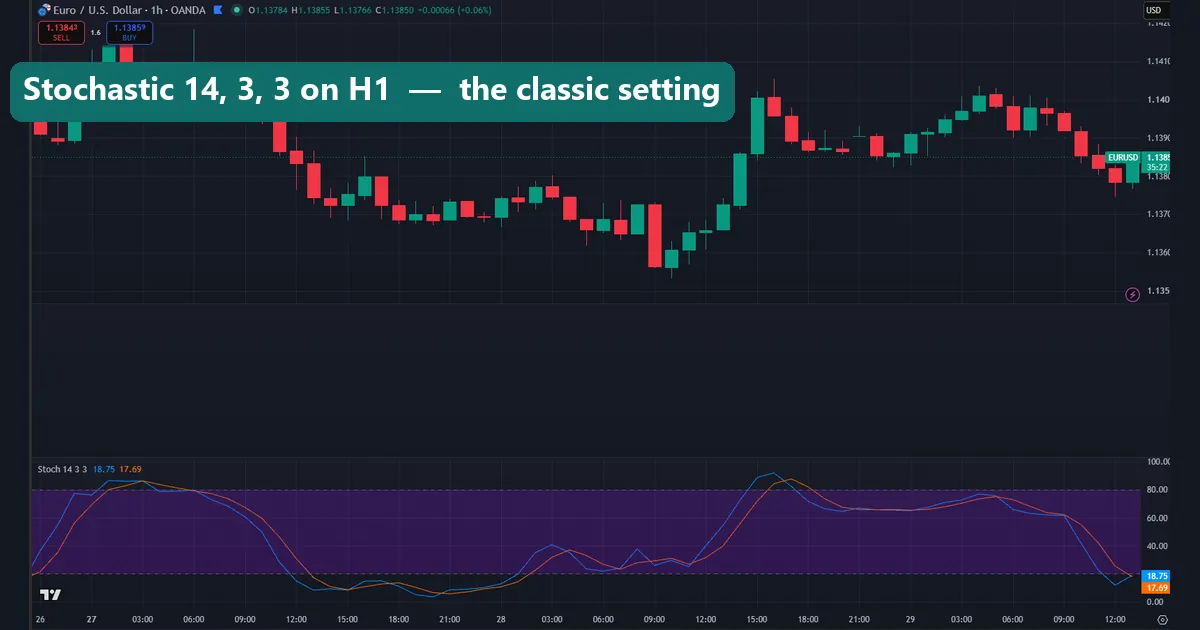
What the Stochastic Oscillator is, and the 14, 3, 3 default

George Lane built the Stochastic Oscillator to answer one question: where does the current close sit inside the recent high-low range? The reading swings between 0 and 100. A value near 100 means price is closing at the top of its range. A value near 0 means it is closing at the bottom. So the tool measures momentum, not price itself.
Two lines do the work. %K is the main line, and %D is a moving average of %K that acts as the signal line. The settings are written as three numbers: the %K lookback, the %K slowing, then the %D period. The default 14, 3, 3 tracks the last 14 candles, smooths %K by 3, and averages that into a 3-period %D. Keep this default when you are learning the tool or trading H1 and above. It reacts fast enough for intraday work, yet the smoothing keeps it from firing on every wick.
Best stochastic settings for scalping

Scalping on M1 to M5 needs an oscillator that turns now, not in fourteen candles. Shorten the lookback to 5 and keep the smoothing at 3, giving you a fast 5, 3, 3. The shorter period hugs price far more tightly, so %K reaches the overbought and oversold zones sooner and crosses %D more often. On the chart above the 5, 3, 3 line snaps to each swing, which is exactly what a scalper wants.
The trade-off is noise. A faster stochastic fires more signals, and plenty of them go nowhere. So pair it with a trend filter, such as a higher-timeframe moving average or the session you are trading. Then take crosses only in the direction of that filter. Some scalpers push the lookback down to 9 on the London open. Below 5, though, the readings turn to static.
Best stochastic settings for swing trading
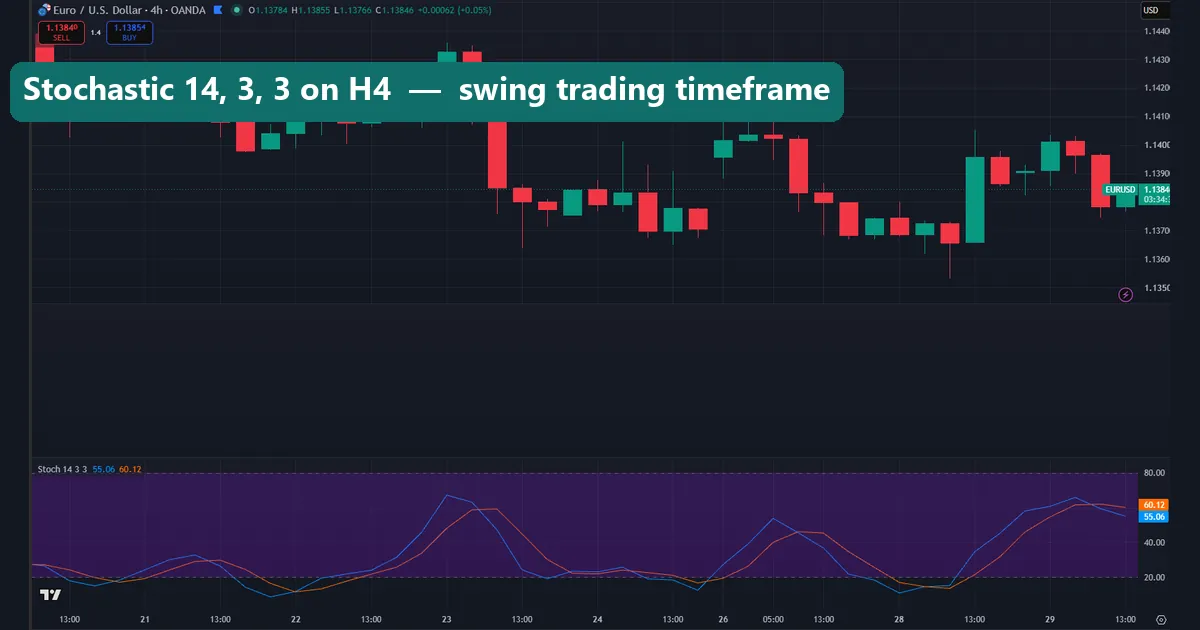
Swing traders on H4 and daily charts want the opposite: fewer, cleaner signals. Slow the oscillator down with a 21, 5, 5. The longer 21-period lookback smooths through intraday chop, and the heavier 5-period smoothing on both %K and %D flattens the small wobbles. On the 21, 5, 5 chart the line ignores the minor noise. It only reaches an extreme on a genuine move, so a signal actually means something.
These settings produce far fewer crosses, which is the point. A daily %K turning up from below 20, with %D following, is a high-quality reversal cue worth waiting for. Many swing traders also read divergence here. Price prints a lower low while the slow stochastic prints a higher low, which hints the down-move is tiring. The slower setup makes that divergence easier to trust.
Fast vs slow stochastic: what actually changes
People trade two versions of this tool, and the difference sits in the middle number. The fast stochastic uses a slowing of 1, so %K is raw and jumpy. It whips between extremes and is hard to read on its own. The slow stochastic applies a moving average to %K, usually a slowing of 3. That is why almost every platform ships 14, 3, 3 as the default. That smoothing is the whole point of the “slow” version.
In everyday use, though, most traders adjust the lookback to change speed rather than the slowing. A shorter lookback reacts faster; a longer one reacts slower. So when this guide calls 5, 3, 3 “fast” and 21, 5, 5 “slow”, it means the speed you feel on the chart. That is not quite the same as Lane’s original labels. Both still keep the 3-period smoothing that makes the readings usable.
Stochastic settings by style and timeframe
| Style | Timeframe | %K / Slowing / %D | Levels | Use it for |
|---|---|---|---|---|
| Scalping | M1–M5 | 5, 3, 3 | 80 / 20 | Fast crosses and quick reversals |
| Day trading | M15–H1 | 14, 3, 3 | 80 / 20 | Balanced momentum and pullbacks |
| Swing | H4–D1 | 21, 5, 5 | 80 / 20 | High-quality reversals and divergence |
| Ranging market | M15–H1 | 14, 3, 3 | 70 / 30 | Earlier signals inside a channel |
Treat these as starting points, not rules. Backtest the numbers on the pair and timeframe you actually trade before you rely on them. A setting that shines on EURUSD H1 can behave very differently on gold or a quiet cross.
Overbought, oversold and %K/%D crosses
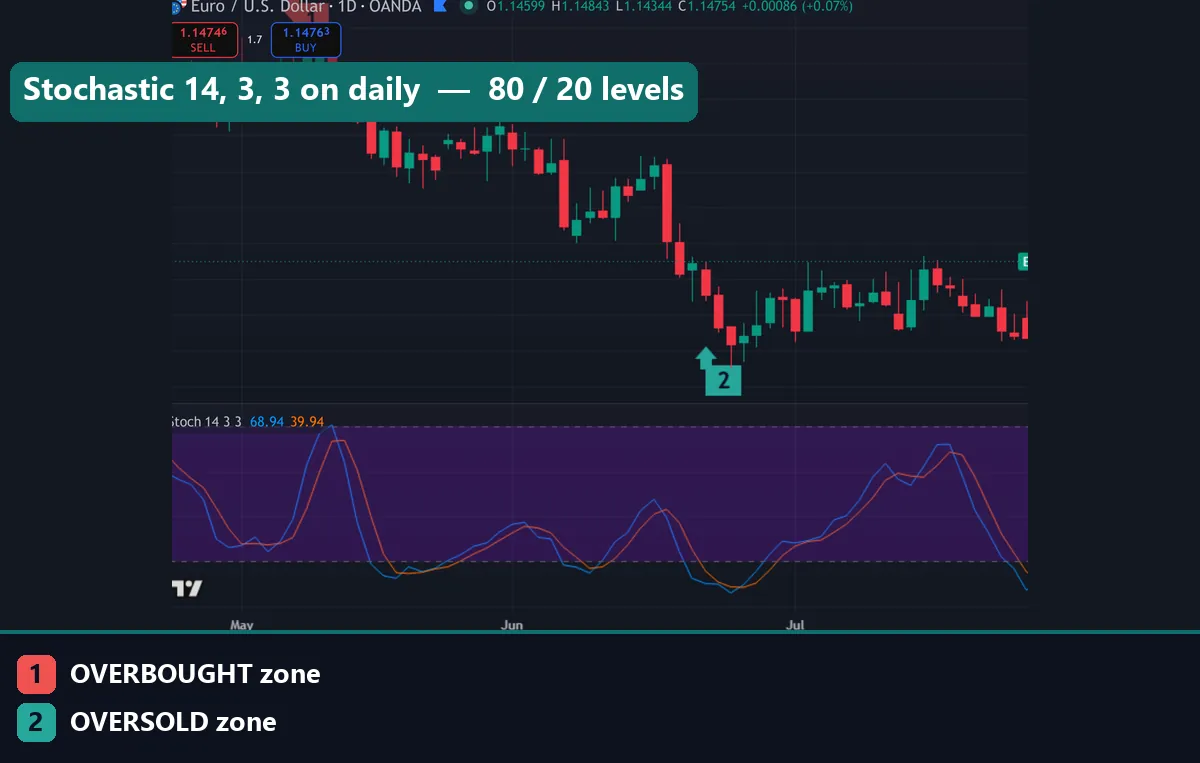
The default zones are 80 and 20. Above 80 the market is overbought; below 20 it is oversold. A reading in those zones does not mean “sell now” or “buy now” on its own. In a strong trend the stochastic can sit pinned at an extreme for a long time. The signal traders actually watch is the %K/%D cross. %K crossing above %D from below 20 is a bullish cue. A cross of %K below %D from above 80 is a bearish one.
Some traders prefer 70 and 30 instead. The tighter band triggers earlier and more often, which suits ranging markets where price rotates inside a channel. The wider 80/20 band waits for a deeper stretch, so it produces fewer but firmer signals and works better in trends. Pick the levels to match the market: 70/30 when price is boxed in a range, 80/20 when a clear trend is running. Whichever you choose, act on the cross, not the zone alone.
How to change stochastic settings on MT4, MT5 and TradingView
On MetaTrader the oscillator lives under Insert → Indicators → Oscillators → Stochastic Oscillator. In the dialog, %K period is the lookback, Slowing is the middle number, and %D period is the signal line. Enter the values from the table, set the MA method to Simple and the price field to Low/High, then click OK. On TradingView, add the Stochastic study and open its settings gear to edit K, D and Smooth. The full walkthrough with screenshots is in the guide on how to install MT4 and MT5 indicators.

Download the complete indicator database
Put these concepts on your charts. One email unlocks the full library of 1,380+ indicators with compiled MT4 and MT5 files, plus my TradingView scripts. No paywall, no spam, unsubscribe any time.
Get free access to my indicator database
One email unlocks 1,380+ free MT4, MT5 and TradingView indicators — the complete library. No single-tool download; you get the whole database.
Common stochastic settings mistakes
Three mistakes ruin most stochastic setups. First, trading every trip into the zone. In a strong trend %K rides above 80 for dozens of candles, so an overbought reading is not a sell on its own; wait for the cross back through the level. Second, over-tightening the lookback. A period of 3 on a daily chart just tracks noise and floods you with false crosses. Third, ignoring the trend entirely. The oscillator shines at timing pullbacks inside a trend and inside ranges, but fighting a runaway move with oversold buys is how accounts bleed. Fix the lookback to your timeframe first, keep the smoothing near 3, and confirm every signal against the higher-timeframe direction.
Where to go next
The stochastic pairs well with other momentum tools. See our roundup of the best forex indicators, the wider set of indicator settings guides, and the full libraries of oscillator indicators and overbought and oversold indicators. For the theory, Investopedia explains how the Stochastic Oscillator works, and Wikipedia covers the underlying stochastic oscillator maths.
FAQ
What are the best stochastic settings for day trading?
Stick with the default 14, 3, 3 on M15 to H1. It balances speed and reliability, giving readable overbought and oversold zones and clean %K/%D crosses without the constant false signals a faster setting produces.
What is the best stochastic setting for scalping a 1-minute chart?
Shorten the lookback to 5 for a fast 5, 3, 3. It reacts quickly enough for M1 and M5 scalping, but always add a trend filter, because a fast stochastic fires many signals that lead nowhere in choppy conditions.
What is the difference between the fast and slow stochastic?
The slow stochastic smooths %K with a moving average, usually a slowing of 3, which is the standard 14, 3, 3. The fast stochastic uses raw %K with a slowing of 1, so it is jumpier and harder to read on its own.
Should I use 80/20 or 70/30 levels?
Use 80/20 in trending markets for fewer, firmer signals. Switch to 70/30 in a range, where the tighter band triggers earlier as price rotates inside the channel. Match the levels to the market rather than leaving them fixed.
Does the Stochastic Oscillator repaint?
No. The oscillator is calculated from closed prices, so once a candle closes its stochastic value is fixed. Only the current, unclosed candle updates in real time as price moves, which is normal for every momentum tool.
Are these settings guaranteed to work?
No. Settings only shape the tool; they do not predict price. Trading involves risk, results are not guaranteed, and past performance is not indicative of future results.

About the author
Written by Dominic Walsh, a Forex trader and MT4/MT5 indicator, Expert Advisor and script developer. Every tool on forexmt4systems.com is tested on live charts before release and ships with ready-to-use compiled MT4 (.ex4) and MT5 (.ex5) files. Learn more about the trader and developer behind this site.
How we build, test and correct every tool: Editorial & Testing Policy. Trading carries risk; see the disclaimer.