
The best Bollinger Band settings for most traders are the classic 20-period length with a 2.0 standard deviation. The right numbers, though, depend on how you trade. Scalpers tighten the length to react faster; swing traders widen it to filter noise. This guide gives you the exact Bollinger Band settings for scalping, day trading and swing trading on MT4, MT5 and TradingView. Real EURUSD and gold charts show each one, so you can see the difference before you commit.
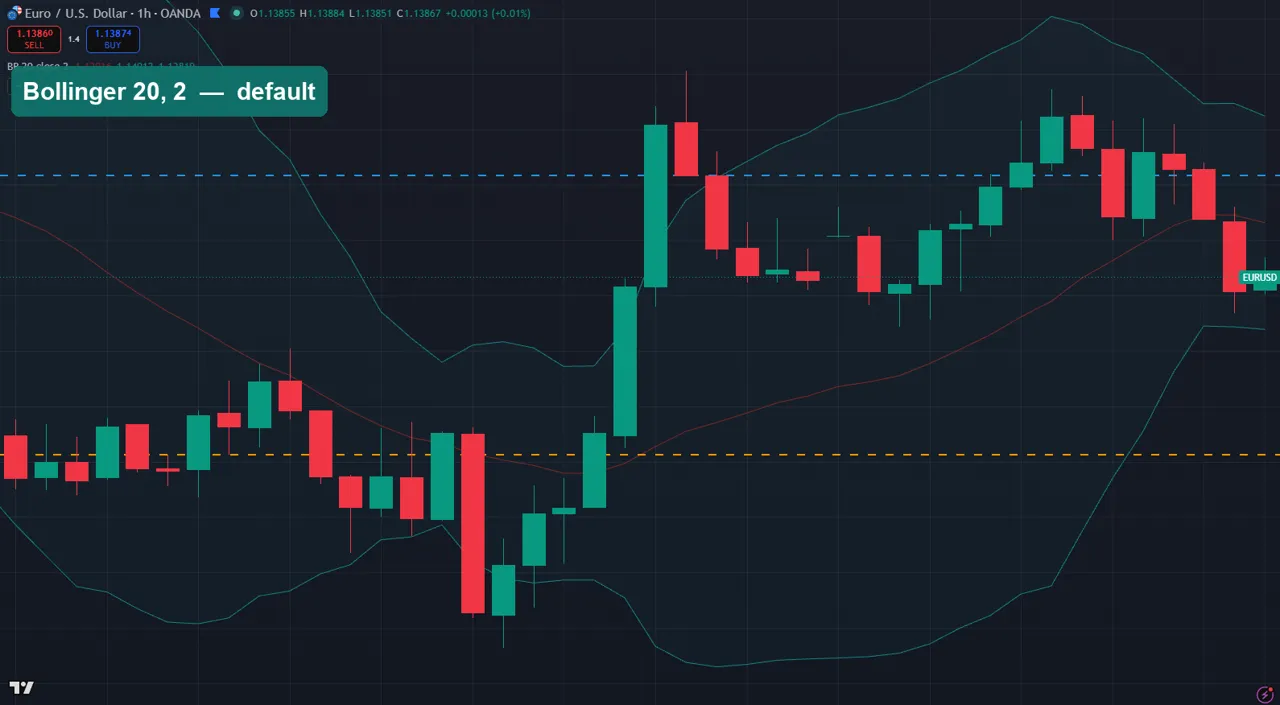
The default Bollinger Band settings: 20, 2.0
John Bollinger designed the bands around a 20-period simple moving average with the outer bands set two standard deviations away. That default is the right starting point for a reason. The 20-period basis tracks the last month of daily bars, or the last 20 candles on any timeframe. So it reflects the current trend without lagging badly. The 2.0 deviation captures roughly 95% of price action, so a close outside the band is genuinely unusual.
Keep 20, 2.0 when you are learning the tool or trading H1 and above. Price riding the upper band signals strength. A snap back to the middle band is the common pullback entry. And a tight “squeeze” warns that volatility is about to expand. Change the numbers only once you know why the defaults are not fitting your style.
Best Bollinger Band settings for scalping
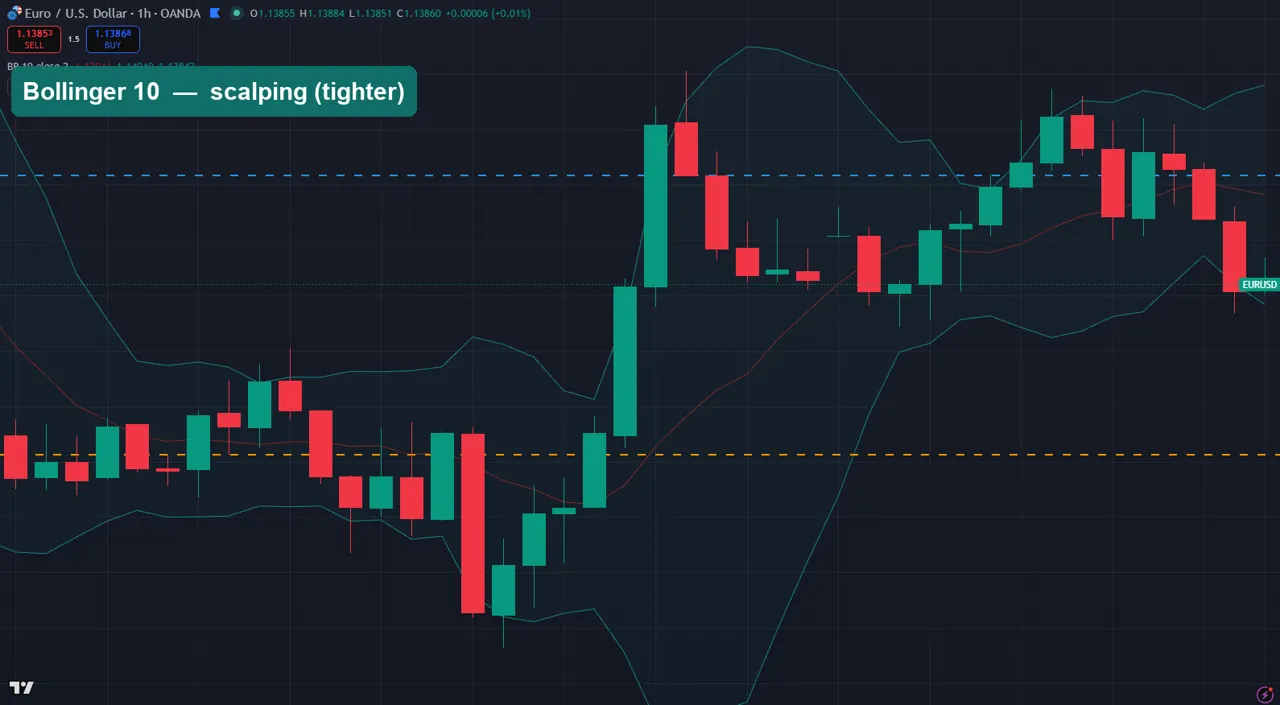
Scalping on M1 to M5 needs bands that react now, not in twenty candles. Shorten the length to 10 to 14 and, if your platform allows it, drop the deviation to 1.5. The shorter length hugs price far more tightly, so you get more band touches and faster mean-reversion signals. On the chart above the length-10 band wraps each swing closely, which is exactly what a scalper wants.
The trade-off is noise. Tighter bands fire more often, and plenty of those touches go nowhere. So pair a scalping Bollinger with a trend filter — a higher-timeframe moving average, or the session you are trading. Then take touches only in the direction of that filter.
Best Bollinger Band settings for swing trading
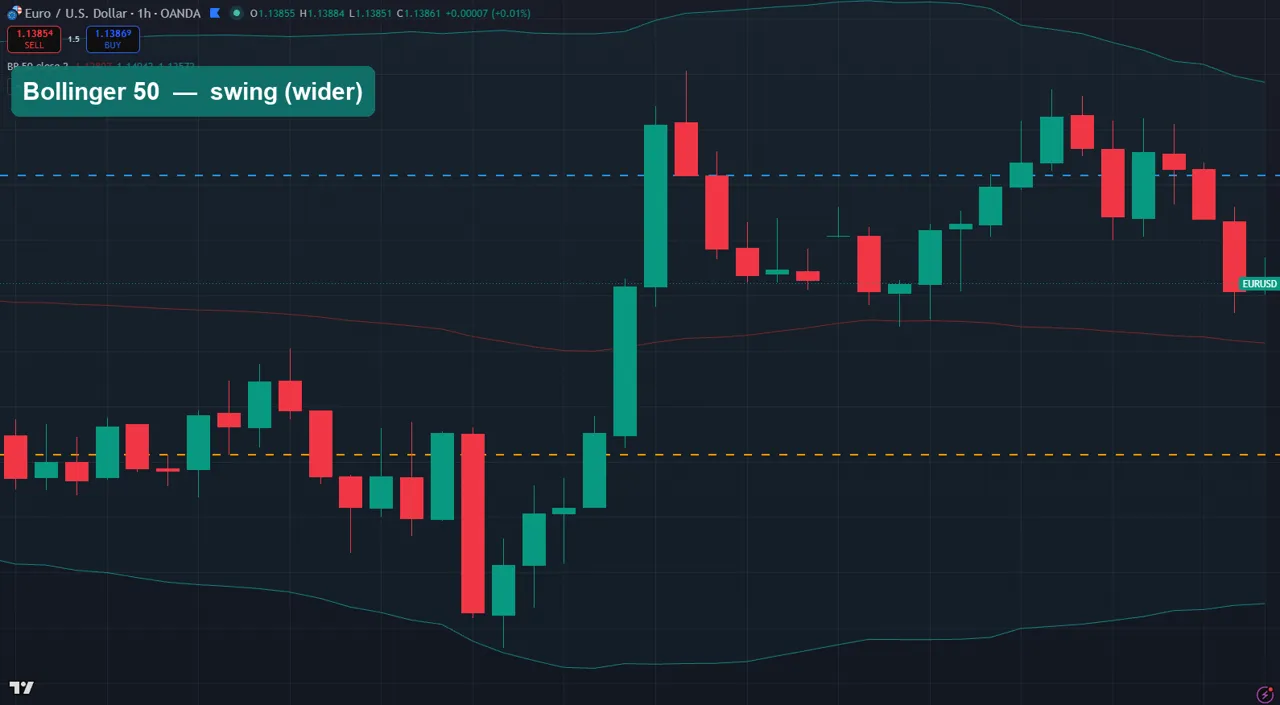
Swing traders on H4 and daily charts want the opposite: fewer, cleaner signals. Widen the length to 50 and keep the deviation at 2.0 to 2.5. The longer basis smooths through intraday chop, and the wider bands only flag a real extreme. On the length-50 chart the band ignores the small wobbles and stretches out only on the big moves, so a touch actually means something.
These settings produce far fewer signals, which is the point. A daily close outside a 50, 2.5 band, back inside a strong trend, is a high-quality reversion setup worth waiting for.
Bollinger Band settings by timeframe and style
| Style | Timeframe | Length | Deviation | Use it for |
|---|---|---|---|---|
| Scalping | M1–M5 | 10–14 | 1.5 | Fast mean-reversion touches |
| Day trading | M15–H1 | 20 | 2.0 | Balanced pullbacks + squeezes |
| Swing | H4–D1 | 50 | 2.0–2.5 | High-quality extreme reversions |
Treat these as starting points, not rules. Backtest the numbers on the pair and timeframe you actually trade before you rely on them.
The Bollinger Band squeeze setting
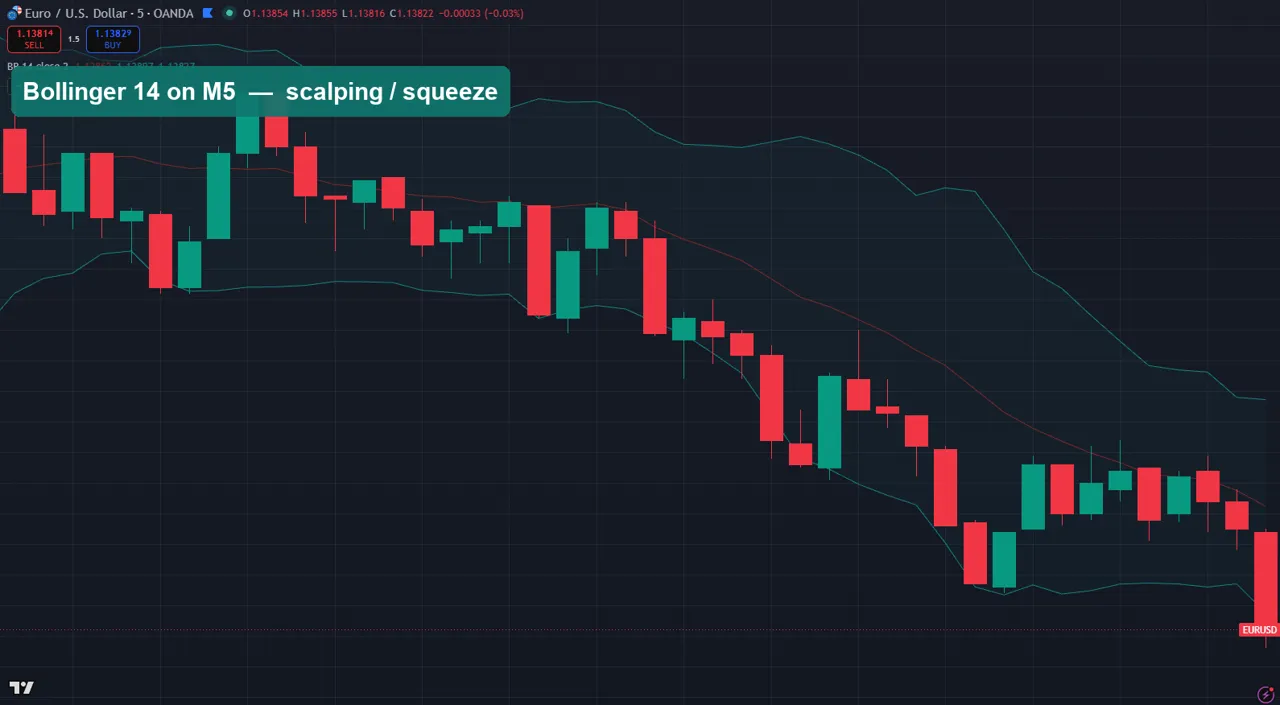
A squeeze is the single most useful thing Bollinger Bands show. When the bands contract into a narrow tube, volatility has dried up and a bigger move usually follows. On lower-length settings the squeeze is obvious, because the tight band snaps outward the moment price breaks. Scalpers watch the M5 for this: bands pinch, then a candle closes decisively outside, and momentum runs.
You do not need a special “squeeze” setting; the standard bands reveal it. But a slightly shorter length (10–14) makes the pinch and expansion easier to spot in real time. Wait for the close outside the band, not the wick, and trade in the direction of the break.
Combining Bollinger Bands with RSI
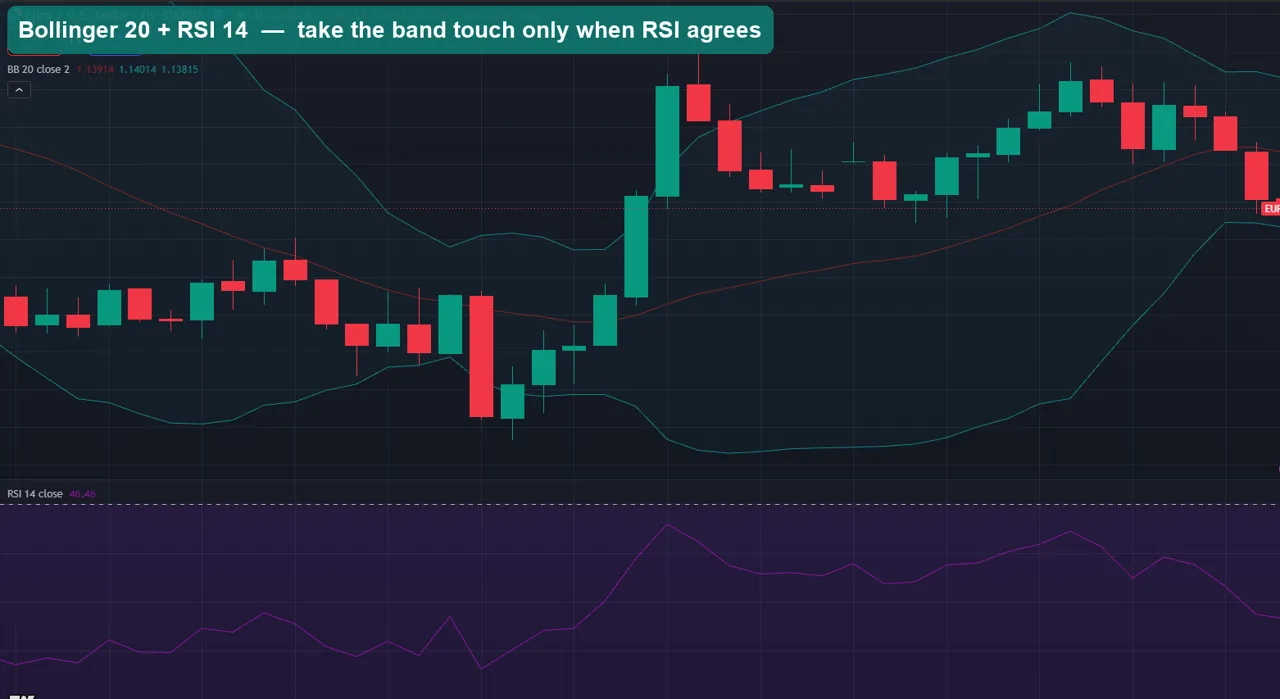
Bands tell you where price is stretched; they do not tell you whether momentum agrees. That is why so many traders stack a 14-period RSI underneath. The high-probability setup is simple: price tags the lower band and RSI is oversold, or price tags the upper band and RSI is overbought. When both line up, the mean-reversion odds improve; when they disagree, you skip the trade.
Keep the Bollinger at your timeframe’s setting from the table above and leave RSI at the standard 14. The two tools use different maths — deviation versus momentum — so their agreement is a genuine second opinion, not the same signal twice.
Bollinger Band settings for gold (XAUUSD)
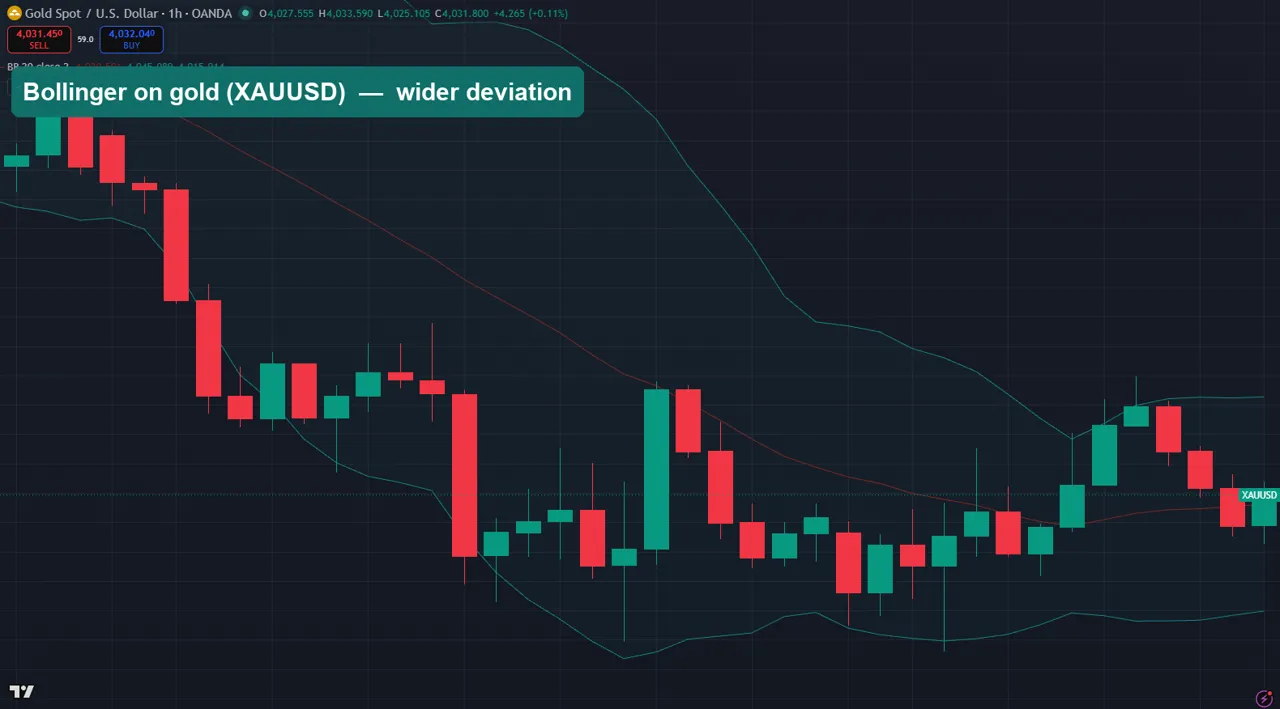
Gold moves in larger, sharper swings than the majors. The bands sit wider, and price spends more time riding them. On XAUUSD, most traders keep the 20-period length but lift the deviation to 2.5 to stop the band from firing on every ordinary spike. On lower timeframes a length of 14–20 with a 2.5 deviation keeps the touches meaningful without drowning you in signals.
The same logic applies to volatile indices like US30 and NAS100: keep the length, widen the deviation. Always confirm on your own broker’s feed, because gold spreads and candles vary between brokers.
How to change Bollinger Band settings on MT4 and MT5
On MetaTrader the bands live under Insert → Indicators → Trend → Bollinger Bands. In the dialog, Period is the length and Deviations is the multiplier. Set them to the values above, pick Close as the applied price, and click OK. On TradingView, open the indicator’s settings gear and edit Length and StdDev. The full walkthrough with screenshots is in the guide on how to install MT4 and MT5 indicators.
Download the complete indicator database
One email unlocks the full library of 1,380+ indicators with compiled MT4 and MT5 files, plus my TradingView scripts. No paywall, no spam, unsubscribe any time.
Get free access to my indicator database
One email unlocks 1,380+ free MT4, MT5 and TradingView indicators — the complete library. No single-tool download; you get the whole database.
Common Bollinger Band settings mistakes
Three mistakes ruin most Bollinger setups. First, over-tightening: a length of 5 on a daily chart just tracks noise and produces endless false touches. Second, trading every band touch. In a strong trend price rides the band for dozens of candles, so a touch is not a reversal on its own. Wait for a break of structure or an RSI disagreement. Third, changing the deviation without reason; 2.0 is standard for a reason, and moving to 3.0 means you will almost never see a signal. Fix the length to your timeframe first, and leave the deviation near 2.0 unless a backtest tells you otherwise.
Where to go next
Bollinger Bands pair well with momentum tools. See our roundups of the best forex indicators, the best settings for the RSI and MACD, and the full bands and channels indicators in our library. For the theory, Investopedia explains how Bollinger Bands work, and Wikipedia covers the underlying standard deviation the bands are built on.
FAQ
What are the best Bollinger Band settings for day trading?
Stick with the default 20-period length and 2.0 deviation on M15 to H1. It balances responsiveness and reliability, giving clean pullback entries to the middle band and readable squeezes before breakouts.
What is the best Bollinger Band setting for a 1-minute chart?
Shorten the length to 10–14 and, if your platform allows, lower the deviation to 1.5. That reacts fast enough for M1 scalping, but always add a trend filter because tight bands produce many false touches.
What are the best Bollinger Band settings for gold?
Keep the 20-period length but raise the deviation to about 2.5 on XAUUSD. Gold is more volatile than the majors, so the wider deviation stops the bands from signalling on every ordinary spike.
Do Bollinger Bands repaint?
No. The bands are calculated from closed prices, so once a candle closes the band values for that bar are fixed. Only the current, unclosed candle updates in real time, which is normal.
Should I change the deviation or the length?
Change the length first — it does most of the work of matching the bands to your timeframe. Leave the deviation near 2.0 unless a backtest on your own pair clearly shows a better number.
Are these settings guaranteed to work?
No. Settings only shape the tool; they do not predict price. Trading involves risk, results are not guaranteed, and past performance is not indicative of future results. Backtest any setting on a demo account before trading it live.

About the author
Written by Dominic Walsh, a Forex trader and MT4/MT5 indicator, Expert Advisor and script developer. Every tool on forexmt4systems.com is tested on live charts before release and ships with ready-to-use compiled MT4 (.ex4) and MT5 (.ex5) files. Learn more about the trader and developer behind this site.
How we build, test and correct every tool: Editorial & Testing Policy. Trading carries risk; see the disclaimer.