
The best MACD settings for most traders are the classic 12, 26, 9 — a 12-period fast EMA, a 26-period slow EMA and a 9-period signal line. Those numbers still work because they balance speed against reliability. The right settings, though, depend on how you trade. Scalpers speed the MACD up so it reacts within a few candles; swing traders slow it down to filter out noise. This guide gives you the exact best settings for MACD across scalping, day trading and swing trading on MT4, MT5 and TradingView. Charts show each one, so you can see how the signals change before you commit.
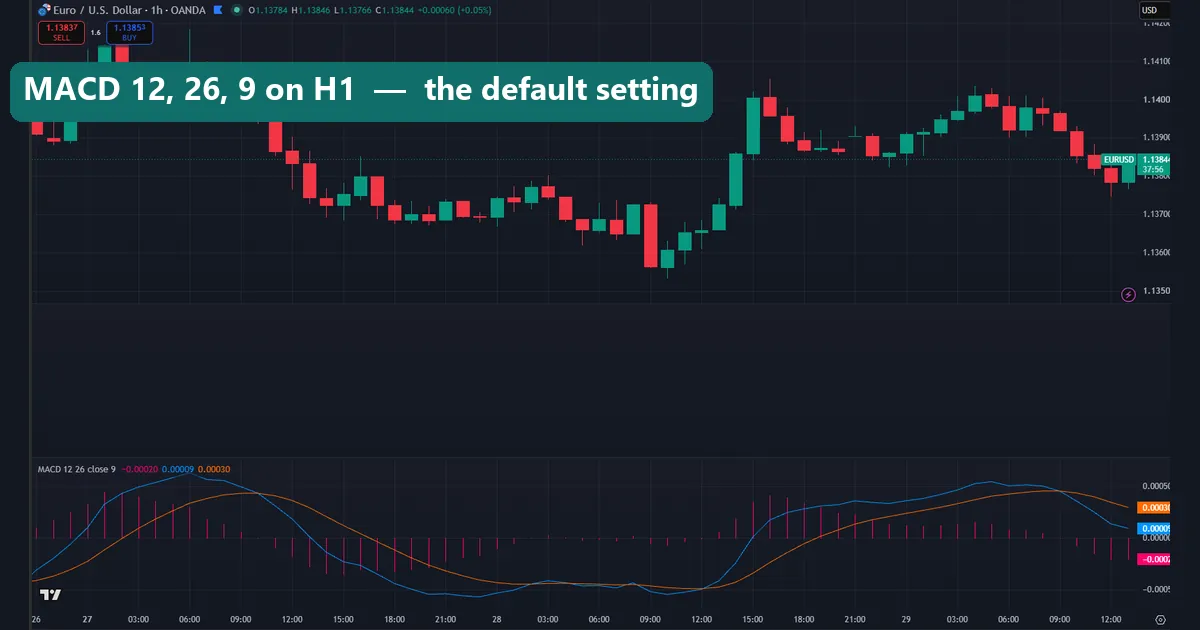
What MACD is and the default 12, 26, 9 settings
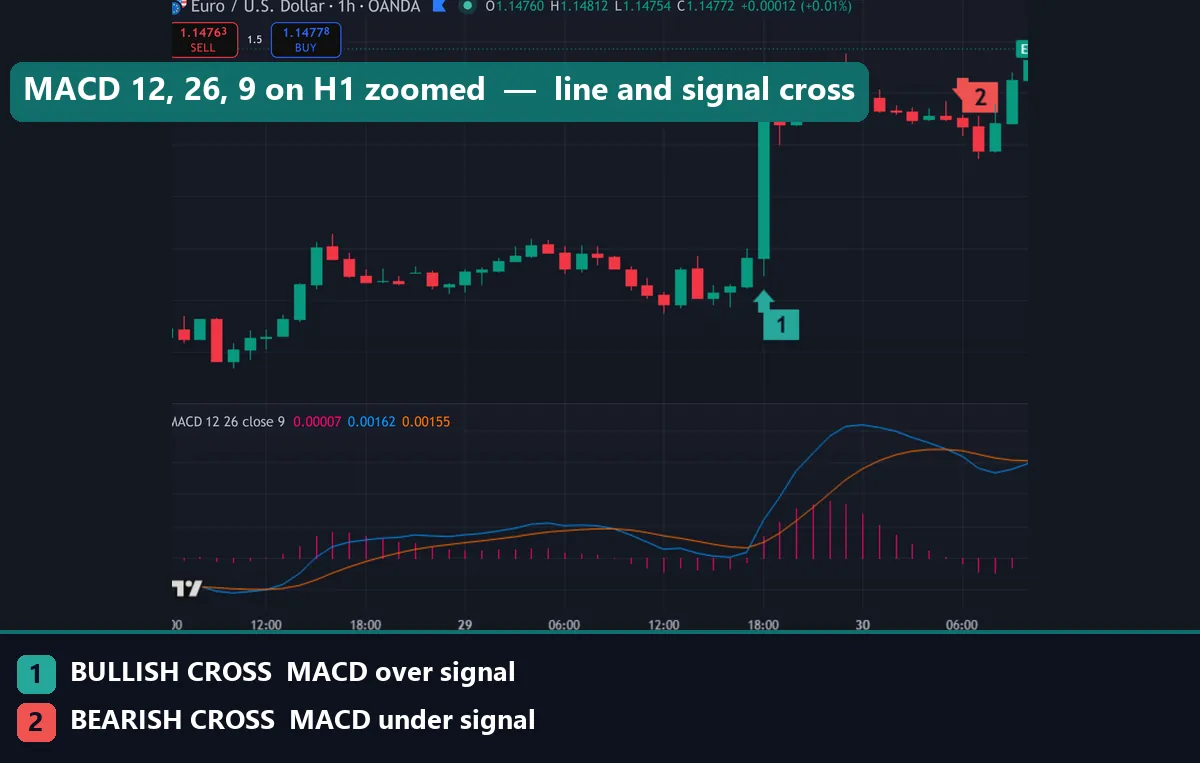
Gerald Appel built the MACD — Moving Average Convergence Divergence — in the late 1970s. It stacks three parts. The MACD line subtracts a 26-period EMA from a 12-period EMA. A signal line then smooths that result with a 9-period EMA. Finally, the histogram plots the gap between the two. So the tool measures momentum: when the fast average pulls away from the slow one, the histogram grows, and when momentum fades, it shrinks.
The chart above shows the default 12, 26, 9 on an hourly chart. Keep these numbers while you learn the tool or trade H1 and above. A signal-line cross flags a shift in momentum. A zero-line cross confirms the trend has actually turned. And a histogram that peaks and rolls over warns that the current push is running out of steam. Change the settings only once you know why the defaults do not fit your style.
Best MACD settings for scalping
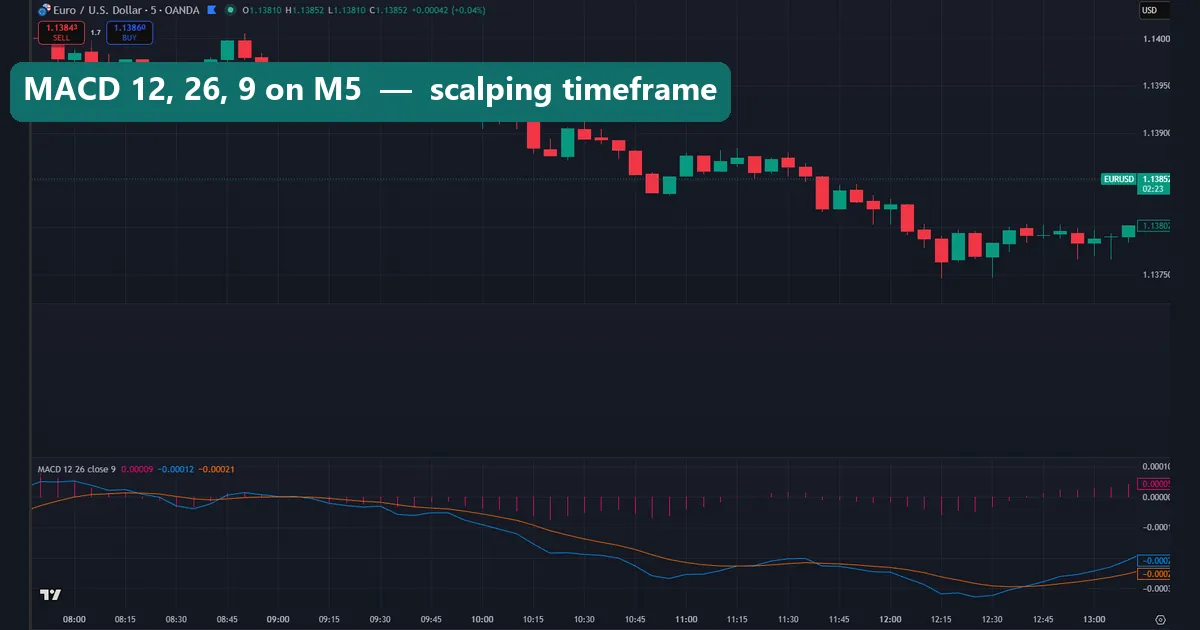
Scalping on M1 to M5 needs a MACD that reacts now, not eight candles later. So traders speed it up. A popular fast setting is 5, 13, 1: a 5-period fast EMA and a 13-period slow EMA. The signal period of 1 strips the smoothing out entirely. Another well-known choice is 3, 10, 16, the fast oscillator Linda Raschke made popular. On the chart above the faster histogram flips far sooner than the default, which is exactly what a scalper wants.
The trade-off is noise. A faster MACD fires more often, and plenty of those crosses lead nowhere. So pair it with a trend filter — a higher-timeframe EMA, or the session you trade — and take signals only in that direction. These are the best MACD indicator settings for pure speed, yet speed without a filter just churns your account in spread. Confirm each cross against the larger trend before you click.
Best MACD settings for day trading
Day traders on M15 to H1 are usually best served by the default 12, 26, 9. It sits in the sweet spot: quick enough to catch an intraday swing, slow enough to ignore the small wobbles that trap a faster setting. Most professionals never move off it for this style, and for good reason. The defaults were tuned on daily data, but they translate cleanly to intraday charts because EMAs scale with whatever timeframe you load them on.
If the default still feels a touch slow on M15, nudge the EMAs to 10, 22, 9 rather than jumping to a scalping setting. That small change sharpens the response without flooding you with false crosses. In short, the best MACD settings for day trading are the ones you barely need to touch. Then you spend your energy reading price instead of tuning inputs.
Best MACD settings for swing trading
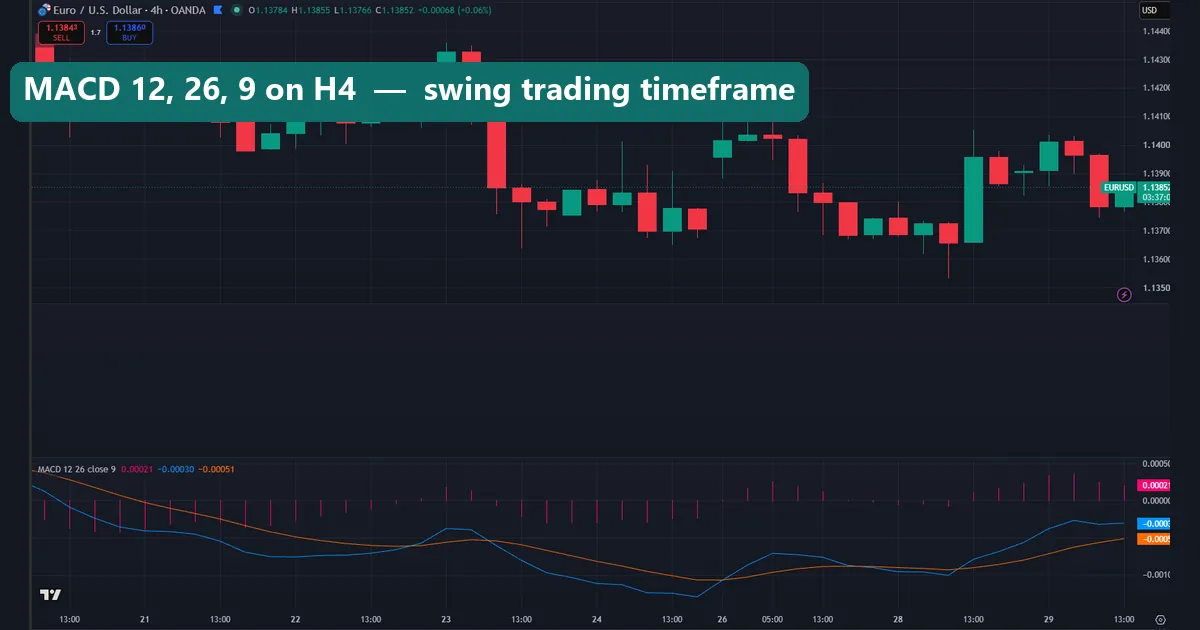
Swing traders on H4 and daily charts want the opposite of a scalper: fewer, cleaner signals. So slow the MACD down. A common approach doubles the defaults to 24, 52, 9, and another widely used slow setting is 19, 39, 9. The longer EMAs smooth through intraday chop, so the histogram only turns on moves that genuinely matter. On the chart above the slower MACD ignores the minor pullbacks and rolls over only at the real swing highs and lows.
These settings produce far fewer signals, which is the whole point. A daily signal-line cross from a slower MACD, in line with the higher-timeframe trend, is a high-quality setup worth waiting for. Patience is the edge here, not frequency. Fewer trades also means fewer chances to overtrade a choppy market.
Best MACD settings by timeframe and style
| Style | Timeframe | Fast EMA | Slow EMA | Signal | Use it for |
|---|---|---|---|---|---|
| Scalping | M1–M5 | 5 | 13 | 1 | Fast momentum flips |
| Day trading | M15–H1 | 12 | 26 | 9 | Balanced intraday swings |
| Swing | H4–D1 | 19–24 | 39–52 | 9 | High-quality trend turns |
Treat these as starting points, not rules. Backtest the numbers on the pair and timeframe you actually trade before you rely on them. What suits EURUSD on H1 may need a tweak on a faster pair or a quieter session.
Combining MACD with price and RSI
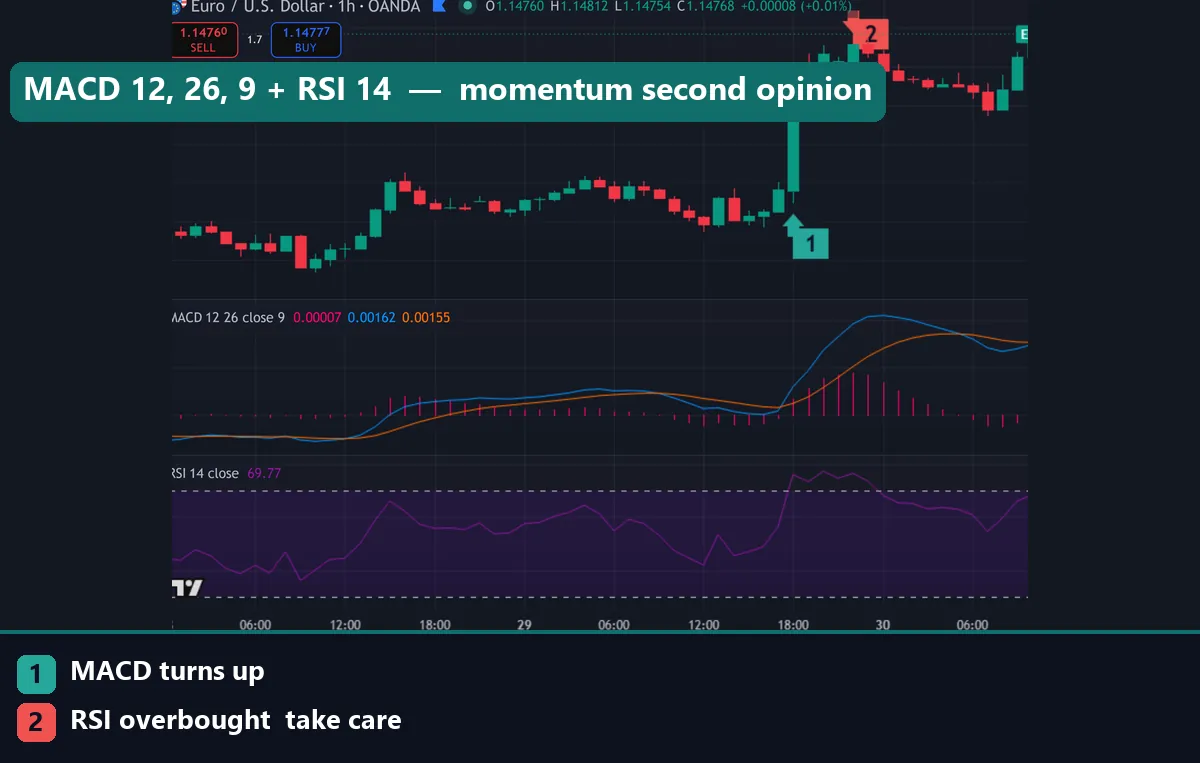
MACD tells you whether momentum is building or fading; it does not tell you where price is stretched. That is why traders read it alongside price structure and a 14-period RSI. The strongest signal is agreement: price breaks a swing level, the MACD histogram confirms with a matching cross, and RSI leaves oversold or overbought ground. When all three line up, the odds improve. When they disagree, you simply skip the trade.
Divergence is the other high-value read. Say price prints a higher high but the MACD prints a lower high. Momentum is fading even as price climbs. That is a classic reversal warning, shown on the chart above. Keep the MACD at your timeframe’s setting from the table and leave RSI at the standard 14. The two tools use different maths, so their agreement is a genuine second opinion rather than the same signal twice.
How to change MACD settings on MT4, MT5 and TradingView
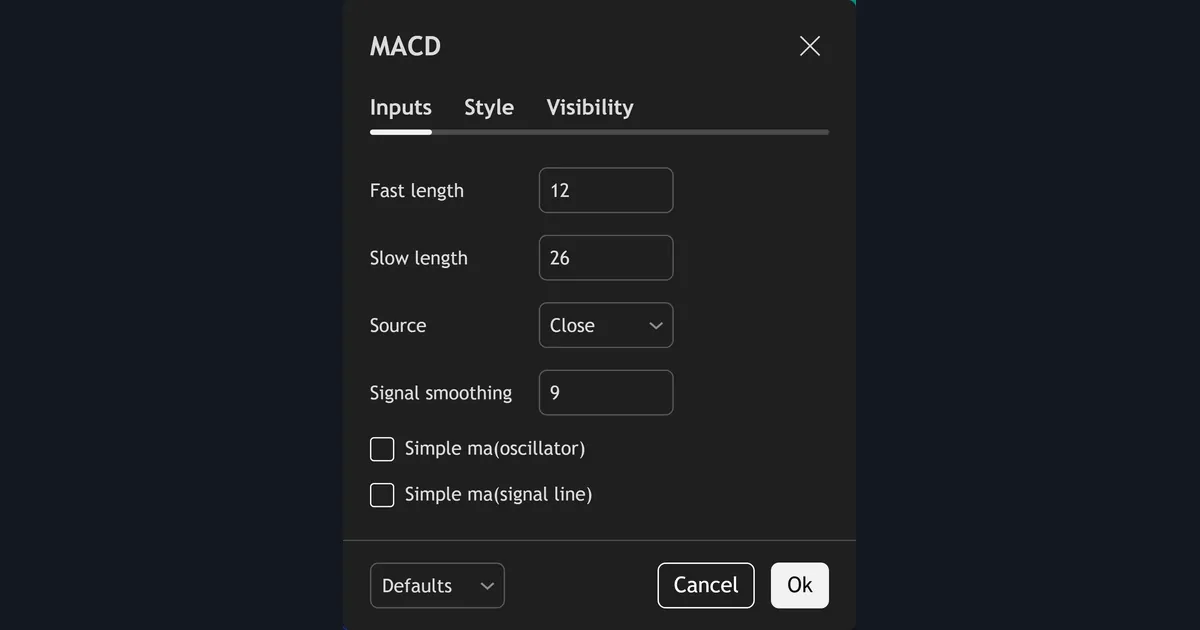
On MetaTrader the MACD lives under Insert → Indicators → Oscillators → MACD. One catch trips people up here. MT4’s built-in MACD hides the fast and slow EMAs behind a single histogram. It also draws the signal line as a simple average. So a true three-line MACD needs a custom version loaded instead. In the dialog set Fast EMA, Slow EMA and MACD SMA to the values above, choose Close as the applied price, and click OK. On TradingView, open the indicator’s settings gear and edit Fast Length, Slow Length and Signal Smoothing. The full walkthrough with screenshots is in the guide on how to install MT4 and MT5 indicators.
Download the complete indicator database
Put these concepts on your charts. One email unlocks the full library of 1,380+ indicators with compiled MT4 and MT5 files, plus my TradingView scripts. No paywall, no spam, unsubscribe any time.
Get free access to my indicator database
One email unlocks 1,380+ free MT4, MT5 and TradingView indicators — the complete library. No single-tool download; you get the whole database.
Common MACD settings mistakes
Three mistakes ruin most MACD setups. First, over-tuning: chasing an exotic 5, 35, 5 combination that curve-fits last month’s chart and then fails on the next. Stick close to the tested numbers and change one input at a time. Second, trading every signal-line cross. During a strong trend the MACD crosses back and forth around the zero line. Most of those crosses are noise. Instead, wait for a zero-line confirmation or a break of price structure. Third, forgetting that MACD lags. It is built from moving averages, so it always reports a turn after price has already moved. Use it to confirm momentum, never to predict the exact top or bottom. Fix these three habits and the default settings will serve you better than any “perfect” number ever could.
Where to go next
MACD works best beside other momentum tools. See our roundup of the best day trading indicators, compare settings for other tools in the indicator settings hub, and browse the full range of oscillator indicators in our library. For the theory, Investopedia explains how the MACD works, and Wikipedia covers the MACD calculation in detail.
FAQ
What are the best MACD settings for day trading?
Stick with the default 12, 26, 9 on M15 to H1. It balances speed and reliability, giving clean signal-line crosses and readable histogram turns without the false signals a faster setting throws off intraday.
What are the best MACD settings for scalping?
Speed the MACD up to 5, 13, 1, or use the 3, 10, 16 fast oscillator on M1 to M5. Both react within a few candles, but always add a trend filter because a faster MACD fires many low-quality crosses.
Is 12, 26, 9 still the best MACD setting?
For most traders, yes. The default suits H1 and higher and needs no tweaking. Change it only when your timeframe or style demands a faster or slower response, and test any change before you rely on it.
Does the MACD repaint?
No. The MACD is calculated from closed prices, so once a candle closes its MACD, signal and histogram values are fixed. Only the current, unclosed candle updates in real time, which is completely normal.
Should I change the EMAs or the signal period?
Change the fast and slow EMAs first, because they set how quickly the MACD reacts to price. Leave the signal period near 9 unless a backtest on your own pair clearly shows shorter or longer smoothing works better.
Are these MACD settings guaranteed to work?
No. Settings only shape the tool; they do not predict price. Always backtest any setting on a demo account before trading it live. Trading involves risk, results are not guaranteed, and past performance is not indicative of future results.

About the author
Written by Dominic Walsh, a Forex trader and MT4/MT5 indicator, Expert Advisor and script developer. Every tool on forexmt4systems.com is tested on live charts before release and ships with ready-to-use compiled MT4 (.ex4) and MT5 (.ex5) files. Learn more about the trader and developer behind this site.
How we build, test and correct every tool: Editorial & Testing Policy. Trading carries risk; see the disclaimer.