
The abutrader expert advisor indicator places no trades, despite the name. It is a chart indicator that draws two lines and marks a crossing. What makes it worth having is the filter: ADX has to sit at or above `AdxMin` before a cross counts, so range chop produces nothing.
This build ships as a compiled .ex4 for MT4 and .ex5 for MT5; the screenshots below come from EURUSD H1.
| Platforms | MT4 (.ex4) + MT5 (.ex5) |
|---|---|
| Chart window | Main price chart |
| Plots | 4: Fast EMA, Slow EMA, Buy, Sell |
| Alerts | popup, push notification, email, sound |
| Inputs | 20 |
Drawn output, plot by plot
Fast EMA and Slow EMA are the two lines, coloured by `FastColor` and `SlowColor`.
Buy marks a crossing up while the trend filter passes.
Sell marks the crossing down.
An OBJ_LABEL note in the corner repeats the current settings when `ShowNote` is on.
- Fast EMA: line, width 2
- Slow EMA: line, width 2
- Buy: arrow, width 2, arrow code 233
- Sell: arrow, width 2, arrow code 234
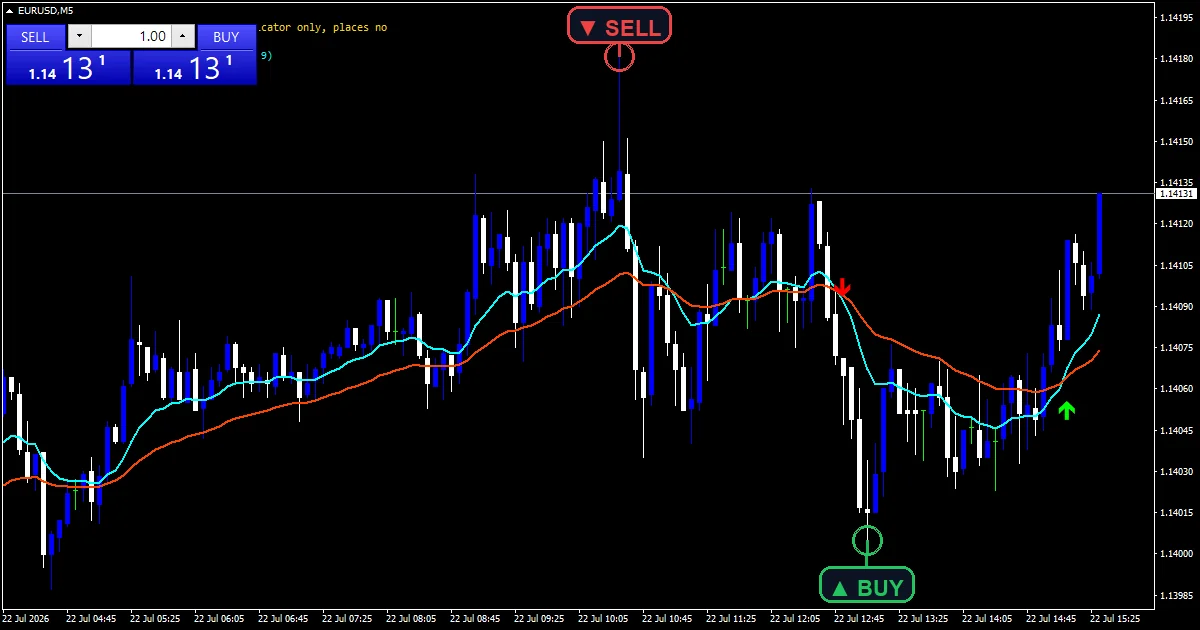
How the values come out
The two averages
iMA supplies exponential averages at `FastEma` `13` and `SlowEma` `34`. Both come from the terminal at direct-value form, so warmup and seeding are handled for you. No hand-rolled recursion appears anywhere in this build.
The trend-strength filter
iADX supplies the main line at `AdxPeriod` `14`. trending needs that reading at or above `AdxMin` `20.0`. A cross with ADX below the level is discarded, which removes most of the crossings a plain pair would show.
Spacing the marks
`MinBarsBetween` `3` keeps consecutive same-side marks apart. `MaxBars` `1500` bounds how much history the scan covers. Both settings exist to keep a long chart readable rather than to change the logic.
How to take a reading
The two lines show whether a cross was even close.
A missing mark at an obvious cross means ADX failed the test.
Raise `AdxMin` toward 25 for a much stricter filter.
Nothing here touches your account, so treat the name as a label only.
Alert channels in this build: popup, push notification, email and sound, one message per closed bar.
Alerts run through `EnableAlerts`, which is true out of the box, and `EnablePopup` handles delivery. `EnablePushNotify`, `EnableEmail` and `EnableSound` all begin false. `SoundFile` picks the clip. The check reads the last closed bar once.
Every AbuTrader Expert Advisor Indicator input
Core settings
| Setting | What it does | Default |
|---|---|---|
FastEma |
Fast EMA period. Fast average length, default `13`. | 13 |
SlowEma |
Slow EMA period. Slow average length, default `34`. | 34 |
AdxPeriod |
ADX period (trend-strength filter). Length of the trend-strength reading, default `14`. | 14 |
AdxMin |
Minimum ADX for a signal. Minimum trend strength for a mark, default `20.0`. | 20.0 |
MinBarsBetween |
Minimum bars between same-side arrows. Bars kept between same-side marks, default `3`. | 3 |
Display settings
| Setting | What it does | Default |
|---|---|---|
ArrowOffsetPoints |
Arrow distance from the bar (points). Mark distance from the bar in points, default `25`. | 25 |
FastColor |
Fast EMA colour. Fast line colour, default aqua. | aqua |
SlowColor |
Slow EMA colour. Slow line colour, default orange red. | orange red |
BuyColor |
Buy arrow colour. | lime |
SellColor |
Sell arrow colour. | red |
Alert settings
| Setting | What it does | Default |
|---|---|---|
MaxBars |
History bars to scan (0 = all). History bars scanned, default `1500`. | 1500 |
ShowNote |
Show the settings note. Draws a settings note in the corner, default `true`. | on |
NoteX |
Note X (px). | 12 |
NoteY |
Note Y (px). | 18 |
EnableAlerts |
Master alert switch. Master switch for the filtered cross alerts, default `true`. | on |
EnablePopup |
Popup alert. Terminal dialog on a filtered cross, default `true`. | on |
EnablePushNotify |
Push notification to phone. Phone push on a filtered cross, default `false`. | off |
EnableEmail |
Email alert. Mail delivery on a filtered cross, default `false`. | off |
EnableSound |
Sound alert. Sound playback on a filtered cross, default `false`. | off |
SoundFile |
Sound file. Wav clip for the cross alert, default `alert.wav`. | alert.wav |
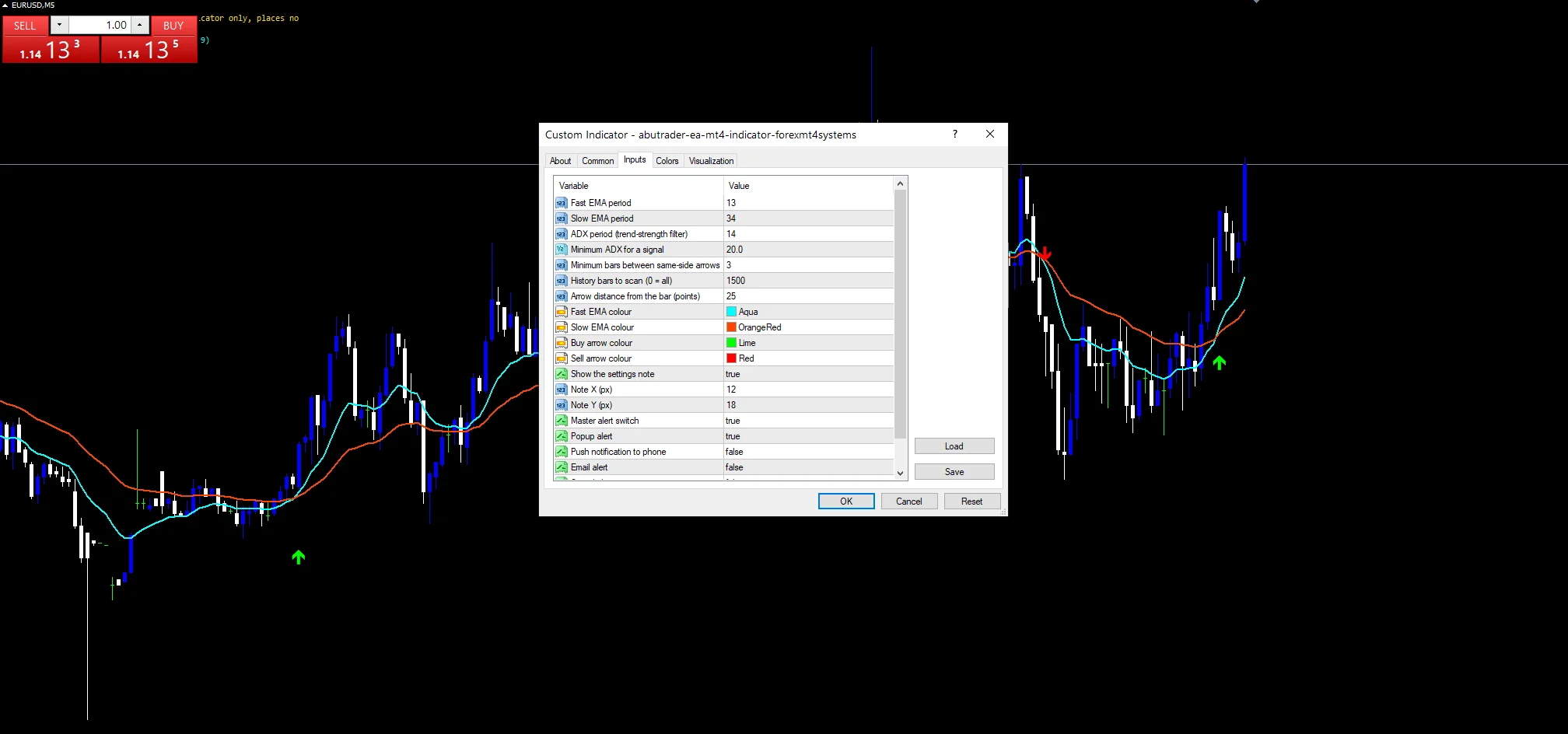
Which chart earns the most from it
A 13 and 34 pair with a trend filter suits charts where moves last hours. EURUSD H1 is the reference chart, where `SlowEma` at `34` covers a day and a half. On M5 the filter blocks a lot and the marks thin out usefully. On H4 they become rare events.
When not to trust the output
The name promises an Expert Advisor and the file is an indicator. Nothing here trades.
ADX lags, so it can confirm a trend that has already run most of its course.
`AdxMin` `20.0` is a low bar, and plenty of ordinary conditions clear it.
Copy the compiled AbuTrader Expert Advisor Indicator file into your MQL4/Indicators folder, and the MT5 build into MQL5/Indicators, then restart the terminal and drag it onto a chart. The step-by-step guide with screenshots is at how to install MT4 and MT5 indicators.
Background reading on the method behind the AbuTrader Expert Advisor Indicator: Adp at BabyPips, Accountinfointeger at the MQL5 Documentation.
Download the AbuTrader Expert Advisor Indicator for MT4 and MT5
The zip holds the compiled AbuTrader Expert Advisor Indicator build for MT4 and MT5, plus a short README. Compiled files only, no source. Enter your email below and the download link arrives in your inbox.
Download this Expert Advisor free
Enter your email and the file is yours. You also get the full MT4 and MT5 library.
FAQ
Does the AbuTrader file place trades?
No. This is a custom indicator, not an Expert Advisor, whatever the file name suggests. The code draws two lines, prints arrows and raises alerts. It sends no orders and touches no account state at all.
What does AdxMin at 20.0 block?
Every cross that happens while the trend-strength reading sits below 20. Those are the crossings that occur in a range, where the two averages tangle. Raising it toward 25 makes the filter noticeably stricter.
Why pair FastEma 13 with SlowEma 34?
Both are Fibonacci numbers and the ratio is roughly one to two and a half, which keeps the lines far enough apart to separate. On EURUSD H1 the slow line covers a day and a half, so a cross means something changed over that span.
What does MinBarsBetween at 3 prevent?
A second same-side mark within three bars of the last one. Crosses often arrive in pairs when the two lines hug each other. The gap keeps one wobble from producing three arrows on the chart.
Are results guaranteed?
No. Trading involves risk. Results are not guaranteed; past performance is not indicative of future results. Use the AbuTrader Expert Advisor Indicator as one input. Always backtest before trading live.
External references
- The core method is documented in Adp at BabyPips.
- Additional market context is at Accountinfointeger at the MQL5 Documentation.

About the author
Written by Dominic Walsh, a Forex trader and MT4/MT5 indicator, Expert Advisor and script developer. Every tool on forexmt4systems.com is tested on live charts before release and ships with ready-to-use compiled MT4 (.ex4) and MT5 (.ex5) files. Learn more about the trader and developer behind this site.
How we build, test and correct every tool: Editorial & Testing Policy. Trading carries risk; see the disclaimer.