
The auto order block indicator hunts for the candle that started a move, then marks the one immediately before it. An impulse has to clear a volatility threshold built from ATR, and the candle in front of it has to point the other way. Bull OB and Bear OB tag those origin candles.
This build ships as a compiled .ex4 for MT4 and .ex5 for MT5; the screenshots below come from EURUSD H1.
| Platforms | MT4 (.ex4) + MT5 (.ex5) |
|---|---|
| Chart window | Main price chart |
| Plots | 4: Bull OB, Bear OB, Buy, Sell |
| Alerts | popup, push notification, email, sound |
| Inputs | 9 |
The display
Bull OB (blue, code 119) marks the low of the down candle sitting in front of a bullish impulse.
Bear OB (crimson, code 119) marks the high of the up candle before a bearish impulse.
Buy (lime, code 233) sits under the impulse candle itself.
Sell (red, code 234) sits above the bearish impulse.
- Bull OB: arrow, deep sky blue, width 2, arrow code 119
- Bear OB: arrow, crimson, width 2, arrow code 119
- Buy: arrow, lime, width 4, arrow code 233
- Sell: arrow, red, width 4, arrow code 234
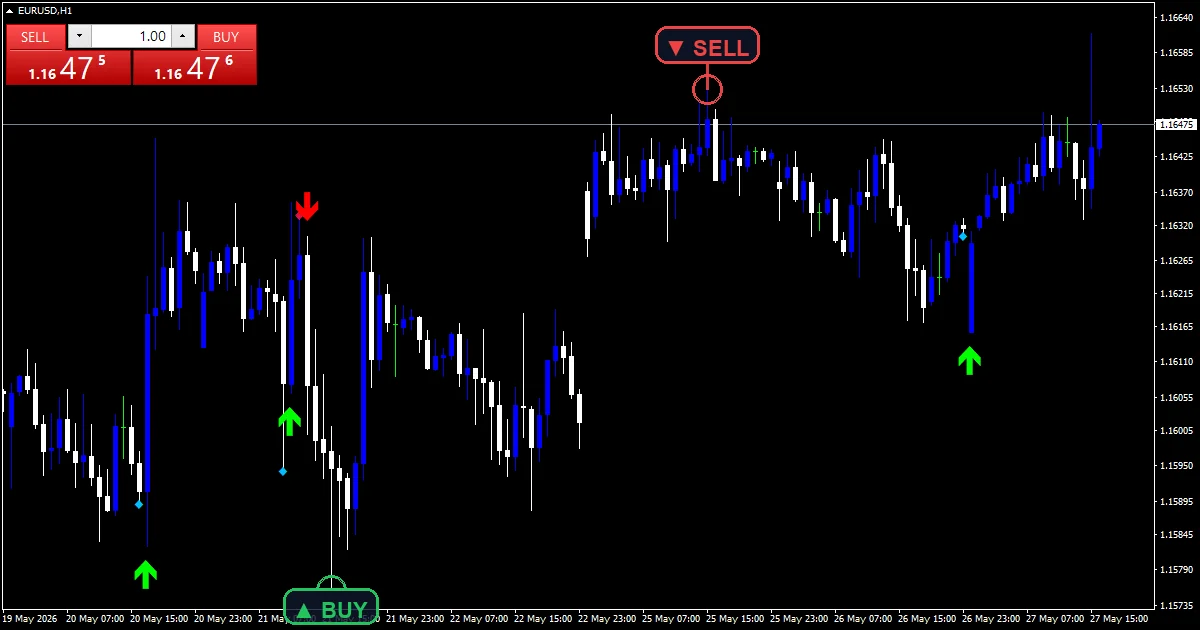
How the Auto Order Block Indicator reaches a value
What counts as an impulse
Measurement here is the candle body, meaning close minus open with the wicks ignored. That body has to beat ATR multiplied by ImpulseMultiplier.
ATR comes from the platform routine over AtrPeriod bars, read one bar back so the impulse candle cannot inflate its own threshold.
The candle in front
An impulse alone is not enough. For a bullish case the candle immediately before it has to have closed below its open, and the mirror applies on the bearish side.
That prior candle is what gets tagged. Its low becomes the Bull OB level, or its high becomes the Bear OB level.
Where each marker lands
Block markers sit on the origin candle, one bar behind the impulse. Directional arrows sit on the impulse bar itself.
ArrowOffsetPoints separates an arrow from its candle by a fixed number of points. Every buffer gets cleared to empty first, so no stale marker survives a recalculation.
Making sense of the output
A Bull OB level marks where the move began, which is the level traders watch for a return.
Arrow and block sit on adjacent bars by design. They are two views of one event.
Blocks clustering close together means several impulses cleared the threshold in a short stretch.
No blocks for a long period usually means ATR is high relative to the bodies printing, rather than that nothing happened.
Alert channels in this build: popup, push notification, email and sound, one message per closed bar.
Alerts cover popup, push, email and sound when a block forms. A bar time check limits it to one alert per closed bar.
Every Auto Order Block Indicator input
Core settings
| Setting | What it does | Default |
|---|---|---|
ImpulseMultiplier |
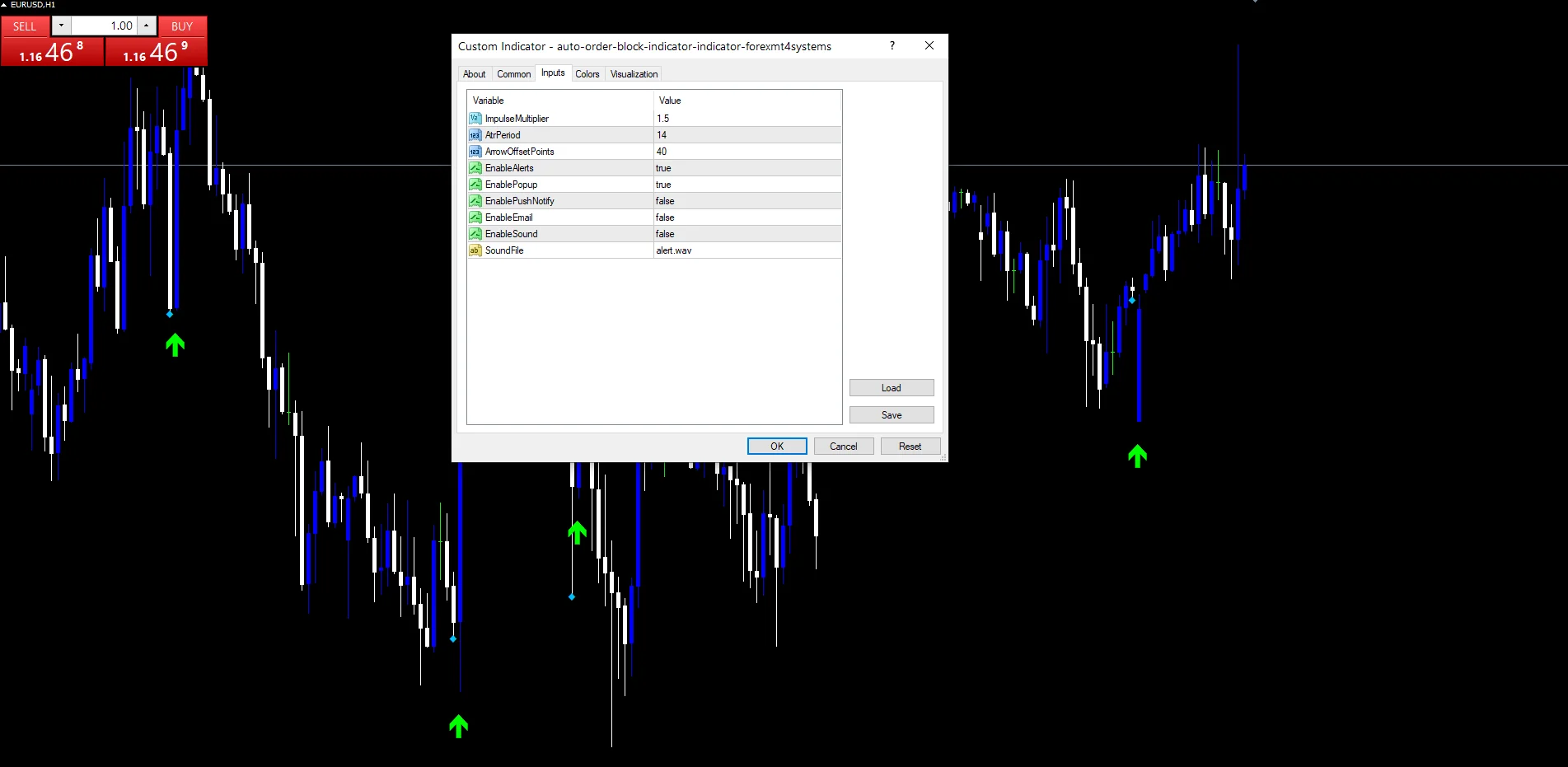
ImpulseMultiplier is how many times ATR a candle body has to beat. It defaults to 1.5. Raising it towards 2.5 leaves only the strongest moves marked. | 1.5 |
AtrPeriod |
AtrPeriod is the volatility window that threshold gets built from, 14 by default. | 14 |
Display settings
| Setting | What it does | Default |
|---|---|---|
ArrowOffsetPoints |
ArrowOffsetPoints is the cosmetic gap between an arrow and its candle, 40 points by default. | 40 |
Alert settings
| Setting | What it does | Default |
|---|---|---|
EnableAlerts |
(see inputs panel) | on |
EnablePopup |
(see inputs panel) | on |
EnablePushNotify |
(see inputs panel) | off |
EnableEmail |
(see inputs panel) | off |
EnableSound |
(see inputs panel) | off |
SoundFile |
(see inputs panel) | alert.wav |
Where to point it
The screenshot uses EURUSD H1. Because the threshold scales with ATR, one ImpulseMultiplier works across symbols without adjustment. H1 and H4 give blocks that stay relevant for a session or more. On M1 and M5 the marks pile up around news and most get run through quickly.
What to be wary of
This rule only ever looks at two candles. A genuine origin zone often spans several bars, and this marks a single one.
ATR includes recent impulses, so a run of large candles raises the bar and later moves in that same run stop qualifying.
Nothing tracks whether a block has already been revisited. An old level keeps its marker whether price returned to it or not.
Body only measurement ignores wicks entirely, so a candle that travelled a long way and closed near its open never counts.
Copy the compiled Auto Order Block Indicator file into your MQL4/Indicators folder, and the MT5 build into MQL5/Indicators, then restart the terminal and drag it onto a chart. The step-by-step guide with screenshots is at how to install MT4 and MT5 indicators.
Background reading on the method behind the Auto Order Block Indicator: Order (exchange) on Wikipedia, Percent B Money Flow at StockCharts ChartSchool.
Download the Auto Order Block Indicator for MT4 and MT5
The zip holds the compiled Auto Order Block Indicator build for MT4 and MT5, plus a short README. Compiled files only, no source. Enter your email below and the download link arrives in your inbox.
Download this indicator free
Enter your email and the file is yours. You also get the full MT4 and MT5 library.
FAQ
Why does AtrPeriod read one bar back instead of the current bar?
So the impulse candle cannot raise its own threshold. Reading ATR at the previous bar means the yardstick reflects the market before the move, and a genuinely large body still has to clear it. Reading it at the current bar would let a big candle partly cancel itself out.
What does ImpulseMultiplier at 1.5 require of a candle?
The body has to exceed one and a half times the current ATR reading over AtrPeriod bars. Bodies under that get ignored completely. Raising the multiplier towards 2.5 marks only the strongest candles, and lowering it towards 1.0 tags a great many more.
Why is Bull OB drawn on the candle before the arrow?
They mark different things. The arrow sits on the impulse, meaning the candle that made the move. Bull OB sits on the down candle immediately before it, because that is the origin traders watch for a return. The two always land on adjacent bars.
Does a Bull OB marker disappear once price trades back through it?
No. The code carries no logic for tracking whether a level has been revisited, so a marker stays where it was drawn for as long as that bar is on the chart. Judging whether a block still deserves watching is left entirely to you.
Are results guaranteed?
No. Trading involves risk. Results are not guaranteed; past performance is not indicative of future results. Use the Auto Order Block Indicator as one input. Always backtest before trading live.
Category: this is part of our Smart Money collection. Also, still, hence, plainly, truly, browse more Smart Money for MetaTrader, or explore every MT4 indicator and MT5 indicator on the site.
External references
- For background on this concept, see Order (exchange) on Wikipedia.
- For broader market context, see Percent B Money Flow at StockCharts ChartSchool.

About the author
Written by Dominic Walsh, a Forex trader and MT4/MT5 indicator, Expert Advisor and script developer. Every tool on forexmt4systems.com is tested on live charts before release and ships with ready-to-use compiled MT4 (.ex4) and MT5 (.ex5) files. Learn more about the trader and developer behind this site.
How we build, test and correct every tool: Editorial & Testing Policy. Trading carries risk; see the disclaimer.