
State here is sticky. The band trend indicator keeps its current direction through every bar that closes inside the channel, and only a close beyond one of the bands changes it. That makes the coloured midline a record of the last decisive move rather than a reaction to each bar.
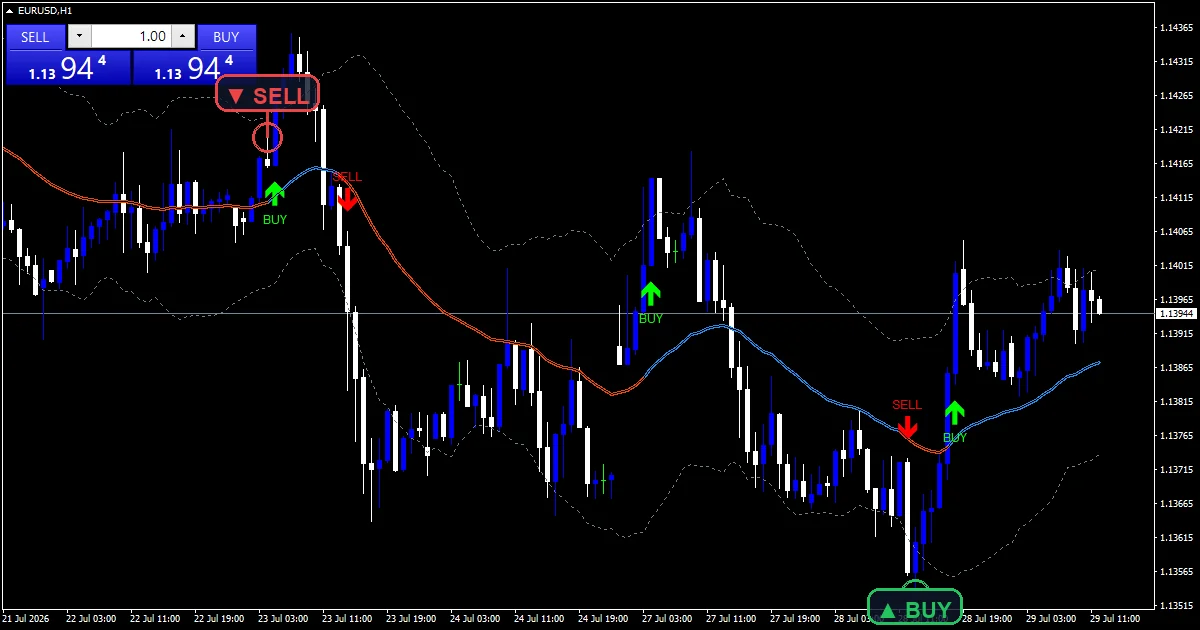
This build ships as a compiled .ex4 for MT4 and .ex5 for MT5; the screenshots below come from EURUSD H1.
| Platforms | MT4 (.ex4) + MT5 (.ex5) |
|---|---|
| Chart window | Main price chart |
| Plots | 6: Upper Band, Lower Band, Trend Up, Trend Down, Buy Flip, Sell Flip |
| Alerts | popup, push notification, email, sound |
| Inputs | 12 |
Its visible parts
Six plots over price, plus a panel.
`Upper Band` and `Lower Band` trace slate gray.
`Trend Up` colours the midline dodger blue.
`Trend Down` colours the same midline orange red.
`Buy Flip` prints lime and `Sell Flip` prints red.
A corner panel names the current state.
- Upper Band: line, slate gray, width 1
- Lower Band: line, slate gray, width 1
- Trend Up: line, dodger blue, width 3
- Trend Down: line, orange red, width 3
- Buy Flip: arrow, lime, width 3, arrow code 233
- Sell Flip: arrow, red, width 3, arrow code 234
The maths behind the plots
A Keltner channel
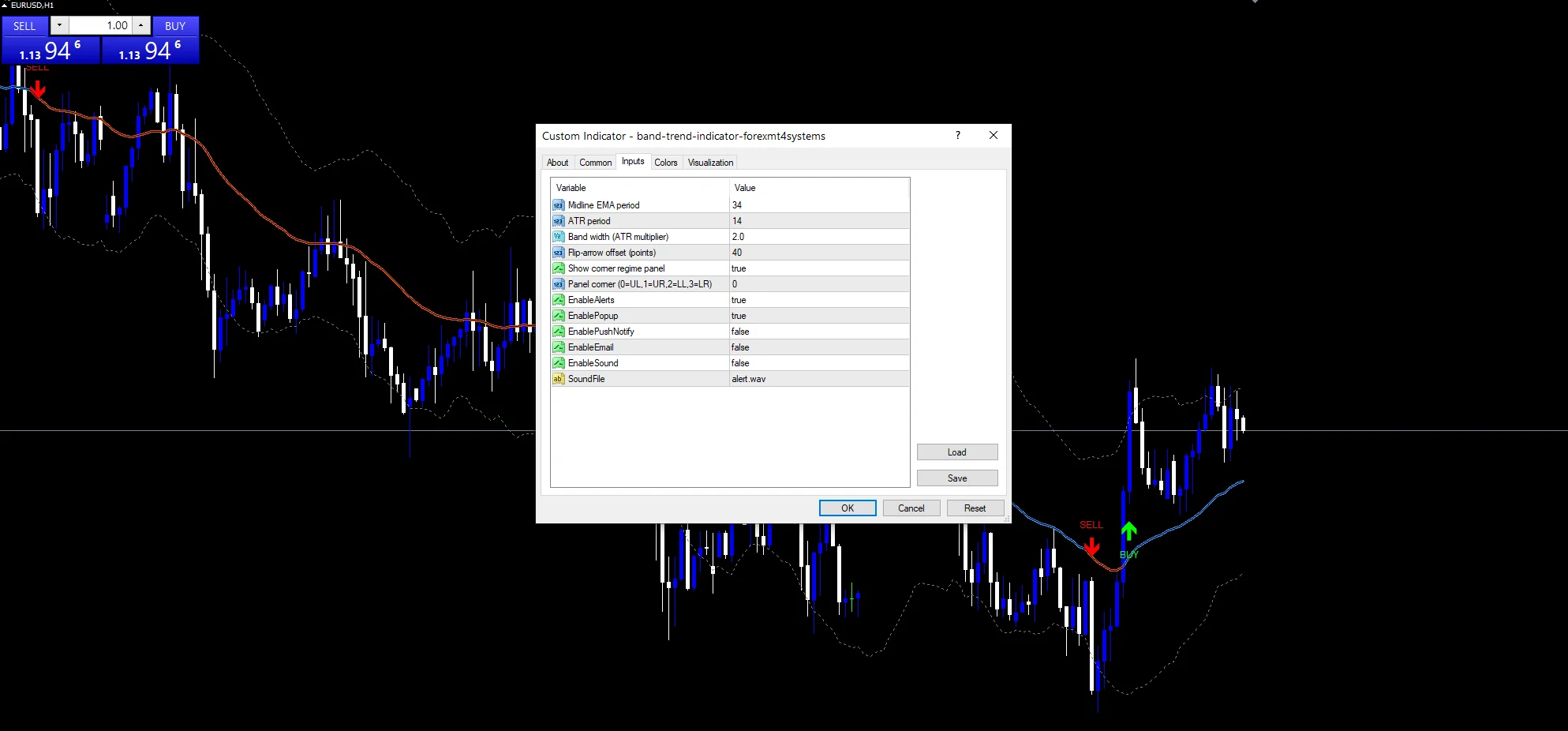
iMA at `InpMaPeriod` `34` gives the midline and iATR at `InpAtrPeriod` `14` the width. `InpMult` `2.0` places both bands either side of it.
Holding the state
Nothing changes inside the channel. The direction carries forward bar after bar, which is what makes the coloured line describe a state rather than a position.
Flipping it
A close beyond the upper band sets the state up. A close below the lower one sets it down. The flip bar earns a mark at `InpArrowOffset` `40` points.
Reading it correctly
Midline colour is the held state, not this bar’s position.
Price can sit under a blue line and the state stays up.
A mark shows exactly where the state changed.
The two gray bands are the thresholds for that change.
Wider bands mean flips take a larger move.
The panel repeats the state in words.
Alert channels in this build: popup, push notification, email and sound, one message per closed bar.
A state flip is reported only while `EnableAlerts` stays true, and no other event triggers a message. `EnablePopup` arrives on beside it. The mobile push, the mail route and the desktop audio behind `SoundFile` stay closed.
Every Band Trend Indicator input
Core settings
| Setting | What it does | Default |
|---|---|---|
InpMaPeriod |
Midline EMA period. Thirty-four bars form the midline everything hangs from. | 34 |
InpAtrPeriod |
ATR period. Fourteen bars set the range that sizes the channel. | 14 |
InpMult |
Band width (ATR multiplier). Each band sits two of those ranges off the midline. | 2.0 |
Display settings
| Setting | What it does | Default |
|---|---|---|
InpArrowOffset |
Flip-arrow offset (points). A flip mark stands forty points clear of its candle. | 40 |
InpShowPanel |
Show corner regime panel. The corner readout appears unless you turn it off. | on |
InpPanelCorner |
Panel corner (0=UL,1=UR,2=LL,3=LR). It occupies the upper left by default. | 0 |
Alert settings
| Setting | What it does | Default |
|---|---|---|
EnableAlerts |
A state flip is reported only while this stays true. | on |
EnablePopup |
That flip raises a MetaTrader dialog, on by default. | on |
EnablePushNotify |
(see inputs panel) | off |
EnableEmail |
It goes out as mail, off by default. | off |
EnableSound |
(see inputs panel) | off |
SoundFile |
Any audio comes from alert.wav. | alert.wav |
Suitable markets
A thirty-four bar midline with two-range bands is slow on purpose. EURUSD H1 is the reference chart, where flips come a few times a month. Drop to M5 and they arrive weekly in chart terms. On H4 each state can hold for months.
Where it falls down
A held state can persist well past a turn.
Wide bands mean the flip arrives very late.
The midline lags whatever it measures.
One large bar can flip the state on its own.
Copy the compiled Band Trend Indicator file into your MQL4/Indicators folder, and the MT5 build into MQL5/Indicators, then restart the terminal and drag it onto a chart. The step-by-step guide with screenshots is at how to install MT4 and MT5 indicators.
Download the Band Trend Indicator for MT4 and MT5
The zip holds the compiled Band Trend Indicator build for MT4 and MT5, plus a short README. Compiled files only, no source. Enter your email below and the download link arrives in your inbox.
Download this indicator free
Enter your email and the file is yours. You also get the full MT4 and MT5 library.
FAQ
Why does Trend Up hold between the two bands?
Because a close between them is not decisive. Holding the previous direction lets the coloured line describe the last real move instead of flickering with each bar’s position against the midline.
What does InpMult 2.0 change?
How far a close must travel to flip the state. Two ranges is a moderate threshold; raising it makes flips rare and late, while lowering it makes the state change on fairly ordinary bars.
Can price sit under a blue Trend Up line?
Yes, and that is the design. The colour records the state set by the last band break, so price pulling back through the midline changes nothing until it closes beyond a band.
What does the InpShowPanel readout add?
The state in words. The colour already carries it, but on a chart with several tools loaded the panel is quicker to read than working out which of two similar line colours is currently drawn.
Are results guaranteed?
No. Trading involves risk. Results are not guaranteed; past performance is not indicative of future results. Use the Band Trend Indicator as one input. Always backtest before trading live.
External references
- For background on this concept, see Band of fluctuation on Wikipedia.
- For broader market context, see isar (SAR) at the MQL5 Documentation.

About the author
Written by Dominic Walsh, a Forex trader and MT4/MT5 indicator, Expert Advisor and script developer. Every tool on forexmt4systems.com is tested on live charts before release and ships with ready-to-use compiled MT4 (.ex4) and MT5 (.ex5) files. Learn more about the trader and developer behind this site.
How we build, test and correct every tool: Editorial & Testing Policy. Trading carries risk; see the disclaimer.