
The best super signals indicator works in two stages. Price must first stretch a long way from a fast average. That arms the tool. Only when a close turns back toward the average does an arrow actually print.
This build ships as a compiled .ex4 for MT4 and .ex5 for MT5; the screenshots below come from EURUSD H1.
| Platforms | MT4 (.ex4) + MT5 (.ex5) |
|---|---|
| Chart window | Main price chart |
| Plots | 3: Fair Value EMA, Super Buy, Super Sell |
| Alerts | popup, push notification, email, sound |
| Inputs | 13 |
The chart output explained
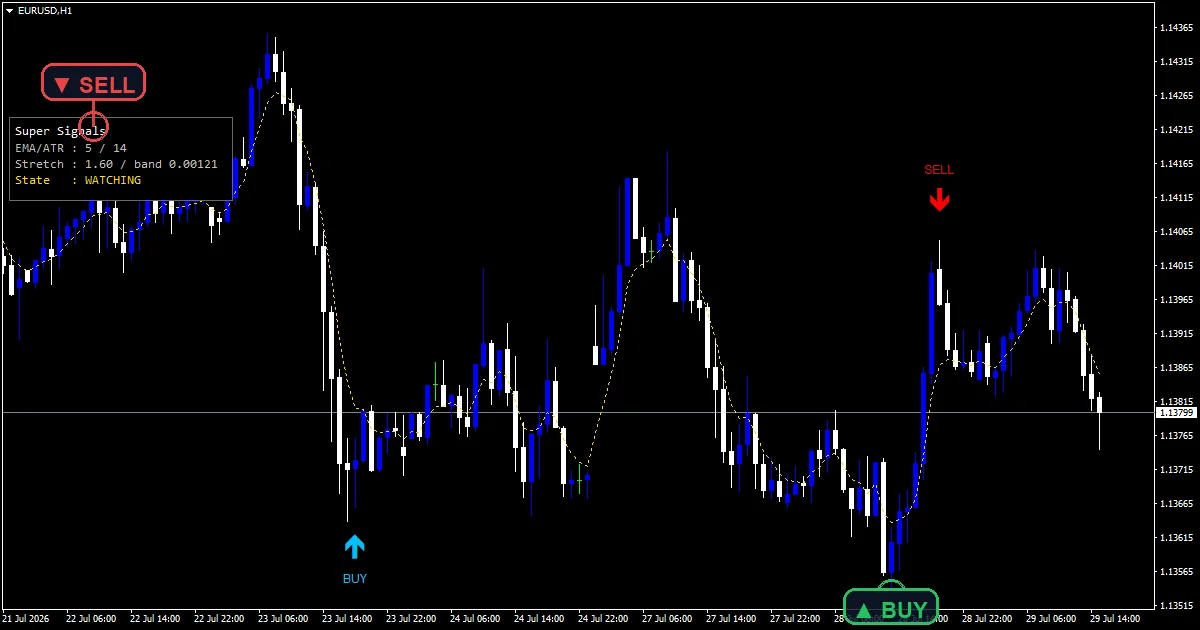
A gold `Fair Value EMA` line runs at `InpFastMA` `5`.
`Super Buy` uses arrow 233 in deep sky blue.
`Super Sell` uses arrow 234 in red.
A corner panel and text labels report the current state.
- Fair Value EMA: line, gold, width 1
- Super Buy: arrow, deep sky blue, width 3, arrow code 233
- Super Sell: arrow, red, width 3, arrow code 234
What the file computes
The fair value line
iMA gives a five-bar exponential average, which the code treats as fair value. Distance from that line is what the rest of the logic measures.
Arming needs a real stretch
iATR at `InpAtrPeriod` `14` sets the yardstick. Price has to travel more than `InpStretch` `1.6` range units away from the average. A stretch below the line arms a buy, above it arms a sell.
Firing needs a turn
Once armed, the tool waits. The first closed bar that closes back toward the average fires the arrow and clears the armed state. Both bars in that test are complete, so a printed arrow stays put.
Getting a read from it
An arrow means two separate events happened in order, not one.
Distance from the gold line is the whole basis of the setup.
Marks sit `InpArrowOffset` `55` points clear of the candle.
The state resets after each fire, which keeps marks few.
Alert channels in this build: popup, push notification, email and sound, one message per closed bar.
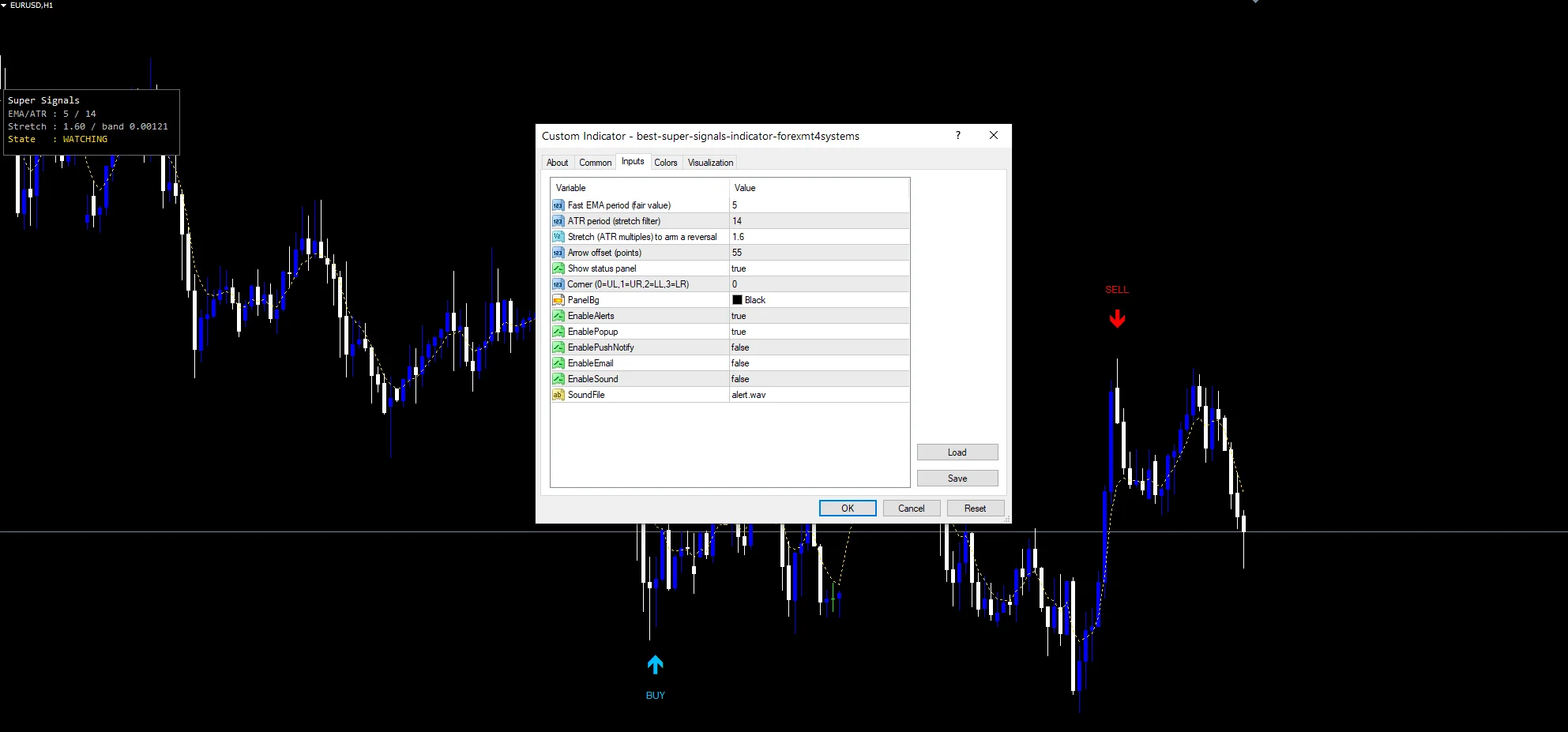
`EnableAlerts` governs the set and ships true with `EnablePopup`. `EnablePushNotify` reaches the mobile app, `EnableEmail` sends mail and `EnableSound` plays `SoundFile`, all three starting off. A fire reports once per closed bar.
Every Best Super Signals Indicator input
Core settings
| Setting | What it does | Default |
|---|---|---|
InpFastMA |
Fast EMA period (fair value). Bars in the fair value average, default `5`. | 5 |
InpAtrPeriod |
ATR period (stretch filter). Bars in the range yardstick, default `14`. | 14 |
InpStretch |
Stretch (ATR multiples) to arm a reversal. Range units price must travel to arm, default `1.6`. | 1.6 |
Display settings
| Setting | What it does | Default |
|---|---|---|
InpArrowOffset |
Arrow offset (points). Points between an arrow and the candle, default `55`. | 55 |
ShowPanel |
Show status panel. Show the state readout, default `true`. | on |
PanelCorner |
Corner (0=UL,1=UR,2=LL,3=LR). Corner the readout anchors to, default `0`. | 0 |
PanelBg |
Readout background, default `clrBlack`. | black |
Alert settings
| Setting | What it does | Default |
|---|---|---|
EnableAlerts |
Governs every delivery route, default `true`. | on |
EnablePopup |
Dialog inside MetaTrader, default `true`. | on |
EnablePushNotify |
Message to the mobile app, default `false`. | off |
EnableEmail |
(see inputs panel) | off |
EnableSound |
(see inputs panel) | off |
SoundFile |
(see inputs panel) | alert.wav |
Where this one belongs
A stretch measure needs instruments that actually stretch. EURUSD H1 is the reference chart, where `InpStretch` `1.6` arms a few times a week. On M5 arming happens often and the turn test does the filtering. Daily bars leave very few marks.
Where it stops working
A move can stay stretched for many bars, and the arrow waits through all of them.
The turn test only compares two closes, so a single pause can trigger it early.
This hunts exhaustion, so it fires against the move by design.
Copy the compiled Best Super Signals Indicator file into your MQL4/Indicators folder, and the MT5 build into MQL5/Indicators, then restart the terminal and drag it onto a chart. The step-by-step guide with screenshots is at how to install MT4 and MT5 indicators.
Background reading on the method behind the Best Super Signals Indicator: Market distortion on Wikipedia, Keltnerchannel at Investopedia.
Download the Best Super Signals Indicator for MT4 and MT5
The zip holds the compiled Best Super Signals Indicator build for MT4 and MT5, plus a short README. Compiled files only, no source. Enter your email below and the download link arrives in your inbox.
Download this indicator free
Enter your email and the file is yours. You also get the full MT4 and MT5 library.
FAQ
What does InpStretch 1.6 measure?
How far price must travel from the five-bar average before the tool arms, counted in range units from `InpAtrPeriod`. Raising it demands a bigger excursion and gives fewer, later setups. Lowering it arms on ordinary pullbacks.
Why does the Fair Value EMA use only 5 bars?
Because the tool measures short-term exhaustion rather than trend. A five-bar average sits close to price, so the distance reading reacts within a few candles instead of describing a move that ended long ago.
What fires a Super Buy after arming?
The first closed bar whose close is above the previous close, while the armed state is still set. That single turn is the trigger, after which the state clears and the tool waits for a fresh stretch.
Why does InpArrowOffset default to 55?
The arrows carry text labels, and a narrow gap would put the text across the candle. Fifty-five points suits a five-digit currency pair. Shrink it on instruments whose point size is much larger.
Are results guaranteed?
No. Trading involves risk. Results are not guaranteed; past performance is not indicative of future results. Use the Best Super Signals Indicator as one input. Always backtest before trading live.
External references
- For background on this concept, see Market distortion on Wikipedia.
- For broader market context, see Keltnerchannel at Investopedia.

About the author
Written by Dominic Walsh, a Forex trader and MT4/MT5 indicator, Expert Advisor and script developer. Every tool on forexmt4systems.com is tested on live charts before release and ships with ready-to-use compiled MT4 (.ex4) and MT5 (.ex5) files. Learn more about the trader and developer behind this site.
How we build, test and correct every tool: Editorial & Testing Policy. Trading carries risk; see the disclaimer.