
The big trend indicator is a SuperTrend deliberately set too wide to react to small moves. A 22-bar ATR and a 3.5 multiplier keep the band far from price, and a points buffer sits on top of that: a flip only counts once the close breaks the opposite band by a set margin. What survives is a regime read rather than a signal stream.
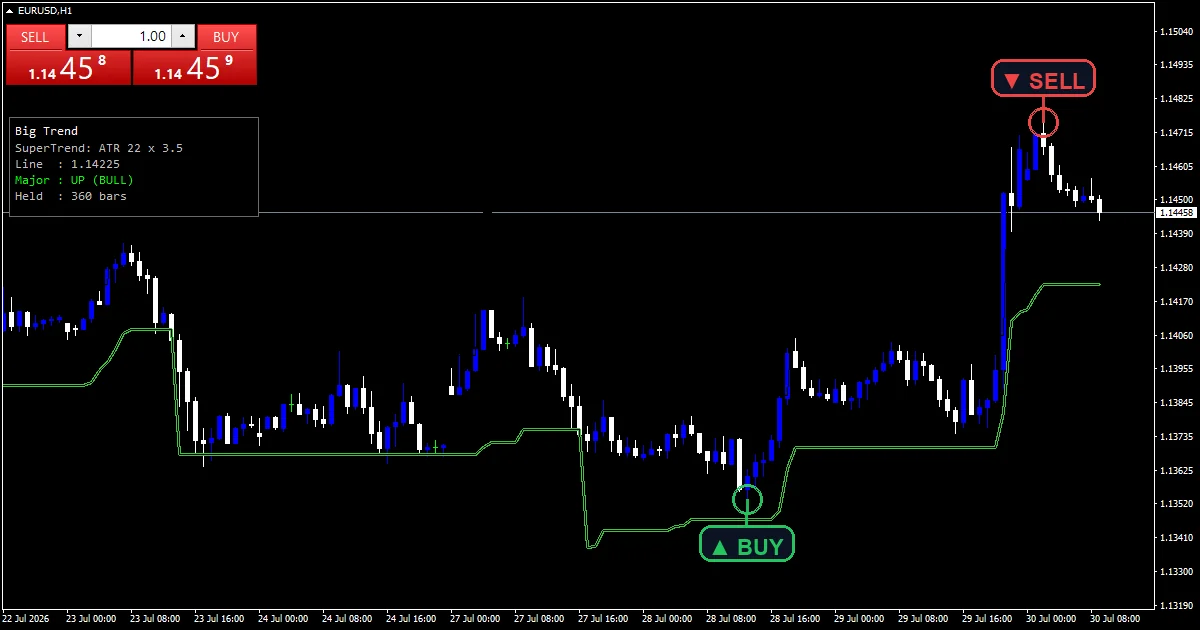
This build ships as a compiled .ex4 for MT4 and .ex5 for MT5; the screenshots below come from EURUSD H1.
| Platforms | MT4 (.ex4) + MT5 (.ex5) |
|---|---|
| Chart window | Main price chart |
| Plots | 4: Big Trend Up, Big Trend Down, Big Buy, Big Sell |
| Alerts | popup, push notification, email, sound |
| Inputs | 15 |
The visual side
Big Trend Up traces the baseline in lime green while the regime reads bullish.
Big Trend Down traces the same line in red once the regime turns.
Big Buy and Big Sell arrows mark the bar where the regime actually changed.
A status panel and text labels sit on the chart, positioned to clear the broker’s one-click trading panel.
- Big Trend Up: line, lime green, width 3
- Big Trend Down: line, red, width 3
- Big Buy: arrow, lime, width 3, arrow code 233
- Big Sell: arrow, red, width 3, arrow code 234
What the formula does
Bands built from the bar midpoint
hl2 takes (high[i] + low[i]) / 2.0. From there bu adds `InpAtrMult` times atr and bl subtracts it, with atr from iATR over `InpAtrPeriod`. The defaults of `22` and `3.5` are wider than a standard SuperTrend on purpose, which is what keeps the line clear of ordinary swings.
Locking the bands so they only tighten
A raw band jumps around, so each bar compares against the previous value. FUpBuf takes the new bu only when bu sits below FUpBuf[i + 1], or when close[i + 1] already broke above it. FLoBuf mirrors that. The band therefore ratchets toward price while a regime holds and resets when the regime ends.
Requiring a margin before a flip counts
This is what separates the build from a plain SuperTrend. filt takes `InpFilterPoints` converted to price, and the close has to break the opposite band by more than that margin before DirBuf changes. The source header is direct about why: the buffer kills the whipsaw micro-flips a raw SuperTrend produces. STBuf then carries the active band, and UpLineBuf or DnLineBuf receives it depending on direction, with the previous bar written into the other buffer at a junction so the coloured line has no gap.
Turning output into a view
Line colour is the regime. That is the main output, and it changes rarely by design.
An arrow marks a confirmed change, not a candidate. Flips that failed the margin never appear.
The line sitting far from price marks a volatile stretch, since the band is three and a half ATRs wide.
The panel gives the current state as text, which is quicker to read than the line on a crowded chart.
Alert channels in this build: popup, push notification, email and sound, one message per closed bar.
Four channels sit beneath `EnableAlerts`: popup, push notification, email and sound, with `SoundFile` naming the clip. Popup ships enabled. The alert group is labelled one per closed bar, matching a flip test that reads settled closes.
Every Big Trend Indicator input
Core settings
| Setting | What it does | Default |
|---|---|---|
InpAtrPeriod |
ATR period (long = major swings). Bars in the volatility measure, default `22`, chosen long so the band tracks major swings. | 22 |
InpAtrMult |
ATR multiplier (wide = big trend only). How many ATRs the band sits from the midpoint, default `3.5`. Lower it toward 2.0 and it behaves like an ordinary SuperTrend. | 3.5 |
InpFilterPoints |
Flip confirmation buffer (points). Extra margin the close must clear before a flip registers, default `40` points. This is the anti-whipsaw dial. | 40 |
Display settings
| Setting | What it does | Default |
|---|---|---|
InpArrowOffset |
Arrow offset (points). Distance between candle and arrow, default `80` points, set wide to suit the thick baseline. | 80 |
InpMaxLabels |
Max BUY/SELL text tags kept. | 30 |
ShowPanel |
Show status panel. Turns the status readout on and off; `PanelYStart` at `120` keeps it clear of the one-click panel. | on |
PanelCorner |
0=UL 1=UR 2=LL 3=LR. | 0 |
PanelYStart |
Panel top offset (clears one-click panel). | 120 |
PanelBg |
(see inputs panel) | black |
Alert settings
| Setting | What it does | Default |
|---|---|---|
EnableAlerts |
(see inputs panel) | on |
EnablePopup |
(see inputs panel) | on |
EnablePushNotify |
(see inputs panel) | off |
EnableEmail |
(see inputs panel) | off |
EnableSound |
(see inputs panel) | off |
SoundFile |
(see inputs panel) | alert.wav |

Placing it well
Wide defaults suit charts where a regime lasts. EURUSD H1 is the reference, where flips come every week or two. On M5 even these settings flip more often than the design intends. On H4 and daily the tool comes into its own, marking a handful of regime changes a year that each cover substantial ground.
Its blind spots
A wide band means late exits. By the time the line flips, a good part of the move has already reversed.
The flip buffer is a fixed point count rather than an ATR fraction, so 40 points means something different on gold than on EURUSD.
Long sideways stretches leave the line hovering with no flip at all, which reads as a trend that is not really there.
Copy the compiled Big Trend Indicator file into your MQL4/Indicators folder, and the MT5 build into MQL5/Indicators, then restart the terminal and drag it onto a chart. The step-by-step guide with screenshots is at how to install MT4 and MT5 indicators.
Background reading on the method behind the Big Trend Indicator: Mischler Financial Group on Wikipedia, Scalping at Investopedia.
Download the Big Trend Indicator for MT4 and MT5
The zip holds the compiled Big Trend Indicator build for MT4 and MT5, plus a short README. Compiled files only, no source. Enter your email below and the download link arrives in your inbox.
Download this indicator free
Enter your email and the file is yours. You also get the full MT4 and MT5 library.
FAQ
What does InpFilterPoints add to a normal SuperTrend?
A margin. A standard SuperTrend flips the moment a close crosses the opposite band, which produces repeated micro-flips in choppy conditions. Here the close must break that band by `40` points on top. Flips that fail the margin leave the regime unchanged, and no arrow prints.
Why are InpAtrPeriod and InpAtrMult set so high?
Because the tool targets major swings rather than entries. At `22` and `3.5` the band sits far enough from price that ordinary pullbacks cannot reach it. A conventional SuperTrend uses something closer to 10 and 3.0. These wider settings are the whole design, not a tuning accident.
Does the Big Trend Up line ever move away from price?
No, not while a regime holds. FUpBuf and FLoBuf only accept a new band when it sits tighter than the stored one, so the line ratchets toward price. It resets outward only when the regime itself flips, which is the same locked-band behaviour classic SuperTrend uses.
What is the ShowPanel readout for?
A text summary of the current regime, drawn in a chart corner. `PanelYStart` defaults to `120` pixels so it clears the broker’s one-click trading panel rather than sitting under it. Turn it off with `ShowPanel` if you prefer to read the line colour alone.
Are results guaranteed?
No. Trading involves risk. Results are not guaranteed; past performance is not indicative of future results. Use the Big Trend Indicator as one input. Always backtest before trading live.
External references
- For background on this concept, see Mischler Financial Group on Wikipedia.
- For broader market context, see Scalping at Investopedia.

About the author
Written by Dominic Walsh, a Forex trader and MT4/MT5 indicator, Expert Advisor and script developer. Every tool on forexmt4systems.com is tested on live charts before release and ships with ready-to-use compiled MT4 (.ex4) and MT5 (.ex5) files. Learn more about the trader and developer behind this site.
How we build, test and correct every tool: Editorial & Testing Policy. Trading carries risk; see the disclaimer.