
ICT’s SMT divergence compares two correlated markets at the same swing. If EURUSD makes a higher high while GBPUSD does not, one of them is not confirming. The SMT divergence ICT indicator finds those swings, marks them, and joins the two pivots with a line.
This build ships as a compiled .ex4 for MT4 and .ex5 for MT5; the screenshots below come from EURUSD H1.
| Platforms | MT4 (.ex4) + MT5 (.ex5) |
|---|---|
| Chart window | Main price chart |
| Plots | 2: SMT Buy, SMT Sell |
| Alerts | popup, push notification, email, sound |
| Inputs | 12 |
What you see once it loads
Divergence lines and two marks on price.
`SMT Buy` prints lime with arrow 233.
`SMT Sell` prints red with arrow 234.
`DrawDivergenceLines` joins the two pivots.
A status block names the correlated pair.
`ArrowOffsetPips` `6.0` spaces the marks.
- SMT Buy: arrow, lime, width 2, arrow code 233
- SMT Sell: arrow, red, width 2, arrow code 234

The calculation in three parts
Correlated pair
`CorrelatedSymbol` blank picks GBPUSD, or EURUSD when you are on GBPUSD. Enter any symbol to override.
Swings
`FractalWing` `2` bars on each side confirm each swing. `ScanBars` `2500` limits the history searched.
Divergence
A higher high on your chart while the other pair’s high at that swing is lower prints a sell. Lower lows with a higher partner low print a buy.
How to work with it
A red mark means your pair’s new high went unconfirmed.
A lime mark means its new low went unconfirmed.
Lines join the two compared pivots.
Marks appear two bars after the swing.
Without partner data, a momentum check stands in.
History must load for both pairs.
Alert channels in this build: popup, push notification, email and sound, one message per closed bar.
Each divergence sends one message once its swing confirms. `EnableAlerts` is the master switch, and the popup is the route live by default.
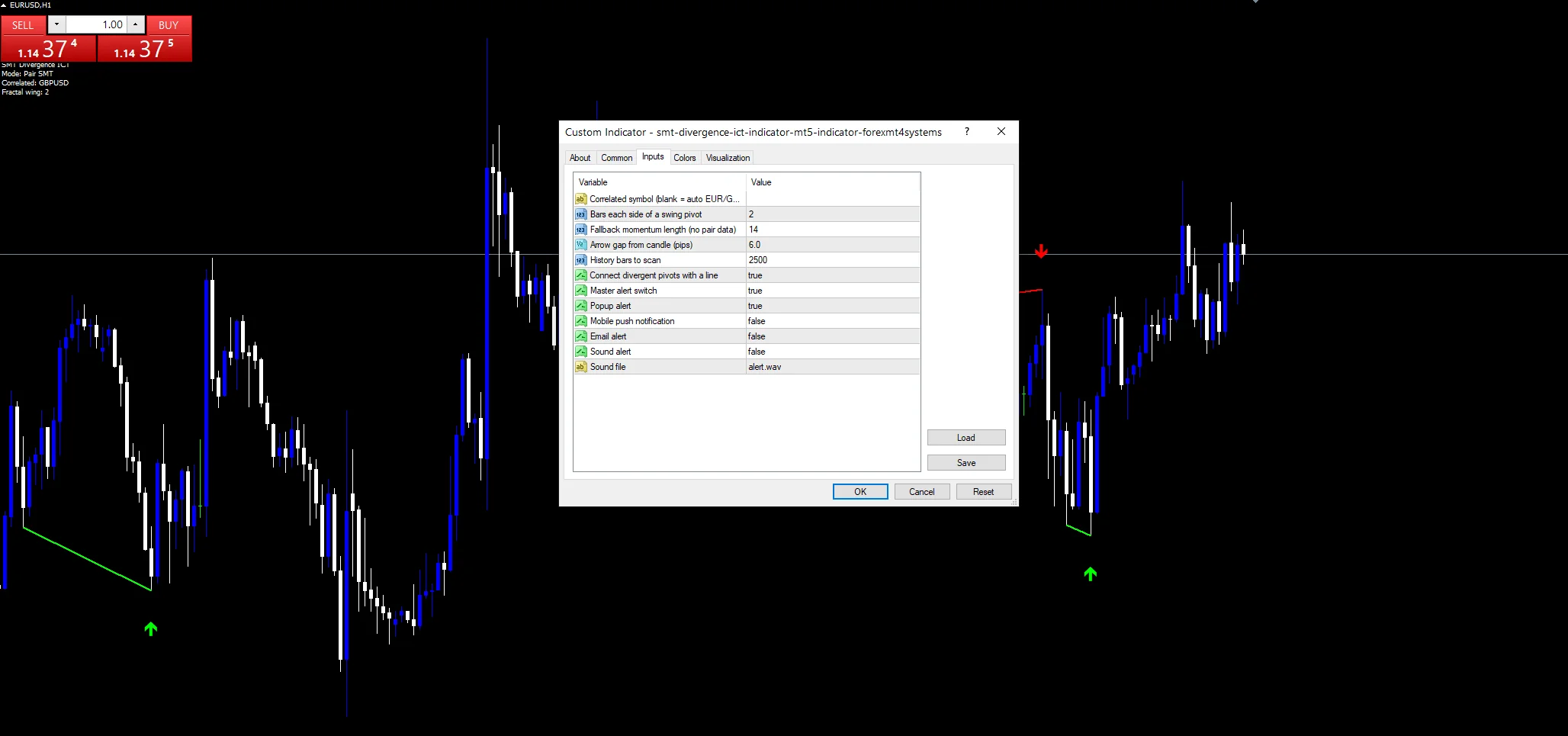
Every Smt Divergence Ict Indicator input
Core settings
| Setting | What it does | Default |
|---|---|---|
CorrelatedSymbol |
Correlated symbol (blank = auto EUR/GBP). Pair to compare, blank for auto, `””`. | |
FractalWing |
Bars each side of a swing pivot. Bars on each side of a swing, `2`. | 2 |
MomentumLen |
Fallback momentum length (no pair data). Fallback momentum length, `14`. | 14 |
ScanBars |
History bars to scan. History searched, `2500`. | 2500 |
Display settings
| Setting | What it does | Default |
|---|---|---|
ArrowOffsetPips |
Arrow gap from candle (pips). Mark gap in pips, `6.0`. | 6.0 |
DrawDivergenceLines |
Connect divergent pivots with a line. Join the pivots, `true`. | on |
Alert settings
| Setting | What it does | Default |
|---|---|---|
EnableAlerts |
Master alert switch. Master alert switch, `true`. | on |
EnablePopup |
Popup alert. Popup, `true`. | on |
EnablePushNotify |
Mobile push notification. Mobile route, `false`. | off |
EnableEmail |
Email alert. | off |
EnableSound |
Sound alert. Speaker, `false`. | off |
SoundFile |
Sound file. | alert.wav |
Suitable charts
SMT needs two liquid, correlated pairs. EURUSD against GBPUSD on H1 is the reference setup. On M15 divergences come each session. On H4 they flag the larger turns ICT traders watch.
When not to trust the output
Correlated pairs can decouple on news.
Missing partner history switches to momentum.
Two-bar swings give many small divergences.
Just the popup is enabled at first.
Copy the compiled Smt Divergence Ict Indicator file into your MQL4/Indicators folder, and the MT5 build into MQL5/Indicators, then restart the terminal and drag it onto a chart. The step-by-step guide with screenshots is at how to install MT4 and MT5 indicators.
Download the Smt Divergence Ict Indicator for MT4 and MT5
The zip holds the compiled Smt Divergence Ict Indicator build for MT4 and MT5, plus a short README. Compiled files only, no source. Enter your email below and the download link arrives in your inbox.
Download this indicator free
Enter your email and the file is yours. You also get the full MT4 and MT5 library.
FAQ
Which pair does CorrelatedSymbol blank pick?
GBPUSD, or EURUSD when the chart is already GBPUSD. Enter another symbol, such as the dollar index, if you want to compare your pair against a different market.
What does an SMT Sell mark mean?
Your pair made a higher swing high while the correlated pair’s high at the same swing was lower. One market failed to confirm the push, which ICT reads as weakness.
What does MomentumLen do without partner history?
The build falls back to a fourteen-bar momentum reading on your own chart, set by `MomentumLen`. Load history for both pairs to keep true SMT comparisons.
Why use FractalWing 2 for swings?
Two bars on each side confirm swings quickly, which suits intraday SMT work. Raise it to three or five for larger swings and fewer, more meaningful divergences.
Are results guaranteed?
No. Trading involves risk. Results are not guaranteed; past performance is not indicative of future results. Use the Smt Divergence Ict Indicator as one input. Always backtest before trading live.
Category: this is part of our Smart Money collection. Browse more Smart Money for MetaTrader, or explore every MT4 indicator and MT5 indicator on the site.
External references
- The core method is documented in Stock market prediction on Wikipedia.
- Additional market context is at ICHIMOKU Cloud at Investopedia.

About the author
Written by Dominic Walsh, a Forex trader and MT4/MT5 indicator, Expert Advisor and script developer. Every tool on forexmt4systems.com is tested on live charts before release and ships with ready-to-use compiled MT4 (.ex4) and MT5 (.ex5) files. Learn more about the trader and developer behind this site.
How we build, test and correct every tool: Editorial & Testing Policy. Trading carries risk; see the disclaimer.