
The supertrend mtf alert indicator builds an ATR trailing line on the chart. It rebuilds that same line on a higher timeframe. Supertrend Up and Supertrend Dn plot the trailing line. Buy and Sell arrows mark a flip, once both timeframes agree.
This build ships as a compiled .ex4 for MT4 and .ex5 for MT5; the screenshots below come from EURUSD H1.
| Platforms | MT4 (.ex4) + MT5 (.ex5) |
|---|---|
| Chart window | Main price chart |
| Plots | 4: Supertrend Up, Supertrend Dn, Buy, Sell |
| Alerts | popup, push notification, email, sound |
| Inputs | 12 |
The display
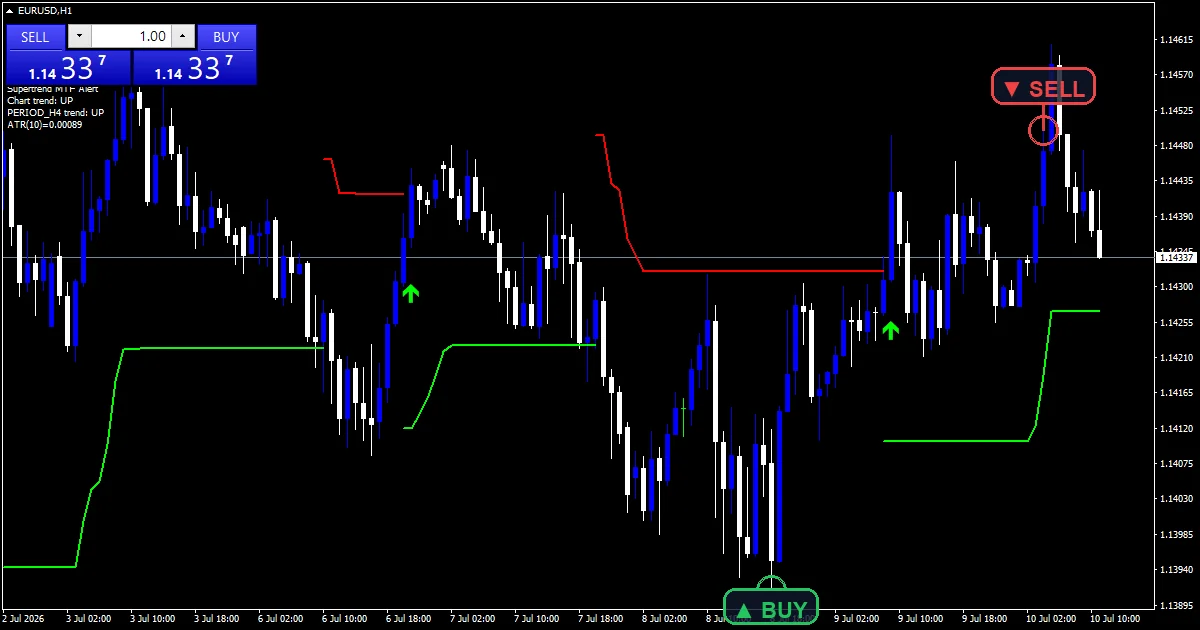
Supertrend Up (lime, DRAW_LINE) plots the trailing support line while price sits in an uptrend.
Supertrend Dn (red, DRAW_LINE) plots the trailing resistance line while price sits in a downtrend.
Buy (lime, DRAW_ARROW, code 233) marks a bar where the trend flips up and the higher timeframe agrees.
Sell (red, DRAW_ARROW, code 234) marks a bar where the trend flips down and the higher timeframe agrees.
- Supertrend Up: line, lime, width 2
- Supertrend Dn: line, red, width 2
- Buy: arrow, lime, arrow code 233
- Sell: arrow, red, arrow code 234
What the code actually computes
ATR bands and the flip
The code builds a Wilder ATR from AtrPeriod bars, 10 by default. It sets an upper and lower band at the bar’s midpoint. Each one sits Multiplier times that ATR away. Multiplier defaults to 3.0.
Each band only moves the way that tightens the stop. The up band rises with price; the down band falls with price. That holds until price closes through the far band, and the trend flips.
The higher timeframe filter
A second copy of the same band math runs on HigherTF, PERIOD_H4 by default. It rebuilds on each new chart bar. UseMTFFilter, on by default, only lets an arrow print when that higher direction matches the flip.
ArrowGapATR sets the arrow’s gap from price in ATR units, not a fixed pip value. The gap scales with volatility instead of staying fixed.
Warm-up and updates
The indicator needs at least AtrPeriod plus five bars before it will compute at all. Below that floor it draws nothing.
The higher timeframe cache only rebuilds when a new chart bar forms, not on every tick. That keeps the MTF check cheap to run.
Getting a signal from it
The line switches from Supertrend Dn to Supertrend Up, or back, on the bar where price closes through the far band.
A Buy or Sell arrow only prints on a flip bar when UseMTFFilter is on and the higher timeframe agrees. A flip against it still changes the line color, but gets no arrow.
ShowArrows can turn the arrow layer off. The trailing line and the alert channels stay active either way.
Once a bar sets a color, it does not switch back without a fresh close through the opposite band.
Alert channels in this build: popup, push notification, email and sound, one message per closed bar.
EnableAlerts, EnablePopup, EnablePushNotify, EnableEmail and EnableSound cover the four channels. The check runs once on the last closed bar. It fires a BUY or SELL message on a fresh arrow.
Every Supertrend Mtf Alert Indicator input
Core settings
| Setting | What it does | Default |
|---|---|---|
AtrPeriod |
ATR period (Wilder). AtrPeriod sets the Wilder ATR length behind both bands. It defaults to 10 bars. | 10 |
Multiplier |
ATR band multiplier. Multiplier sets how many ATR units separate the band from price. It defaults to 3.0. | 3.0 |
HigherTF |
MTF confirmation timeframe. HigherTF picks the confirmation timeframe for the MTF filter. It defaults to PERIOD_H4. | PERIOD_H4 |
UseMTFFilter |
arrow only when HTF trend agrees. UseMTFFilter switches the higher timeframe check on or off. It defaults to true. | on |
Display settings
| Setting | What it does | Default |
|---|---|---|
ShowArrows |
draw BUY/SELL flip arrows. ShowArrows toggles the Buy and Sell arrow layer. It defaults to true. | on |
ArrowGapATR |
arrow offset in ATR units. ArrowGapATR sets the arrow gap in ATR units, not points. It defaults to 0.6. | 0.6 |
Alert settings
| Setting | What it does | Default |
|---|---|---|
EnableAlerts |
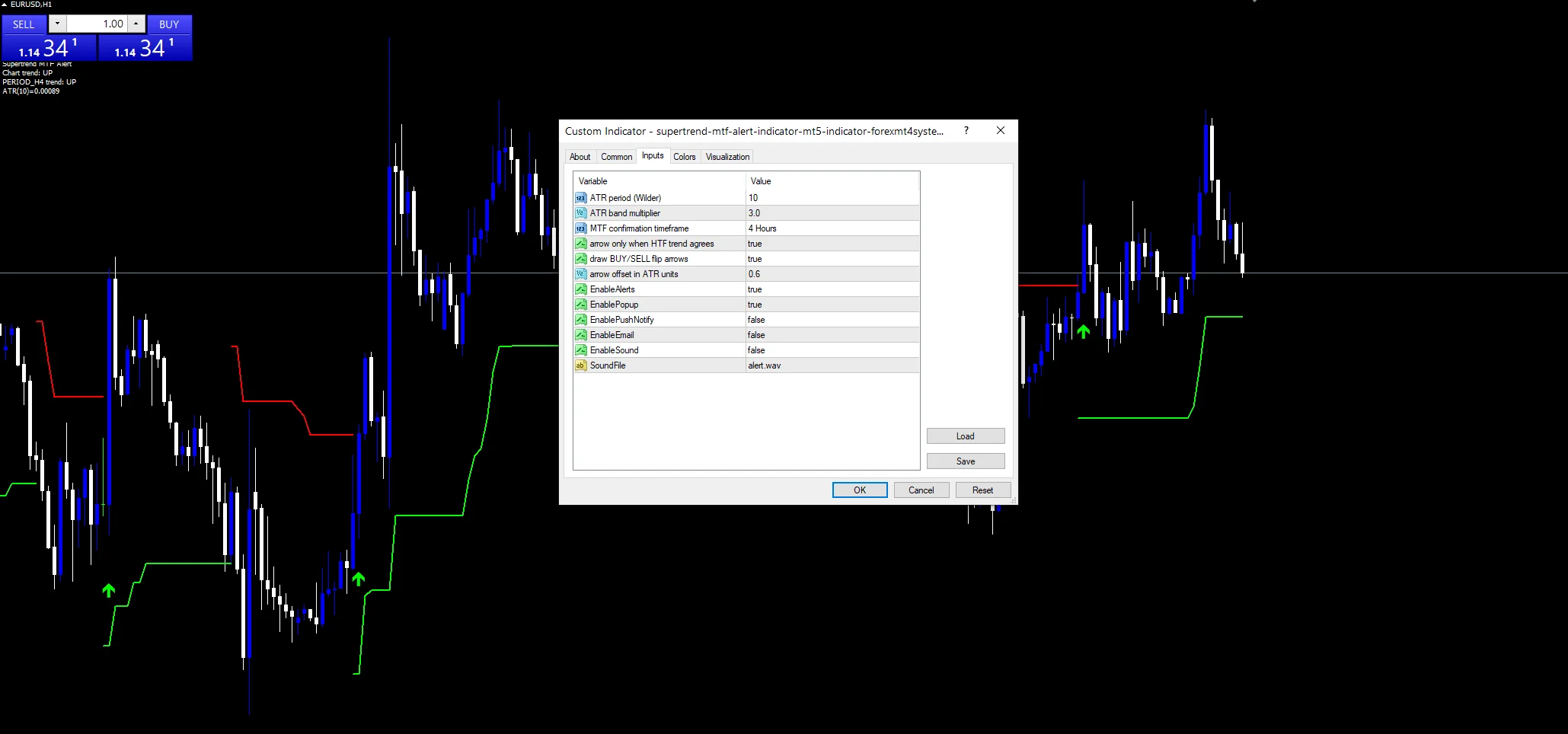
(see inputs panel) | on |
EnablePopup |
(see inputs panel) | on |
EnablePushNotify |
(see inputs panel) | off |
EnableEmail |
(see inputs panel) | off |
EnableSound |
(see inputs panel) | off |
SoundFile |
(see inputs panel) | alert.wav |
Where the defaults suit
The screenshot runs the supertrend mtf alert indicator on EURUSD H1. The default H4 filter sits one step above it. The same AtrPeriod and Multiplier pair also works on other forex majors. Just set HigherTF above the chart timeframe. A pair with steady trends tends to give cleaner flips than one that chops sideways.
Where it comes unstuck
In a tight range the band flips sides often. Even with the higher timeframe filter on, a ranging chart up there can agree with both flips in a row.
The bands only tighten, never widen, until a flip. A sudden gap or spike can push price through both bands at once. The flip and any arrow then lag the real move.
If HigherTF sits too close to the chart timeframe, the filter adds little real confirmation. Both lines end up reading nearly the same price action.
There is no separate volume check here. Only the ATR bands and the higher timeframe direction decide when an arrow prints.
Copy the compiled Supertrend Mtf Alert Indicator file into your MQL4/Indicators folder, and the MT5 build into MQL5/Indicators, then restart the terminal and drag it onto a chart. The step-by-step guide with screenshots is at how to install MT4 and MT5 indicators.
Download the Supertrend Mtf Alert Indicator for MT4 and MT5
The zip holds the compiled Supertrend Mtf Alert Indicator build for MT4 and MT5, plus a short README. Compiled files only, no source. Enter your email below and the download link arrives in your inbox.
Download this indicator free
Enter your email and the file is yours. You also get the full MT4 and MT5 library.
FAQ
What does the HigherTF input do on the supertrend mtf alert indicator?
HigherTF sets which higher timeframe the code checks before letting an arrow print. It defaults to PERIOD_H4. A second ATR-band line runs on that timeframe. With UseMTFFilter on, a chart flip only earns a Buy or Sell arrow when the higher direction agrees. Turning UseMTFFilter off removes that check entirely.
Why does Multiplier default to 3.0 instead of a smaller number?
Multiplier sets how many ATR units the trailing band sits from price. A value of 3.0 keeps the band far enough back that ordinary noise does not force a flip on every pullback. That comes at the cost of a wider stop than a tighter setting gives. A smaller Multiplier flips sooner but tighter.
How is ArrowGapATR different from a fixed pip offset?
ArrowGapATR multiplies the current ATR reading, not a fixed point value. Buy and Sell arrows sit further from price when volatility runs high, and closer when it stays calm. The default is 0.6 times the current ATR. That keeps the gap sensible across both quiet and fast markets.
Can I turn off the arrows but keep the alert emails?
Yes. ShowArrows only controls whether Buy and Sell arrows draw on the chart. The check still watches the Supertrend Up and Supertrend Dn line for a fresh flip. It can fire through EnableEmail or the other channels regardless of that setting. The trailing line itself also keeps drawing either way.
Are results guaranteed?
No. Trading involves risk. Results are not guaranteed; past performance is not indicative of future results. Use the Supertrend Mtf Alert Indicator as one input. Always backtest before trading live.
Category: this is part of our Trend collection. Browse more Trend for MetaTrader, or explore every MT4 indicator and MT5 indicator on the site.
External references
- The core method is documented in Master of Financial Technical Analysis on Wikipedia.
- Additional market context is at Pip at Investopedia.

About the author
Written by Dominic Walsh, a Forex trader and MT4/MT5 indicator, Expert Advisor and script developer. Every tool on forexmt4systems.com is tested on live charts before release and ships with ready-to-use compiled MT4 (.ex4) and MT5 (.ex5) files. Learn more about the trader and developer behind this site.
How we build, test and correct every tool: Editorial & Testing Policy. Trading carries risk; see the disclaimer.