
Ten against fifty is a classic pairing, and the only real choice left is how to average. The ma crossover alerts indicator lets you make that choice, then marks the bar where the quick line clears the slow one. By default it waits for that bar to close before saying anything.
This build ships as a compiled .ex4 for MT4 and .ex5 for MT5; the screenshots below come from EURUSD H1.
| Platforms | MT4 (.ex4) + MT5 (.ex5) |
|---|---|
| Chart window | Main price chart |
| Plots | 4: Fast MA, Slow MA, Cross Up, Cross Down |
| Alerts | popup, push notification, email, sound |
| Inputs | 11 |
What draws where
Two lines and two marks on price.
`Fast MA` traces dodger blue at width 2.
`Slow MA` traces orange red beside it.
`Cross Up` prints lime using arrow 233.
`Cross Down` prints red using arrow 234.
Nothing opens in a pane below.
- Fast MA: line, dodger blue, width 2
- Slow MA: line, orange red, width 2
- Cross Up: arrow, lime, width 2, arrow code 233
- Cross Down: arrow, red, width 2, arrow code 234

What happens behind it
Four ways to average
`MaMethod` `MODE_EMA` picks the recipe. The file carries simple, exponential, smoothed and weighted versions, and both lines use the same one.
The two lengths
`FastPeriod` `10` and `SlowPeriod` `50` set the pace. Five times the length separates them, so a cross needs a real change of direction.
When a cross counts
`EarlyMode` ships `false`. The mark waits for a closed bar; switch it on and the forming bar can show a cross that later vanishes.
On a live chart
Blue above orange red means the short trend leads.
A cross is a change of lead, not a forecast.
`ArrowGapMult` `0.6` spaces marks by candle size.
Even a tiny candle gets a gap of ten points.
Leave early mode off unless you watch every tick.
Warm-up needs fifty bars.
Alert channels in this build: popup, push notification, email and sound, one message per closed bar.
A cross on a closed bar is the event here. `EnableAlerts` is the top switch and the terminal window route is open; the mobile, inbox and speaker routes behind `SoundFile` start shut.
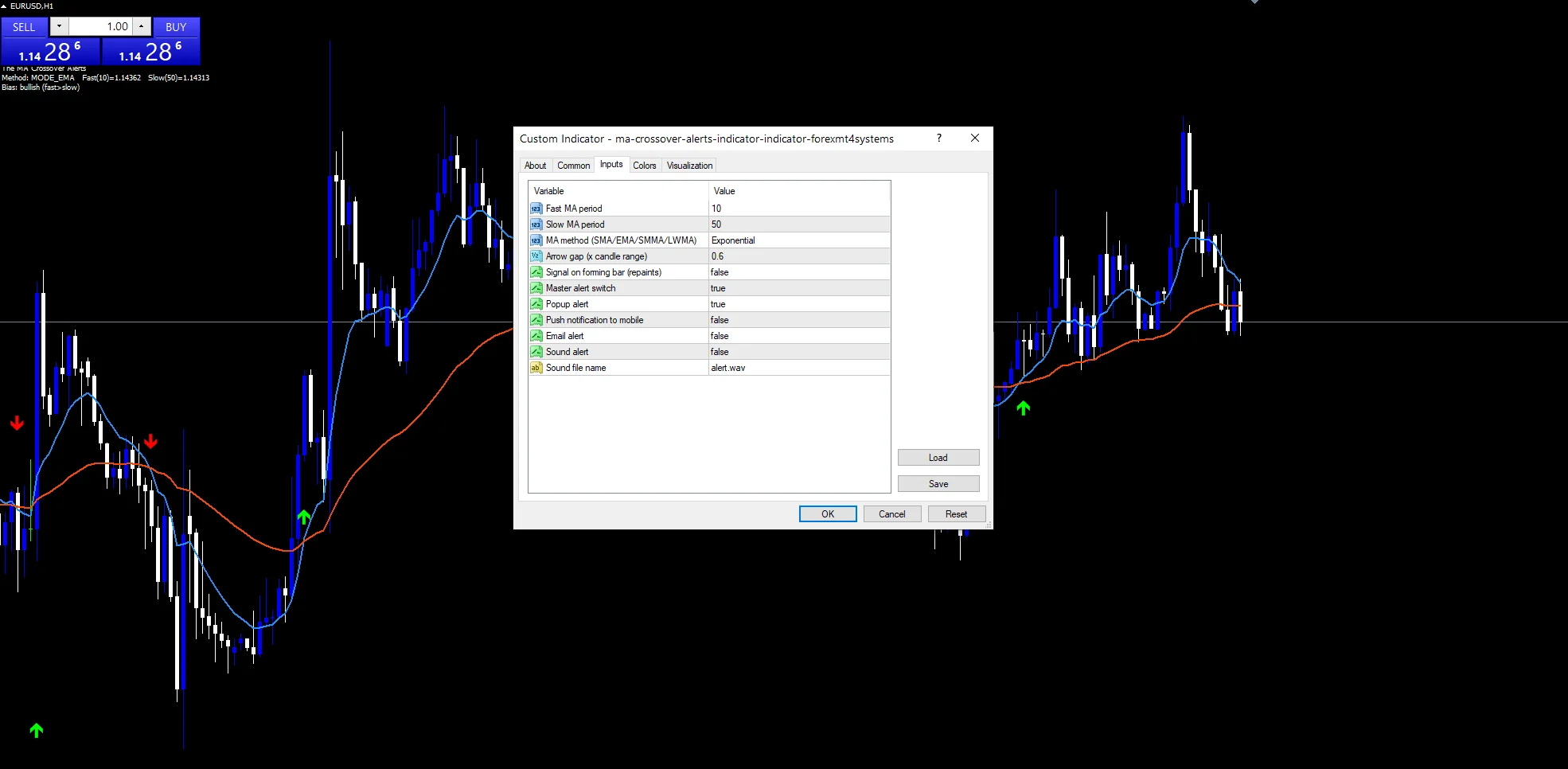
Every The MA Crossover Alerts Indicator input
Core settings
| Setting | What it does | Default |
|---|---|---|
FastPeriod |
Fast MA period. Length of the quick line, `10`. | 10 |
SlowPeriod |
Slow MA period. Length of the slow line, `50`. | 50 |
MaMethod |
MA method (SMA/EMA/SMMA/LWMA). Averaging recipe for both lines, `MODE_EMA`. | MODE_EMA |
EarlyMode |
Signal on forming bar (repaints). Fire on the forming bar, `false`. | off |
Display settings
| Setting | What it does | Default |
|---|---|---|
ArrowGapMult |
Arrow gap (x candle range). Gap as a share of the candle, `0.6`. | 0.6 |
Alert settings
| Setting | What it does | Default |
|---|---|---|
EnableAlerts |
Master alert switch. Top switch for the cross message, `true`. | on |
EnablePopup |
Popup alert. Terminal window route, `true`. | on |
EnablePushNotify |
Push notification to mobile. Mobile route, `false`. | off |
EnableEmail |
Email alert. Inbox route, `false`. | off |
EnableSound |
Sound alert. | off |
SoundFile |
Sound file name. Clip for the speaker route, `”alert.wav”`. | alert.wav |
Placing it well
Ten over fifty on the hourly chart gives a cross every few days. EURUSD H1 is the reference chart. On M5 the same pair crosses many times a session. On D1 each cross can mark a move lasting weeks.
What it will not tell you
In a range the two lines weave through each other.
Both lines lag the price that moves them.
Early mode trades certainty for speed.
A cross says nothing about how far a move runs.
Copy the compiled The MA Crossover Alerts Indicator file into your MQL4/Indicators folder, and the MT5 build into MQL5/Indicators, then restart the terminal and drag it onto a chart. The step-by-step guide with screenshots is at how to install MT4 and MT5 indicators.
Background reading on the method behind the The MA Crossover Alerts Indicator: Moving average crossover on Wikipedia, Exponential Moving Average at Investopedia.
Download the The MA Crossover Alerts Indicator for MT4 and MT5
The zip holds the compiled The MA Crossover Alerts Indicator build for MT4 and MT5, plus a short README. Compiled files only, no source. Enter your email below and the download link arrives in your inbox.
Download this indicator free
Enter your email and the file is yours. You also get the full MT4 and MT5 library.
FAQ
What does EarlyMode change in practice?
It lets the forming bar trigger a mark. That is faster, but a cross that appears mid-bar can disappear before the close, so the mark you saw may not survive.
Which averaging recipe does MaMethod MODE_EMA use?
Exponential, which weights recent closes more heavily and turns sooner than a simple average. Smoothed and weighted recipes are also built in, and both lines always share one.
Why does Cross Up need a closed bar by default?
Because a closed bar cannot change. Waiting for it costs a little time and removes the marks that flicker in and out while a bar is still forming.
How does ArrowGapMult 0.6 size the gap?
It takes six tenths of the candle’s own high-to-low span, with a floor of ten points. Large candles get more room and small ones still keep their mark visible.
Are results guaranteed?
No. Trading involves risk. Results are not guaranteed; past performance is not indicative of future results. Use the The MA Crossover Alerts Indicator as one input. Always backtest before trading live.
Category: this is part of our Trend collection. Browse more Trend for MetaTrader, or explore every MT4 indicator and MT5 indicator on the site.
External references
- The core method is documented in Currency on Wikipedia.
- Additional market context is at Speed Resistance Lines at StockCharts ChartSchool.

About the author
Written by Dominic Walsh, a Forex trader and MT4/MT5 indicator, Expert Advisor and script developer. Every tool on forexmt4systems.com is tested on live charts before release and ships with ready-to-use compiled MT4 (.ex4) and MT5 (.ex5) files. Learn more about the trader and developer behind this site.
How we build, test and correct every tool: Editorial & Testing Policy. Trading carries risk; see the disclaimer.