
Stacking indicators usually just stacks opinions. Also, confluence Conviction Engine, a trend confirmation indicator TradingView traders can run on any chart, counts them instead. Four factors each cast a single vote, plus one or minus one: regime, acceleration, signal and momentum. Indeed, the script adds those votes into a net score between minus four and plus four. It then waits for an EMA reclaim in that direction before it marks anything.
It is free and open source. Still, you can add it to any chart from the Confluence Conviction Engine script page on TradingView, and the full Pine source is published there for you to read.
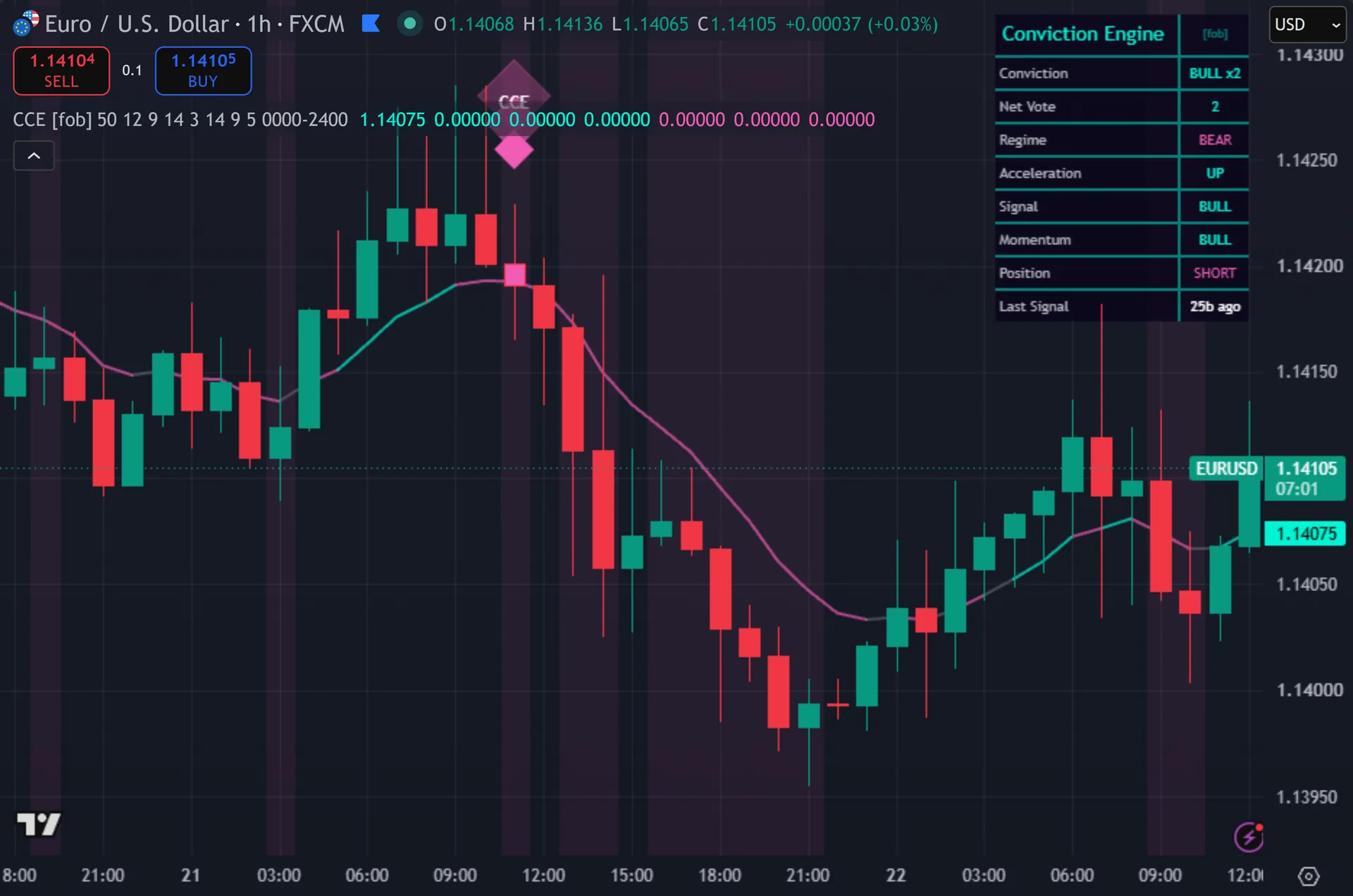
What Confluence Conviction Engine plots on the price chart
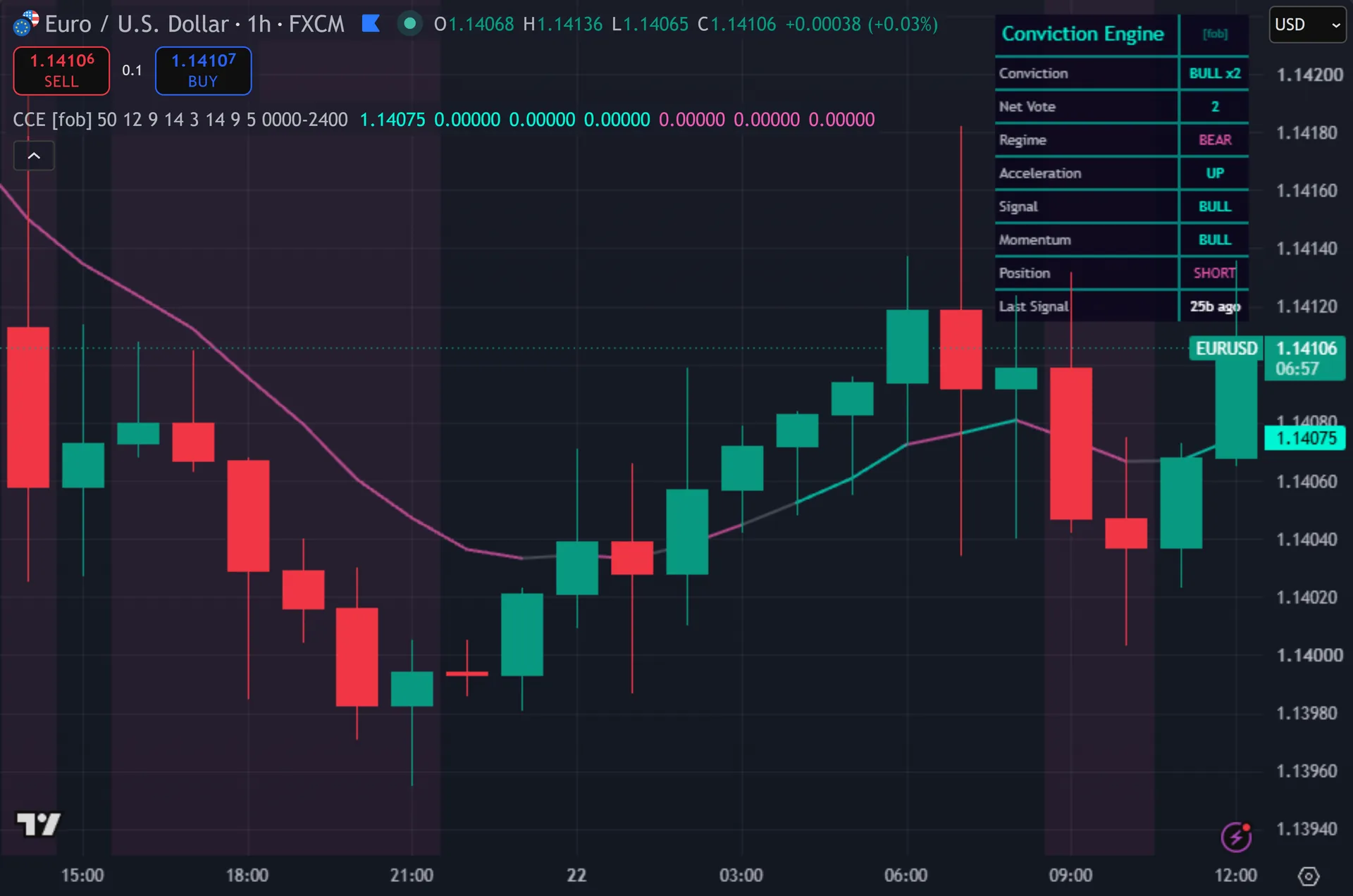
The script plots a single line, the 9-period reclaim EMA. Thus, it turns teal while the net vote leans bullish and pink while it leans bearish. Diamond markers with a three-layer glow mark entries, tagged CCE. Hence, the signal bar takes a solid colour, and the background tints whenever conviction meets your threshold. A nine-row dashboard sits top right. Next, it shows the conviction label, the raw net vote and each of the four factors separately, so you can see exactly which one disagrees.
How Confluence Conviction Engine is built
Four votes, one score
Factor one is regime. Then, price above the 50-period EMA votes plus one, below it votes minus one. Factor two is acceleration. Yet, the script takes the 12-bar price change, then compares that figure with the same figure one bar ago. A rising value votes plus one.
Factor three is the signal vote: price against a 9-period EMA. Truly, factor four is momentum: RSI over 14 bars against the 50 line. Each factor returns plus one, minus one or zero, and zero only on an exact tie.
The net vote is the plain sum, so it runs from minus four to plus four. Conviction is its absolute value. Bias is its sign. Plainly, the inputs cover wide ranges, so you can set the regime EMA anywhere from 10 to 300 and the momentum length from 2 to 60.
The entry gate
A score alone does not trade. Also, the bias must point one way, conviction must reach your Min Conviction setting, which starts at 3, and the close must cross the reclaim EMA in that same direction. An optional session window can restrict the whole thing, and it stays switched off by default.
Two details deserve attention. First, each factor returns plus one or minus one, and exact ties almost never happen. Four such votes always sum to an even number, so the net vote lands on minus four, minus two, zero, two or four. Nothing else. That makes the default Min Conviction of 3 behave exactly like 4, and a trade then needs all four factors to agree.
Second, the Fast Signal EMA and the Entry Reclaim EMA both default to 9, so they trace the same line. Indeed, when price crosses above it, factor three already votes plus one. Only three votes stay genuinely free at the entry bar. Still, set Min Conviction to 2 for a three-to-one majority, or give the Fast Signal EMA a different length so it stops shadowing the trigger. A five-bar cooldown and a position flip apply on top, and every signal checks barstate.isconfirmed.
How to read the signals
Read the four factor rows before the diamond. Thus, the dashboard breaks the score apart, so a BEAR reading on Acceleration inside a BULL regime tells you the move is losing steam. The marker alone cannot give you that.
Watch the Net Vote row change. Hence, it updates every bar and swings between minus four and plus four. A vote sliding from 4 to 2 while you hold a long is an early warning that one leg of the case has broken.
The background tint shows when conviction meets your threshold. On defaults it appears only when all four factors agree, so it stays rare. Lower Min Conviction to 2 and both the tint and the diamonds show up far more often.
Every Confluence Conviction Engine setting explained
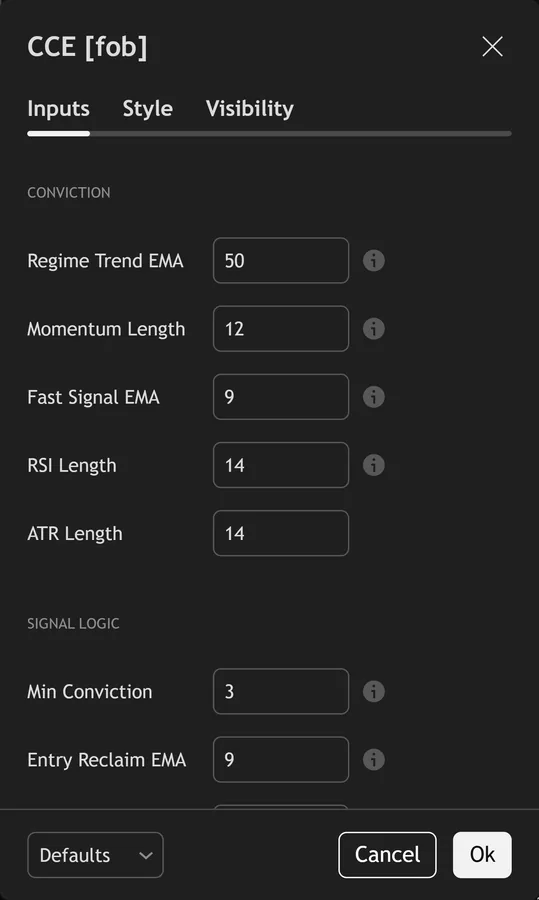
The script exposes 16 inputs, grouped in the settings panel exactly as shown below. Defaults are the published values.
Conviction
| Setting | What it does | Default | Range |
|---|---|---|---|
| Regime Trend EMA | Factor 1: price above/below this EMA. | 50 | 10 to 300 |
| Momentum Length | Factor 2: ROC over this length, its change = acceleration. | 12 | 2 to 60 |
| Fast Signal EMA | Factor 3: price above/below this EMA. | 9 | 2 to 50 |
| RSI Length | Factor 4: RSI above/below 50. | 14 | 2 to 50 |
| ATR Length | Sets the atr length used in the calculation. | 14 | 5 to 50 |
Signal Logic
| Setting | What it does | Default | Range |
|---|---|---|---|
| Min Conviction | Require |net vote| of at least this (1-4) to trade. | 3 | 1 to 4 |
| Entry Reclaim EMA | Close-cross of this EMA in the conviction direction times the entry. | 9 | 2 to 50 |
| Cooldown Bars | Sets the cooldown bars used in the calculation. | 5 | 1 to 40 |
Filters
| Setting | What it does | Default | Range |
|---|---|---|---|
| Restrict to Session | Toggles restrict to session on the chart. | off | on / off |
| Session Window | Controls session window. | 0000-2400 |
Visual
| Setting | What it does | Default | Range |
|---|---|---|---|
| Show Dashboard | Toggles show dashboard on the chart. | on | on / off |
| Show 3-Layer Glow | Toggles show 3-layer glow on the chart. | on | on / off |
| Show Reclaim EMA | Toggles show reclaim ema on the chart. | on | on / off |
| Buy Color | Colour used for buy color. | #00f5d4 | |
| Sell Color | Colour used for sell color. | #f15bb5 | |
| Dashboard BG | Colour used for dashboard bg. | color.new(#0a061c, 14) |
Alerts built into Confluence Conviction Engine
The script ships 15 alert conditions. Next, open the alert dialog on the chart, pick the indicator as the condition source, then choose the event you want. Alerts fire on the close of the bar, so they follow the same confirmed-bar rule the on-chart signals use.
- CCE Buy
- CCE Sell
- CCE Any Signal
- CCE Full Bull
- CCE Full Bear
- CCE Edge On
- CCE Bias Bull
- CCE Bias Bear
- CCE EMA Up
- CCE EMA Down
- CCE Vote Change
- CCE RSI Mid
Other markets and timeframes
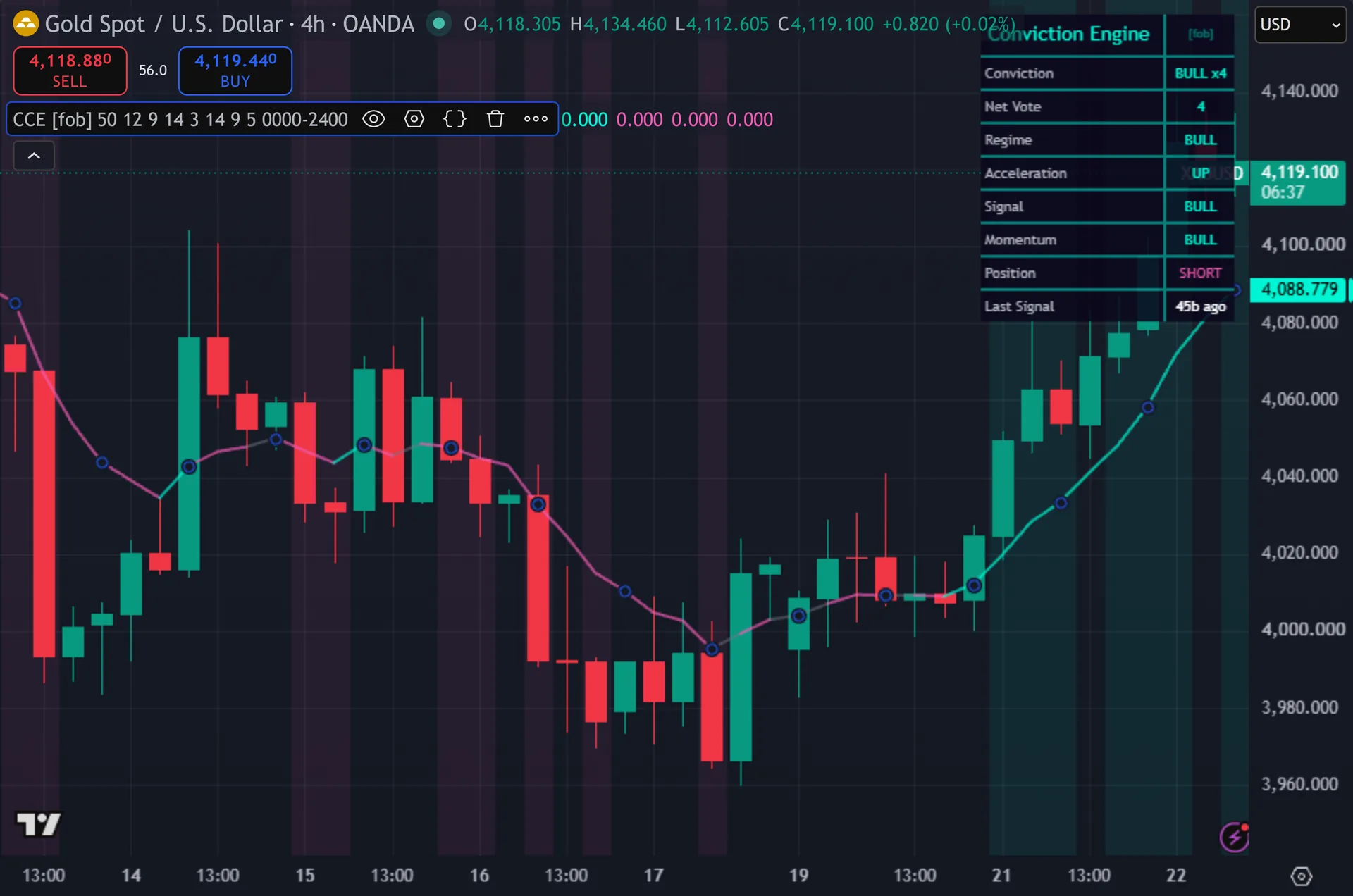
This one travels anywhere. Then, every factor reads price alone: two EMAs, a 12-bar change and RSI against 50. The script uses no volume, quotes no pip value and hard-codes no price level. Yet, so gold, indices, crypto and equities all accept the same defaults. Slower instruments may suit a regime EMA longer than 50. Truly, the optional session window is the only forex-flavoured piece, and it stays off unless you switch it on yourself.
Limitations worth knowing
Counting votes is not the same as measuring edge. Plainly, all four factors read the same close price through different filters, so they correlate heavily. Three moving averages and an RSI can agree and still be wrong together. Also, the score measures agreement, nothing more.
The tool marks entries only. Indeed, it carries no stop, no target and no position sizing. It also calls no request.security, so every factor reads the chart timeframe alone. Still, there is no higher-timeframe confirmation here despite the confluence framing.
The ATR Length input has no effect. Thus, the script computes a 14-period ATR by default and then never uses that value in a signal, a plot or a table row. Changing it changes nothing on screen. Hence, the position flip also means a long cannot follow a long, so a long trending run yields a single diamond.
Get Confluence Conviction Engine on TradingView
Open Confluence Conviction Engine on TradingView
If you also trade MetaTrader, the MT4 and MT5 indicator library is available below.
Get the complete indicator library
One email unlocks the full MT4 and MT5 indicator library. Next, this TradingView script stays free on TradingView – the button above adds it to your chart.
Using it alongside MetaTrader
Adding a script on TradingView takes one click, so there is no install step here. Then, if you want the same idea on MetaTrader, the MT4 and MT5 indicator installation guide walks through copying files into the data folder and attaching them to a chart. You can also browse the full MetaTrader indicator library, the MT4 indicators section, or the other free TradingView scripts published on this profile. For related chart tools see the MT5 indicators section and the forex trading strategies guides.
External references
Frequently asked questions
Does the Confluence Conviction Engine repaint?
No. Yet, both signal conditions require barstate.isconfirmed, and the diamond markers use those conditions directly. A mark appears only after the bar closes. Truly, the dashboard rows update live on the forming bar, which is normal behaviour for a status panel.
What exactly is conviction?
The absolute value of the net vote. Plainly, four factors each cast plus one or minus one: price against the 50-EMA, the direction of the 12-bar momentum change, price against the 9-EMA, and RSI against 50. Conviction of 4 means unanimity. Also, conviction of 2 means a three-to-one split.
Why do signals appear so rarely on defaults?
Because Min Conviction of 3 effectively demands 4. Indeed, four votes of plus or minus one always sum to an even number, so a score of exactly 3 cannot occur. Drop the setting to 2 and the script accepts a three-to-one majority instead.
Can I use it as a filter for another strategy?
Yes, and the dashboard suits that job. Still, read the Net Vote row and the four factor rows, then take your own entries only when the vote agrees with your plan. The script also exposes thirteen alertcondition hooks, including full bull, full bear and any vote change.
How much should I rely on this indicator?
Treat it as one input, not a decision. Thus, it is a chart analysis tool, not trading advice. Test it on your own markets and timeframes before relying on it. Results are not guaranteed; past performance is not indicative of future results.

About the author
Written by Dominic Walsh, a Forex trader and MT4/MT5 indicator, Expert Advisor and script developer. Every tool on forexmt4systems.com is tested on live charts before release and ships with ready-to-use compiled MT4 (.ex4) and MT5 (.ex5) files. Learn more about the trader and developer behind this site.
How we build, test and correct every tool: Editorial & Testing Policy. Trading carries risk; see the disclaimer.