
Price tells you where the market went. It hides who pushed. Delta Momentum Shift, a free momentum shift indicator TradingView traders can drop on any chart, estimates that balance from each candle. Also, it measures where the bar closed inside its own range, sums that reading over 14 bars, then marks the moment the running total flips sides. A 50 EMA and a volume check gate the arrow.
It is free and open source. Indeed, you can add it to any chart from the Delta Momentum Shift script page on TradingView, and the full Pine source is published there for you to read.
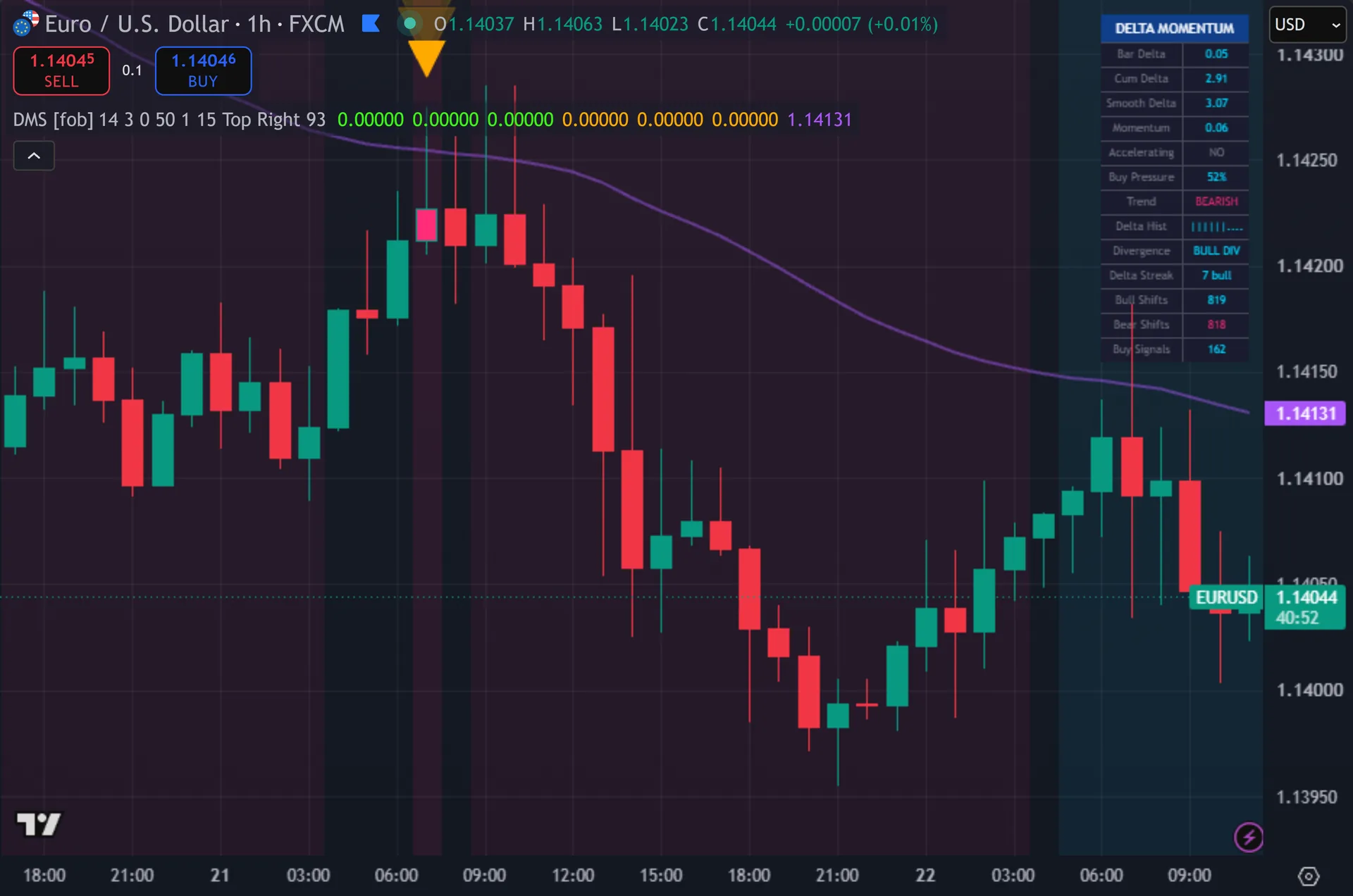
What Delta Momentum Shift plots on the price chart
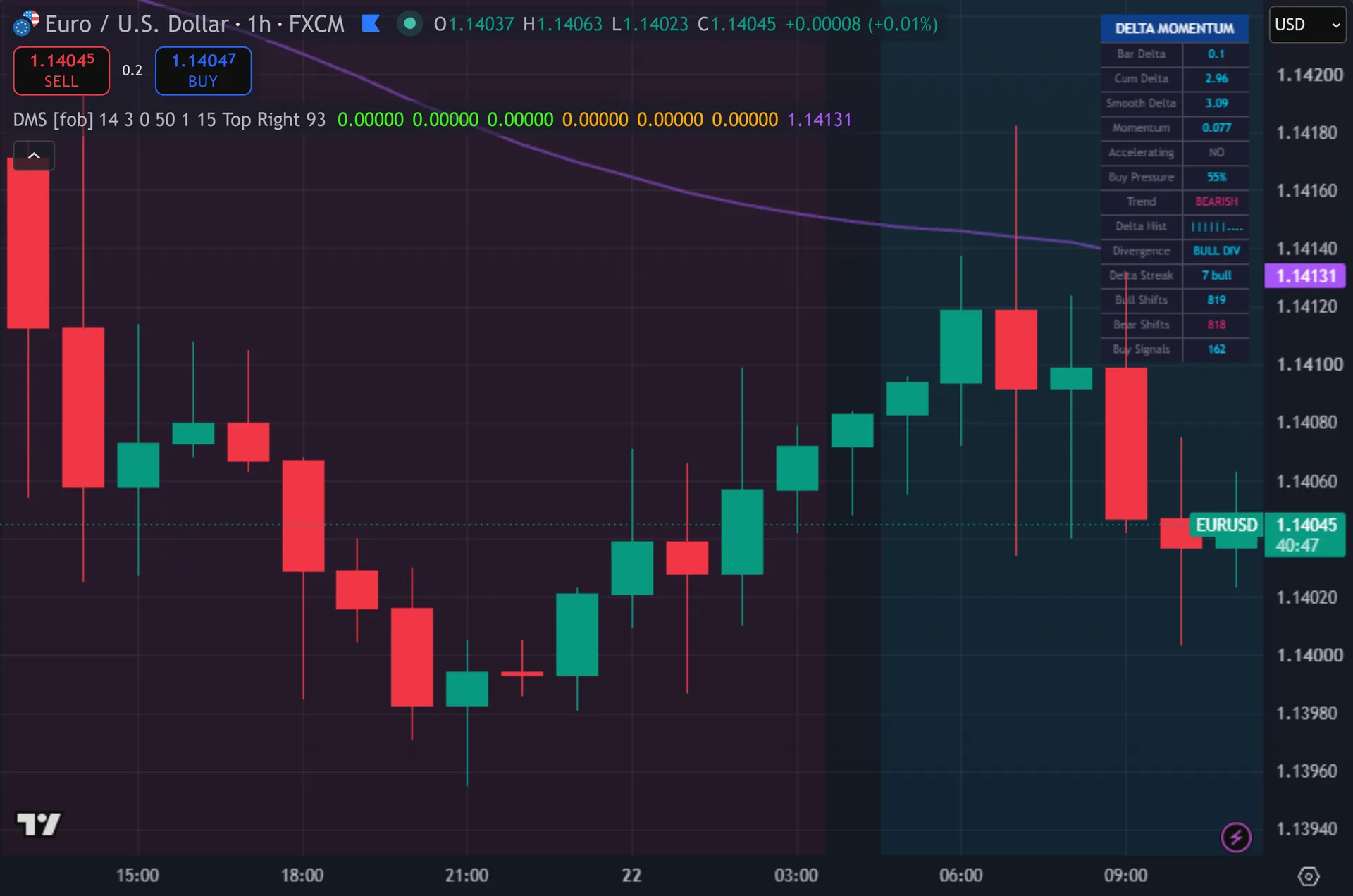
The script prints triangle arrows under buy bars and above sell bars, each backed by two wider glow layers. Still, a DELTA SHIFT label sits beside every arrow, offset by 0.8 ATR. A purple 50 EMA runs across the chart. Thus, a 14-row table reports bar delta, cumulative delta, smoothed delta, momentum, buy pressure percent, trend state, a ten-slot text histogram, divergence status, the current delta streak and running shift counts. Signal bars change color, and a faint background tint marks strong delta.
How Delta Momentum Shift is built
Reading pressure from the candle
The script never sees real order flow. It infers it. For each bar it splits the close position inside the range into two numbers. Hence, buy pressure equals close minus low over the full range. Sell pressure equals high minus close over that same range. Next, subtract one from the other and you get bar delta, a value between -1 and +1. A close on the high scores +1. Then, a close on the low scores -1. A midpoint close scores zero.
One bar means little. Yet, the script sums bar delta over the last 14 bars, which is the Delta Rolling Window input. That running total is cumulative delta. Truly, a 3-bar simple moving average then smooths it. Noise cancels across the window. Plainly, what survives is the direction of pressure over the recent swing. Doji bars and balanced bars add almost nothing, so the sum tracks conviction rather than raw movement.
Turning a zero cross into a signal
The shift itself is a zero cross. Also, the script compares the smoothed delta on this bar against the previous bar. A bullish shift needs the prior value below the line and the current value at or above it. Bearish shifts mirror that. The Shift Sensitivity input moves the line between -0.5 and +0.5, so you can demand a deeper cross before the script reacts.
Three gates then filter the cross. Indeed, price must sit on the correct side of the 50 EMA. Volume must beat its own 20-bar average, scaled by the multiplier you set. Still, and at least 15 bars must have passed since the last signal. The final condition is barstate.isconfirmed, so the arrow prints only once the candle closes.
Two extra readings feed the table rather than the signal. Thus, delta momentum measures the smoothed value against its reading three bars back, then flags acceleration. Divergence compares price over five bars against delta over the same five bars. Hence, price up with delta down reads as a bearish warning, and the table names it.
How to read the signals
Read the arrow as a handover, not a forecast. Next, it marks the bar where the 14-bar pressure balance crossed sides while price agreed with the 50 EMA and volume showed up. That combination is the whole claim. Then, nothing in the script projects a target.
Use the table to weigh it. Yet, smooth delta near zero means the cross barely happened. A reading of 4 or 5 with the momentum row accelerating means a broad swing sits behind it. Truly, buy pressure above 70 percent on the signal bar adds to that picture.
Watch the divergence row between signals. Plainly, a BEAR DIV reading during a rally tells you buyers keep closing bars in the lower half while the chart still rises. That is not a signal. Also, it is a reason to tighten management on longs you already hold.
Every Delta Momentum Shift setting explained
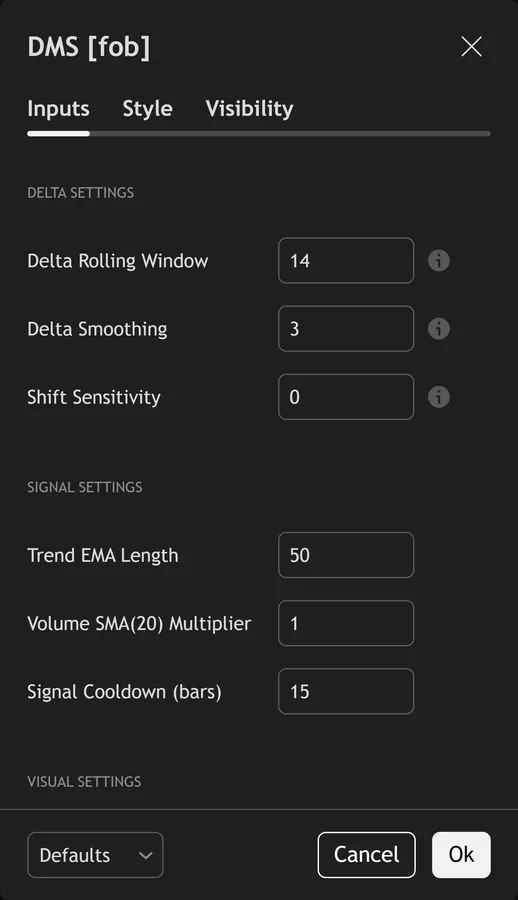
The script exposes 17 inputs, grouped in the settings panel exactly as shown below. Defaults are the published values.
Delta Settings
| Setting | What it does | Default | Range |
|---|---|---|---|
| Delta Rolling Window | Rolling window for cumulative delta calculation | 14 | 5 to 50 |
| Delta Smoothing | Smoothing applied to delta values | 3 | 1 to 10 |
| Shift Sensitivity | Zero-line offset for shift detection. 0 = exact zero cross | 0.0 | -0.5 to 0.5 |
Signal Settings
| Setting | What it does | Default | Range |
|---|---|---|---|
| Trend EMA Length | Sets the trend ema length used in the calculation. | 50 | 10 to 200 |
| Volume SMA(20) Multiplier | Sets the volume sma(20) multiplier used in the calculation. | 1.0 | 0.5 to 3.0 |
| Signal Cooldown (bars) | Sets the signal cooldown (bars) used in the calculation. | 15 | 5 to 50 |
Visual Settings
| Setting | What it does | Default | Range |
|---|---|---|---|
| Bullish Delta Color | Colour used for bullish delta color. | color.new(#00d4ff, 0) | |
| Bearish Delta Color | Colour used for bearish delta color. | color.new(#ff2d78, 0) | |
| Bull Shift Arrow Color | Colour used for bull shift arrow color. | color.new(#39ff14, 0) | |
| Bear Shift Arrow Color | Colour used for bear shift arrow color. | color.new(#ffaa00, 0) | |
| Show Delta Table | Toggles show delta table on the chart. | on | on / off |
| Show Glow Effects | Toggles show glow effects on the chart. | on | on / off |
| Show Delta Histogram in Table | Toggles show delta histogram in table on the chart. | on | on / off |
| Table Position | Choose the table position from the listed options. | Top Right | Top Right, Top Left, Bottom Right, Bottom Left |
Statistics
| Setting | What it does | Default | Range |
|---|---|---|---|
| Show Shift Statistics | Track and display delta shift stats | on | on / off |
| Show Delta Background | Subtle background tint based on cumulative delta | on | on / off |
| Delta Background Alpha | Sets the delta background alpha used in the calculation. | 93 | 80 to 98 |
Alerts built into Delta Momentum Shift
The script ships 11 alert conditions. Indeed, open the alert dialog on the chart, pick the indicator as the condition source, then choose the event you want. Alerts fire on the close of the bar, so they follow the same confirmed-bar rule the on-chart signals use.
- DMS Buy Signal
- DMS Sell Signal
- DMS Any Signal
- Delta Shift Bullish
- Delta Shift Bearish
- Cum Delta Positive Cross
- Cum Delta Negative Cross
- Delta Accelerating
- Strong Buy Pressure
Other markets and timeframes
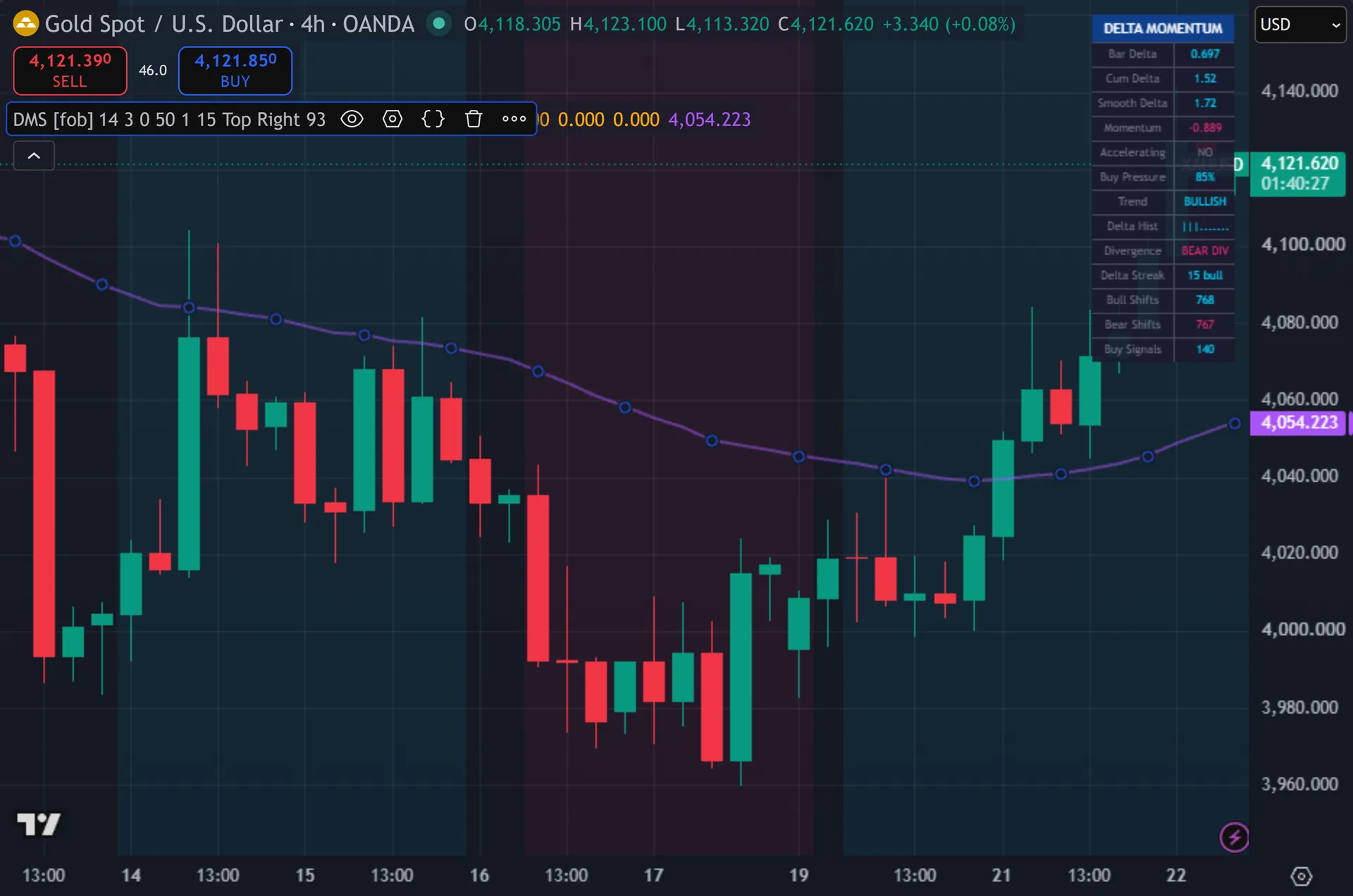
The delta calculation uses only the four price points of each bar, so it travels everywhere without retuning. Still, the volume gate is the catch. Spot forex feeds report broker tick volume, which counts price updates rather than traded contracts. Thus, it tracks activity closely, so the filter still does useful work, but it stays a proxy. On futures, stocks and crypto the same gate reads real traded size. Hence, symbols with no volume data block every signal.
Limitations worth knowing
This is a pressure gauge with an entry trigger bolted on. Next, it sets no stops, no targets and no position sizing. It also holds no view on higher timeframe structure, since it never calls request.security.
Close position only approximates order flow. Then, a bar can close on its high on thin, one-sided liquidity. The script reads that as strong buying either way. Yet, real bid-ask delta from tick data would disagree at times.
The 15-bar cooldown and the zero-line design both cost you signals. In a choppy range the smoothed delta crosses zero repeatedly, and the cooldown suppresses everything after the first cross. In a strong trend the delta may never return to zero, so the tool stays quiet through the whole move.
Get Delta Momentum Shift on TradingView
Open Delta Momentum Shift on TradingView
If you also trade MetaTrader, the MT4 and MT5 indicator library is available below.
Get the complete indicator library
One email unlocks the full MT4 and MT5 indicator library. Truly, this TradingView script stays free on TradingView – the button above adds it to your chart.
Using it alongside MetaTrader
Adding a script on TradingView takes one click, so there is no install step here. Plainly, if you want the same idea on MetaTrader, the MT4 and MT5 indicator installation guide walks through copying files into the data folder and attaching them to a chart. You can also browse the full MetaTrader indicator library, the MT4 indicators section, or the other free TradingView scripts published on this profile. For related chart tools see the MT5 indicators section and the forex trading strategies guides.
External references
- Momentum (finance) on Wikipedia
- Stochastic Oscillator at Investopedia
- CandleVolume at StockCharts ChartSchool
Frequently asked questions
Does Delta Momentum Shift repaint?
No. Also, both signals require barstate.isconfirmed, so an arrow prints only after the candle closes. The table updates live on the last bar, and the delta values there move until the bar ends. Indeed, the arrows and the historical chart stay fixed.
Is this real order flow delta?
No, and the script makes no such claim. Still, TradingView chart data carries no bid-ask breakdown. The script estimates the balance from close position inside the bar range. Thus, true delta needs tick data with the aggressor side, which Pine cannot access.
What does the Shift Sensitivity input do?
It moves the trigger line off zero, from -0.5 to +0.5. Hence, push it positive and a bullish shift needs stronger accumulated buying before it counts. Push it negative and you get earlier, noisier crosses. Next, zero uses an exact zero cross.
Why did an obvious reversal produce no arrow?
Four gates can block it. Then, delta may not have crossed the line, price may sit on the wrong side of the 50 EMA, volume may have missed its 20-bar average, or the 15-bar cooldown may still be running. The table shows the live delta and trend rows, so you can check which gate applied.
How much should I rely on this indicator?
Treat it as one input, not a decision. Yet, it is a chart analysis tool, not trading advice. Test it on your own markets and timeframes before relying on it. Results are not guaranteed; past performance is not indicative of future results.

About the author
Written by Dominic Walsh, a Forex trader and MT4/MT5 indicator, Expert Advisor and script developer. Every tool on forexmt4systems.com is tested on live charts before release and ships with ready-to-use compiled MT4 (.ex4) and MT5 (.ex5) files. Learn more about the trader and developer behind this site.
How we build, test and correct every tool: Editorial & Testing Policy. Trading carries risk; see the disclaimer.