
Gaps either close or they run. Also, gap Hunter Pro sorts the two. This gap fill indicator TradingView traders can drop on any chart flags every gap of at least 0.1 percent, boxes the empty space, tags it as breakaway, continuation or exhaustion, then follows it until price trades back through. Indeed, spot forex mostly gaps at the Sunday open, so the tool works hardest on indices, stocks and futures.
It is free and open source. Still, you can add it to any chart from the Gap Hunter Pro script page on TradingView, and the full Pine source is published there for you to read.
What Gap Hunter Pro plots on the price chart
Each new gap gets a coloured box spanning the empty space between the prior close and the open. Thus, a small label sits on the box edge with a direction arrow, a three-letter type code – BRK, CNT or EXH – and the gap size as a percentage. Filled boxes fade to grey. Hence, open boxes keep stretching to the right. Signal bars carry stacked triangles reading BUY or SELL, plus a larger label naming the setup and the volume ratio. The bar itself changes colour. A seven-row table tallies gaps, fills and trend.

How Gap Hunter Pro is built
Finding and classifying each gap
Detection is strict about size. Next, a gap up needs the open above the previous close, and that distance must reach the Minimum Gap Size percentage, 0.1 by default, measured against the previous close. A gap down mirrors it. Then, the box then spans from the previous close to the open, so it covers exactly the untraded space.
Classification reads three things at once. Yet, direction against a 50-period EMA gives trend context. Volume against its own 20-bar SMA gives participation. Truly, distance from that EMA against ATR over 14 bars gives extension, and the script calls price extended once it sits more than two ATR away.
The rules run in order. Plainly, a gap with the trend, volume above 1.5 times average and price not extended earns BRK for breakaway. A gap with the trend, volume under 0.8 times average and price extended earns EXH for exhaustion. Everything else becomes CNT. That includes every counter-trend gap, because both of the first two tests require trend agreement. Also, the script keeps 20 gaps at a time by default. When a twenty-first arrives, it deletes the oldest box and label.
Fills, runs and signal gates
On every bar the script walks its stored gaps. Indeed, an up gap counts as filled once the low reaches the bottom edge, which is the old close. A down gap fills once the high reaches the top edge. Still, filled boxes drop to a faded grey so the history stays readable, or vanish entirely if you switch the option off. Unfilled boxes keep extending five bars past the current candle.
The script also watches gaps that refuse to fill. Thus, once a gap has held more than 5 bars, with price closing beyond its far edge and volume above 1.2 times average, it raises a run event.
Four signals come out of that. Hence, a fill buy needs a fill this bar, volume above its 20-bar SMA, the 15-bar cooldown elapsed, and a green candle. A fill sell wants the same with a red candle. Next, the two gap-and-go signals need the run event plus a fresh gap detected on that same bar, which makes them uncommon by design rather than by accident. All four sit behind barstate.isconfirmed, so the triangles never flicker mid-candle.
How to read the signals
Start with the box, not the arrow. Then, an open box is unfinished business – a price band nobody traded. The label tells you what kind of gap created it. Yet, a BRK tag says the move left with volume behind it and room ahead. An EXH tag says the move gapped late, on thin volume, already stretched from the mean.
Fill signals and run signals answer opposite questions. Truly, a fill buy fires when price returns into the void and the candle closes up, which suits mean-reversion. A gap-and-go fires when the void holds and price keeps travelling. Plainly, decide which behaviour you trade before you use both.
Watch the volume figure printed on the signal label. Also, every signal already requires volume above its 20-bar average, so the number tells you by how much. A fill on 2.4 times average carries more weight than one scraping past at 1.1, and the table’s live volume ratio shows the same reading before the bar closes.

Every Gap Hunter Pro setting explained
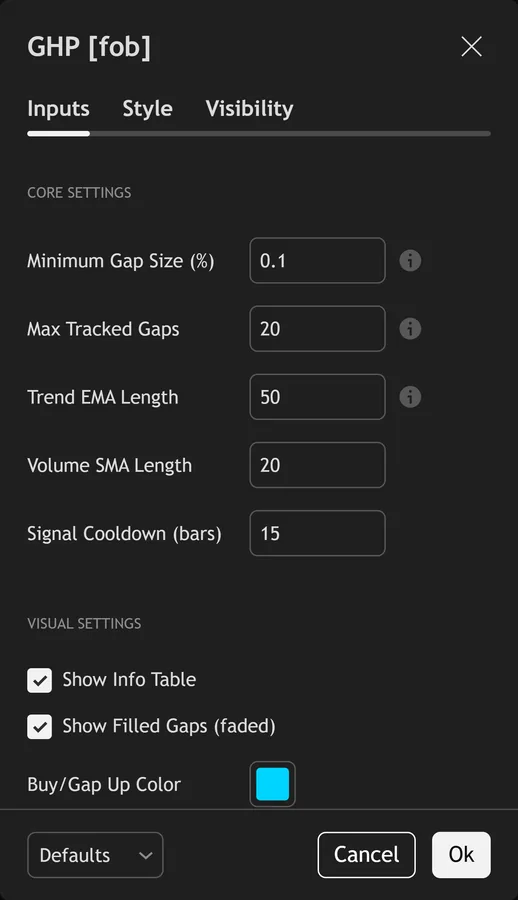
The script exposes 12 inputs, grouped in the settings panel exactly as shown below. Defaults are the published values.
Core Settings
| Setting | What it does | Default | Range |
|---|---|---|---|
| Minimum Gap Size (%) | Minimum gap as % of price to track | 0.1 | 0.01 to 2.0 |
| Max Tracked Gaps | Maximum number of gap zones to display | 20 | 5 to 50 |
| Trend EMA Length | EMA for gap classification trend context | 50 | 10 to 200 |
| Volume SMA Length | Sets the volume sma length used in the calculation. | 20 | 5 to 50 |
| Signal Cooldown (bars) | Sets the signal cooldown (bars) used in the calculation. | 15 | 5 to 50 |
Visual Settings
| Setting | What it does | Default | Range |
|---|---|---|---|
| Show Info Table | Toggles show info table on the chart. | on | on / off |
| Show Filled Gaps (faded) | Toggles show filled gaps (faded) on the chart. | on | on / off |
| Buy/Gap Up Color | Colour used for buy/gap up color. | #00d4ff | |
| Sell/Gap Down Color | Colour used for sell/gap down color. | #ff2d78 | |
| Breakaway Color | Colour used for breakaway color. | #39ff14 | |
| Continuation Color | Colour used for continuation color. | #a855f7 | |
| Exhaustion Color | Colour used for exhaustion color. | #ffaa00 |
Alerts built into Gap Hunter Pro
The script ships 11 alert conditions. Indeed, open the alert dialog on the chart, pick the indicator as the condition source, then choose the event you want. Alerts fire on the close of the bar, so they follow the same confirmed-bar rule the on-chart signals use.
- Bullish Gap Fill
- Bearish Gap Fill
- Bullish Gap & Go
- Bearish Gap & Go
- Gap Up Detected
- Gap Down Detected
- Any Gap Filled
- Any Signal
- Large Gap
Other markets and timeframes
The instrument matters more than the settings here. Still, minimum Gap Size is a percentage, so it scales across price levels on its own. But gaps need a closed session to form. Thus, cash equities and index futures gap most, so they suit the tool best. Spot forex only really gaps at the Sunday open, and crypto trades non-stop so it barely gaps at all. On very high-priced instruments, raise the 0.1 percent floor to stop routine open-to-close noise filling the chart with boxes.

Limitations worth knowing
This tracks and labels gaps. Hence, it is not a trading system, and the three-letter tag is a description of conditions at the gap, not a forecast. The classifier is also blunt in one place: every counter-trend gap lands in the continuation bucket, since the breakaway and exhaustion tests both demand trend agreement.
Volume gates every signal. Next, spot forex volume comes from broker tick counts rather than an exchange, so the ratio acts as a proxy and differs between brokers. On symbols with no volume feed at all, the filter blocks every signal, and only the boxes and labels still work.
Read the table as a tally, not a statistic. Then, it counts what happened on the loaded chart, and the fill-rate cell divides two integer counters so it rounds hard. The script also keeps just 20 gaps, so older boxes disappear even when they never filled, and the cooldown can suppress a genuine second setup that follows soon after the first.
Get Gap Hunter Pro on TradingView
Open Gap Hunter Pro on TradingView
If you also trade MetaTrader, the MT4 and MT5 indicator library is available below.
Get the complete indicator library
One email unlocks the full MT4 and MT5 indicator library. Yet, this TradingView script stays free on TradingView – the button above adds it to your chart.
Using it alongside MetaTrader
Adding a script on TradingView takes one click, so there is no install step here. Truly, if you want the same idea on MetaTrader, the MT4 and MT5 indicator installation guide walks through copying files into the data folder and attaching them to a chart. You can also browse the full MetaTrader indicator library, the MT4 indicators section, or the other free TradingView scripts published on this profile. For related chart tools see the MT5 indicators section and the forex trading strategies guides.
External references
- Candlestick pattern on Wikipedia
- Pivot Point at Investopedia
- Candlestick Charts at StockCharts ChartSchool
Frequently asked questions
Does Gap Hunter Pro repaint?
No. Plainly, all four signals gate on barstate.isconfirmed, so arrows and labels appear only after the bar closes. Gap boxes draw on the bar that creates the gap and never move afterwards, apart from their right edge, which trails the chart.
Why do I see so few gaps on forex?
Spot forex trades around the clock on weekdays, so consecutive bars rarely leave untraded space. Also, almost every forex gap you see is the Sunday or Monday open. Index CFDs, futures and cash equities gap far more often because they close overnight.
What counts as a filled gap?
For a gap up, the low must reach the bottom edge of the box, which is the previous close. For a gap down, the high must reach the top edge. Touching the edge is enough. Indeed, the box then fades to grey and stops being a candidate.
Why are gap-and-go signals so rare?
That signal requires two things on the same bar: an older gap that has held more than 5 bars while price runs away from it on above-average volume, and a fresh gap in the same direction right now. Both conditions rarely align.
How much should I rely on this indicator?
Treat it as one input, not a decision. Still, it is a chart analysis tool, not trading advice. Test it on your own markets and timeframes before relying on it. Results are not guaranteed; past performance is not indicative of future results.

About the author
Written by Dominic Walsh, a Forex trader and MT4/MT5 indicator, Expert Advisor and script developer. Every tool on forexmt4systems.com is tested on live charts before release and ships with ready-to-use compiled MT4 (.ex4) and MT5 (.ex5) files. Learn more about the trader and developer behind this site.
How we build, test and correct every tool: Editorial & Testing Policy. Trading carries risk; see the disclaimer.