
Stops cluster above equal highs and below equal lows. Also, price often runs those levels, then snaps back. Liquidity Sweep Detector is a free liquidity sweep indicator TradingView traders can drop on any chart. Indeed, it groups swing highs and lows that sit within 0.2 ATR of each other into pools, then marks the bar where price pierces a pool by at least 0.1 ATR and closes back inside.
It is free and open source. Still, you can add it to any chart from the Liquidity Sweep Detector script page on TradingView, and the full Pine source is published there for you to read.
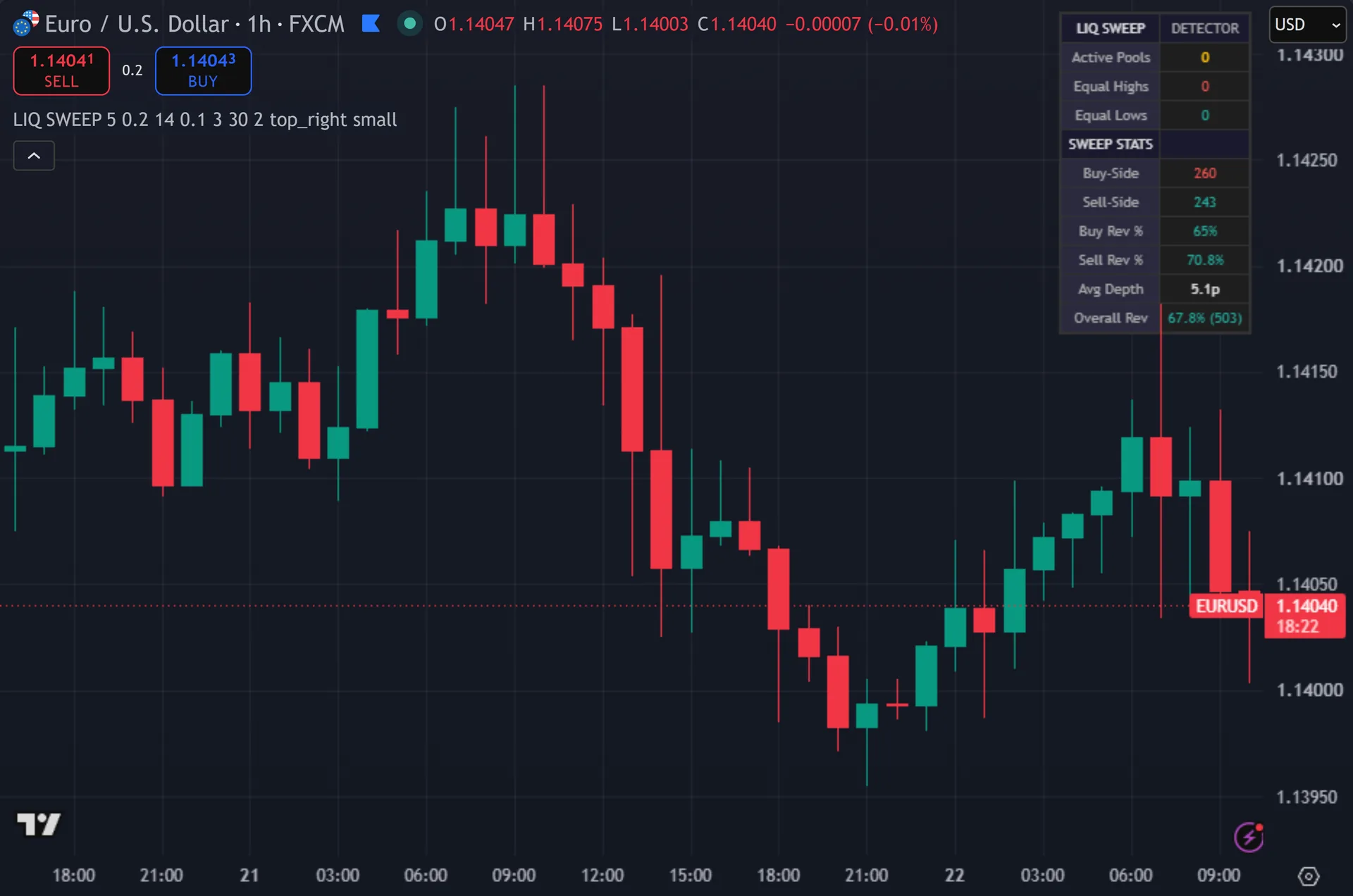
What Liquidity Sweep Detector plots on the price chart
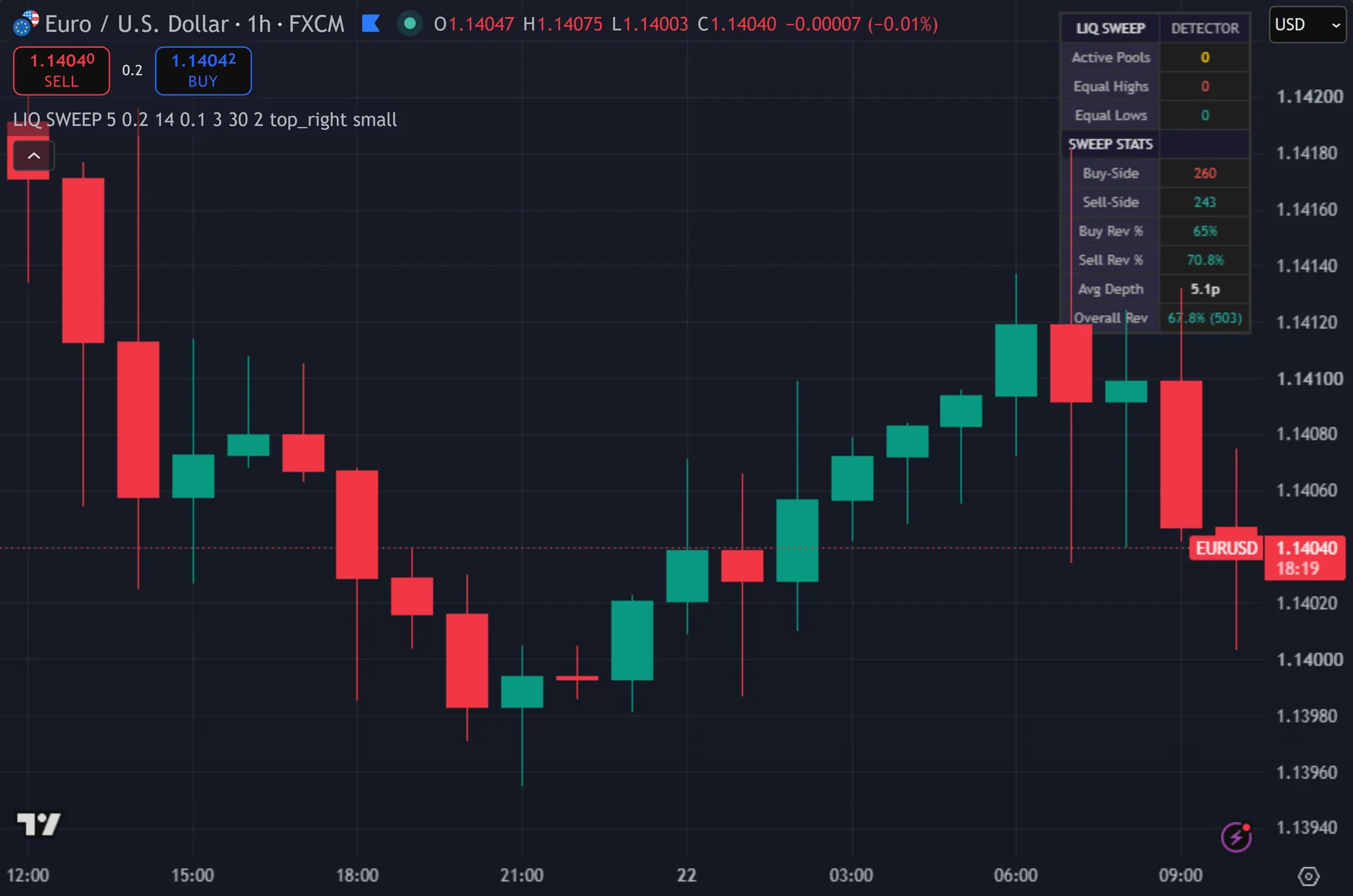
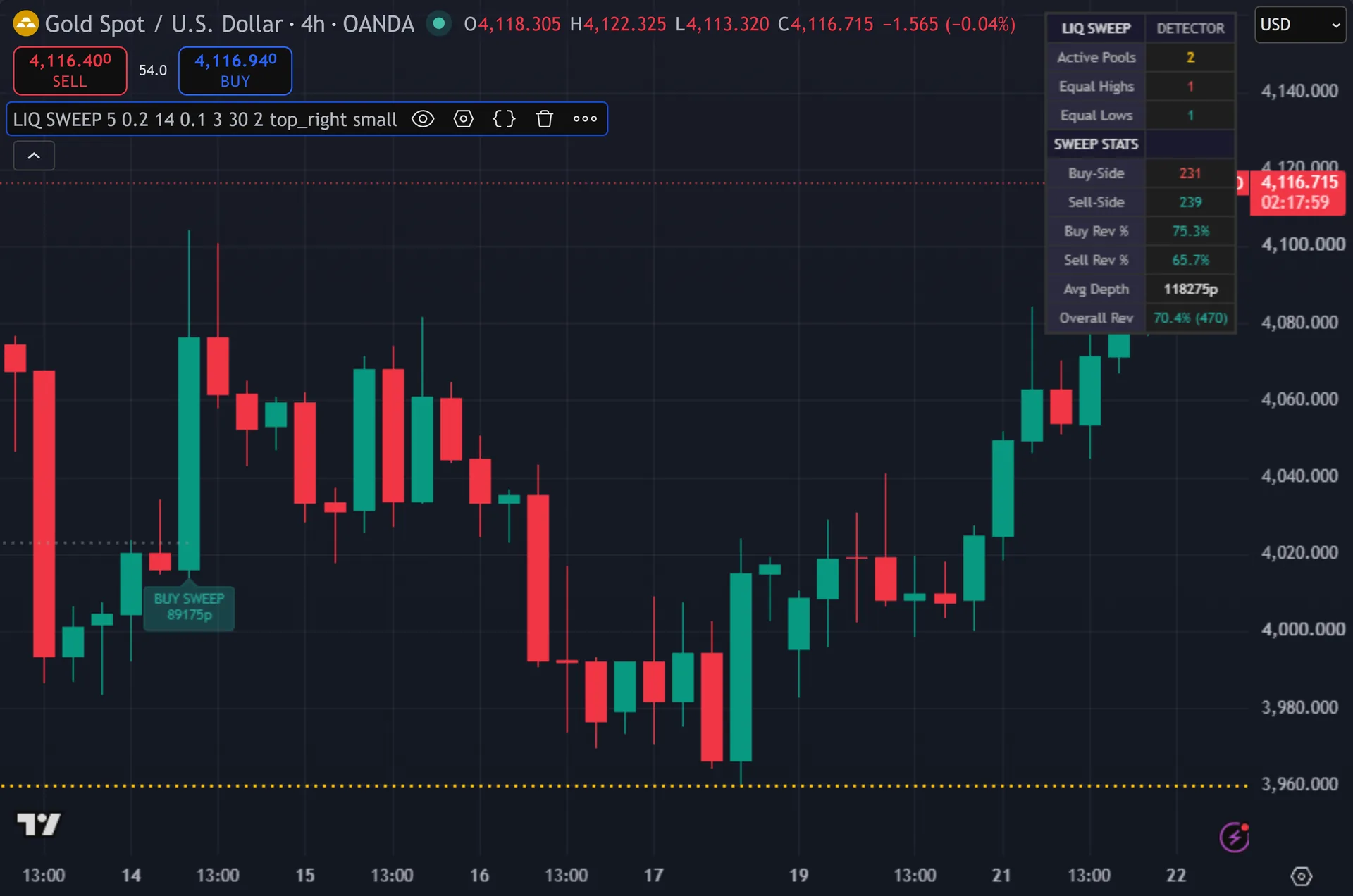
The script draws a dotted horizontal line at every swing level it tracks. Thus, a level brightens to amber and thickens once a second swing lands inside the tolerance band, which marks it as a live pool. When price sweeps a pool, the line turns grey and stops at that bar. Hence, a label prints on the sweep bar – SELL SWEEP above swept highs, BUY SWEEP below swept lows – with the sweep depth in pips underneath. A corner dashboard counts active pools, equal highs, equal lows, sweeps per side, reversal percentages and average depth.
How Liquidity Sweep Detector is built
How the pools form
Two pivot functions do the spotting. ta.pivothigh and ta.pivotlow both run with a length of 5, so a swing high needs five lower highs on each side before it counts. Next, a pivot therefore confirms five bars after it printed. The script only processes pivots on confirmed bars, so nothing shifts once a candle closes.
Then it decides whether the new swing joins an existing level. Then, it compares the new price against every unswept level of the same type. The tolerance is ATR times 0.2 by default, using a 14-period ATR. Yet, inside that band, the two merge: the touch count rises by one and the stored price becomes the running average of all touches. Outside it, the script opens a new level. Truly, a level needs two touches to become a pool, and only pools qualify for sweep detection.
How a sweep confirms
A sweep needs two things on the same bar. First, price must pierce the pool by at least 0.1 ATR – a wick that merely tags the level does not count. Second, the bar must close back on the correct side. Plainly, with Require Close Back Inside on, a buy-side sweep needs the close at or below the pool price, and a sell-side sweep needs the close at or above it.
The script then marks the level swept, stores the depth, and prints the label. Also, it converts depth to pips through the symbol tick size. Five-digit forex divides by 0.0001, JPY pairs and gold divide by 0.01, and symbols with a whole-number tick divide by 1.
Housekeeping keeps the chart light. Indeed, the script tracks 30 levels by default and drops the oldest when the list overflows. It also deletes swept levels once they sit more than 500 bars back. Still, every one of these blocks runs under barstate.isconfirmed, so the drawings you see on history match what the script produced live.
How to read the signals
Read the label direction, not just the word on the arrow. Thus, a SELL SWEEP prints above equal highs. Price grabbed the stops resting there and rejected, so the bearish case starts at that bar. Hence, a BUY SWEEP prints below equal lows and reads the other way.
Depth tells you how hard the run was. Next, a 4-pip poke through a pool differs from a 30-pip drive. The dashboard’s Avg Depth gives you a baseline for that symbol and timeframe, so you can judge whether the current sweep ran deep or shallow.
The reversal rows measure one thing only: whether the sweep bar closed against the previous bar’s close. Then, they give a rough read on how the symbol has behaved lately. They say nothing about follow-through over the next ten bars, and they carry no view on where you would exit.
Every Liquidity Sweep Detector setting explained
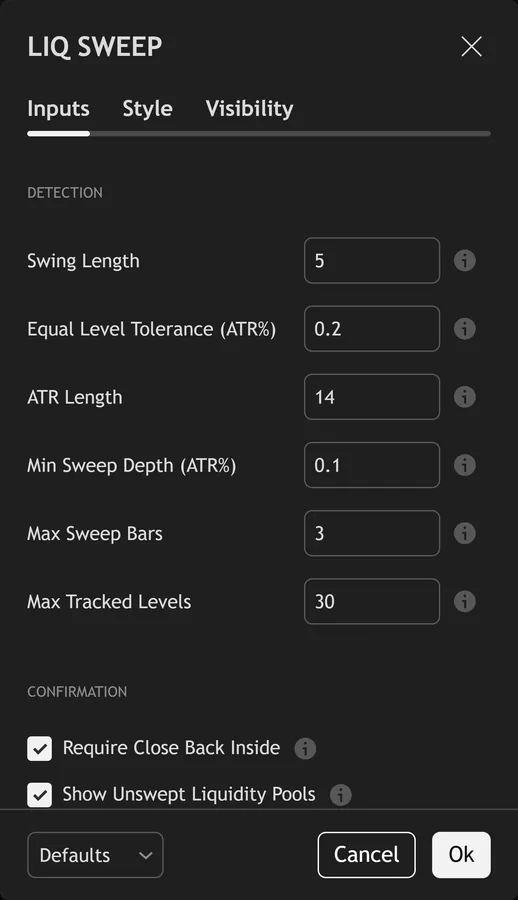
The script exposes 19 inputs, grouped in the settings panel exactly as shown below. Defaults are the published values.
Detection
| Setting | What it does | Default | Range |
|---|---|---|---|
| Swing Length | Pivot lookback/forward for swing high/low detection | 5 | 2 to 20 |
| Equal Level Tolerance (ATR%) | How close two highs/lows must be to count as ‘equal’ (as % of ATR) | 0.2 | 0.01 to 2.0 |
| ATR Length | ATR period for tolerance and sweep depth calculations | 14 | 5 to 50 |
| Min Sweep Depth (ATR%) | Minimum distance price must exceed the level to count as a sweep | 0.1 | 0.01 to 1.0 |
| Max Sweep Bars | Sweep must reverse within this many bars | 3 | 1 to 10 |
| Max Tracked Levels | Maximum number of liquidity levels tracked | 30 | 5 to 100 |
Confirmation
| Setting | What it does | Default | Range |
|---|---|---|---|
| Require Close Back Inside | Price must close back inside the level after sweeping for confirmation | on | on / off |
| Show Unswept Liquidity Pools | Show equal high/low levels that haven’t been swept yet | on | on / off |
| Min Touches for Pool | Minimum swing touches at similar level to form a liquidity pool | 2 | 2 to 5 |
Display
| Setting | What it does | Default | Range |
|---|---|---|---|
| Show Buy-Side Sweeps | Sweeps above equal highs | on | on / off |
| Show Sell-Side Sweeps | Sweeps below equal lows | on | on / off |
| Show Sweep Depth | Display how far past the level price swept | on | on / off |
| Show Dashboard | Toggles show dashboard on the chart. | on | on / off |
| Dashboard Position | Choose the dashboard position from the listed options. | top_right | top_left, top_center, top_right, bottom_left, bottom_center, bottom_right |
| Text Size | Choose the text size from the listed options. | small | tiny, small, normal |
Colors
| Setting | What it does | Default | Range |
|---|---|---|---|
| Buy-Side Sweep | Sweep above highs (bearish signal) | #EF5350 | |
| Sell-Side Sweep | Sweep below lows (bullish signal) | #26A69A | |
| Liquidity Pool | Unswept equal highs/lows | #FFC107 | |
| Swept Pool | Pool after it has been swept | color.new(#9E9E9E, 60) |
Alerts built into Liquidity Sweep Detector
The script ships 4 alert conditions. Yet, open the alert dialog on the chart, pick the indicator as the condition source, then choose the event you want. Alerts fire on the close of the bar, so they follow the same confirmed-bar rule the on-chart signals use.
- Buy-Side Liquidity Sweep
- Sell-Side Liquidity Sweep
- New Liquidity Pool Formed
- Any Liquidity Sweep
Other markets and timeframes
Every threshold scales with ATR rather than a fixed distance. Truly, the equal-level tolerance sits at 0.2 ATR and the minimum sweep depth at 0.1 ATR, so the same defaults behave the same way on EURUSD, gold, an index or a crypto pair. Only the pip display adapts to the instrument, through the symbol tick size. Plainly, faster charts produce more pools, so lower Max Tracked Levels on an M5 chart if the drawing gets busy.
Limitations worth knowing
The pivot length of 5 sets a hard delay. Also, a swing high only registers five bars after it formed, so a level appears on your chart later than your eye saw it. The script times the sweep off the close of the sweep bar, which is honest, but you still never get a level before its first touch.
Sweep and close-back must land on the same bar. Indeed, a run that pierces a pool on one candle and reclaims on the next does not register here, even though many traders would call that a sweep. Turning off Require Close Back Inside widens the net, at the cost of many more marks.
This is a structure map, not a trade plan. Still, it sets no stop, no target and no direction filter, and it never reads the higher timeframe. The reversal counters describe the sweep bar itself, so treat them as description rather than forecast.
Get Liquidity Sweep Detector on TradingView
Open Liquidity Sweep Detector on TradingView
If you also trade MetaTrader, the MT4 and MT5 indicator library is available below.
Get the complete indicator library
One email unlocks the full MT4 and MT5 indicator library. Thus, this TradingView script stays free on TradingView – the button above adds it to your chart.
Using it alongside MetaTrader
Adding a script on TradingView takes one click, so there is no install step here. Hence, if you want the same idea on MetaTrader, the MT4 and MT5 indicator installation guide walks through copying files into the data folder and attaching them to a chart. You can also browse the full MetaTrader indicator library, the MT4 indicators section, or the other free TradingView scripts published on this profile. For related chart tools see the MT5 indicators section and the forex trading strategies guides.
External references
- Flight-to-liquidity on Wikipedia
- Liquidity at Investopedia
- Support and Resistance at StockCharts ChartSchool
Frequently asked questions
Does the Liquidity Sweep Detector repaint?
No. Next, the level-building and sweep blocks both run inside a barstate.isconfirmed gate, so the script acts on closed bars only. One nuance sits apart from repainting: pivots need five bars on each side, so a new level appears five bars after the swing that created it.
What counts as a liquidity pool here?
Two or more swing points of the same type sitting within 0.2 ATR of each other. Then, the script averages their prices into one line and raises the touch count. Single-touch swings stay on the chart as faint dotted lines, and the sweep logic ignores them.
Why did an obvious stop run get no label?
Check three things. Yet, the level may have held only one touch. The wick may have pierced by less than 0.1 ATR. Truly, or the bar may have closed outside the level, which fails the close-back rule. The dashboard’s Active Pools count shows what the script was tracking at the time.
Can I run it on lower timeframes?
Yes, since every threshold scales with ATR. Plainly, an M5 chart simply generates pools faster than an H4 chart. Raise Swing Length or lower Max Tracked Levels if the chart fills with lines.
How much should I rely on this indicator?
Treat it as one input, not a decision. Also, it is a chart analysis tool, not trading advice. Test it on your own markets and timeframes before relying on it. Results are not guaranteed; past performance is not indicative of future results.

About the author
Written by Dominic Walsh, a Forex trader and MT4/MT5 indicator, Expert Advisor and script developer. Every tool on forexmt4systems.com is tested on live charts before release and ships with ready-to-use compiled MT4 (.ex4) and MT5 (.ex5) files. Learn more about the trader and developer behind this site.
How we build, test and correct every tool: Editorial & Testing Policy. Trading carries risk; see the disclaimer.