
Stops sit just past the last swing. Also, price reaches for them, then turns. Liquidity Sweep Reversal is a stop hunt indicator TradingView traders can use to mark that exact bar. Indeed, it waits for a wick to pierce a confirmed swing extreme by at least 0.20 ATR, checks that the bar closes back inside the level, then arms a reversal bias and times entry on a 9-period EMA reclaim.
It is free and open source. Still, you can add it to any chart from the Liquidity Sweep Reversal script page on TradingView, and the full Pine source is published there for you to read.
What Liquidity Sweep Reversal plots on the price chart
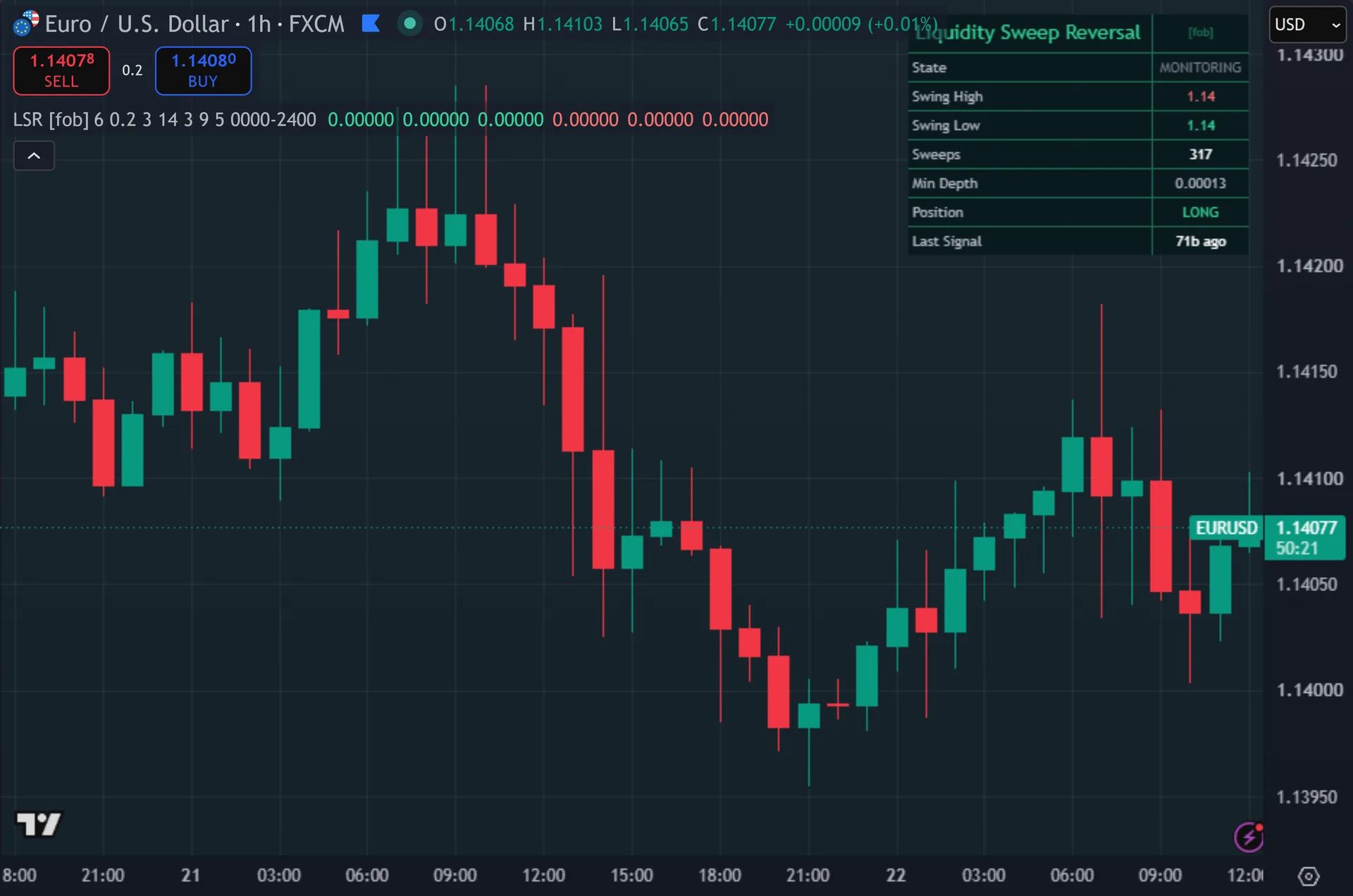
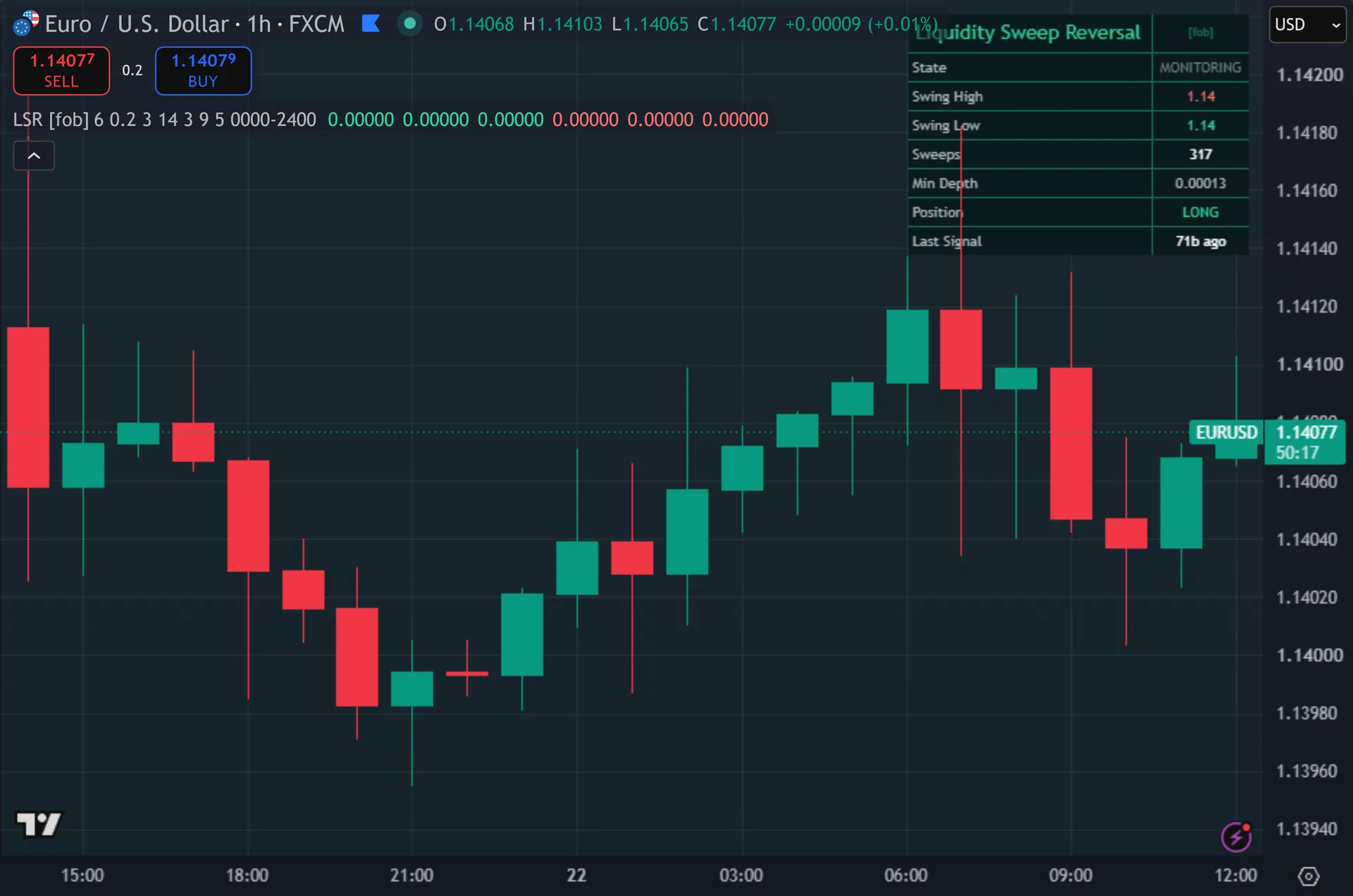
A dashed line marks the swept level and extends 10 bars to the right, green for a swept low and red for a swept high. Thus, only the most recent swept level stays on screen. The script recolours sweep bars, and while a bias is active the background carries a faint directional tint. Hence, entries print as X crosses below or above the bar, drawn in three stacked sizes and labelled LSR. An eight-row dashboard reports state, the live swing high and low, a sweep counter, the minimum depth in price and position.
How Liquidity Sweep Reversal is built
Finding the liquidity, then the sweep
The script tracks structure with pivot highs and pivot lows, both set to 6 bars each side. Next, a pivot needs 6 bars to its right before it confirms. So the swing level the script defends is always at least 6 bars old. Then, that is the honest cost of confirmed structure – no repainted swing, but a late one. The script stores the newest confirmed high and low, then holds them until a fresh pivot replaces them.
A sweep needs four things on one bar. Yet, the low must trade below the stored swing low by more than 0.20 ATR, measured with a 14-period ATR. It must not trade more than 3.0 ATR below, which separates a real break from a stop run. Truly, the close must come back above that swing low. And with Require Reversal Body on by default, the bar must close above its open. Plainly, the bearish case mirrors all four against the swing high.
One input does not do what its name suggests. Also, reclaim Within Bars, default 3, never reaches the sweep test in the code. The script demands the wick and the reclaim close on the same bar. Indeed, so changing that number has no effect on the signals you see.
Bias, then the EMA reclaim
A sweep sets a persistent bias. Still, a swept low sets the bias long, a swept high sets it short. The bias holds until the opposite side gets swept. Thus, it carries no timer, so it can stay armed across a long stretch of bars.
Default mode does not fire on the sweep bar. Hence, with Sweep-Only Mode off, the script waits for close to cross the 9-period EMA in the bias direction. A long bias plus a close crossing above the EMA gives a buy. Next, a short bias plus a close crossing below gives a sell. Switch Sweep-Only Mode on and the signal moves back onto the sweep bar itself, which yields far fewer marks.
Two gates finish the job. Then, signals must alternate, so no second buy prints before a sell. At least 5 bars must pass since the last signal. Yet, every signal checks barstate.isconfirmed, so an X appears only after the bar closes. The optional session filter stays off by default and reads 0000-2400.
How to read the signals
Treat the dashed line as the liquidity price just took. Truly, the dashboard State row spells out the current condition: sweep low and bullish, sweep high and bearish, or simply monitoring. A tinted background means the script armed a bias and now hunts the EMA reclaim.
Depth tells you a lot. Plainly, the Min Depth row shows what 0.20 ATR equals in price right now. A wick that barely clears it is a marginal sweep. Also, a wick pushing toward the 3.0 ATR ceiling nearly failed the filter as a genuine break, so read those two extremes differently.
The X can print several bars after the wick, because the default entry waits for the EMA cross. Indeed, judge the sweep and the entry as two separate events. Signals also need a closed bar, so your fill sits at the next open, and stops should allow for that bar’s range.
Every Liquidity Sweep Reversal setting explained
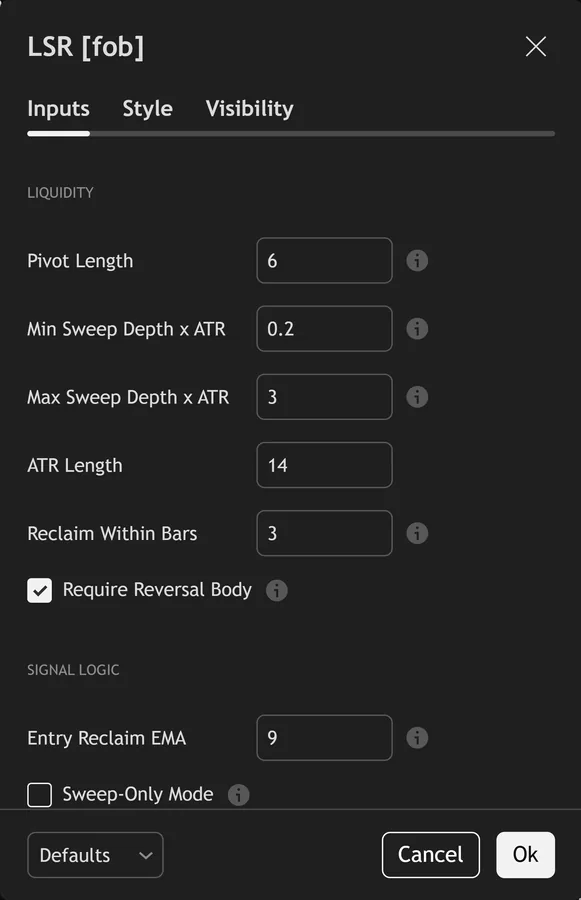
The script exposes 17 inputs, grouped in the settings panel exactly as shown below. Defaults are the published values.
Liquidity
| Setting | What it does | Default | Range |
|---|---|---|---|
| Pivot Length | Bars each side to confirm the swing whose liquidity gets swept. | 6 | 2 to 30 |
| Min Sweep Depth x ATR | Wick must pierce the swing by at least k x ATR. | 0.20 | 0.0 to 3.0 |
| Max Sweep Depth x ATR | Reject runaway breaks (not a sweep, a real break). | 3.0 | 0.5 to 10.0 |
| ATR Length | Sets the atr length used in the calculation. | 14 | 5 to 50 |
| Reclaim Within Bars | Close must reclaim the level within this many bars of the wick. | 3 | 1 to 10 |
| Require Reversal Body | Confirmation bar must close in the reversal direction. | on | on / off |
Signal Logic
| Setting | What it does | Default | Range |
|---|---|---|---|
| Entry Reclaim EMA | After a sweep arms a reversal bias, a close-cross of this EMA in that direction times the entry. | 9 | 2 to 50 |
| Sweep-Only Mode | On = fire strictly on the sweep+reclaim bar (rarer, classic). Off = EMA reclaim inside the active sweep bias (more signals). | off | on / off |
| Cooldown Bars | Sets the cooldown bars used in the calculation. | 5 | 1 to 40 |
Filters
| Setting | What it does | Default | Range |
|---|---|---|---|
| Restrict to Session | Toggles restrict to session on the chart. | off | on / off |
| Session Window | Controls session window. | 0000-2400 |
Visual
| Setting | What it does | Default | Range |
|---|---|---|---|
| Show Swept Levels | Toggles show swept levels on the chart. | on | on / off |
| Show Dashboard | Toggles show dashboard on the chart. | on | on / off |
| Show 3-Layer Glow | Toggles show 3-layer glow on the chart. | on | on / off |
| Buy Color | Colour used for buy color. | #34d399 | |
| Sell Color | Colour used for sell color. | #f87171 | |
| Dashboard BG | Colour used for dashboard bg. | color.new(#06181a, 16) |
Alerts built into Liquidity Sweep Reversal
The script ships 15 alert conditions. Still, open the alert dialog on the chart, pick the indicator as the condition source, then choose the event you want. Alerts fire on the close of the bar, so they follow the same confirmed-bar rule the on-chart signals use.
- LSR Buy
- LSR Sell
- LSR Any Signal
- LSR Low Swept
- LSR High Swept
- LSR New Swing High
- LSR New Swing Low
- LSR Low Pierce
- LSR High Pierce
- LSR Any Sweep
- LSR Sweep Tick
- LSR Strong Bull
Other markets and timeframes
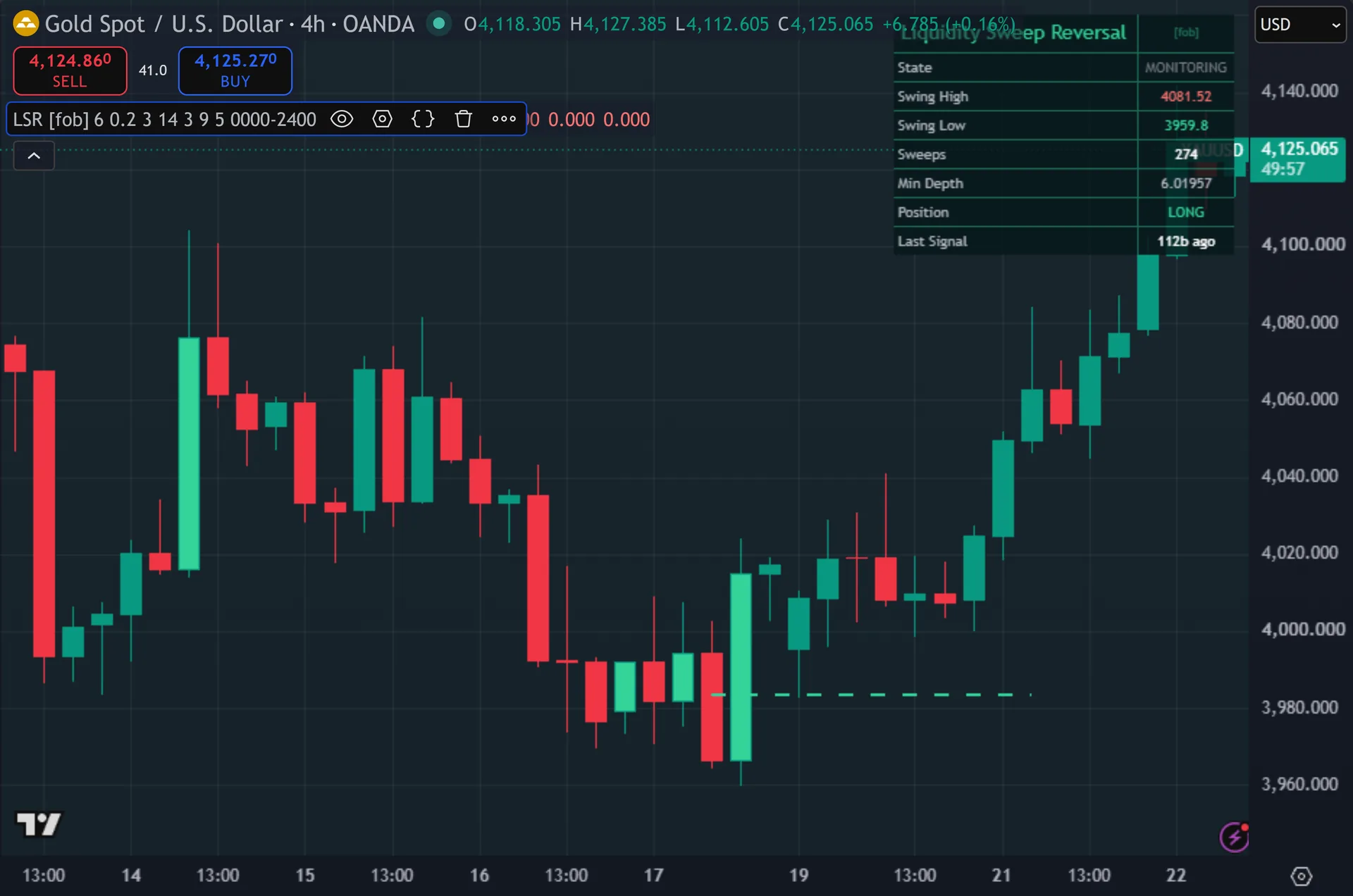
Every threshold scales with ATR rather than pips, so the defaults travel between markets without retuning. Thus, indices, gold, crypto and stocks all build swing highs and lows the same way. Volume never enters the calculation, which removes the usual spot-forex problem. Hence, the one input worth revisiting is Pivot Length. Six bars each side suits H1 and H4 charts. On very fast intraday data, raise it so the script defends real structure rather than noise.
Limitations worth knowing
This marks where price took resting liquidity. Next, it is not a trading system. It sets no stop, no target and no position size, and it does not grade one sweep against another. Then, a sweep at a major daily level and a sweep of a minor 6-bar pivot print the same X.
Pivot confirmation costs 6 bars. Yet, a sweep of the very latest extreme goes unmarked until that pivot confirms, and any intraday high that never became a pivot stays invisible to the script. Reclaim Within Bars also sits unused, since the code requires the pierce and the reclaim on one bar.
The bias never expires. Truly, it holds until the opposite side sweeps, so an EMA cross far later still counts as a sweep entry. The script deletes the dashed level line each time a new sweep occurs, so past levels leave no history. Plainly, bar colouring and the bias tint update live and can vanish before the close, unlike the X crosses.
Get Liquidity Sweep Reversal on TradingView
Open Liquidity Sweep Reversal on TradingView
If you also trade MetaTrader, the MT4 and MT5 indicator library is available below.
Get the complete indicator library
One email unlocks the full MT4 and MT5 indicator library. Also, this TradingView script stays free on TradingView – the button above adds it to your chart.
Using it alongside MetaTrader
Adding a script on TradingView takes one click, so there is no install step here. Indeed, if you want the same idea on MetaTrader, the MT4 and MT5 indicator installation guide walks through copying files into the data folder and attaching them to a chart. You can also browse the full MetaTrader indicator library, the MT4 indicators section, or the other free TradingView scripts published on this profile. For related chart tools see the MT5 indicators section and the forex trading strategies guides.
External references
- Price action trading on Wikipedia
- ADX at Investopedia
- Support and Resistance at StockCharts ChartSchool
Frequently asked questions
Does the Liquidity Sweep Reversal repaint?
The X crosses do not. Still, each one checks barstate.isconfirmed and prints after the bar closes. The pivots confirm too, which is why they lag 6 bars by design. Thus, the sweep bar colouring and the background bias tint do follow the live bar and can change before the close.
What separates a sweep from a real break?
Depth and the close. Hence, the wick must pierce the swing by more than 0.20 ATR but less than 3.0 ATR, and the bar must close back inside the level. A candle that runs 4 ATR past the swing, or one that closes beyond it, fails the test as a break rather than a stop run.
Why did the X appear several bars after the wick?
Default mode arms a bias on the sweep, then waits for close to cross the 9-period EMA in that direction. Next, turn on Sweep-Only Mode to fire on the sweep bar itself. That gives the classic, rarer signal at the cost of far fewer marks.
Does changing Reclaim Within Bars do anything?
No. Then, the input exists in the settings panel but the sweep test never reads it. The code requires the pierce and the reclaiming close on the same bar, so the reclaim window is effectively fixed at one bar.
How much should I rely on this indicator?
Treat it as one input, not a decision. Yet, it is a chart analysis tool, not trading advice. Test it on your own markets and timeframes before relying on it. Results are not guaranteed; past performance is not indicative of future results.

About the author
Written by Dominic Walsh, a Forex trader and MT4/MT5 indicator, Expert Advisor and script developer. Every tool on forexmt4systems.com is tested on live charts before release and ships with ready-to-use compiled MT4 (.ex4) and MT5 (.ex5) files. Learn more about the trader and developer behind this site.
How we build, test and correct every tool: Editorial & Testing Policy. Trading carries risk; see the disclaimer.