
Most breakout tools draw a flat line, wait for a cross, and fire. No trend check. No volume test. Also, you enter every fake break and get stopped in the chop. Apex Break PRO is a non repaint breakout indicator TradingView traders use to fix that. Indeed, it draws sloped pivot trendlines that follow the market bias, then scores each break through four independent filters before a signal ever prints on your chart.
What Apex Break PRO shows on your chart
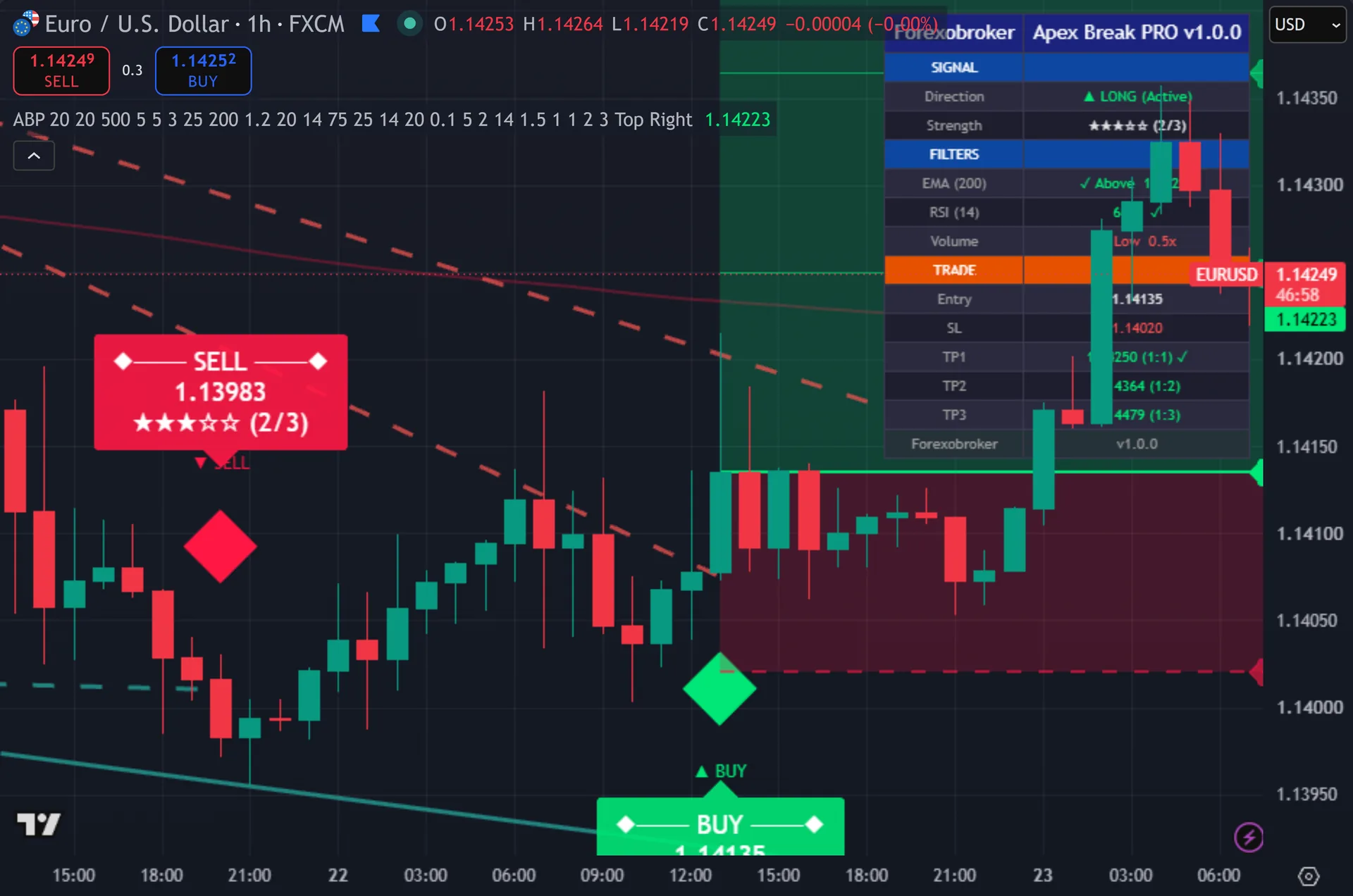
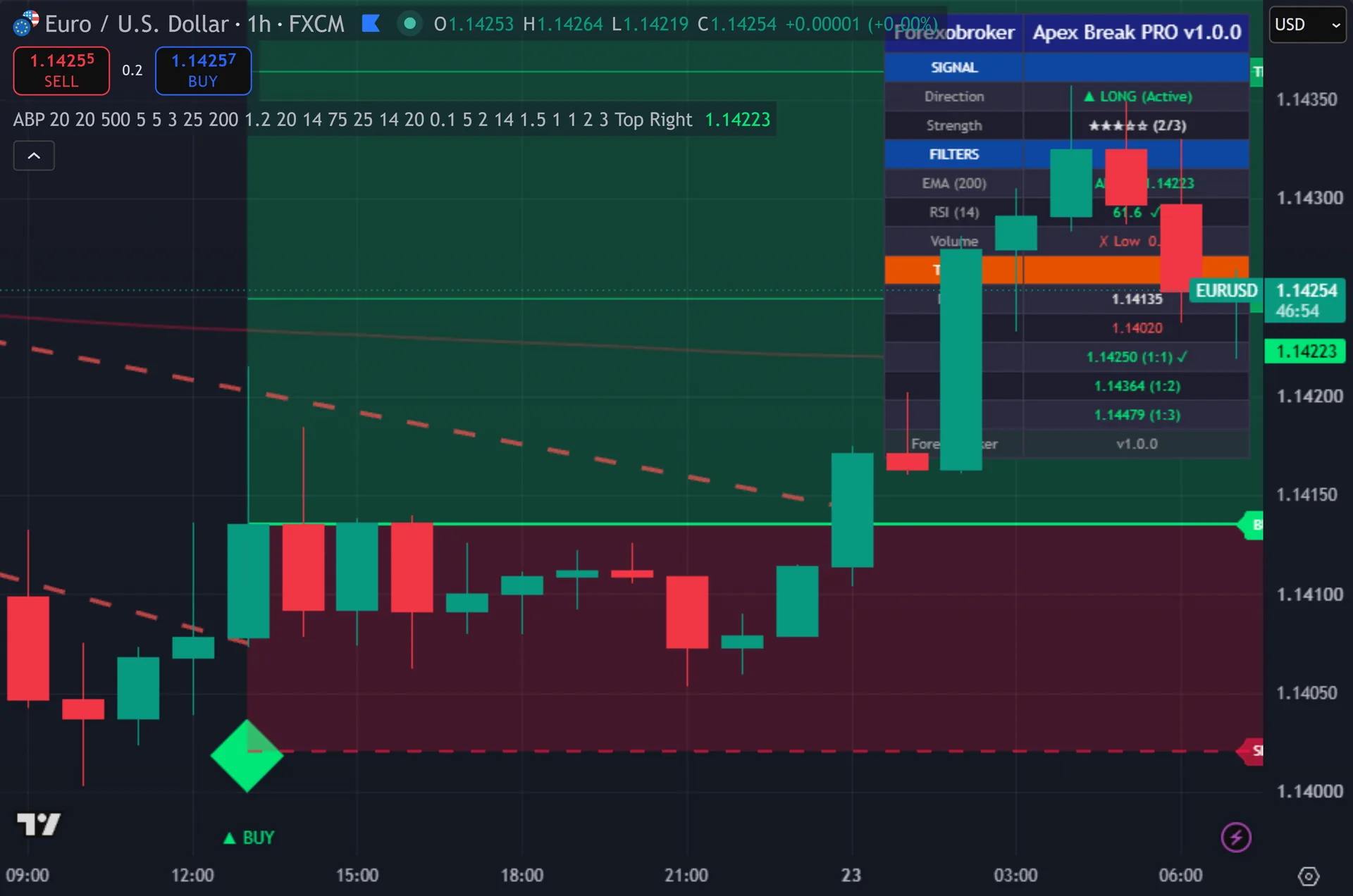
You get sloped support and resistance lines built from consecutive pivot highs and lows, not static levels. Still, when price clears one on a closed bar, a diamond signal prints and stays put. Each signal carries a star rating, so you see how many filters agreed. Thus, below it, an ATR stop and three take-profits at 1:1, 1:2 and 1:3 draw as color-coded zones. A live dashboard shows signal direction, each filter pass or fail with current values, your entry, and hit-tracking checkmarks.
Why Apex Break PRO is different
Four filters decide, not one line
A raw breakout means nothing on its own. Hence, apex Break PRO checks four things before it trusts one. Price must sit on the right side of the 200 EMA. RSI must confirm the push. Volume must spike to at least 1.2 times its average. Next, ADX must show real trend strength. Only breaks that clear these gates print a signal.
The star rating turns that into one glance. Then, a four-star break passed every filter. A weaker one shows fewer stars, so you can size down or skip it. Yet, you stop treating every cross the same. You trade the ones with weight behind them and leave the noise alone.
Risk drawn on the chart before you enter
Every signal arrives with a plan. Truly, apex Break PRO places an ATR-based stop and three take-profits at 1:1, 1:2 and 1:3 risk-reward, drawn as color-coded zones. You see your risk and reward before you click, not after. Plainly, the math is done for you on every instrument, from gold to EURUSD.
The signals confirm on the bar close, so they do not repaint. Also, that is the tool documented design. Once a diamond prints on a closed bar, it does not move, vanish, or change on reload. Indeed, the nine-alert package pushes buy, sell, each break, every take-profit and the stop to your phone as webhook JSON, ready for a bot.
How to trade it
Wait for a diamond on a closed bar. Check its star count first. A high rating means all four filters agreed, so the break carries more conviction than a bare cross. Still, a low rating is your cue to stand aside or trade smaller.
Read the break against structure. Thus, a signal that fires where a sloped trendline meets a fresh pivot, on a real volume spike, is exactly what the scoring aims to surface. The same arrow mid-range tells you less.
Use the levels already on your chart. Hence, the ATR stop caps your risk. The three targets let you scale out at 1:1, 1:2 and 1:3. Next, move the stop to breakeven after TP1 if you want to hold for the larger targets. Let the dashboard hit-tracking confirm each fill.
Settings you control
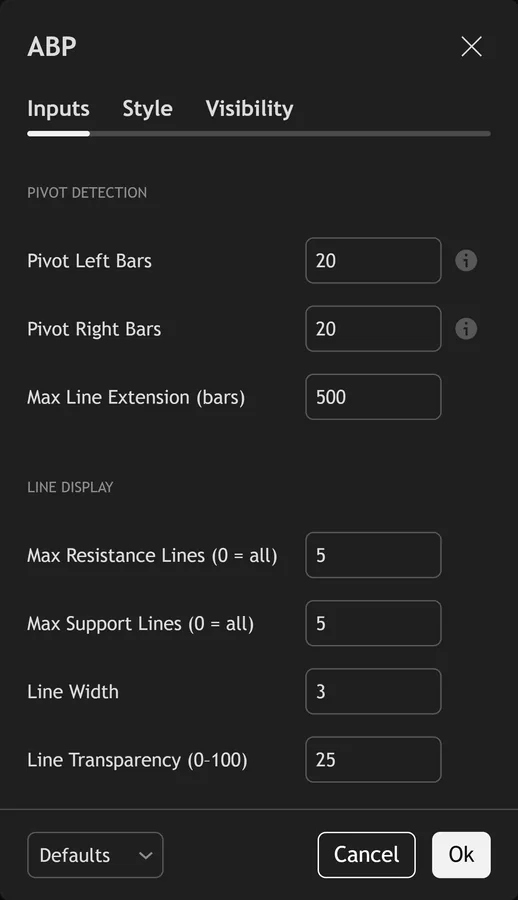
Apex Break PRO exposes its full input panel on the TradingView settings dialog. Then, the screenshot below shows the groups you can tune – signal sensitivity, the confluence filters, the dashboard and the trade levels. Defaults are set for a balanced starting point, and every input carries an on-hover tooltip.
Alerts and automation
Apex Break PRO ships 9 alert conditions with a webhook-ready payload. Yet, wire them to your phone, to email, or to a Telegram, Discord or automation endpoint, and the tool tells you the moment a signal confirms on the bar close – you do not have to watch the chart.
Any market, any timeframe
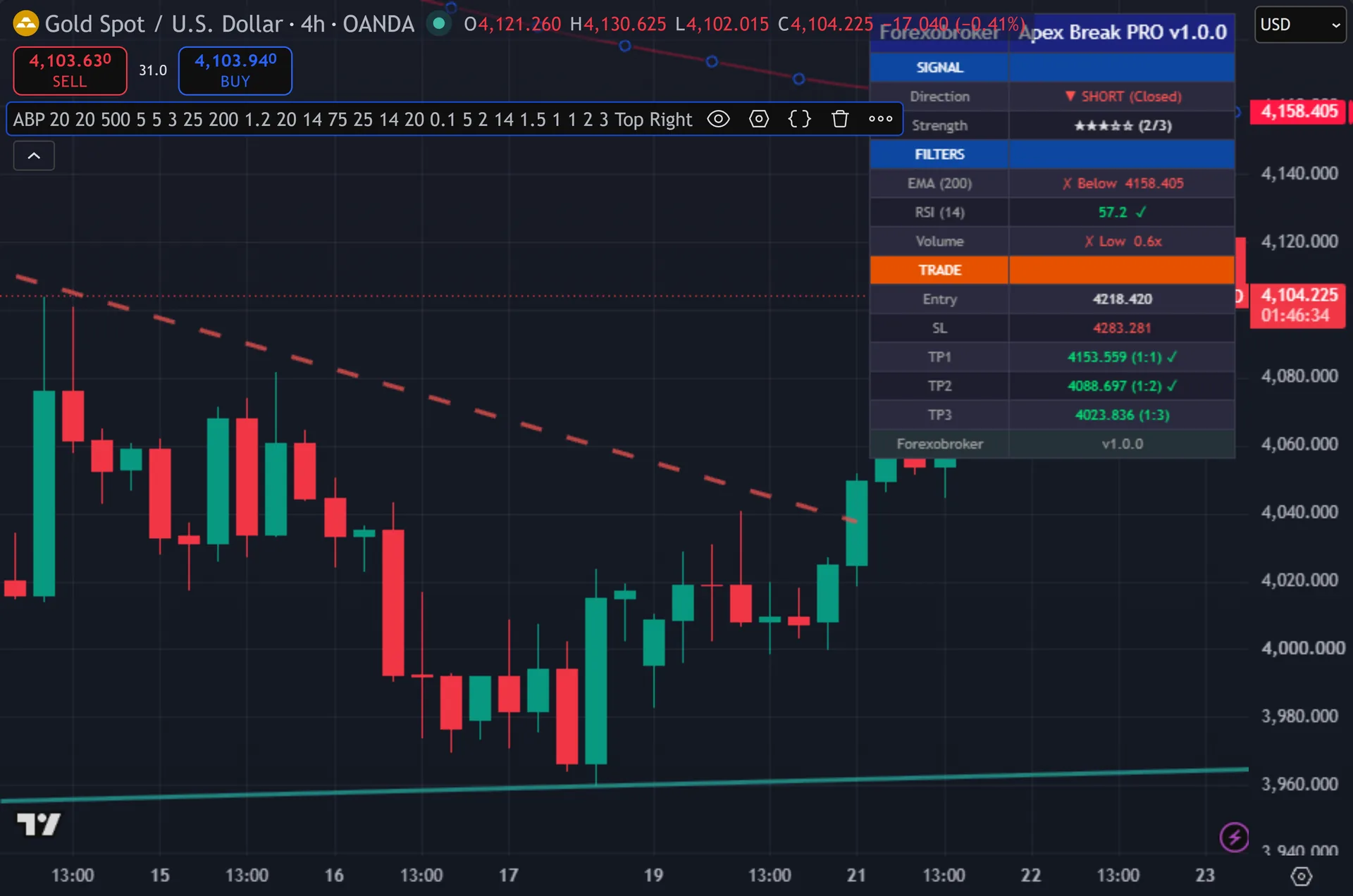
Apex Break PRO reads price the same way everywhere, so the same setup carries to forex, gold, indices, crypto and stocks. Truly, the screenshot below shows it on a second market and timeframe.
What you get
- Lifetime TradingView access to Apex Break PRO, tied to your username
- The 4-filter confluence engine with star-rated signal strength
- Automatic ATR stop-loss and three take-profits at 1:1, 1:2 and 1:3
- The on-chart dashboard with live filter status and hit-tracking
- The 9-alert webhook JSON package for phone alerts and bot integration
- A 60-day money-back policy on your purchase
Get Apex Break PRO
Get Apex Break PRO on forexobroker.com
The button opens the Apex Break PRO product page, where you can see the current price and buy it. Plainly, access is a one-time purchase with lifetime TradingView access and a 60-day money-back policy. You can also view the script on TradingView first.
Prefer the free MetaTrader library?
If you trade MT4 or MT5, my free indicator library is one email away. Also, it does not include this premium tool, but it is a strong starting kit.
Get the complete indicator library
One email unlocks the full MT4 and MT5 indicator library. Indeed, this TradingView script stays free on TradingView – the button above adds it to your chart.
More from this profile
Browse the other free TradingView indicators, the full MetaTrader indicator library, the MT4 indicators and MT5 indicators sections, or the forex trading strategies guides.
External references
- Breakout (technical analysis) on Wikipedia
- ADX at Investopedia
- Raff Regression Channel at StockCharts ChartSchool
Frequently asked questions
Does Apex Break PRO repaint?
No. Still, the tool aims to confirm every signal on the bar close, so signals do not repaint. Once a diamond prints on a closed bar, it stays fixed. Thus, the historical chart matches what you would have seen live.
Which markets and timeframes does it work on?
Any of them. Hence, the pivot and ATR math auto-adapt to each instrument price scale and volatility, so forex, gold, indices, crypto and stocks all work. Higher timeframes give fewer, weightier breaks.
What do the stars mean?
Each star is one confluence filter that agreed with the break – trend, RSI, volume and ADX. Next, four stars means every filter passed. Fewer stars means a weaker break, which helps you size or skip the trade.
Can I send the signals to my phone or a bot?
Yes. Then, the package includes nine alert conditions with structured webhook JSON – buy, sell, each break, all three take-profits and the stop. Point them at your phone or an automation service.
Does this indicator repaint?
Apex Break PRO is built to confirm its signals on the close of the bar, so a printed signal stays put. As with any tool, test it on your own markets and timeframes before relying on it. Results are not guaranteed; past performance is not indicative of future results.

About the author
Written by Dominic Walsh, a Forex trader and MT4/MT5 indicator, Expert Advisor and script developer. Every tool on forexmt4systems.com is tested on live charts before release and ships with ready-to-use compiled MT4 (.ex4) and MT5 (.ex5) files. Learn more about the trader and developer behind this site.
How we build, test and correct every tool: Editorial & Testing Policy. Trading carries risk; see the disclaimer.