
The classic SuperTrend fires on every flip. Also, it flips in dead consolidation, against the higher timeframe, on exhausted momentum, on thin-volume sessions. Most of those flips go nowhere, and you get whipsawed chasing them. Indeed, superTrend Sentinel Levels is a SuperTrend indicator TradingView traders use to cut that noise. Five independent gates vote before a flip counts as an alert. Still, the raw flips still draw, so you keep the full picture while you trade only the strong ones.
What SuperTrend Sentinel Levels shows on your chart
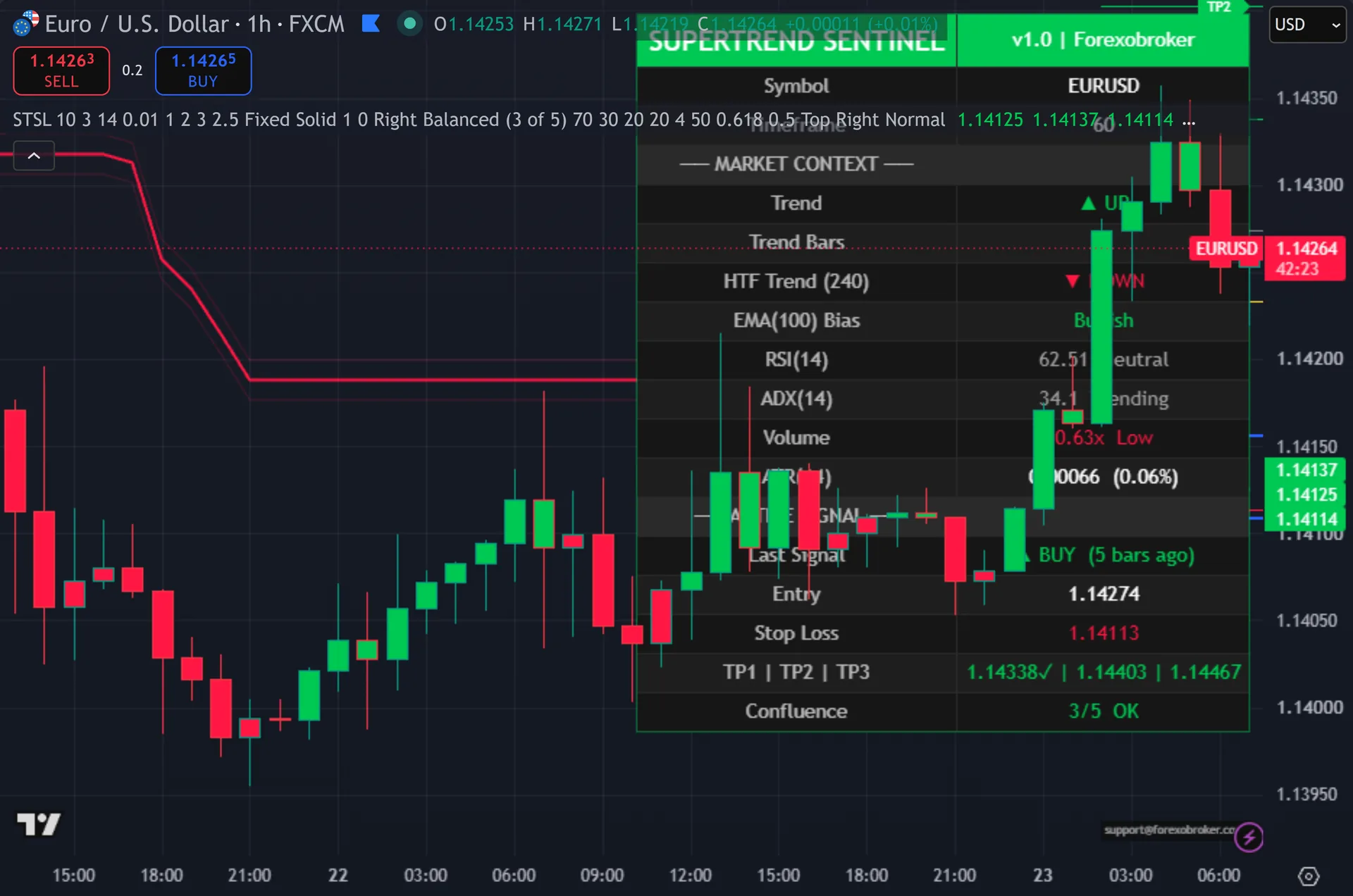
Every trend flip draws an arrow and refreshes a full trade map: entry, stop loss, and three take-profit lines at one, two and three ATR. Thus, a VWAP line resets at each daily open. A Fibonacci golden zone marks the 50 and 61.8 percent retracements. Hence, an 18-row dashboard reads out symbol, timeframe, trend, higher-timeframe trend, EMA bias, RSI, ADX, volume ratio, ATR and the last signal. A live confluence score labels the current flip STRONG, OK, WEAK or NONE. Next, checkmarks track each target and stop as it hits.
Why SuperTrend Sentinel Levels is different
Five gates decide before you act
Each gate catches a different way a flip fails. Then, EMA(100) bias checks the bigger trend. RSI extreme flags exhausted momentum. Yet, ADX confirms a real trend is running. Volume above average proves participation. Truly, higher-timeframe SuperTrend agreement keeps you on side with the larger chart. The gates are independent, so they read different conditions rather than the same one five times.
You set how strict the vote is. Plainly, loose, Balanced and Strict modes decide how many gates must pass before a flip earns an alert. Run Loose when you want more signals, Strict when you want only the cleanest. Also, the dashboard confluence row tells you, in plain words, whether the flip in front of you is alert-worthy right now.
Risk and tracking are drawn for you
Every flip anchors a full trade to ATR. Indeed, entry, stop loss, and three take-profits plot as forward lines, at one, two and three ATR by default and all configurable. The stop can sit fixed or trail. Still, you never sketch a level by hand again – the plan is on the chart the moment the signal appears.
The tool then tracks the trade for you. Thus, TP1, TP2, TP3 and SL flag on the dashboard with checkmarks and an X marker as price reaches them. An 11-channel alert package covers BUY, SELL, strong variants, trend flips, every target and the stop. Hence, each routes through popup, sound, email, mobile push and webhook, ready for Telegram, Discord, n8n or 3Commas.
How to trade it
Watch for a flip arrow on a closed bar, then read the confluence score on the dashboard. Next, a STRONG or OK label means enough gates agree for the setup to count. WEAK or NONE means the raw flip drew, but the filters are telling you to wait.
When a flip qualifies, the entry, stop and three targets are already on the chart. Then, take the entry, set your stop where the tool marks it, and let the three-step take profit scale you out as price runs.
Use the VWAP line and Fibonacci golden zone as extra context. Yet, a flip that fires near the golden zone with price on the right side of VWAP is a cleaner read than one in open space. Let the checkmarks track your exits so you are not glued to the screen.
Settings you control
SuperTrend Sentinel Levels exposes its full input panel on the TradingView settings dialog. Truly, the screenshot below shows the groups you can tune – signal sensitivity, the confluence filters, the dashboard and the trade levels. Defaults are set for a balanced starting point, and every input carries an on-hover tooltip.

Alerts and automation
SuperTrend Sentinel Levels ships 11 alert conditions with a webhook-ready payload. Plainly, wire them to your phone, to email, or to a Telegram, Discord or automation endpoint, and the tool tells you the moment a signal confirms on the bar close – you do not have to watch the chart.
Any market, any timeframe
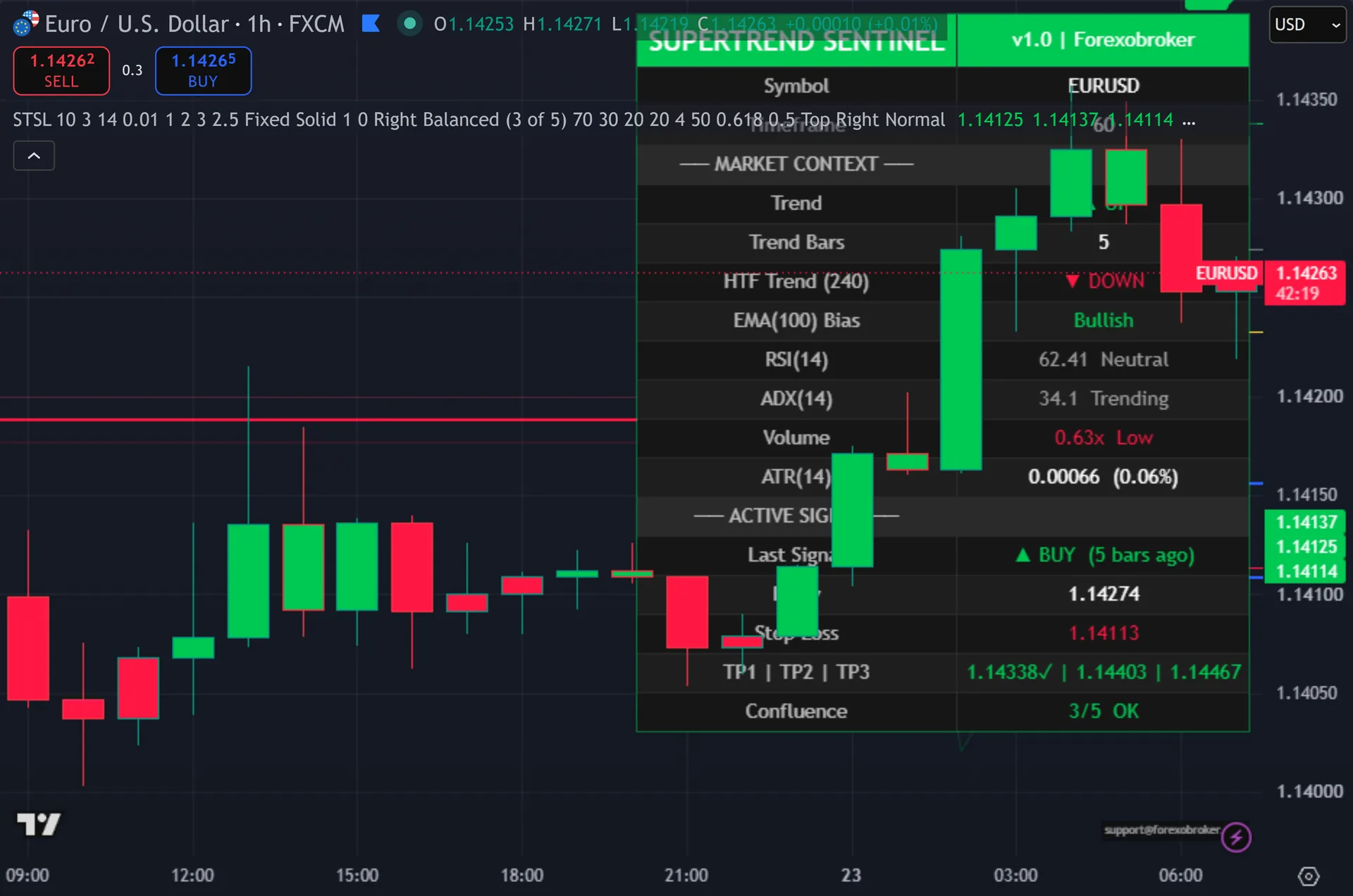
SuperTrend Sentinel Levels reads price the same way everywhere, so the same setup carries to forex, gold, indices, crypto and stocks. Also, the screenshot below shows it on a second market and timeframe.

What you get
- Lifetime TradingView access to SuperTrend Sentinel Levels, one-time
- The five-gate confluence filter with Loose, Balanced and Strict modes
- Auto entry, stop loss and three ATR-anchored take-profit levels
- VWAP daily line, Fibonacci golden zone and an 18-row dashboard
- The 11-channel alert package across popup, email, push and webhook
- Lifetime updates and a 60-day money-back policy
Get SuperTrend Sentinel Levels
Get SuperTrend Sentinel Levels on forexobroker.com
The button opens the SuperTrend Sentinel Levels product page, where you can see the current price and buy it. Indeed, access is a one-time purchase with lifetime TradingView access and a 60-day money-back policy. You can also view the script on TradingView first.
Prefer the free MetaTrader library?
If you trade MT4 or MT5, my free indicator library is one email away. Still, it does not include this premium tool, but it is a strong starting kit.
Get the complete indicator library
One email unlocks the full MT4 and MT5 indicator library. Thus, this TradingView script stays free on TradingView – the button above adds it to your chart.
More from this profile
Browse the other free TradingView indicators, the full MetaTrader indicator library, the MT4 indicators and MT5 indicators sections, or the forex trading strategies guides.
External references
Frequently asked questions
Does SuperTrend Sentinel Levels repaint?
No. By its documented design every signal evaluates on the confirmed bar close, and higher-timeframe checks use the last fully closed bar. Alert one-shot guards stop a bar from firing twice.
What are the five gates?
EMA(100) bias, RSI extreme, ADX trending, volume above average, and higher-timeframe SuperTrend agreement. Hence, each reads a different market condition, and your chosen mode sets how many must pass.
Will it still show every flip?
Yes. Next, the confluence gates filter alerts only. Every raw trend flip still draws an arrow and refreshes the entry, stop and take-profit lines, so the chart keeps the full signal history.
Which timeframes work best?
It runs on every timeframe from one minute to monthly and on every symbol type. Then, higher timeframes tend to give cleaner flips, but the five-gate filter helps on faster charts too.
Does this indicator repaint?
SuperTrend Sentinel Levels is built to confirm its signals on the close of the bar, so a printed signal stays put. As with any tool, test it on your own markets and timeframes before relying on it. Results are not guaranteed; past performance is not indicative of future results.

About the author
Written by Dominic Walsh, a Forex trader and MT4/MT5 indicator, Expert Advisor and script developer. Every tool on forexmt4systems.com is tested on live charts before release and ships with ready-to-use compiled MT4 (.ex4) and MT5 (.ex5) files. Learn more about the trader and developer behind this site.
How we build, test and correct every tool: Editorial & Testing Policy. Trading carries risk; see the disclaimer.