
Most buy/sell tools bury you in arrows. Also, every crossover, every wick, every micro-pullback prints its own signal. Scroll back and half of them have quietly moved because the script repainted. Indeed, voidbreak Buy Sell Pro, a non repaint buy sell indicator TradingView traders can add to any chart, takes the opposite path. Its Range-Filter regime engine tracks how far price travels each bar. Still, when the regime genuinely flips, you get one BUY or SELL. One logic, one trade at a time.
What Voidbreak Buy Sell Pro shows on your chart
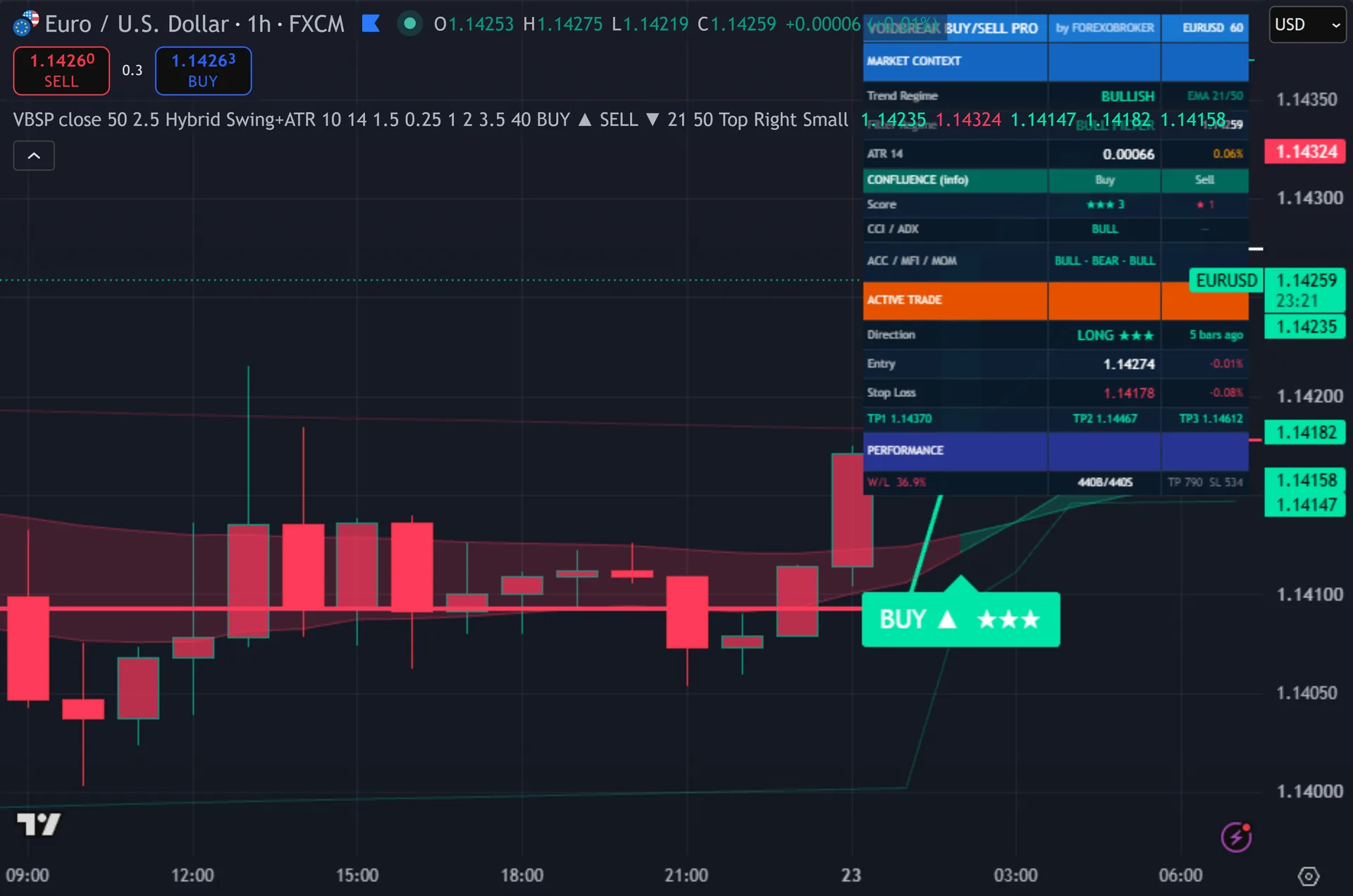
You see a single BUY or SELL label at the moment the market regime flips, not an arrow on every wiggle. Thus, each signal arrives with its full risk plan drawn on the chart. A hybrid stop-loss line marks your exit. Hence, three take-profit lines sit at TP1, TP2 and TP3. Five confluence stars rate the setup from 0 to 5 for a quick conviction read. Next, a six-section live dashboard fills the corner. It reports market context, the range-filter engine state, confluence, the active trade and running performance, all updating in real time.

Why Voidbreak Buy Sell Pro is different
One decision, nothing to second-guess
The engine watches a smoothed range band around price. Then, price has to break the filter and the filter has to commit to a direction before anything prints. That single commitment is your signal. Yet, you do not sort ten conflicting arrows on one bar. You act on one clear flip.
The signal confirms on the bar close, so it does not repaint by design. Truly, the arrow you saw yesterday is the arrow that stays. What you check in your backtest is what you trade live. Plainly, that alone removes the biggest reason traders lose faith in a signal tool.
Risk and conviction handed to you on the chart
Every signal ships with a hybrid stop-loss. Also, the engine picks the tighter of an ATR-distance stop and a recent-swing stop. You can switch to pure ATR or recent-swing modes when you prefer. Indeed, three take-profits then plot at configurable R-multiples, with defaults at 1.0R, 2.0R and 3.5R. The trade exits on TP3, the stop, or an opposite regime flip.
Five confluence stars read CCI, ADX/DMI, accumulation-distribution, MFI and momentum. Still, they combine into a 0 to 5 score. The score is a display-only conviction gauge. Thus, it never blocks a signal, so you stay in control of what you take. You glance at the stars, weigh the setup, and place the trade with a plan already on the screen.
How to trade it
Wait for the regime to flip. Hence, when Voidbreak prints a BUY, the range filter has committed to the upside on a closed bar. Read the confluence stars in the label. Next, four or five stars signal broad agreement across the sub-filters, so you can size with more confidence.
Take your risk straight from the chart. Then, the hybrid stop-loss line is your invalidation level. The three take-profit lines mark where you scale out. Yet, many traders bank part of the position at TP1, move the stop to entry, and let the rest run toward TP2 and TP3.
Let the trade resolve on its own terms. Truly, the position closes at TP3, at the stop, or when the regime flips against you. Set the eight alert events so a BUY, SELL, take-profit hit, stop hit or opposite flip reaches your phone. Plainly, you never have to sit and watch the chart.
Settings you control
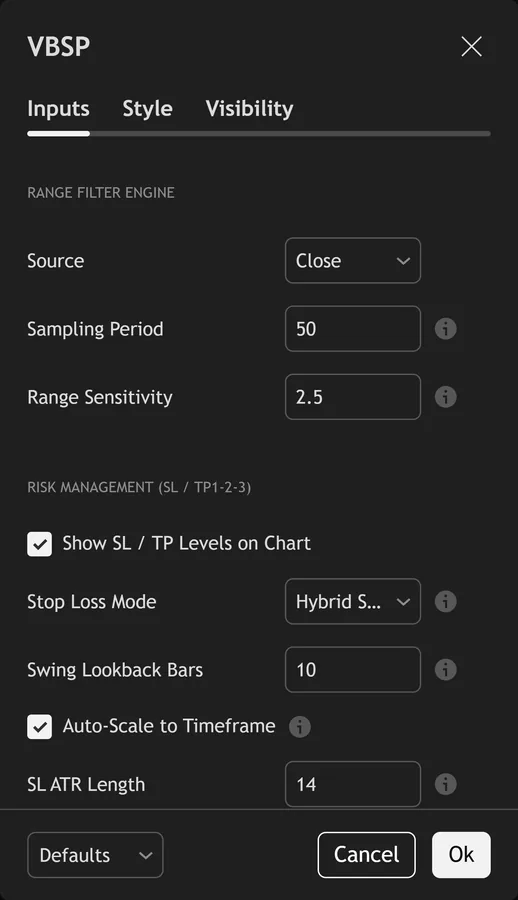
Voidbreak Buy Sell Pro exposes its full input panel on the TradingView settings dialog. Also, the screenshot below shows the groups you can tune – signal sensitivity, the confluence filters, the dashboard and the trade levels. Defaults are set for a balanced starting point, and every input carries an on-hover tooltip.
Alerts and automation
Voidbreak Buy Sell Pro ships 8 alert conditions with a webhook-ready payload. Indeed, wire them to your phone, to email, or to a Telegram, Discord or automation endpoint, and the tool tells you the moment a signal confirms on the bar close – you do not have to watch the chart.
Any market, any timeframe
Voidbreak Buy Sell Pro reads price the same way everywhere, so the same setup carries to forex, gold, indices, crypto and stocks. Still, the screenshot below shows it on a second market and timeframe.

What you get
- Lifetime access to Voidbreak Buy Sell Pro on TradingView, tied to your username
- The non-repainting Range-Filter regime engine with single BUY/SELL signals
- Hybrid stop-loss plus three configurable take-profit targets, drawn on the chart
- The six-section live dashboard and the 5-layer confluence star rating
- The 8-event alert package with popup, mobile push, email and webhook JSON delivery
- A 60-day money-back policy on your purchase
Get Voidbreak Buy Sell Pro
Get Voidbreak Buy Sell Pro on forexobroker.com
The button opens the Voidbreak Buy Sell Pro product page, where you can see the current price and buy it. Thus, access is a one-time purchase with lifetime TradingView access and a 60-day money-back policy. You can also view the script on TradingView first.
Prefer the free MetaTrader library?
If you trade MT4 or MT5, my free indicator library is one email away. Hence, it does not include this premium tool, but it is a strong starting kit.
Get the complete indicator library
One email unlocks the full MT4 and MT5 indicator library. Next, this TradingView script stays free on TradingView – the button above adds it to your chart.
More from this profile
Browse the other free TradingView indicators, the full MetaTrader indicator library, the MT4 indicators and MT5 indicators sections, or the forex trading strategies guides.
External references
Frequently asked questions
Does Voidbreak Buy Sell Pro repaint?
No. Then, the Range-Filter regime engine is documented to confirm each signal on the bar close, so signals do not repaint. The BUY or SELL that printed stays fixed on the chart, which means your backtest and your live chart show the same history.
What markets and timeframes does it work on?
It runs on forex, crypto, metals, oil, indices and stocks. Yet, you can use it from the one-minute chart up to monthly. The swing lookback auto-scales to your chart, so the risk levels stay sensible across timeframes.
Do I get stop-loss and take-profit levels automatically?
Yes. Truly, every signal draws a hybrid stop-loss and three take-profit lines at configurable R-multiples. You choose hybrid, pure ATR or recent-swing stop modes, then read the exact levels straight off the chart.
How do I get alerts on my phone?
The indicator ships with 8 alert events covering BUY, SELL, each take-profit hit, the stop hit and the opposite-flip exit. Plainly, you can send them as popups, mobile push or email, in plain text or as webhook JSON for bots.
Does this indicator repaint?
Voidbreak Buy Sell Pro is built to confirm its signals on the close of the bar, so a printed signal stays put. As with any tool, test it on your own markets and timeframes before relying on it. Results are not guaranteed; past performance is not indicative of future results.

About the author
Written by Dominic Walsh, a Forex trader and MT4/MT5 indicator, Expert Advisor and script developer. Every tool on forexmt4systems.com is tested on live charts before release and ships with ready-to-use compiled MT4 (.ex4) and MT5 (.ex5) files. Learn more about the trader and developer behind this site.
How we build, test and correct every tool: Editorial & Testing Policy. Trading carries risk; see the disclaimer.