
One clue rarely turns a market. Also, smart Reversal Compass is a reversal signal indicator TradingView traders can use to demand agreement before acting. It checks four independent conditions on every bar: RSI divergence, a volume climax, a rejection candle and a touch of the last swing level. Each hit scores one point. The compass then points north or south only when one side clears your minimum count and beats the other side.
It is free and open source. Indeed, you can add it to any chart from the Smart Reversal Compass script page on TradingView, and the full Pine source is published there for you to read.
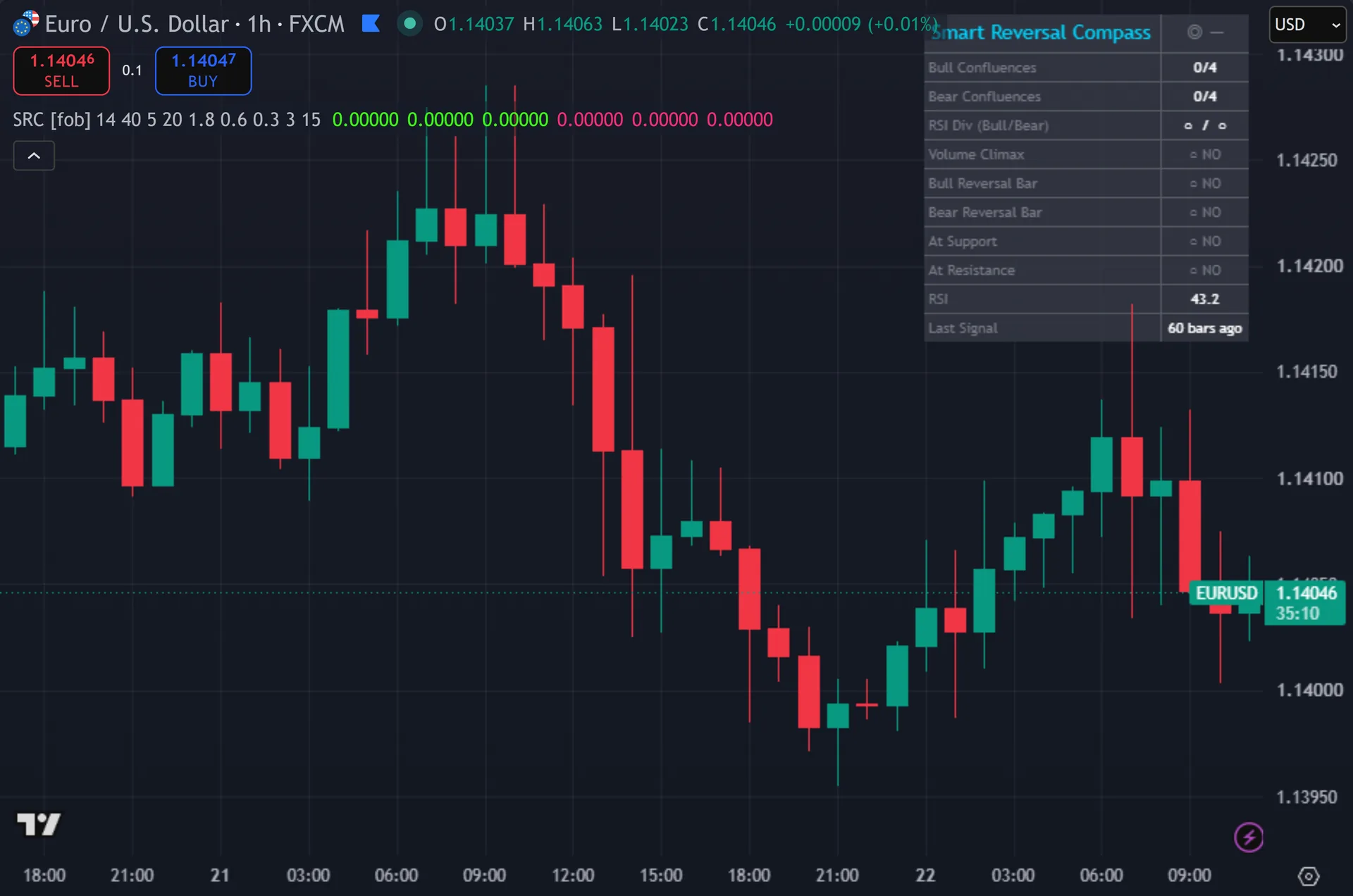
What Smart Reversal Compass plots on the price chart
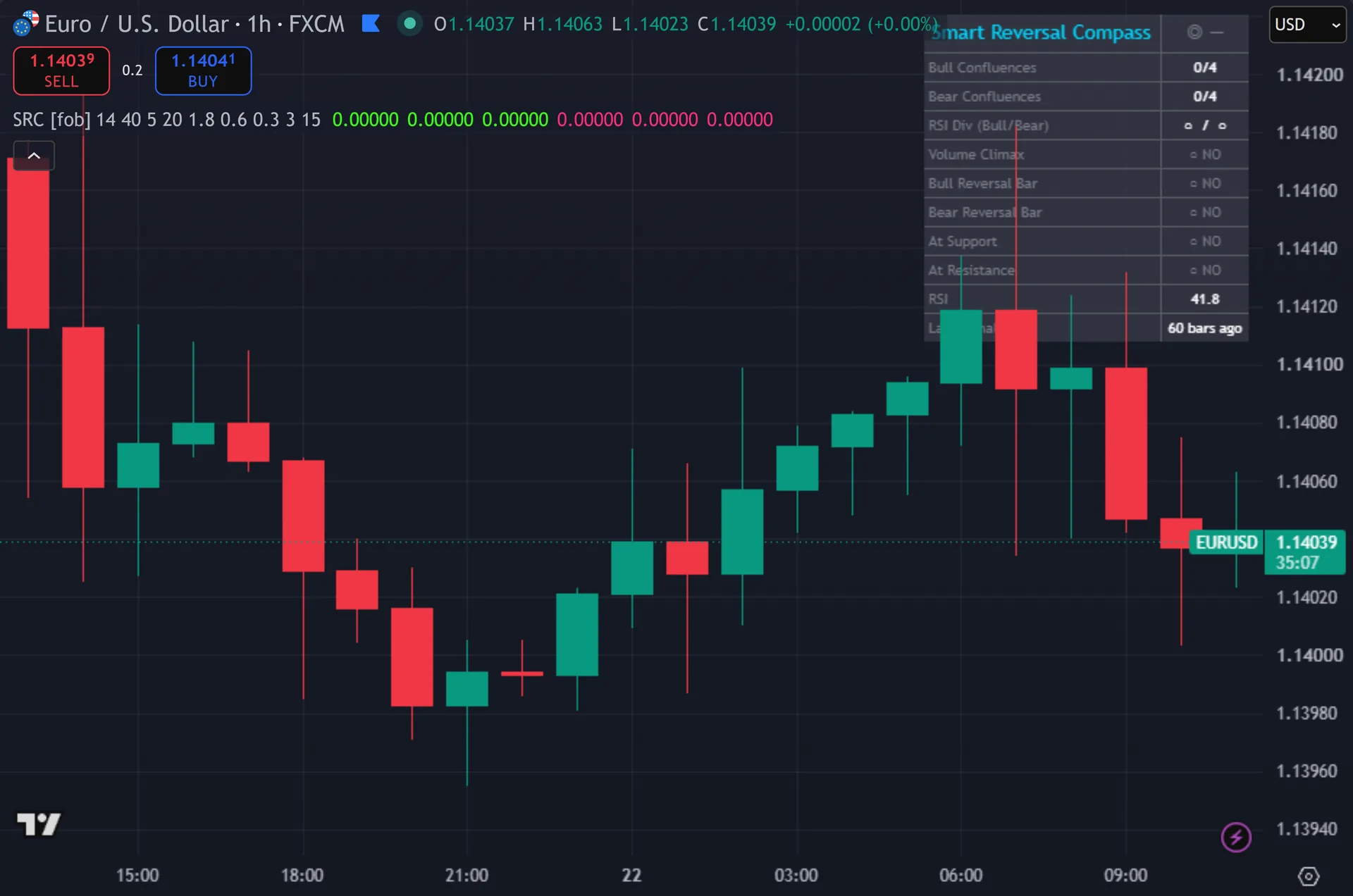
The script overlays the price chart. Still, triangles mark signals in three stacked layers for a glow effect, tagged with an up N or a down S. Each signal also drops a label 1.5 ATR away from the bar. Thus, that label shows the score out of 4 plus a filled or hollow dot for each of DIV, VOL, REV and S/R. Signal bars paint, and the background tints on the same bar. Hence, an eleven-row dashboard sits top right with the compass heading, both confluence counts, every individual condition, live RSI and bars since the last signal.
How Smart Reversal Compass is built
The four confluences
Confluence one is RSI divergence. Next, the script stores the last two pivot highs and the last two pivot lows, using a 5-bar pivot length on each side. It also stores the RSI reading at each pivot. Then, a bullish divergence needs a lower price low with a higher RSI low. The newest pivot must also sit within the 40-bar Divergence Lookback.
Confluence two is a volume climax. Yet, current volume must reach 1.8 times its 20-bar average. That multiplier runs from 1.2 to 4.0. Truly, note that this single condition counts toward both the bull and the bear score, since heavy volume alone carries no direction.
Confluence three is a reversal candle. Plainly, a bullish pin needs a lower wick worth at least 60 percent of the bar’s range plus a close above the open. A bullish engulf is stricter: close above the prior high and open below the prior low. Also, confluence four is a swing-level touch, where the bar comes within 0.3 ATR of the most recent pivot low or pivot high.
Scoring and the signal gate
Each side gets a count from 0 to 4. Indeed, the bull count adds bullish divergence, volume climax, a bullish reversal bar and a support touch. The bear count mirrors that with the bearish versions and a resistance touch. Still, both counts appear in the dashboard on every bar, so you can watch conditions light up before anything fires.
A signal needs three things. Thus, the count must reach the Min Confluences input, which defaults to 3 of 4 and accepts 2 to 4. That count must also be strictly greater than the opposing count, so a 3 against 3 standoff produces nothing. Hence, and the bar must close, because every signal gates on barstate.isconfirmed.
A 15-bar cooldown then spaces signals out, adjustable from 3 to 50. Next, the script also blocks the rare case where both sides qualify on the same bar. Lower Min Confluences to 2 and you will see many more marks. Then, raise it to 4 and you will wait a long time between them, since all four dots must light at once.
How to read the signals
Read the label, not just the triangle. Yet, it prints the score and four dots. A 3 of 4 built on divergence, a rejection wick and a support touch is a very different setup from a 3 of 4 that leans on a volume spike alone. Truly, the dots tell you which evidence actually fired.
Watch the dashboard between signals. Plainly, RSI divergence and the swing levels both come from pivots, which confirm 5 bars after the fact. So a divergence row can light up mid-move. Also, use those rows as a warning that the compass is loading, then wait for the closed-bar triangle.
Treat the S/R row as context. Indeed, it only measures distance to the most recent pivot high or pivot low, within 0.3 ATR. That is a fresh level, not a long-term zone. Still, a reversal bar at that level with a divergence behind it is the setup the scoring was designed to surface. The same bar in open space scores lower for a reason.
Every Smart Reversal Compass setting explained
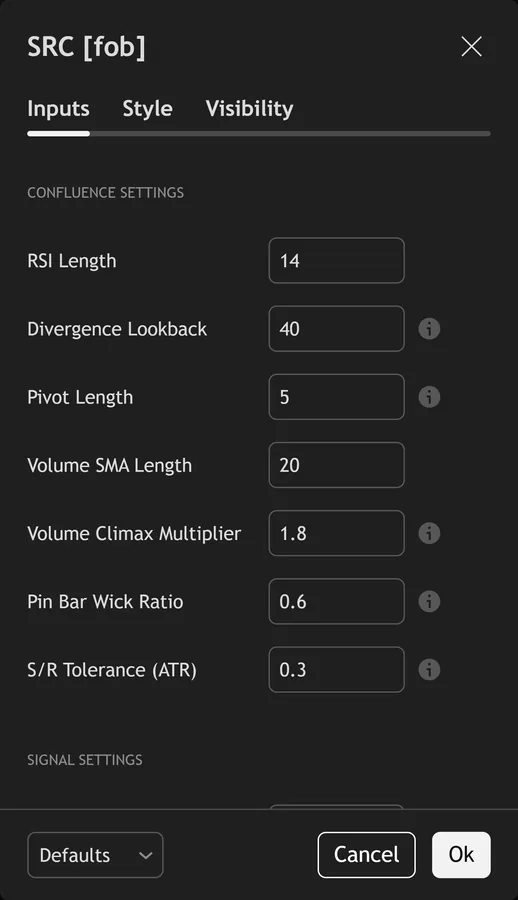
The script exposes 14 inputs, grouped in the settings panel exactly as shown below. Defaults are the published values.
Confluence Settings
| Setting | What it does | Default | Range |
|---|---|---|---|
| RSI Length | Sets the rsi length used in the calculation. | 14 | 5 to 50 |
| Divergence Lookback | Bars to scan back for divergence pivots | 40 | 10 to 100 |
| Pivot Length | Lookback for swing high/low detection | 5 | 2 to 15 |
| Volume SMA Length | Sets the volume sma length used in the calculation. | 20 | 5 to 100 |
| Volume Climax Multiplier | Volume must be this multiple of SMA | 1.8 | 1.2 to 4.0 |
| Pin Bar Wick Ratio | Rejection wick must be this fraction of total range | 0.6 | 0.4 to 0.8 |
| S/R Tolerance (ATR) | Distance in ATR units to qualify as S/R touch | 0.3 | 0.1 to 1.0 |
Signal Settings
| Setting | What it does | Default | Range |
|---|---|---|---|
| Min Confluences (0-4) | Minimum number of confluences lit to fire signal | 3 | 2 to 4 |
| Signal Cooldown Bars | Sets the signal cooldown bars used in the calculation. | 15 | 3 to 50 |
Visual Settings
| Setting | What it does | Default | Range |
|---|---|---|---|
| Show Compass Dashboard | Toggles show compass dashboard on the chart. | on | on / off |
| Show Compass Label on Chart | Toggles show compass label on chart on the chart. | on | on / off |
| Show 3-Layer Signal Glow | Toggles show 3-layer signal glow on the chart. | on | on / off |
| Buy Color | Colour used for buy color. | #39ff14 | |
| Sell Color | Colour used for sell color. | #ff2d78 |
Alerts built into Smart Reversal Compass
The script ships 11 alert conditions. Thus, open the alert dialog on the chart, pick the indicator as the condition source, then choose the event you want. Alerts fire on the close of the bar, so they follow the same confirmed-bar rule the on-chart signals use.
- SRC Buy Compass N
- SRC Sell Compass S
- SRC Any Signal
- SRC Bull Divergence
- SRC Bear Divergence
- SRC Volume Climax
- SRC Reversal Candle
- SRC Perfect 4/4
- SRC Webhook JSON
Other markets and timeframes
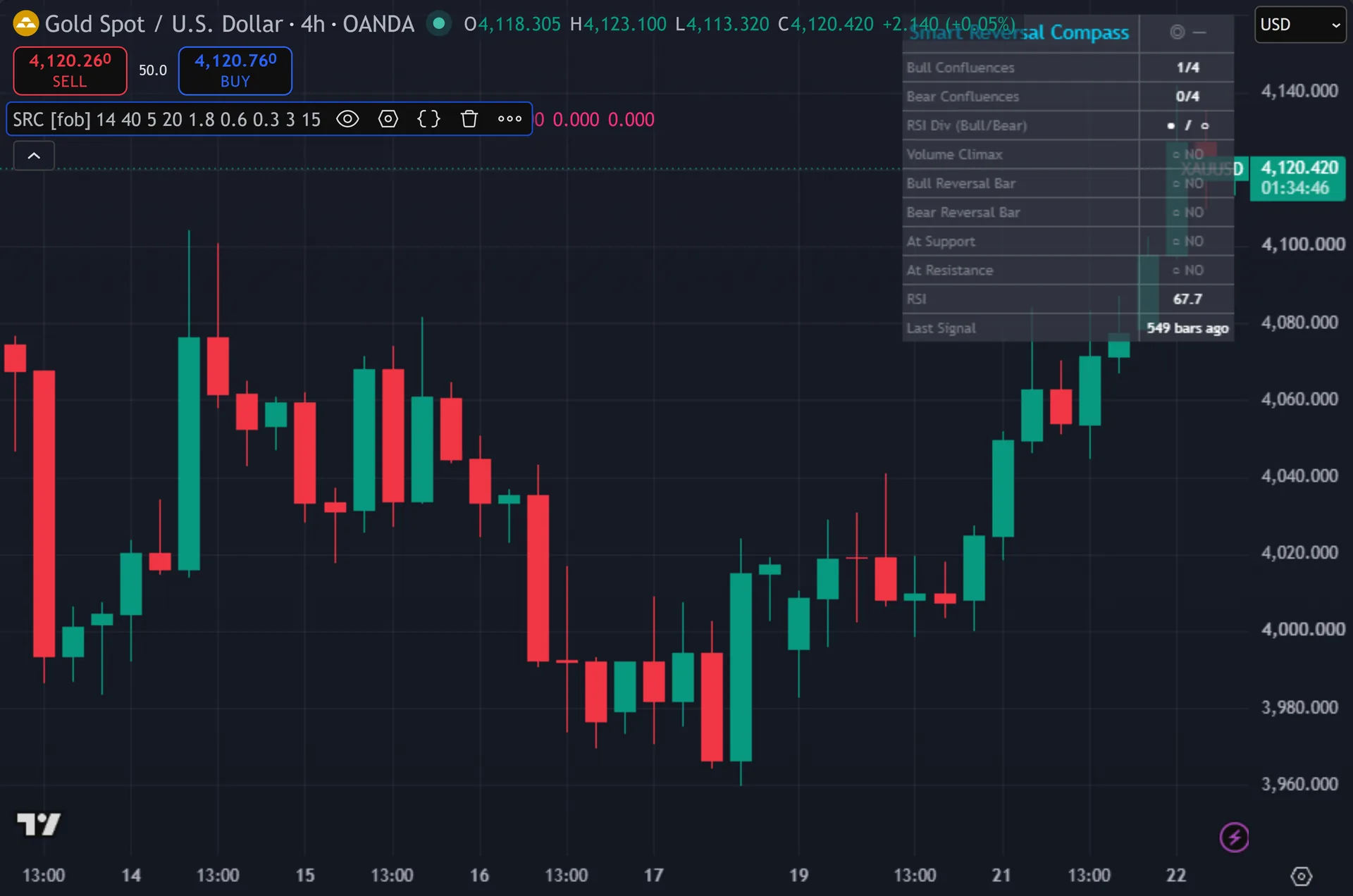
Most of the scoring stays relative, so it travels well. Hence, wick ratios use a fraction of the bar’s own range. The swing tolerance uses ATR units rather than pips. RSI is bounded by design. Only the volume climax needs care. Next, spot forex reports broker tick volume, a count of price updates rather than traded size, so that condition acts as a proxy. On symbols with no volume feed, the climax dot never lights and the highest reachable score falls to 3 of 4.
Limitations worth knowing
The tool grades reversal evidence. It does not manage trades. There are no stops, no targets and no sizing rules. Then, it also never calls request.security, so it reads only your chart timeframe with no higher-timeframe confirmation.
Pivots confirm 5 bars late. Yet, so the divergence and swing-level inputs describe structure that finished several bars ago. The signal itself still waits for a closed bar and does not repaint, but the underlying evidence carries that built-in lag.
Some definitions are strict, and some are loose. Truly, the engulfing test demands a close above the prior high and an open below the prior low, so many textbook engulfing bars fail it. Meanwhile the volume climax counts for both directions, so it never breaks a tie. Plainly, the 15-bar cooldown can also hide a genuine second attempt at the same level.
Get Smart Reversal Compass on TradingView
Open Smart Reversal Compass on TradingView
If you also trade MetaTrader, the MT4 and MT5 indicator library is available below.
Get the complete indicator library
One email unlocks the full MT4 and MT5 indicator library. Also, this TradingView script stays free on TradingView – the button above adds it to your chart.
Using it alongside MetaTrader
Adding a script on TradingView takes one click, so there is no install step here. Indeed, if you want the same idea on MetaTrader, the MT4 and MT5 indicator installation guide walks through copying files into the data folder and attaching them to a chart. You can also browse the full MetaTrader indicator library, the MT4 indicators section, or the other free TradingView scripts published on this profile. For related chart tools see the MT5 indicators section and the forex trading strategies guides.
External references
- Candlestick pattern on Wikipedia
- Pivot Point at Investopedia
- Candlestick Charts at StockCharts ChartSchool
Frequently asked questions
Does Smart Reversal Compass repaint?
The signals do not. Still, every triangle gates on barstate.isconfirmed, so it prints after the bar closes and then stays put. The dashboard rows do update live during the forming bar, and pivot-based rows only confirm 5 bars after the swing itself.
What do the four dots on the label mean?
They map to the four confluences: DIV for RSI divergence, VOL for the volume climax, REV for the reversal candle and S/R for the swing-level touch. Thus, a filled dot means that condition was true on the signal bar. A hollow dot means it was not.
Should I set Min Confluences to 4?
Only if you want very rare marks. Hence, all four dots must light on the same closed bar, which is uncommon on most charts. The default of 3 balances frequency against evidence. Next, setting 2 produces far more signals and lets weaker combinations through.
Why did an obvious reversal bar get no triangle?
Four gates can block it. Then, the count may have fallen under your minimum, the opposing count may have matched it, the 15-bar cooldown may still be running, or volume may have missed the 1.8x climax level. The dashboard shows each condition, so you can see exactly which one stopped it.
How much should I rely on this indicator?
Treat it as one input, not a decision. Yet, it is a chart analysis tool, not trading advice. Test it on your own markets and timeframes before relying on it. Results are not guaranteed; past performance is not indicative of future results.

About the author
Written by Dominic Walsh, a Forex trader and MT4/MT5 indicator, Expert Advisor and script developer. Every tool on forexmt4systems.com is tested on live charts before release and ships with ready-to-use compiled MT4 (.ex4) and MT5 (.ex5) files. Learn more about the trader and developer behind this site.
How we build, test and correct every tool: Editorial & Testing Policy. Trading carries risk; see the disclaimer.