
Checking the same Heiken-Ashi read on four charts means four windows and a lot of clicking. The 4 timeframe heiken ashi indicator does it in one panel. It builds Heiken-Ashi candles on M15, H1, H4 and D1 independently. Each row reports its direction and how long it has held. An alert can wait until all four agree.
This build ships as a compiled .ex4 for MT4 and .ex5 for MT5; the screenshots below come from EURUSD H1.
| Platforms | MT4 (.ex4) + MT5 (.ex5) |
|---|---|
| Chart window | Separate window (levels 0) |
| Plots | 2: Heiken Ashi bull, Heiken Ashi bear |
| Alerts | popup, push notification, email, sound |
| Inputs | 23 |
What the build actually draws
Heiken Ashi bull and Heiken Ashi bear form a two-colour histogram in a separate pane, showing the CURRENT timeframe’s direction as plus or minus one.
A four-row dashboard reports each timeframe’s state alongside a run count of consecutive candles.
A zero level sits in the pane so the histogram sides read clearly.
Nothing is drawn on the price candles themselves.
- Heiken Ashi bull: histogram, width 3
- Heiken Ashi bear: histogram, width 3
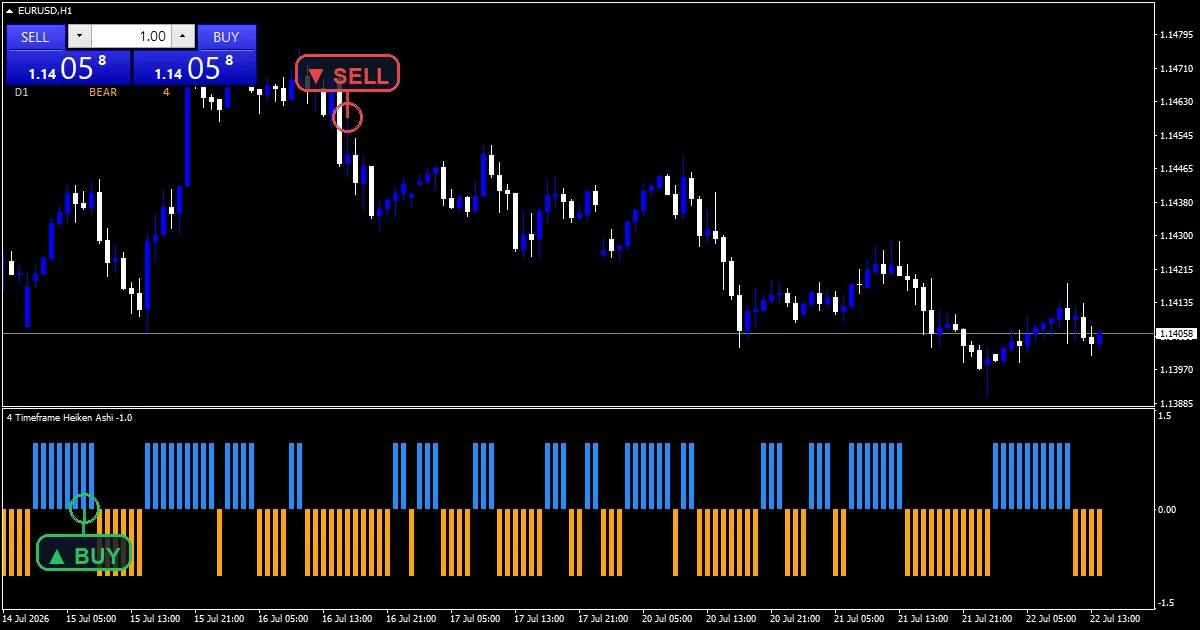
How the 4 Timeframe Heiken Ashi Indicator calculates its values
The Heiken-Ashi recursion
haClose takes (open + high + low + close) / 4. haOpen takes (haOpen[i+1] + haClose[i+1]) / 2. That second line is recursive, so it needs a starting value. The code seeds it at the warmup boundary with (open[seed] + close[seed]) / 2. That stops the series beginning at zero and dragging a false line across the chart.
Resolving higher timeframes by time
sh takes iBarShift on the target period for the current bar’s timestamp. That detail matters. The code finds the higher-timeframe bar BY TIME, not by index arithmetic. Index maths misaligns whenever a bar is missing from either series. `HtfSeedBars` at `60` then gives each timeframe enough history to warm its own recursion.
Reading state and counting the run
A timeframe reads BULL when haClose sits at or above haOpen, and BEAR otherwise. The panel also counts consecutive candles in that state. That separates a fresh flip from a long run. `UseClosedHtfBar` decides whether a row reads the last completed higher-timeframe bar or the one still forming.
Reading it correctly
The dashboard is the output. The histogram only shows the chart you are actually on.
Four rows agreeing is the setup the alert watches for.
The run count separates a one-candle flip from a trend that has held for twenty.
With the closed-bar option off, the highest timeframe’s reading can change during the day.
Alert channels in this build: popup, push notification, email and sound, one message per closed bar.
Four channels sit beneath `EnableAlerts`: popup, push notification, email and sound, with `SoundFile` naming the clip. Popup ships enabled. `AlertOnlyOnAgree` defaults to `true`, so a message waits for all four timeframes to match, and the guard permits one per closed bar.
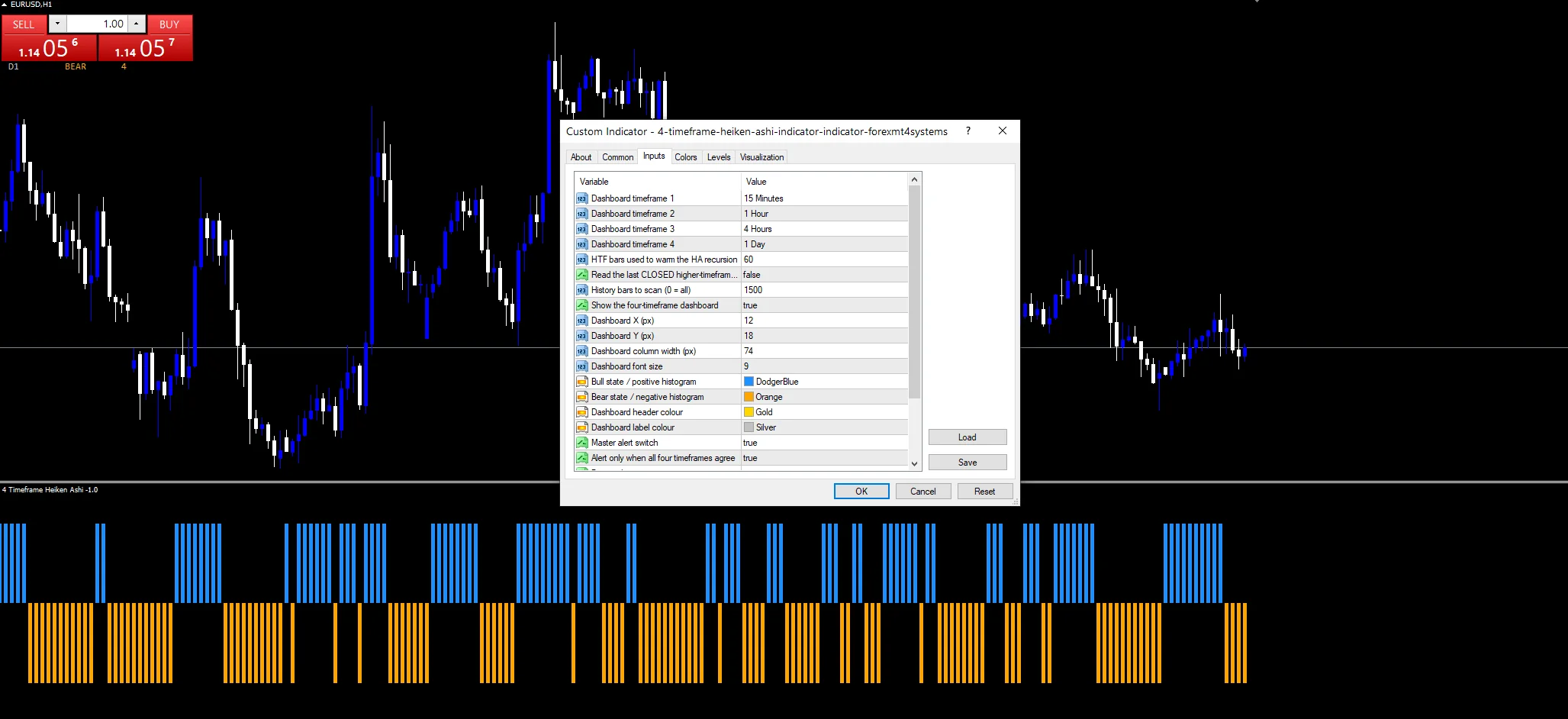
Every 4 Timeframe Heiken Ashi Indicator input
Core settings
| Setting | What it does | Default |
|---|---|---|
Tf1 |
Dashboard timeframe 1. First dashboard timeframe, default `PERIOD_M15`, with `Tf2`, `Tf3` and `Tf4` at H1, H4 and D1. | PERIOD_M15 |
Tf2 |
Dashboard timeframe 2. | PERIOD_H1 |
Tf3 |
Dashboard timeframe 3. | PERIOD_H4 |
Tf4 |
Dashboard timeframe 4. | PERIOD_D1 |
HtfSeedBars |
HTF bars used to warm the HA recursion. Higher-timeframe bars used to warm each recursion, default `60`. | 60 |
UseClosedHtfBar |
Read the last CLOSED higher-timeframe bar. Off by default, so a higher timeframe reports its forming bar. Turn it on for settled readings only. | off |
Display settings
| Setting | What it does | Default |
|---|---|---|
ShowDashboard |
Show the four-timeframe dashboard. Turns the four-row panel on and off; `DashX` and `DashY` position it in pixels. | on |
DashX |
Dashboard X (px). | 12 |
DashY |
Dashboard Y (px). | 18 |
DashColWidth |
Dashboard column width (px). | 74 |
DashFontSize |
Dashboard font size. | 9 |
BullColor |
Bull state / positive histogram. | dodger blue |
BearColor |
Bear state / negative histogram. | orange |
HeaderColor |
Dashboard header colour. | gold |
NeutralColor |
Dashboard label colour. | silver |
Alert settings
| Setting | What it does | Default |
|---|---|---|
MaxBars |
History bars to scan (0 = all). | 1500 |
EnableAlerts |
Master alert switch. | on |
AlertOnlyOnAgree |
Alert only when all four timeframes agree. On by default, so messages fire only when all four timeframes match. | on |
EnablePopup |
Popup alert. | on |
EnablePushNotify |
Push notification to mobile. | off |
EnableEmail |
Email alert. | off |
EnableSound |
Sound alert. | off |
SoundFile |
Sound file. | alert.wav |
Choosing well
The defaults span M15 to D1, which covers an intraday trader’s whole decision range. Attach it to any chart. The dashboard reads its four configured timeframes whichever one you view, while the histogram follows the chart itself. Working a different span? Set all four inputs, for example M5 through H1 for scalping.
Limits worth knowing
Heiken-Ashi smooths price by construction, so every state change lags the candles behind it.
With `UseClosedHtfBar` off, the daily row can flip and flip back during the session. That makes the agreement alert less stable than it looks.
Four timeframes agree well into a move, so the signal confirms rather than leads.
Copy the compiled 4 Timeframe Heiken Ashi Indicator file into your MQL4/Indicators folder, and the MT5 build into MQL5/Indicators, then restart the terminal and drag it onto a chart. The step-by-step guide with screenshots is at how to install MT4 and MT5 indicators.
Related on forexmt4systems.com: Heikin Ashi Trend Strategy.
Download the 4 Timeframe Heiken Ashi Indicator for MT4 and MT5
The zip holds the compiled 4 Timeframe Heiken Ashi Indicator build for MT4 and MT5, plus a short README. Compiled files only, no source. Enter your email below and the download link arrives in your inbox.
Download this indicator free
Enter your email and the file is yours. You also get the full MT4 and MT5 library.
FAQ
How does Tf4 line up its bars with the current chart?
Through iBarShift, which looks up the bar containing a given timestamp. Index arithmetic would break here. Dividing indices by a timeframe ratio assumes both series are complete, and weekends, gaps and broker quirks make that false. Time lookup keeps the alignment right however patchy either series is.
What does UseClosedHtfBar change?
Which higher-timeframe candle each row reports. Off, which is the default, means a row shows the bar still forming, so the daily state can change during the session. On means it reads the last completed bar only, giving a settled reading that updates once per higher-timeframe candle.
Why does HtfSeedBars need to be 60?
Because the Heiken-Ashi open is recursive: each value depends on the one before it. Each timeframe needs enough of its own history to settle that recursion before the reading is trustworthy. Sixty bars gives ample room. Reducing it risks a row showing a state derived from an unsettled series.
Does the Heiken Ashi bull histogram cover all four Tf inputs?
No, only the chart you are on. The pane plots the current timeframe’s Heiken-Ashi direction as plus or minus one. The four-timeframe view lives entirely in the dashboard panel. Turn `ShowDashboard` off and you lose most of the tool.
Are results guaranteed?
No. Trading involves risk. Results are not guaranteed; past performance is not indicative of future results. Use the 4 Timeframe Heiken Ashi Indicator as one input. Always backtest before trading live.
Authoritative references
- Learn more about technical indicators.

About the author
Written by Dominic Walsh, a Forex trader and MT4/MT5 indicator, Expert Advisor and script developer. Every tool on forexmt4systems.com is tested on live charts before release and ships with ready-to-use compiled MT4 (.ex4) and MT5 (.ex5) files. Learn more about the trader and developer behind this site.
How we build, test and correct every tool: Editorial & Testing Policy. Trading carries risk; see the disclaimer.