
The Abella Scalping Robot EA is an automated expert advisor for MT4 and MT5. It opens and manages real trades on its own. The robot is a fast, deterministic EMA-pullback scalper that trades short-timeframe setups with tight targets.
This is not a chart tool. It places live orders once you enable trading. Every position carries a stop loss and a take profit.
Risk warning
The Abella Scalping Robot EA trades live capital automatically. Each trade opens with a mandatory stop loss. Test the EA on a demo account first, then move to a small live size. Only risk money you can afford to lose.
How the Abella Scalping Robot EA trades
The Abella Scalping Robot EA reads two moving averages. It uses a fast EMA and a slower EMA for direction. It acts only on the closed bar, so signals do not flicker mid-tick.
It enters long when the fast EMA sits above the slow EMA and price closes back above the fast EMA after dipping below it. The short rule is the exact mirror. This is a simple pullback-in-trend method with no machine learning and no curve fitting.
Every trade opens with a fixed stop loss and take profit in pips. An optional trailing stop can lock in gains once price moves in your favor. By default the EA holds one position at a time and can close it on an opposite signal.
Settings
| Setting | What it does | Default |
|---|---|---|
| FastEma | Fast EMA period for the pullback trigger | 8 |
| SlowEma | Slow EMA period for trend direction | 21 |
| MoneyMgmt | Position-sizing mode | FIXED_LOT |
| Lots | Fixed lot size when money management is off | 0.01 |
| RiskPercent | Percent of balance risked per trade | 1.0 |
| StopLossPips | Stop loss distance in pips | 20 |
| TakeProfitPips | Take profit distance in pips | 30 |
| UseTrailingStop | Enable the trailing stop | false |
| TrailStartPips | Profit before trailing begins | 15 |
| TrailStepPips | Trailing step in pips | 10 |
| CloseOnOppositeSignal | Close the trade on a reverse signal | true |
| MagicNumber | Unique ID for this EA’s orders | 20260753 |
| MaxOpenTrades | Maximum positions held at once | 1 |
| MaxSpreadPoints | Skip entries above this spread | 25 |
| Slippage | Allowed slippage in points | 20 |
Backtest results
For more like this, browse the more signal-forecast indicators for forex or jump to the full MetaTrader indicator hub.
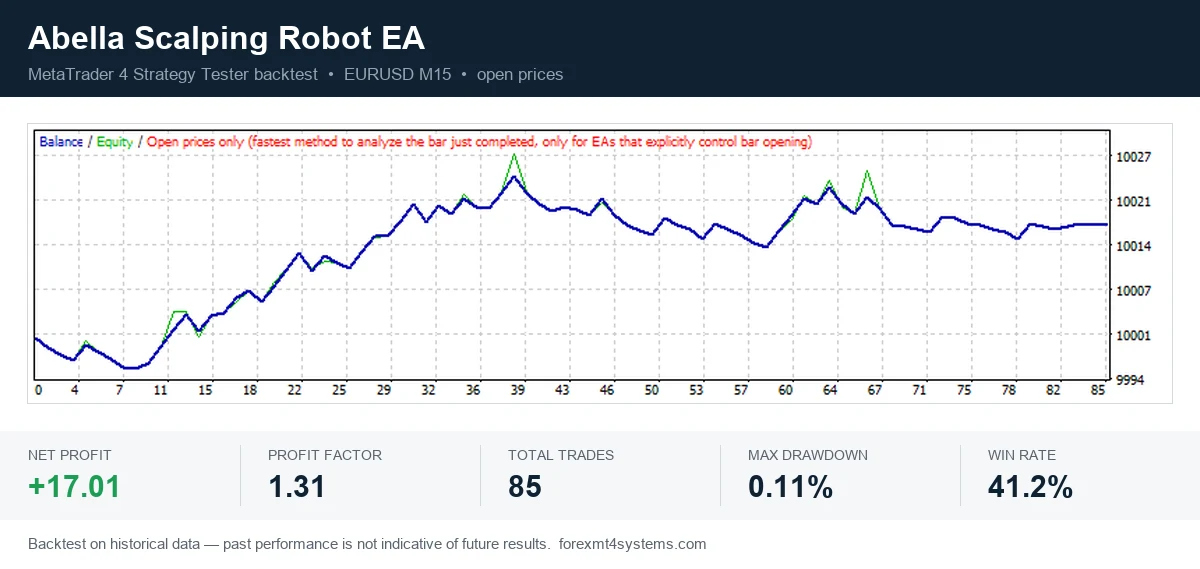
This run used the MetaTrader 4 Strategy Tester on EURUSD M15 with the open-prices model on historical data. Net profit was 17.01 in account currency. The profit factor was 1.31 across 85 trades. Maximum drawdown was 0.11 percent, and profitable trades: 41 percent.
These figures come from one optimized pass on past data. The run is tuned on history, so past performance is not indicative of future results.
How to install on MT4 and MT5
This Expert Advisor installs into the MetaTrader Experts folder (MQL4/Experts for MT4, MQL5/Experts for MT5) and starts trading once you enable AutoTrading. For the full step-by-step with screenshots for both platforms, see the complete guide to installing MT4 and MT5 Expert Advisors.
Best practices
- Run the EA on a demo account before you risk real money.
- Use a VPS for steady 24/5 uptime and low latency.
- Keep the stop loss on at all times.
- Start with 0.01 lots or 1 percent risk while you learn the robot.
- Re-test on your broker’s data before going live.
- Do not run two EAs on the same magic number.
Get the Abella Scalping Robot EA for MT4 and MT5
The Abella Scalping Robot EA is free to download for MT4 and MT5. Enter your email below and the file arrives right away.
Download this Expert Advisor free
Enter your email and the file is yours. You also get the full MT4 and MT5 library.
The download is free after one email confirmation.
Related on forexmt4systems.com: RSI Scalping Strategy for XAUUSD on H1.
For background on automated trading, see Algorithmic Trading at Investopedia.
FAQ
Does the Abella Scalping Robot EA place trades automatically?
Yes. Once you enable AutoTrading, the EA opens, modifies, and closes trades on its own. You stay in control by toggling the AutoTrading button.
What stop loss does it use?
Every trade opens with a fixed stop loss set by StopLossPips, 20 pips by default. An optional trailing stop can tighten the exit as profit grows.
Which pairs and timeframe should I use?
It was tested on EURUSD M15, a fitting home for a fast scalper. You can apply it to other liquid pairs, but re-test each one first.
Can I change the risk or lot size?
Yes. Set a fixed lot with Lots, or switch MoneyMgmt to risk a set percent per trade with RiskPercent. Start small.
Are results guaranteed?
No. Trading involves risk. Results are not guaranteed; past performance is not indicative of future results.
Background reading: how to combine indicators without doubling up.

About the author
Written by Dominic Walsh, a Forex trader and MT4/MT5 indicator, Expert Advisor and script developer. Every tool on forexmt4systems.com is tested on live charts before release and ships with ready-to-use compiled MT4 (.ex4) and MT5 (.ex5) files. Learn more about the trader and developer behind this site.
How we build, test and correct every tool: Editorial & Testing Policy. Trading carries risk; see the disclaimer.