
The arrow alert indicator stacks three conditions on one bar. Two averages must cross. RSI must sit on the matching side of `InpRsiMid` `50.0`. ADX must clear `InpAdxMin` `20.0`. Only then does an arrow print.
This build ships as a compiled .ex4 for MT4 and .ex5 for MT5; the screenshots below come from EURUSD H1.
| Platforms | MT4 (.ex4) + MT5 (.ex5) |
|---|---|
| Chart window | Main price chart |
| Plots | 2: Buy, Sell |
| Alerts | popup, push notification, email, sound |
| Inputs | 14 |
The visual side
`Buy` uses arrow 233 in lime and `Sell` uses 234 in red.
Text objects label the marks on the chart.
Marks sit `InpArrowOffset` `40` points from the candle.
Nothing else gets drawn, so the chart stays readable.
- Buy: arrow, lime, width 3, arrow code 233
- Sell: arrow, red, width 3, arrow code 234

What the code actually computes
The crossing
iMA supplies exponential averages at `InpFastMA` `8` and `InpSlowMA` `21`. A buy wants the fast line at or under the slow one on the previous bar and above it now.
Momentum has to agree
iRSI at `InpRsiPeriod` `14` must read above the midline for a buy and below it for a sell. That rejects a crossing where momentum is pointing the other way.
The strength gate is optional
iADX at `InpAdxPeriod` `14` must reach `InpAdxMin` `20.0`. Below twenty the market is usually drifting, and crossings there tend to reverse. `InpUseAdx` turns the whole gate off.
What you act on
Every mark means all three tests agreed on the same closed bar.
Marks are scarce by design, which is the trade for the filtering.
Switching `InpUseAdx` off will noticeably increase the count.
The alert system is the focus here, not the chart drawing.
Alert channels in this build: popup, push notification, email and sound, one message per closed bar.
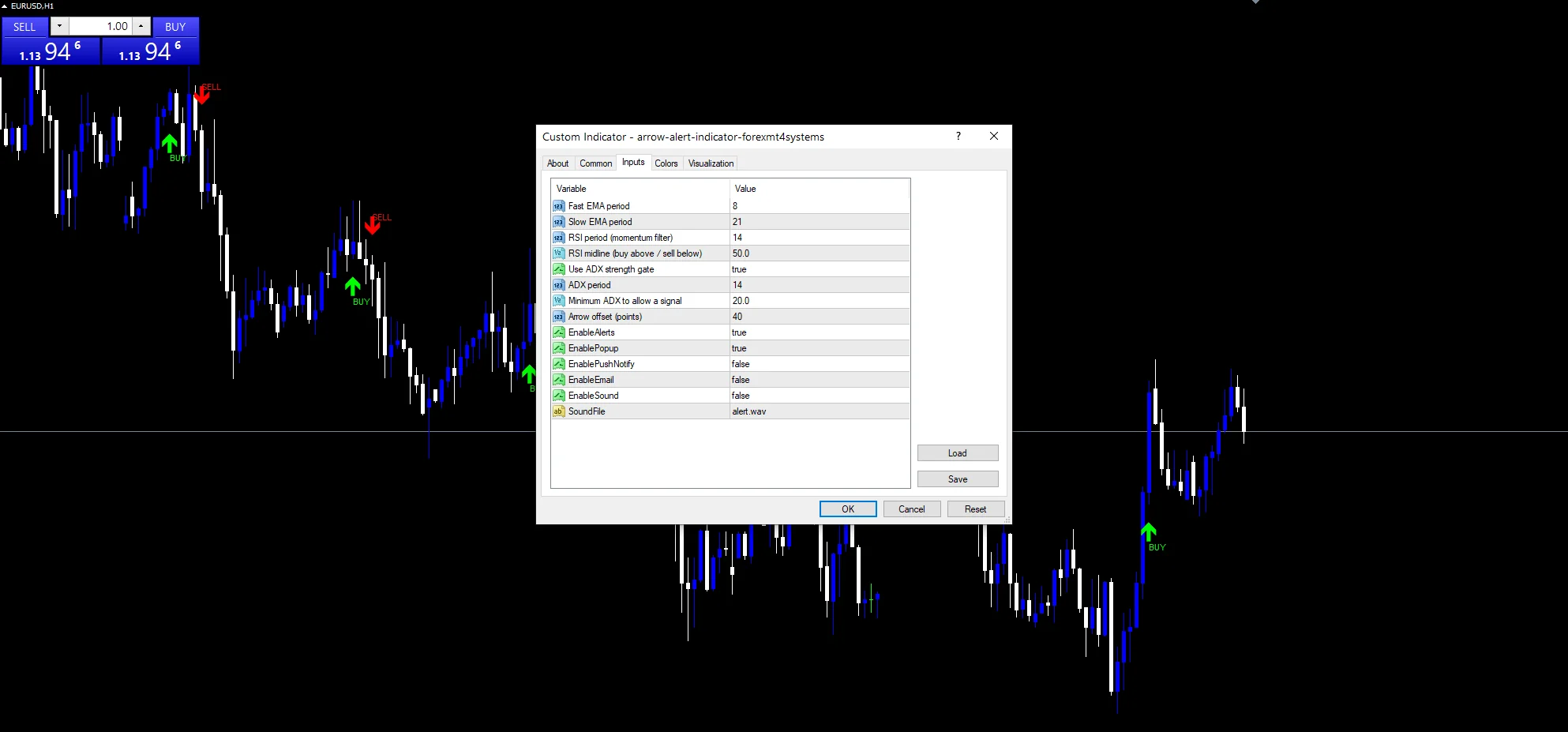
This build is built around delivery. `EnableAlerts` ships true with `EnablePopup`, and the other three wait for you: `EnablePushNotify` for mobile, `EnableEmail` for mail, `EnableSound` for the clip in `SoundFile`. Each fires once per closed bar.
Every Arrow alert Indicator input
Core settings
| Setting | What it does | Default |
|---|---|---|
InpFastMA |
Fast EMA period. Bars in the fast average, default `8`. | 8 |
InpSlowMA |
Slow EMA period. Bars in the slow average, default `21`. | 21 |
InpRsiPeriod |
RSI period (momentum filter). Bars in the momentum filter, default `14`. | 14 |
InpRsiMid |
RSI midline (buy above / sell below). Midline the filter compares against, default `50.0`. | 50.0 |
InpUseAdx |
Use ADX strength gate. Apply the trend-strength gate, default `true`. | on |
InpAdxPeriod |
ADX period. Bars in the strength reading, default `14`. | 14 |
InpAdxMin |
Minimum ADX to allow a signal. Lowest strength that allows a mark, default `20.0`. | 20.0 |
Display settings
| Setting | What it does | Default |
|---|---|---|
InpArrowOffset |
Arrow offset (points). Points between a mark and the candle, default `40`. | 40 |
Alert settings
| Setting | What it does | Default |
|---|---|---|
EnableAlerts |
Umbrella over all four routes, default `true`. | on |
EnablePopup |
Box inside the terminal, default `true`. | on |
EnablePushNotify |
(see inputs panel) | off |
EnableEmail |
(see inputs panel) | off |
EnableSound |
(see inputs panel) | off |
SoundFile |
(see inputs panel) | alert.wav |
What to run it on
Three filters need enough bars to fill their windows. EURUSD H1 is the reference chart, where `InpSlowMA` `21` covers most of a day. On M5 the marks come often enough to be useful. H4 leaves very few.
Where it comes unstuck
Three conditions on one bar means quiet stretches with nothing at all.
ADX reports strength, not direction, so a strong move against you still passes the gate.
Every filter reads the same bar, so nothing here confirms across time.
Copy the compiled Arrow alert Indicator file into your MQL4/Indicators folder, and the MT5 build into MQL5/Indicators, then restart the terminal and drag it onto a chart. The step-by-step guide with screenshots is at how to install MT4 and MT5 indicators.
Background reading on the method behind the Arrow alert Indicator: Floor trader on Wikipedia, Swing Charting at StockCharts ChartSchool.
Download the Arrow alert Indicator for MT4 and MT5
The zip holds the compiled Arrow alert Indicator build for MT4 and MT5, plus a short README. Compiled files only, no source. Enter your email below and the download link arrives in your inbox.
Download this indicator free
Enter your email and the file is yours. You also get the full MT4 and MT5 library.
FAQ
What does InpRsiMid 50.0 reject?
A crossing where momentum disagrees with it. A buy needs the fourteen-bar reading above fifty, so an upward cross while RSI sits at forty produces nothing. That single check removes a lot of weak marks.
Is InpAdxMin 20.0 a strict gate?
Moderately. Twenty is the conventional line between drifting and trending, so it rejects the flattest conditions without demanding a strong run. Raise it toward thirty if you only want established moves.
What happens if I set InpUseAdx false?
The strength gate stops applying and the tool falls back to a crossing plus the momentum filter. Expect noticeably more marks, including ones during sideways stretches that the gate was there to remove.
Why is InpArrowOffset 40 so wide?
Because the marks carry text labels, and a tight gap would put the text over the candle. Forty points gives the label room on a five-digit pair. Reduce it on instruments with a larger point size.
Are results guaranteed?
No. Trading involves risk. Results are not guaranteed; past performance is not indicative of future results. Use the Arrow alert Indicator as one input. Always backtest before trading live.
External references
- Learn more about the underlying method in Floor trader on Wikipedia.
- For wider market background, see Swing Charting at StockCharts ChartSchool.

About the author
Written by Dominic Walsh, a Forex trader and MT4/MT5 indicator, Expert Advisor and script developer. Every tool on forexmt4systems.com is tested on live charts before release and ships with ready-to-use compiled MT4 (.ex4) and MT5 (.ex5) files. Learn more about the trader and developer behind this site.
How we build, test and correct every tool: Editorial & Testing Policy. Trading carries risk; see the disclaimer.