
This arrow buy sell indicator prints a lime Buy arrow or a red Sell arrow on the price chart. The trigger is a cross of the +DI and -DI lines. The ADX main line must also read above a trend threshold. It draws nothing else, so the chart stays clean and the arrow is the whole signal. The build runs on MT4 and MT5. It suits traders who want a directional-movement trigger without a separate ADX window.
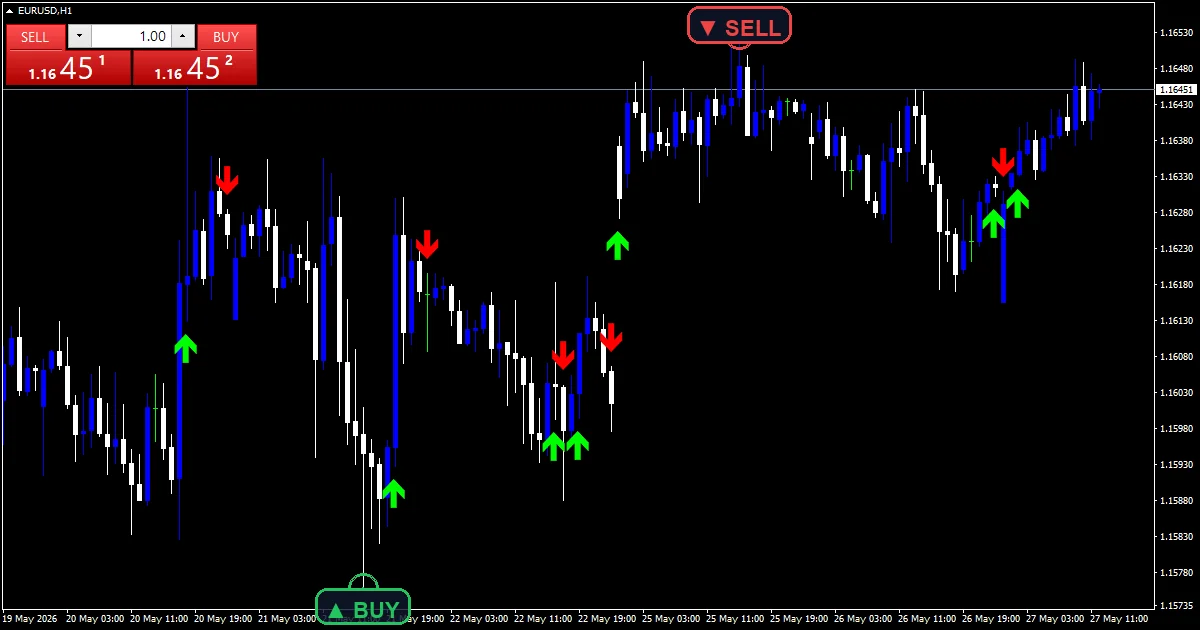
This build ships as a compiled .ex4 for MT4 and .ex5 for MT5; the screenshots below come from EURUSD H1.
| Platforms | MT4 (.ex4) + MT5 (.ex5) |
|---|---|
| Chart window | Main price chart |
| Plots | 2: Buy, Sell |
| Alerts | popup, push notification, email, sound |
| Inputs | 9 |
On screen
Buy is a lime arrow, code 233. It sits ArrowOffsetPoints points below the low of the bar where +DI crosses above -DI. Sell is a red arrow, code 234, placed the same distance above the high when -DI crosses above +DI. Both plots use width 4, so the markers stay visible on a busy H1 chart.
The ADX, +DI and -DI lines themselves stay hidden. The code reads them through iADX with AdxPeriod and PRICE_CLOSE and only surfaces the result as an arrow. To see the lines, add the standard ADX to a sub-window with the same period. Its crosses will line up with the arrows.
- Buy: arrow, lime, width 4, arrow code 233
- Sell: arrow, red, width 4, arrow code 234
How the calculation works
Reading the directional lines
iADX supplies every value. For each bar the code calls it five times. It reads +DI and -DI on the current bar and on the previous bar. It also reads the ADX main line on the current bar. AdxPeriod, 14 by default, feeds every call. No smoothing or extra averaging sits on top of the platform values.
The cross test and the trend gate
A Buy arrow needs three things at once. First, +DI must sit at or below -DI on the previous bar and above it on the current bar. Second, ADX must read above TrendLevel, which defaults to 20. A Sell arrow mirrors that with -DI taking over. When ADX sits under the level, a cross still happens in the data but prints nothing. That removes most crosses inside flat markets.
Warm-up and the forming bar
The loop skips the first AdxPeriod times two plus two bars. The ADX needs that much history to settle. Arrows then print on every bar down to the one still forming. The forming-bar arrow can change until the close, while the alert only looks at the last closed bar.
What to look for
A lime Buy arrow under a candle says +DI has just taken over. The ADX reading also sits above 20 at that moment. Trend traders use it as a go signal in the direction of the larger move. A stop usually goes under the low of the arrow bar.
A red Sell arrow above a candle is the mirror: -DI has just crossed above +DI with ADX confirming. If the arrows alternate every few bars, the ADX is hovering near TrendLevel and the market is not trending. Stand aside until one side holds.
The distance between arrows carries information too. Take one Buy followed by a long run of bars with no Sell. That means +DI stayed on top and ADX stayed high. It is the profile of a sustained trend rather than a spike.
Alert channels in this build: popup, push notification, email and sound, one message per closed bar.
Each arrow on a freshly closed bar triggers one alert. It goes out through popup, push notification, email or sound, depending on the EnablePopup, EnablePushNotify, EnableEmail and EnableSound switches.
Every Arrow Buy Sell Indicator input
Core settings
| Setting | What it does | Default |
|---|---|---|
AdxPeriod |
AdxPeriod (default 14) sets the length of the ADX and DI calculation. Use 10 for more and earlier arrows, or 20 to smooth and delay them. | 14 |
TrendLevel |
TrendLevel (default 20) is the ADX floor an arrow must clear. Use 25 to keep only stronger trends, or 15 on slow pairs where ADX rarely climbs. | 20 |
Display settings
| Setting | What it does | Default |
|---|---|---|
ArrowOffsetPoints |
ArrowOffsetPoints (default 35) moves each arrow away from the candle in points. Increase it on gold and indices with larger point values. | 35 |
Alert settings
| Setting | What it does | Default |
|---|---|---|
EnableAlerts |
(see inputs panel) | on |
EnablePopup |
(see inputs panel) | on |
EnablePushNotify |
(see inputs panel) | off |
EnableEmail |
(see inputs panel) | off |
EnableSound |
(see inputs panel) | off |
SoundFile |
(see inputs panel) | alert.wav |

Where it works best
EURUSD H1 is the pair and timeframe in the screenshots. It gives the DI cross a reasonable rhythm. Expect a handful of arrows per week. Most of them come during London and New York hours, when ADX climbs above 20. On M5 and M15 the DI lines cross constantly and TrendLevel does most of the filtering, so consider 25 there. H4 and D1 produce rare but cleaner arrows that track multi-day trends. The ADX maths is the same on any MT4 or MT5 symbol. Only ArrowOffsetPoints needs adjusting for instruments with large point sizes.
Where it disappoints
Choppy ranges with a lingering ADX. After a strong trend the ADX stays above 20 for a while even as price goes flat. The DI lines then cross back and forth. A Buy and a Sell print within a few bars of each other. The gate only helps once ADX has cooled off.
Late entries. ADX smooths its inputs and the DI lines smooth theirs, so the cross often completes well after the turn. On H1 that can mean entering after thirty or forty pips of the move are gone.
Forming-bar flicker. The cross test runs on the open bar. An arrow can therefore show up mid-bar and clear before the close if the DI lines pull apart again. Arrows on closed bars never change, and alerts wait for the close.
Copy the compiled Arrow Buy Sell Indicator file into your MQL4/Indicators folder, and the MT5 build into MQL5/Indicators, then restart the terminal and drag it onto a chart. The step-by-step guide with screenshots is at how to install MT4 and MT5 indicators.
Background reading on the method behind the Arrow Buy Sell Indicator: Buy side on Wikipedia, Accumulationdistribution at Investopedia.
Download the Arrow Buy Sell Indicator for MT4 and MT5
The zip holds the compiled Arrow Buy Sell Indicator build for MT4 and MT5, plus a short README. Compiled files only, no source. Enter your email below and the download link arrives in your inbox.
Download this indicator free
Enter your email and the file is yours. You also get the full MT4 and MT5 library.
FAQ
Why does a Buy arrow sometimes print right after a Sell arrow?
Both arrows depend on the DI cross. The DI lines can flip twice in a short span when price stalls. The ADX filter only blocks arrows when ADX drops below TrendLevel. ADX falls slowly after a trend, so a few crosses slip through before it cools. Treat back-to-back arrows as a range warning rather than two trades.
What does TrendLevel = 20 filter out on the chart?
Every DI cross that happens while the ADX main line reads 20 or below. ADX measures trend strength without direction, and readings under 20 usually mean a flat market. So the filter removes the crosses that would otherwise whipsaw. Raise it to 25 and you keep only crosses inside stronger trends, at the cost of later and fewer arrows.
Can you see the ADX lines behind the arrow buy sell indicator?
Not from this tool, because it draws only the Buy and Sell arrows. Add the platform’s built-in ADX to a sub-window with period 14 and the default close price. You will then see +DI, -DI and the main line that the arrows come from. The cross bars will match what triggers the arrows.
Does the arrow placement change when AdxPeriod moves from 14 to 10?
Yes, because every arrow depends on the DI values. A shorter AdxPeriod makes +DI and -DI more jumpy, so crosses come earlier and more often. ADX also climbs above TrendLevel faster. The arrows themselves still sit ArrowOffsetPoints away from the candle; only their timing and count change.
Are results guaranteed?
No. Trading involves risk. Results are not guaranteed; past performance is not indicative of future results. Use the Arrow Buy Sell Indicator as one input. Always backtest before trading live.
Category: this is part of our Signal and Forecast collection. Also, truly, browse more Signal and Forecast for MetaTrader, or explore every MT4 indicator and MT5 indicator on the site.
External references
- For background on this concept, see Buy side on Wikipedia.
- For broader market context, see Accumulationdistribution at Investopedia.

About the author
Written by Dominic Walsh, a Forex trader and MT4/MT5 indicator, Expert Advisor and script developer. Every tool on forexmt4systems.com is tested on live charts before release and ships with ready-to-use compiled MT4 (.ex4) and MT5 (.ex5) files. Learn more about the trader and developer behind this site.
How we build, test and correct every tool: Editorial & Testing Policy. Trading carries risk; see the disclaimer.