
I build and chart-test every tool in this library before it ships. Also, so when I say “best MT4 indicators”, I mean something specific. Each pick follows published rules you can read and verify. Indeed, each one signals on closed bars and does not repaint history. Each one fires alerts — popup, push, email, and sound — so you are not chained to the screen. Still, and each download contains compiled MT4 and MT5 files in one zip, so one opt-in covers both platforms. This page ranks my strongest picks across seven categories, drawn from the 1,380 indicator guides in the full library. Thus, every entry links to a complete guide with settings, chart examples, and a free download. Where a tool has a weakness, I state it. Honest limits beat inflated promises.
Best MT4 trend indicators
Trend tools answer the first question of any trade: which way does the market lean? Hence, these three lead the trend indicators hub.
| Tool | What it plots | Signal style | Best timeframes | Alerts |
|---|---|---|---|---|
| Supertrend | ATR trailing line above or below price | Line color flip on close | M15–H4 | Popup, push, email, sound |
| Non-Repainting Supertrend | ATR trailing line, locked at bar close | Confirmed flip plus arrow | M30–D1 | Popup, push, email, sound |
| Adaptive Moving Average | Moving average that adjusts speed to market noise | Slope and price cross | H1–D1 | Popup, push, email, sound |
How to choose a trend tool
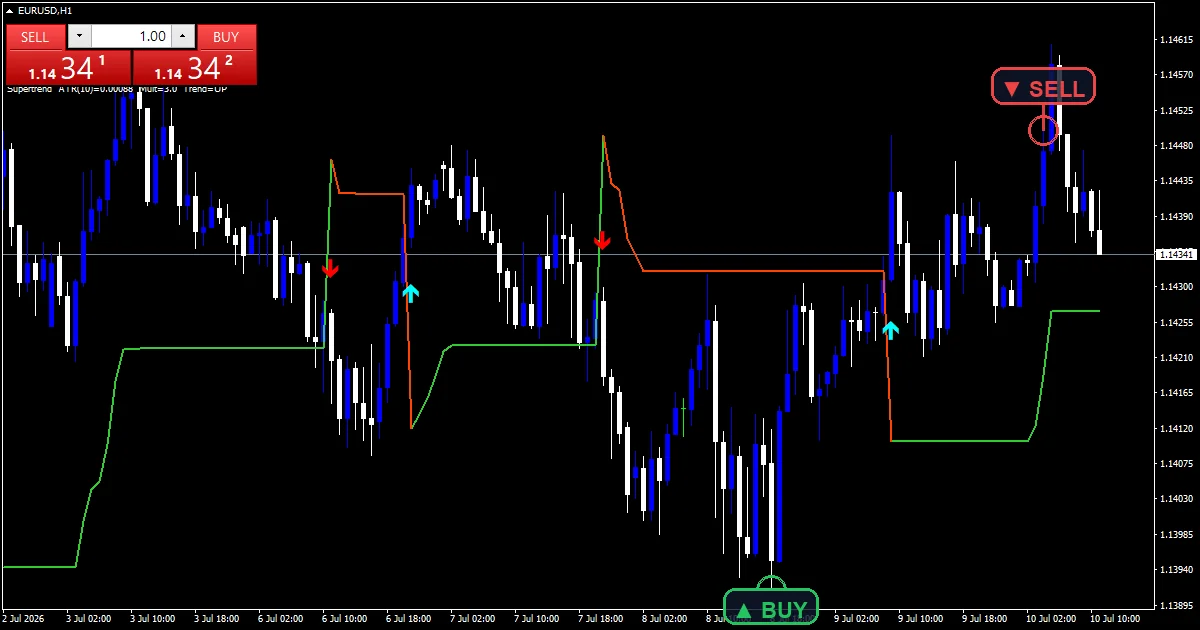
How to choose: Scalpers should take the standard Supertrend on M15 for its instant color flips, then filter entries with an oscillator reading. Next, swing traders should take the non-repainting build on H4, because a signal you review at night must still be there in the morning. Run the Adaptive Moving Average behind any arrow tool as a directional filter; only take arrows that agree with its slope.
Supertrend — I keep this on more charts than any other tool because the rule set fits in one sentence: trade with the line, exit on the flip. Then, its limitation is choppy markets, where repeated flips stack up small losses. Pair it with the ATR Volatility indicator to skip dead conditions.
Non-Repainting Supertrend — What you see in history matches what you would have seen live, and that honesty makes it my default for rule-based trend entries. Yet, the trade-off: confirmed signals arrive one closed bar later than the standard version, so entries are slightly deeper into the move.
Adaptive Moving Average — It speeds up when price trends cleanly and flattens in noise, which kills most of the false crossovers that wreck fixed-period averages. Truly, its limitation is sudden news spikes, where the adaptive formula needs a few bars to catch up.
Download the complete indicator database
Every tool recommended on this page ships in one download. Plainly, one email unlocks the full library: 1,380+ tools, each with compiled MT4 (.ex4) and MT5 (.ex5) files, plus my TradingView scripts. No paywall, no spam, unsubscribe any time.
Get free access to my indicator database
One email unlocks 1,380+ free MT4, MT5 and TradingView indicators — the complete library. No single-tool download; you get the whole database.
Best MT4 signal and arrow indicators
Arrow tools compress several conditions into one mark on the chart. Also, the full set lives in the signal and forecast hub.
| Tool | What it plots | Signal style | Best timeframes | Alerts |
|---|---|---|---|---|
| Arrow Signal | Buy and sell arrows at momentum-trend confluence | Arrow on closed bar | M15–H4 | Popup, push, email, sound |
| 1 Minute Scalping | Fast entry arrows with trend background | Arrow plus color zone | M1–M5 | Popup, push, email, sound |
| Xhmaster Formula | Classic forex arrow system on price | Arrow on closed bar | M30–H4 | Popup, push, email, sound |
How to choose an arrow tool
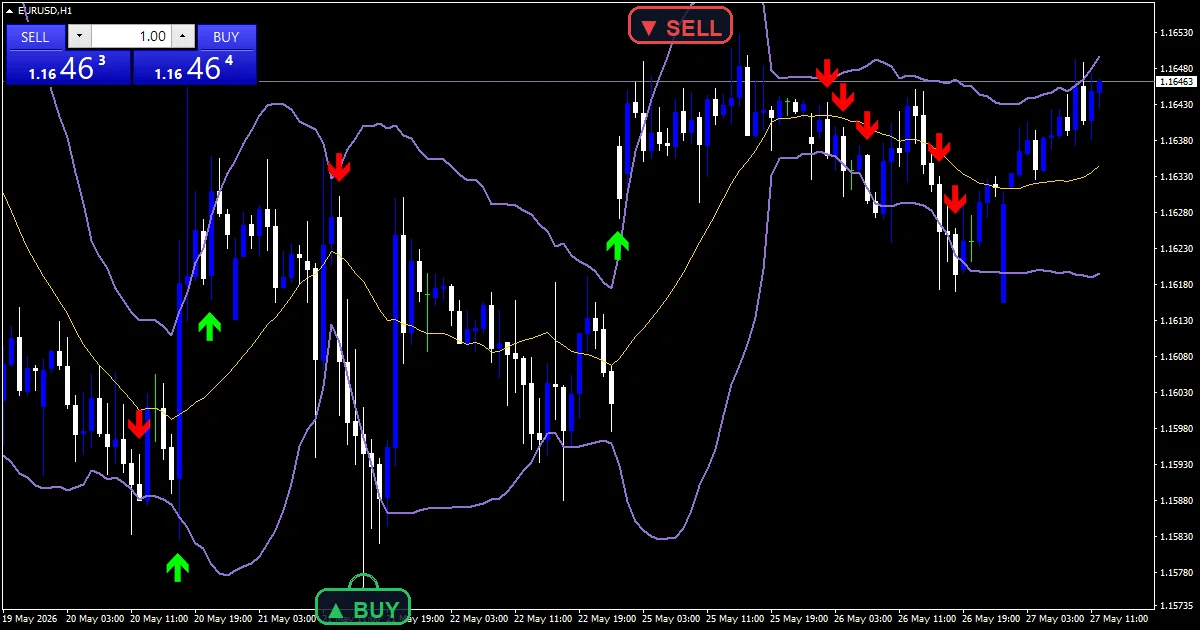
How to choose: Match the tool to your holding time. Indeed, the 1 Minute Scalping indicator exists for M1–M5 bursts during London and New York hours; nothing else here reacts as fast. Arrow Signal is the middle ground for intraday traders who want one clean prompt instead of three stacked windows. Still, xhmaster Formula suits slower traders who confirm each arrow against a support and resistance level before acting. Whatever you pick, add one trend filter — arrows against the higher-timeframe trend are the ones that fail most.
Arrow Signal — I like that it waits for momentum and trend to agree before printing, which keeps the chart quiet between real setups. Thus, its limitation is context blindness: an arrow into a major level is still a bad trade, so check structure before you click.
1 Minute Scalping — On fast charts it gives you a repeatable routine instead of impulse clicks. Hence, it is spread-sensitive by nature; on wide-spread pairs or during rollover the math stops working, so keep it on majors in liquid sessions.
Xhmaster Formula — A veteran forex formula that traders keep requesting, and my rebuild fires alerts on every confirmed arrow. Next, the formula is fixed and knows nothing about the news calendar, so stand aside around red-folder releases.
Best MT4 oscillators
Oscillators measure momentum and flag stretched prices. Then, dozens more live in the oscillators hub.
| Tool | What it plots | Signal style | Best timeframes | Alerts |
|---|---|---|---|---|
| RSI Alert | RSI line with adjustable overbought and oversold levels | Level entry and exit alerts | M15–D1 | Popup, push, email, sound |
| Stochastic RSI | Stochastic formula applied to RSI values | Cross in extreme zones | M15–H4 | Popup, push, email, sound |
| MACD Alert | MACD lines and histogram | Signal-line cross alert | H1–D1 | Popup, push, email, sound |

How to choose: Range traders get the most from oscillators, so start there. Yet, stochastic RSI is the fastest of the three and times entries inside consolidations well. RSI Alert is the watchlist workhorse: set your levels per pair, then let the alerts monitor ten charts you never open. Truly, MACD Alert leans toward swing traders, because its crosses mean more on H4 and daily bars. In a strong trend, flip your reading: treat oversold in an uptrend as a pullback entry cue, ideally at a high-volume level, not as a reversal call.
RSI Alert — It turns a passive gauge into an active screener, and the per-pair thresholds matter more than people expect. Plainly, its known weakness: strong trends pin RSI in the overbought zone for days, so never short a trend just because the alert fired.
Stochastic RSI — It reacts faster than either parent indicator, which is exactly what you want at range edges. Also, speed cuts both ways; it produces more false crosses than plain RSI, so demand a level or a trend filter behind every signal.
MACD Alert — Standard MACD logic, pushed to your phone, changes how you use the tool. As a moving-average construct it lags at sharp turning points, so treat it as confirmation rather than a timing trigger.
Best MT4 volume indicators
Volume shows where traders commit real orders. Indeed, more builds sit in the volume indicators hub.
| Tool | What it plots | Signal style | Best timeframes | Alerts |
|---|---|---|---|---|
| Volume Profile | Horizontal volume histogram by price level | High-volume node zones | M30–D1 | Popup, push, email, sound |
| On Balance Volume | Cumulative volume line | Divergence and trend of the line | H1–D1 | Popup, push, email, sound |

How to choose: These two answer different questions. Still, volume Profile tells you where the market cares: its high-volume nodes act as magnets and reaction zones, which makes it a natural partner for order block and level trading. On Balance Volume tells you whether a move has participation behind it, which suits swing traders holding through pullbacks. Thus, scalpers should favor the profile; position traders should watch OBV divergence at extremes.
Volume Profile — It brings MT4 a feature traders usually pay platform fees for, and node reactions on EURUSD H1 test cleanly in my chart checks. Hence, one honest caveat: MT4 supplies tick volume, not exchange volume, so treat the profile as a liquidity map rather than a precise order count.
On Balance Volume — One line, one message: when OBV climbs while price stalls, someone is accumulating. Next, it shares the tick-volume caveat above, and divergence signals demand patience — they mark conditions, not entry bars, so pair it with a signal tool for timing.
Best MT4 smart money and ICT indicators
Smart money tools map where large orders likely rest. Then, the whole family lives in the smart money hub.
| Tool | What it plots | Signal style | Best timeframes | Alerts |
|---|---|---|---|---|
| Order Block | Institutional candle zones extended forward | Zone retest | M15–H4 | Popup, push, email, sound |
| ICT Concepts | Fair value gaps, order blocks, liquidity, market structure in one overlay | Structure shift plus zone touch | M5–H1 | Popup, push, email, sound |
| CISD CSD + FVG IFVG | Change-in-state-of-delivery levels with gap and inversion-gap boxes | Level break plus gap retest | M1–M15 | Popup, push, email, sound |
How to choose a smart money tool
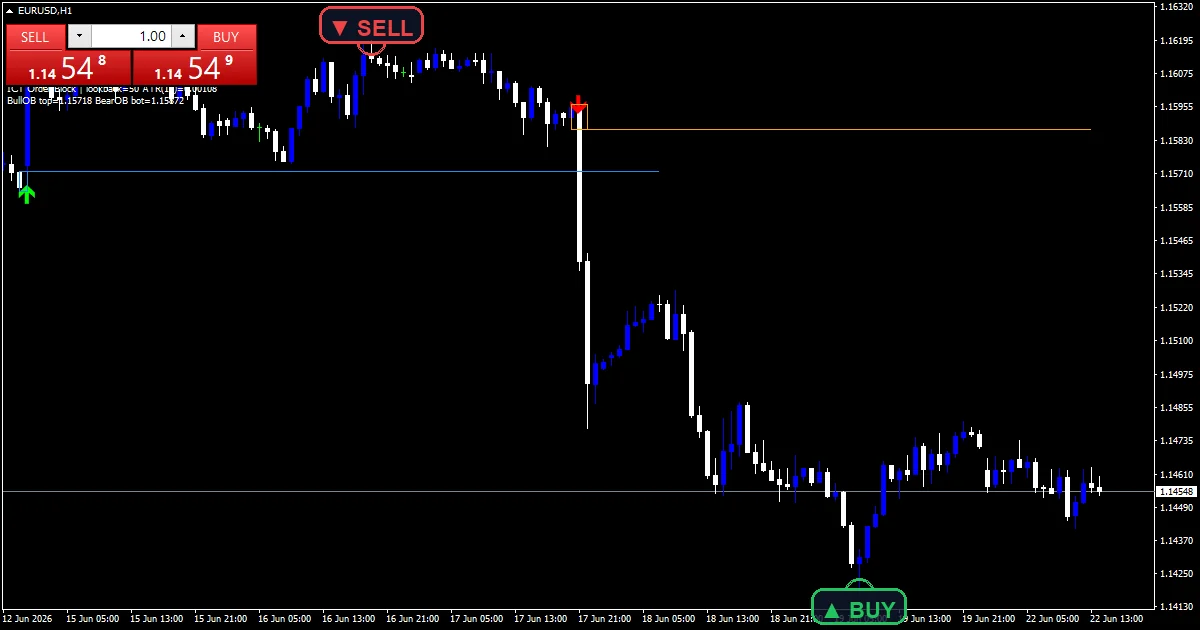
How to choose: Start with the Order Block indicator if you are new to this school — one concept, clearly drawn. Yet, move to ICT Concepts once you want the full picture on a single chart. The CISD build is the specialist pick for low-timeframe traders working London and New York windows. Truly, if you follow the full methodology, the library also covers the ICT 2022 model, Turtle Soup, ICT SMC, and Setup 04 as dedicated tools.
Order Block — It automates the most tedious part of smart money charting: finding the last opposing candle before displacement and projecting the zone forward. Not every retest reacts, though. The indicator finds the zones; you still judge which ones sit with the trend.
ICT Concepts — Gaps, blocks, liquidity, and structure shifts normally take three or four separate tools; here they stay synchronized in one overlay. Plainly, the cost is a busy chart. Toggle off the modules you are not trading that day, or the boxes bury the candles.
CISD CSD + FVG IFVG — Delivery-state flips plus inversion gaps give low-timeframe traders a precise, mechanical read on intent. Also, it is session-dependent: in quiet Asian ranges it draws levels that mean little, so I run it only during active hours.
Best MT4 support and resistance indicators
Levels give structure to every other signal on this page. Indeed, many more variants sit in the support and resistance hub.
| Tool | What it plots | Signal style | Best timeframes | Alerts |
|---|---|---|---|---|
| All Pivot Points | Classic, Fibonacci, Camarilla, and Woodie pivot levels | Level touch and break | M15–H1 | Popup, push, email, sound |
| Buy Side Liquidity | Equal highs and resting liquidity pools | Pool sweep or break | M15–H4 | Popup, push, email, sound |
| Session Box | Asian, London, and New York session ranges | Range boundary break | M5–H1 | Popup, push, email, sound |
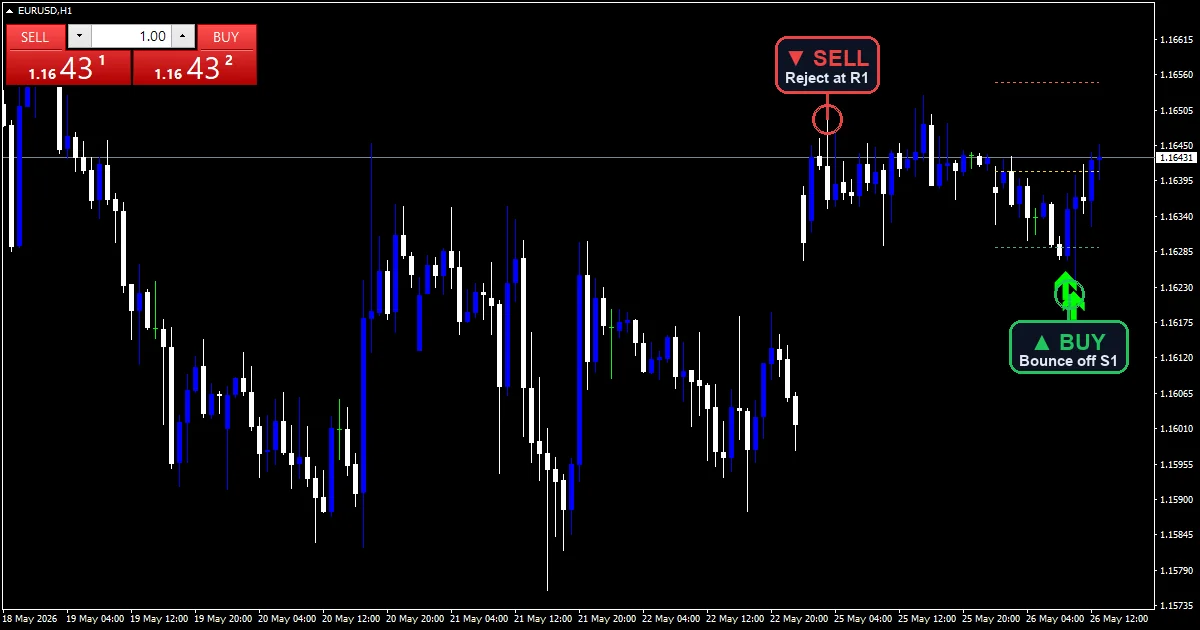
How to choose: Day traders should anchor to All Pivot Points, because the levels are objective, update at each session roll, and half the intraday market watches the same numbers. Still, liquidity-minded traders should add Buy Side Liquidity to see where stops cluster above equal highs — a natural companion to the smart money tools above. Session Box suits breakout traders who trade London’s reaction to the Asian range; combine its boundaries with the Range Breakout indicator for confirmed break signals.
All Pivot Points — Four pivot schools from one input panel, so you stop stacking four separate tools. Thus, pivots are calendar math, not reaction evidence; a level means nothing until price actually respects it, so wait for the touch behavior.
Buy Side Liquidity — Equal highs mark resting orders, and this tool finds them faster than my eye does. Hence, its limit is ambiguity at the moment of contact: a sweep and a genuine breakout look identical on the first bar, so let the bar close decide.
Session Box — Session ranges give the day its cleanest structure, and the boxes make timing visual. Set the server-time offset in the inputs first; a wrong offset shifts every box and quietly poisons the levels.
Best MT4 volatility indicators
Volatility tools size your stops and filter dead markets. Then, the full range lives in the volatility hub.
| Tool | What it plots | Signal style | Best timeframes | Alerts |
|---|---|---|---|---|
| Bollinger Bands | Standard-deviation bands around a moving average | Squeeze and band tag | M15–D1 | Popup, push, email, sound |
| ATR Volatility | Average true range with expansion and contraction phases | Volatility regime change | M30–D1 | Popup, push, email, sound |
| Range Breakout | Consolidation boxes with breakout arrows | Confirmed box break | M15–H4 | Popup, push, email, sound |
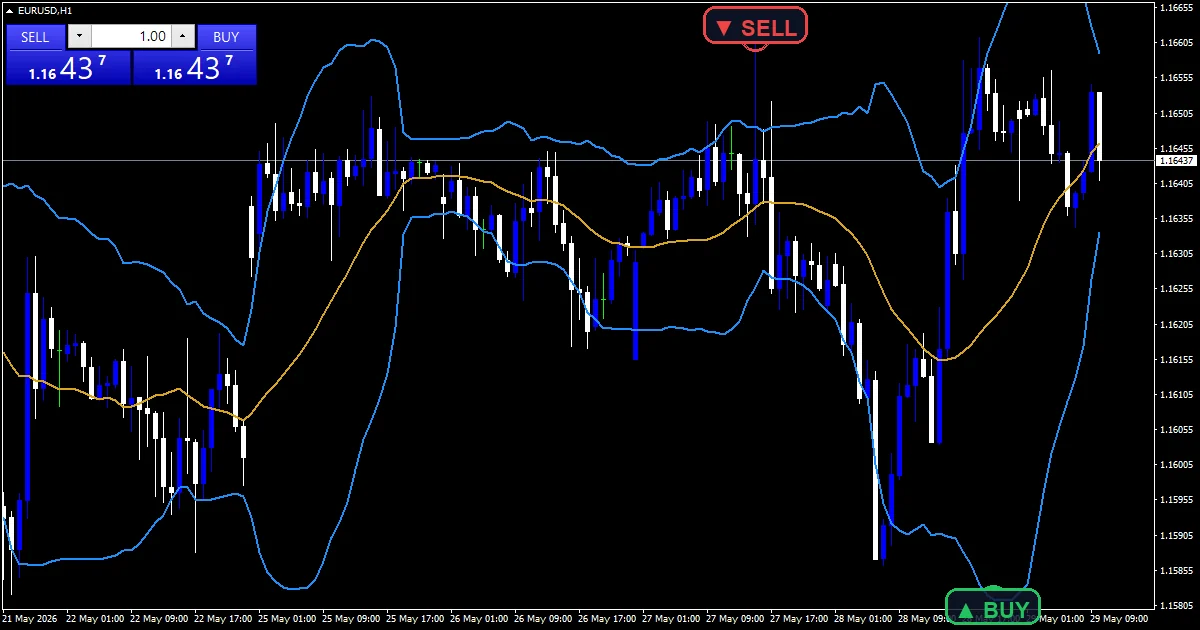
How to choose: Every trader needs one volatility tool, whatever the style. Yet, scalpers and range traders should take Bollinger Bands: squeezes warn of breakouts and band tags flag stretched moves inside ranges. Swing traders should run ATR Volatility purely for stop sizing — a stop set in ATR multiples respects current conditions instead of a fixed pip habit. Truly, breakout traders get the most from Range Breakout, especially stacked with the Session Box so the box aligns with a session open.
Bollinger Bands — Still the most versatile volatility tool on MT4 after four decades, and my build adds the alert layer the platform default lacks. Plainly, remember that a band tag alone is not a signal; in a strong trend, price walks the band for dozens of bars.
ATR Volatility — I use it on every chart for stop placement, and the phase highlighting tells me when to skip trend signals entirely. Also, its limitation is built in: ATR measures energy, not direction, so it never picks a side for you.
Range Breakout — It removes the guesswork of drawing boxes by hand and only fires on a confirmed close outside the range. Indeed, quiet sessions still produce false breaks; requiring an expanding volume reading alongside the arrow filters most of them.
How I test the best MT4 indicators
Every tool on this page passes the same gate before release, documented in the Editorial and Testing Policy. First, the source compiles in MetaEditor with zero errors under strict mode — both the MQL4 and MQL5 builds. Second, I load the compiled file on a live EURUSD H1 chart and check the render: no spikes, no gaps, lines starting where the math has enough data. Third, I verify non-repaint behavior by comparing signals on closed bars against the same bars after new ticks arrive; a signal that moves fails the tool. Fourth, I fire every alert channel — popup, push notification, email, and sound — and confirm one alert per closed bar, not a stream of duplicates. Still, tools that fail any step go back to development, not into the library.
How to install these indicators
Every zip contains compiled files for both platforms. Thus, drop the file into your terminal’s data folder, restart, and attach the indicator from the Navigator window. The step-by-step installation guide covers the exact folder paths for MT4 and MT5 with screenshots. Hence, each indicator page also lists my tested settings, so you start from a sensible baseline instead of raw defaults.
Want everything on this page in one zip? Get the complete database above.
FAQ
Are free MT4 indicators safe to download?
Files from random forums can carry anything, so caution is fair. Next, every download here is compiled in-house from code I wrote, checked in MetaEditor, and tested on a live chart before release. The zip contains the indicator files and a readme — nothing else. Then, when in doubt about any download, from any site, scan it and test it on a demo account first.
Which MT4 indicator is best for beginners?
Start with the Supertrend for direction and the RSI Alert for timing. Yet, both follow one-sentence rules, and the pair teaches you the core skill: trade with the trend, enter on the pullback. Add a third tool only after you can explain why you need it.
Can I use several indicators together?
Yes, and the good combinations cross categories: one trend tool, one entry signal, one volatility gauge for stops. Truly, avoid stacking three tools from the same category — three oscillators give you the same information three times and triple your hesitation.
Do these indicators work on MT5 too?
Yes. Plainly, every download on this site ships compiled MT4 and MT5 files in the same zip, built from separate MQL4 and MQL5 code so each behaves natively on its platform. One opt-in covers both.
Do these indicators predict the market?
No indicator predicts anything. Also, these tools organize price information so your decisions follow rules instead of impulses. Test every tool on a demo account before trading it live: results are not guaranteed; past performance is not indicative of future results.
External references
- The core method is documented in Contract for difference on Wikipedia.
- Additional market context is at Ttm Squeeze at StockCharts ChartSchool.
Background reading: how to combine indicators without doubling up.

About the author
Written by Dominic Walsh, a Forex trader and MT4/MT5 indicator, Expert Advisor and script developer. Every tool on forexmt4systems.com is tested on live charts before release and ships with ready-to-use compiled MT4 (.ex4) and MT5 (.ex5) files. Learn more about the trader and developer behind this site.
How we build, test and correct every tool: Editorial & Testing Policy. Trading carries risk; see the disclaimer.