
Almost every tool here fills a buffer. This one does not. The better shi channel true indicator declares no plots at all and draws its channel purely as chart objects, which is worth knowing before you go looking for it in the data window.
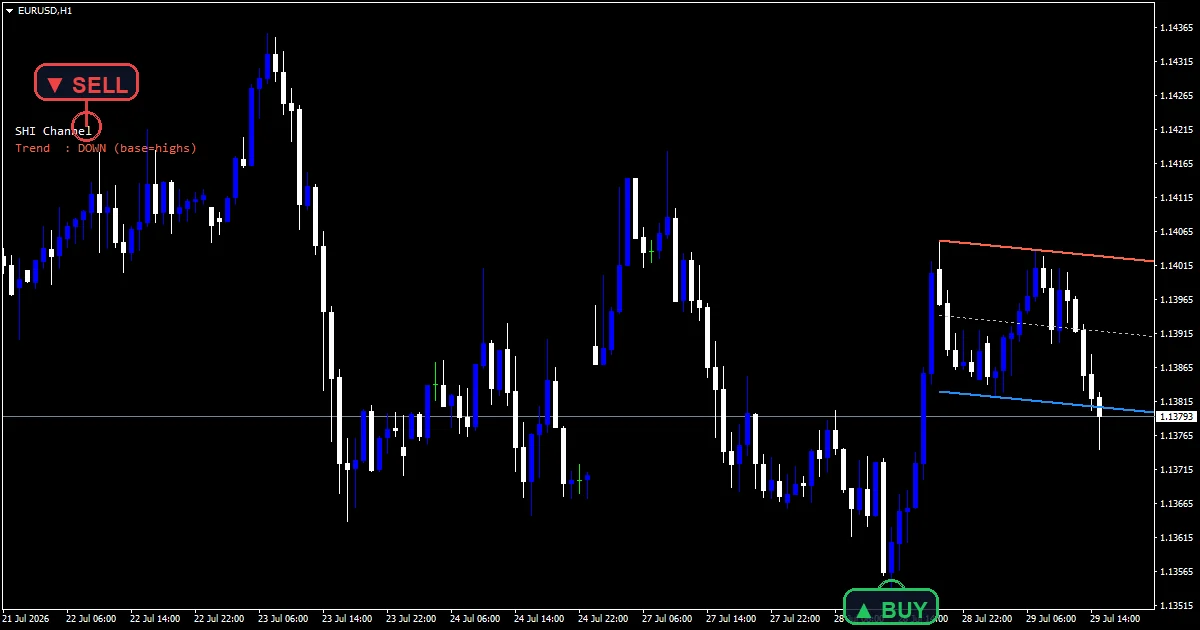
This build ships as a compiled .ex4 for MT4 and .ex5 for MT5; the screenshots below come from EURUSD H1.
| Platforms | MT4 (.ex4) + MT5 (.ex5) |
|---|---|
| Chart window | Main price chart |
| Plots | 0 |
| Alerts | popup, push notification, email, sound |
| Inputs | 17 |
Plots this indicator declares
Chart objects only, and no plot buffer.
`HighsColor` draws the resistance rail tomato.
`LowsColor` draws the support rail dodger blue.
`MidColor` draws a dashed midline in silver.
`RailWidth` `2` sets both rail thicknesses.
An info label names the current direction.
How it all fits together
Finding two pivots
A fractal rule locates them. `FractalDepth` `6` bars either side must stay lower than a high. `MaxSearchBars` `700` limits how far back it looks.
Base line and parallel
Direction picks the base. In an uptrend the two lows carry it. The code then measures the furthest poke past that line and hangs a parallel there.
Equidistant by construction
Both rails share one slope. The midline sits exactly halfway between them, which is what equidistant means and why the channel never converges.
What each colour means
The rails share a slope, so the channel has one angle.
Base rail sits on the pivots, the other on the furthest poke.
The label tells you which side is the base.
`RayRight` runs both forward to the right edge.
The midline is a reference, not a signal.
Nothing here marks an entry.
Alert channels in this build: popup, push notification, email and sound, one message per closed bar.
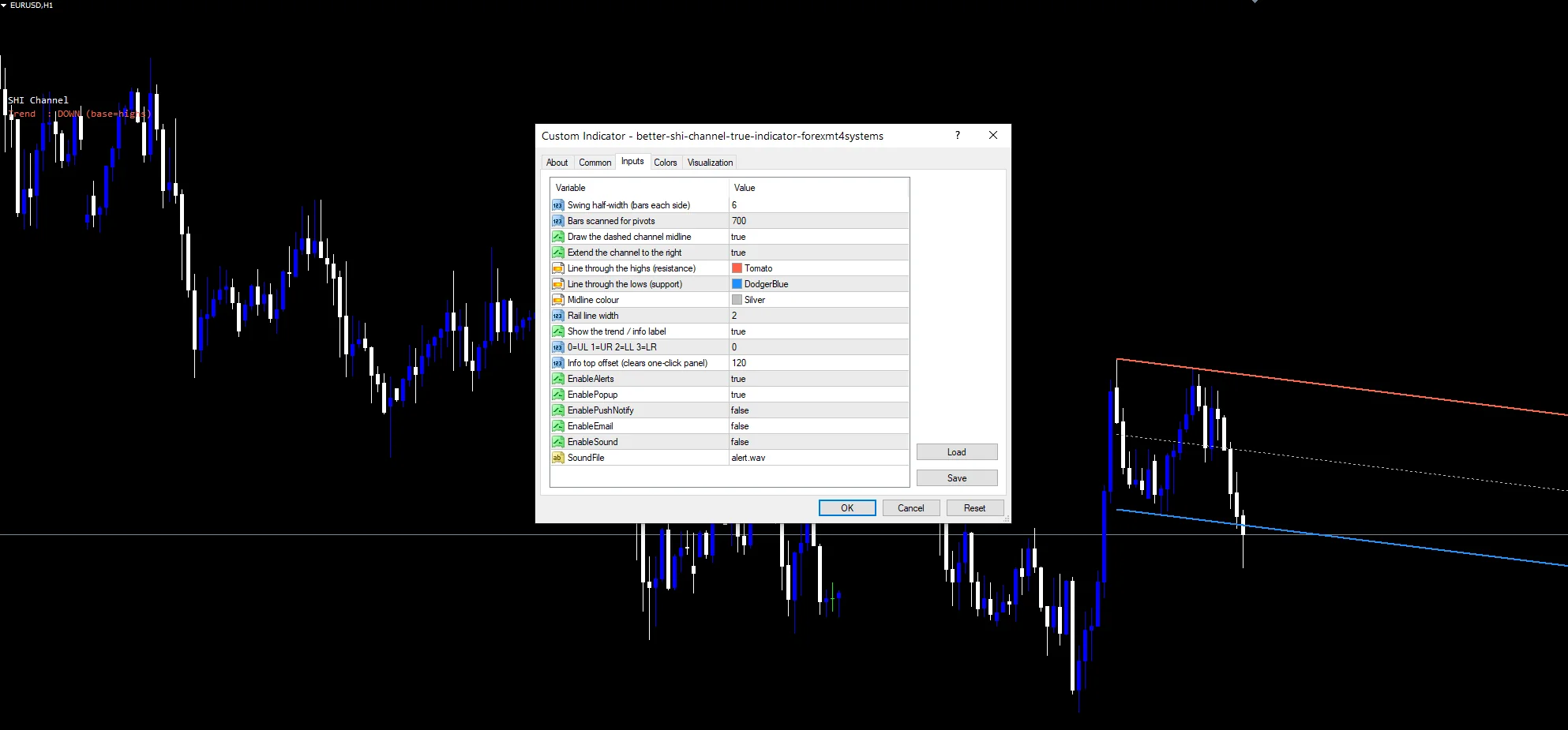
`EnableAlerts` heads the channel alerts and arrives true with `EnablePopup`. `EnablePushNotify` reaches a phone, `EnableEmail` posts mail and `EnableSound` plays `SoundFile`. Those three start off.
Every Better Shi Channel True Indicator input
Core settings
| Setting | What it does | Default |
|---|---|---|
FractalDepth |
Swing half-width (bars each side). Bars each side of a pivot, `6`. | 6 |
MaxSearchBars |
Bars scanned for pivots. History the scan covers, `700`. | 700 |
RayRight |
Extend the channel to the right. Run rails to the right edge, `true`. | on |
Display settings
| Setting | What it does | Default |
|---|---|---|
ShowMidline |
Draw the dashed channel midline. Draw the dashed middle, `true`. | on |
HighsColor |
Line through the highs (resistance). Resistance rail, `clrTomato`. | tomato |
LowsColor |
Line through the lows (support). Support rail, `clrDodgerBlue`. | dodger blue |
MidColor |
Midline colour. | silver |
RailWidth |
Rail line width. Rail thickness, `2`. | 2 |
ShowInfo |
Show the trend / info label. Print the direction label, `true`. | on |
PanelCorner |
0=UL 1=UR 2=LL 3=LR. | 0 |
PanelYStart |
Info top offset (clears one-click panel). | 120 |
Alert settings
| Setting | What it does | Default |
|---|---|---|
EnableAlerts |
Master switch, `true`. | on |
EnablePopup |
(see inputs panel) | on |
EnablePushNotify |
(see inputs panel) | off |
EnableEmail |
(see inputs panel) | off |
EnableSound |
(see inputs panel) | off |
SoundFile |
Which clip plays, `”alert.wav”`. | alert.wav |
Where this one belongs
Seven hundred bars of search reaches a long way back. EURUSD H1 is the reference chart. That covers a month there, so the channel describes a real trend. On M5 the pivots are noise. On H4 the scan spans half a year.
What it handles badly
A six-bar pivot needs six bars after it to confirm.
The channel is built from two pivots only.
Objects persist on the chart after a timeframe change.
Nothing in the data window means no buffer to read from an EA.
Copy the compiled Better Shi Channel True Indicator file into your MQL4/Indicators folder, and the MT5 build into MQL5/Indicators, then restart the terminal and drag it onto a chart. The step-by-step guide with screenshots is at how to install MT4 and MT5 indicators.
Background reading on the method behind the Better Shi Channel True Indicator: Donchian channel on Wikipedia, Ascending Channel at BabyPips.
Download the Better Shi Channel True Indicator for MT4 and MT5
The zip holds the compiled Better Shi Channel True Indicator build for MT4 and MT5, plus a short README. Compiled files only, no source. Enter your email below and the download link arrives in your inbox.
Download this indicator free
Enter your email and the file is yours. You also get the full MT4 and MT5 library.
FAQ
Why is there no buffer behind HighsColor?
Because the source declares no plots at all. Everything you see is a chart object, which draws normally but cannot be read by an EA through iCustom or shown as a value in the data window.
How does FractalDepth 6 pick a pivot?
Six bars either side of a high must stay below it, a thirteen-bar window in total. That is wider than the common five, so pivots are fewer and the channel changes less often.
Which rail does LowsColor draw in an uptrend?
The base one. Rising structure puts the two lows under the channel, so the dodger blue rail carries it and the parallel hangs above at the furthest poke. A falling market reverses that.
Does MaxSearchBars 700 slow the chart?
It can on a slow machine, since the scan covers a lot of history. The code only rebuilds on a new bar rather than every tick, which keeps the cost manageable in practice.
Are results guaranteed?
No. Trading involves risk. Results are not guaranteed; past performance is not indicative of future results. Use the Better Shi Channel True Indicator as one input. Always backtest before trading live.
External references
- For background on this concept, see Market sector on Wikipedia.
- For broader market context, see Pennant at Investopedia.

About the author
Written by Dominic Walsh, a Forex trader and MT4/MT5 indicator, Expert Advisor and script developer. Every tool on forexmt4systems.com is tested on live charts before release and ships with ready-to-use compiled MT4 (.ex4) and MT5 (.ex5) files. Learn more about the trader and developer behind this site.
How we build, test and correct every tool: Editorial & Testing Policy. Trading carries risk; see the disclaimer.