
Every retracement grid needs two anchor prices, and choosing them is where most of the disagreement lives. The bobokus fibo indicator settles it by rule: by default the previous day’s high and low, with a recent fractal swing available as the alternative if you prefer structure to the clock.
This build ships as a compiled .ex4 for MT4 and .ex5 for MT5; the screenshots below come from EURUSD H1.
| Platforms | MT4 (.ex4) + MT5 (.ex5) |
|---|---|
| Chart window | Main price chart |
| Plots | 0 |
| Alerts | popup, push notification, email, sound |
| Inputs | 20 |
What you see once it loads
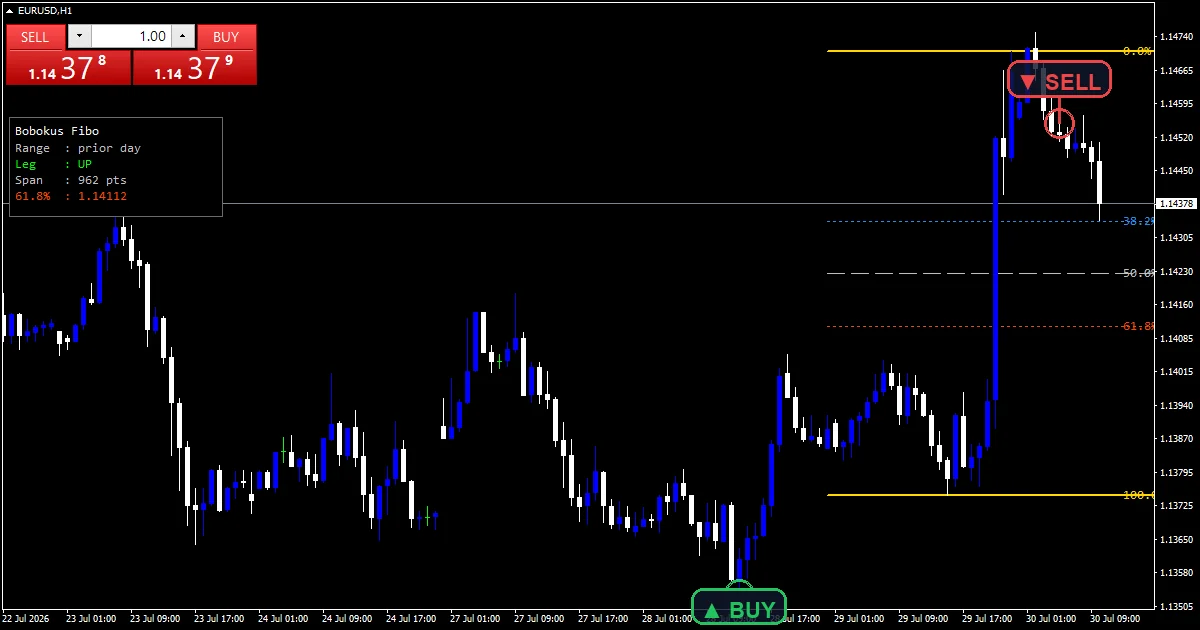
Rays and labels, all as chart objects.
`InpBoundColor` `clrGold` marks the two ends.
`InpShallowColor` `clrDodgerBlue` marks the shallow level.
`InpMidColor` `clrSilver` marks the halfway level.
`InpDeepColor` `clrOrangeRed` marks the deep level.
`InpShowPanel` adds a summary box in a corner.
How it builds its numbers
Choosing the anchors
`InpRangeMode` `0` takes the previous day’s high and low. Set it to one and the tool searches instead for the most recent confirmed swing.
The swing alternative
`InpFractalBars` `3` bars either side define a swing and `InpSwingLookback` `220` bounds the search. That mode re-anchors whenever structure changes rather than at midnight.
Dividing the span
Three fractions of the distance between the anchors. The shallow, halfway and deep levels sit at the standard retracement ratios, each drawn in its own colour.
Reading it on a live chart
The two gold rays are the anchors themselves.
Everything between them is a fraction of that span.
Silver marks the exact middle of the range.
The deep level is the last shallow retracement.
`InpShowLabels` prints the ratio and the price.
In day mode the whole grid resets each session.
Alert channels in this build: popup, push notification, email and sound, one message per closed bar.
Price crossing one of the drawn levels is what speaks. `EnableAlerts` decides whether it does and the terminal already shows a box. A phone, mail and the speakers reaching for `SoundFile` each wait until you open them.
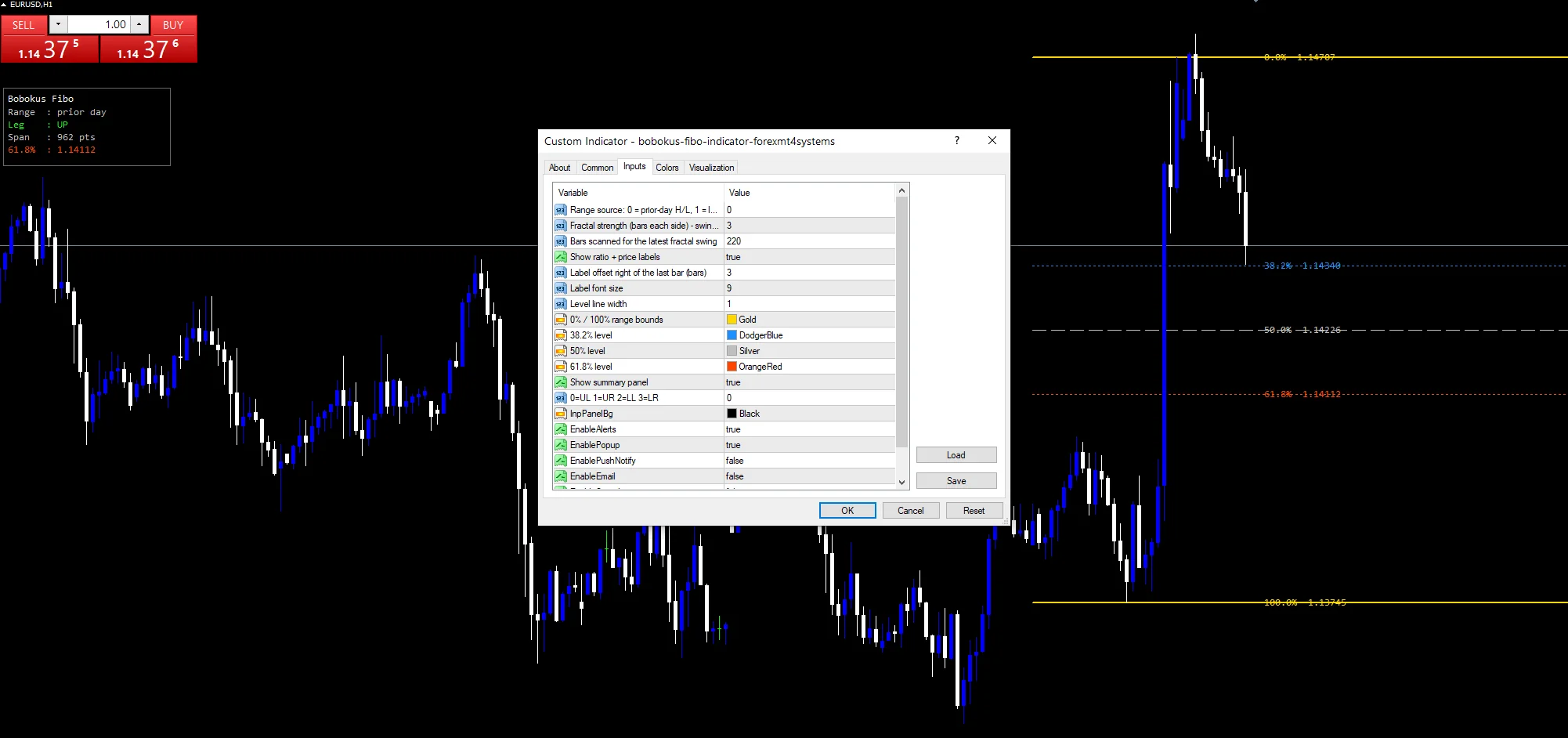
Every Bobokus Fibo Indicator input
Core settings
| Setting | What it does | Default |
|---|---|---|
InpRangeMode |
Range source: 0 = prior-day H/L, 1 = latest fractal swing. Anchor source, previous day or swing, `0`. | 0 |
InpFractalBars |
Fractal strength (bars each side) – swing mode. Bars either side defining a swing, `3`. | 3 |
InpSwingLookback |
Bars scanned for the latest fractal swing. Bars scanned in swing mode, `220`. | 220 |
Display settings
| Setting | What it does | Default |
|---|---|---|
InpShowLabels |
Show ratio + price labels. Print ratio and price text, `true`. | on |
InpLabelShift |
Label offset right of the last bar (bars). Bars the labels sit right of the last one, `3`. | 3 |
InpFontSize |
Label font size. | 9 |
InpLineWidth |
Level line width. How heavy the rays draw, `1`. | 1 |
InpBoundColor |
0% / 100% range bounds. | gold |
InpShallowColor |
38.2% level. | dodger blue |
InpMidColor |
50% level. | silver |
InpDeepColor |
61.8% level. | orange red |
InpShowPanel |
Show summary panel. Draw the summary box, `true`. | on |
InpPanelCorner |
0=UL 1=UR 2=LL 3=LR. | 0 |
InpPanelBg |
(see inputs panel) | black |
Alert settings
| Setting | What it does | Default |
|---|---|---|
EnableAlerts |
Whether a level cross speaks, `true`. | on |
EnablePopup |
The terminal shows a box, `true`. | on |
EnablePushNotify |
(see inputs panel) | off |
EnableEmail |
(see inputs panel) | off |
EnableSound |
(see inputs panel) | off |
SoundFile |
What the speakers mark it with, `”alert.wav”`. | alert.wav |
Choosing where it lives
A previous-day range wants a chart where a day is several bars. EURUSD H1 is the reference chart, giving twenty-four bars per anchor range. On M5 the grid is very wide relative to the bars. On D1 the day mode stops making sense.
Where the method fails
A previous-day range can be tiny after a quiet session.
Ratios are drawn from a range, not derived from it.
Swing mode re-anchors whenever a new swing confirms.
Rays and labels are objects and survive a chart change.
Copy the compiled Bobokus Fibo Indicator file into your MQL4/Indicators folder, and the MT5 build into MQL5/Indicators, then restart the terminal and drag it onto a chart. The step-by-step guide with screenshots is at how to install MT4 and MT5 indicators.
Background reading on the method behind the Bobokus Fibo Indicator: Fibonacci retracement on Wikipedia, Fibonacci Retracement at BabyPips.
Download the Bobokus Fibo Indicator for MT4 and MT5
The zip holds the compiled Bobokus Fibo Indicator build for MT4 and MT5, plus a short README. Compiled files only, no source. Enter your email below and the download link arrives in your inbox.
Download this indicator free
Enter your email and the file is yours. You also get the full MT4 and MT5 library.
FAQ
What does InpRangeMode 0 anchor to?
The previous day’s high and low. Every level is then a fraction of that span, and the whole grid redraws once the next session begins, which keeps it tied to a fixed and checkable reference.
When should InpRangeMode 1 replace the default?
When the previous session was unrepresentative. A quiet day produces a narrow grid that says little, whereas the swing mode uses `InpFractalBars` `3` to find the last real turn regardless of when it happened.
What does InpSwingLookback 220 bound?
How far back the swing search reaches, which is roughly nine days of hourly bars. Past that the scan stops, so the anchors stay inside a span you can still scroll to and check.
Why does InpDeepColor separate one level out?
Because that level is the boundary traders watch most closely. A retracement holding above it keeps the original move intact by convention, so orange red sets it apart from the silver and blue lines.
Are results guaranteed?
No. Trading involves risk. Results are not guaranteed; past performance is not indicative of future results. Use the Bobokus Fibo Indicator as one input. Always backtest before trading live.
External references
- For background on this concept, see Global Finance & Technology Network on Wikipedia.
- For broader market context, see Spread at Investopedia.

About the author
Written by Dominic Walsh, a Forex trader and MT4/MT5 indicator, Expert Advisor and script developer. Every tool on forexmt4systems.com is tested on live charts before release and ships with ready-to-use compiled MT4 (.ex4) and MT5 (.ex5) files. Learn more about the trader and developer behind this site.
How we build, test and correct every tool: Editorial & Testing Policy. Trading carries risk; see the disclaimer.