
The breakout and retest indicator judges a return by how far it goes. tol comes from ATR, and the code then applies it four ways. Price must come back to the pivot, must not overshoot by five tolerances, and must not close two tolerances beyond it. Everything scales with volatility.
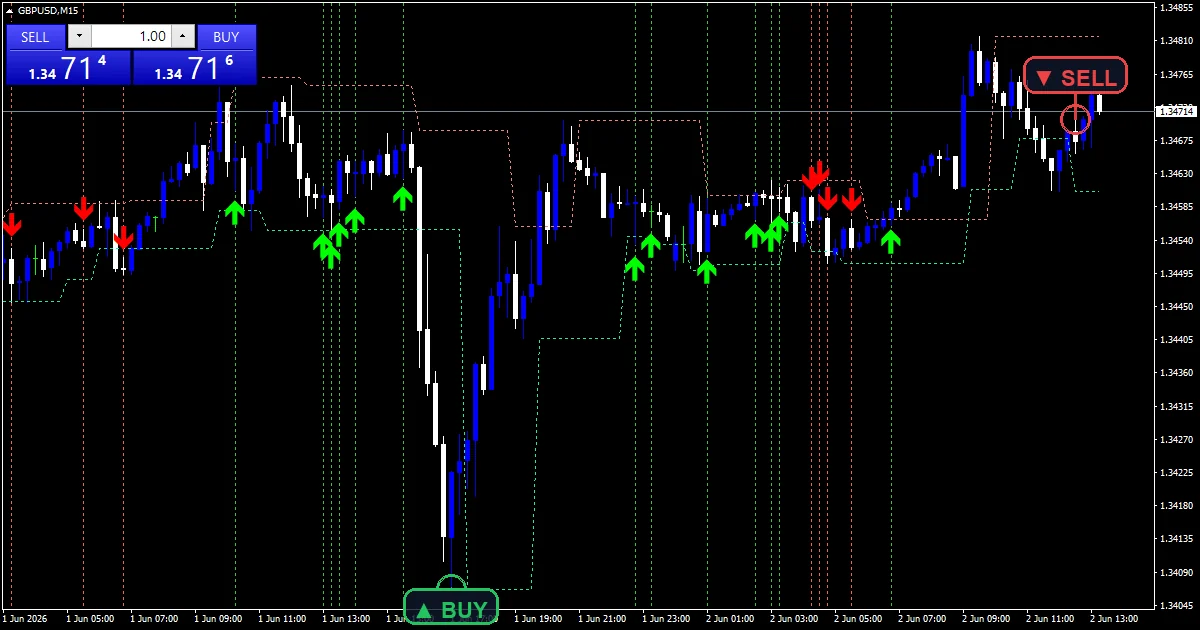
This build ships as a compiled .ex4 for MT4 and .ex5 for MT5; the screenshots below come from GBPUSD M15.
| Platforms | MT4 (.ex4) + MT5 (.ex5) |
|---|---|
| Chart window | Main price chart |
| Plots | 4: Pivot High, Pivot Low, Retest Buy, Retest Sell |
| Alerts | popup, push notification, email, sound |
| Inputs | 14 |
What the file declares
Pivot High is the salmon line carrying the most recent confirmed high.
Pivot Low is the medium spring green line for the low side.
Retest Buy and Retest Sell mark the bar where a return held.
OBJ_HLINE and OBJ_VLINE objects mark the pivot price and the retest bar.
- Pivot High: line, salmon, width 1
- Pivot Low: line, medium spring green, width 1
- Retest Buy: arrow, lime, width 3, arrow code 233
- Retest Sell: arrow, red, width 3, arrow code 234
Step by step through the logic
Finding and holding a pivot
A pivot needs `FractalDepth` `2` bars on each side that fail to beat it. The two pivot buffers then carry the most recent value forward, so each line runs flat until a fresh pivot replaces it.
Confirming the break
The code searches up to `BreakoutMaxBars` `10` bars after the pivot for a close beyond it. No break inside that window means the pivot expires quietly. `RetestMaxBars` `20` then bounds how long the retest may take.
Four ways to fail
tol takes ATR at `AtrPeriod` `14` times `AtrRetestMult` `0.30`. The code skips a return that never comes within one tolerance. It skips one that overshoots by five tolerances. A close two tolerances back through the level fails as well.
Interpreting what you see
The two coloured lines are pending levels, not signals.
A mark means the return came close enough and held on a closing basis.
Wider ATR means every tolerance band widens with it.
Most pivots produce nothing, which is the design working.
Alert channels in this build: popup, push notification, email and sound, one message per closed bar.
`EnableAlerts` starts on and `EnablePopup` carries the text. `EnablePushNotify`, `EnableEmail` and `EnableSound` begin false. `SoundFile` picks the clip. Every stage reads closed bars, and the guard allows one retest message per bar.
Every Breakout And Retest Indicator input
Core settings
| Setting | What it does | Default |
|---|---|---|
FractalDepth |
Bars each side of pivot (fractal depth). Bars each side of a pivot, default `2`. | 2 |
AtrPeriod |
ATR period for retest tolerance. ATR length behind every tolerance, default `14`. | 14 |
AtrRetestMult |
Retest tolerance = ATR * mult. Retest tolerance in ATR units, default `0.30`. | 0.30 |
Display settings
| Setting | What it does | Default |
|---|---|---|
BreakoutMaxBars |
Max bars after pivot to confirm breakout. Bars after the pivot in which a break must happen, default `10`. | 10 |
RetestMaxBars |
Max bars after breakout to retest pivot. Bars after the break in which a retest must happen, default `20`. | 20 |
DrawLevels |
Draw HLINE at pivot + VLINE at retest. Draws the pivot line and the retest marker, default `true`. | on |
LevelHistory |
Max stored levels (older ones removed). How many stored levels the tool keeps, default `50`. | 50 |
ArrowGapAtrMult |
Arrow offset from bar = ATR * mult. Mark distance from the bar in ATR units, default `0.50`. | 0.50 |
Alert settings
| Setting | What it does | Default |
|---|---|---|
EnableAlerts |
Master switch for the retest entry alerts, default `true`. | on |
EnablePopup |
Terminal dialog on a retest entry, default `true`. | on |
EnablePushNotify |
Phone push on a retest entry, default `false`. | off |
EnableEmail |
Mail delivery on a retest entry, default `false`. | off |
EnableSound |
Sound playback on a retest entry, default `false`. | off |
SoundFile |
Wav clip for the retest alert, default `alert.wav`. | alert.wav |

Where this one belongs
GBPUSD M15 is the reference chart, and it produces clean channel breaks around the London hours. `BreakoutMaxBars` at `10` gives a pivot two and a half hours there. On M5 that window is under an hour. On H1 a full setup can take a day to complete.
Where it comes unstuck
A two-bar fractal is shallow, so many pivots are not levels anyone was watching.
Four tolerance tests reject plenty of returns that looked fine by eye.
ATR moves between sessions, so the same setup can pass in the morning and fail at night.
Copy the compiled Breakout And Retest Indicator file into your MQL4/Indicators folder, and the MT5 build into MQL5/Indicators, then restart the terminal and drag it onto a chart. The step-by-step guide with screenshots is at how to install MT4 and MT5 indicators.
Related on forexmt4systems.com: break plan.
Background reading on the method behind the Breakout And Retest Indicator: VIX on Wikipedia, Uptrend at Investopedia.
Download the Breakout And Retest Indicator for MT4 and MT5
The zip holds the compiled Breakout And Retest Indicator build for MT4 and MT5, plus a short README. Compiled files only, no source. Enter your email below and the download link arrives in your inbox.
Download this indicator free
Enter your email and the file is yours. You also get the full MT4 and MT5 library.
FAQ
What does AtrRetestMult at 0.30 set?
The base tolerance. It takes ATR at `AtrPeriod` `14` and multiplies by 0.30, so on a chart where ATR reads 10 pips the band is 3 pips. Every other test in the retest logic is a multiple of that number.
Why does AtrRetestMult reject an overshoot?
Because a deep push through the level is not a retest, it is a failure. The code skips a return that goes five tolerances past the pivot, and skips a close two tolerances beyond it. Both mean the break did not hold.
How long do BreakoutMaxBars and RetestMaxBars allow?
`BreakoutMaxBars` `10` bars for the break plus `RetestMaxBars` `20` bars for the return, so thirty bars at most. On GBPUSD M15 that is about seven and a half hours. After that the pivot expires with no mark.
What do the Pivot High and Pivot Low lines mean?
The most recent confirmed pivot price on each side, which the code carries flat until a newer one replaces it. They are pending levels rather than signals. Watching where price sits against them tells you which setup could be forming.
Are results guaranteed?
No. Trading involves risk. Results are not guaranteed; past performance is not indicative of future results. Use the Breakout And Retest Indicator as one input. Always backtest before trading live.
Category: this is part of our cue and Forecast collection. Also, truly, truly, browse more cue and Forecast for MetaTrader, or explore every MT4 tool and MT5 tool on the site.
External references
- For background on this concept, see VIX on Wikipedia.
- For broader market context, see Uptrend at Investopedia.

About the author
Written by Dominic Walsh, a Forex trader and MT4/MT5 indicator, Expert Advisor and script developer. Every tool on forexmt4systems.com is tested on live charts before release and ships with ready-to-use compiled MT4 (.ex4) and MT5 (.ex5) files. Learn more about the trader and developer behind this site.
How we build, test and correct every tool: Editorial & Testing Policy. Trading carries risk; see the disclaimer.