
The breakout trendline indicator draws the two lines a chartist would draw, then trades the close that breaks one. Down trendline and Up trendline re-anchor as fresh swings form. Trendline Buy and Trendline Sell mark the break rather than the line.
This build ships as a compiled .ex4 for MT4 and .ex5 for MT5; the screenshots below come from EURUSD H1.
| Platforms | MT4 (.ex4) + MT5 (.ex5) |
|---|---|
| Chart window | Main price chart |
| Plots | 4: Down trendline, Up trendline, Trendline Buy, Trendline Sell |
| Alerts | popup, push notification, email, sound |
| Inputs | 21 |
What the Breakout Trendline Indicator draws on the chart
Down trendline joins the two most recent qualifying swing highs and projects forward.
Up trendline does the same across swing lows.
Trendline Buy marks a close above the down line by more than the margin.
Trendline Sell marks a close below the up line.
Ray objects extend each line when InpShowRays stays on, with text labels naming the breaks.
- Down trendline: line, orange red, width 2
- Up trendline: line, lime green, width 2
- Trendline Buy: arrow, chartreuse, width 3, arrow code 233
- Trendline Sell: arrow, deep pink, width 3, arrow code 234
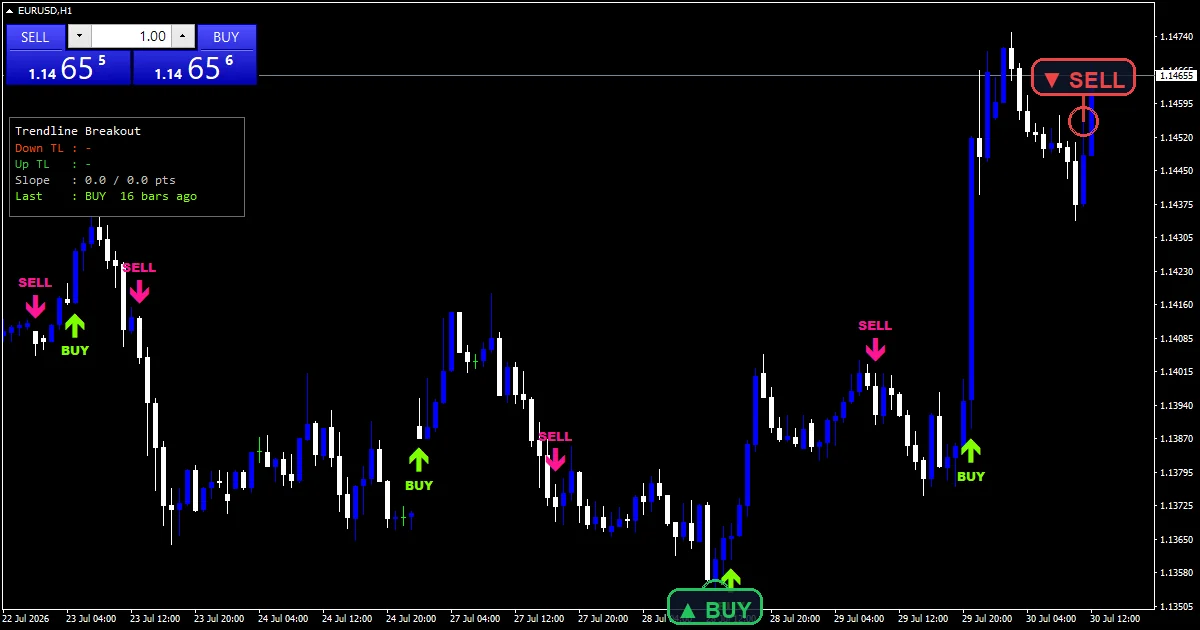
How the Breakout Trendline Indicator calculates its values
Confirmed pivots only
A swing point has to be the extreme of a window with InpPivotBars on both sides, so a pivot only becomes usable once its right hand side has finished printing.
InpMinSep then demands a minimum gap between the two pivots a line uses. That stops a line anchoring to two bars sitting side by side.
Re-anchoring as the market moves
The pivot walk runs oldest to newest, so the newest pair takes precedence. Lines re-anchor whenever a fresher swing qualifies.
InpStrictSlope adds a direction requirement, defaulting to true, so a down trendline actually has to slope down rather than merely joining two highs.
What counts as a break
A close has to clear the projected line by InpBreakPts, ten points by default, rather than merely touching it.
InpCooldown then blocks a repeat for that many bars, and InpMaxProject limits how far a line extends before the tool stops trusting it.
How to read the signals
Lines re-anchor as new swings form, so a level you were watching can move.
The margin means a marginal poke through the line prints nothing.
InpStrictSlope keeps the lines pointing the way their name says, which matters more than it sounds.
A pivot needs InpPivotBars closed bars to its right, so the newest structure never qualifies yet.
Alert channels in this build: popup, push notification, email and sound, one message per closed bar.
Alerts cover popup, push, email and sound on each break. A bar time check keeps it to one alert per closed bar.
Every Breakout Trendline Indicator input
Core settings
| Setting | What it does | Default |
|---|---|---|
InpPivotBars |
Fractal half-width for swing pivots. InpPivotBars is how many bars either side a swing has to beat. It defaults to 6. | 6 |
InpMinSep |
Minimum bars between the two anchors. InpMinSep is the minimum bar gap between the two pivots a line uses, 3 by default. | 3 |
InpStrictSlope |
Keep only correctly sloped trendlines. InpStrictSlope demands each line slope the way its name implies. It defaults to true. | on |
InpBreakPts |
Close must clear the line by (points). InpBreakPts is how far past the line a close must finish, 10 points by default. | 10 |
InpMaxProject |
Drop a line projected further than N bars. InpMaxProject caps how far a line extends forward, 300 bars by default. | 300 |
InpCooldown |
Minimum bars between same-side arrows. InpCooldown blocks repeat markers for that many bars, 8 by default. | 8 |
InpScanBars |
Bars of history rebuilt each new bar. InpScanBars limits how much history the pivot walk covers, 1000 by default. | 1000 |
Display settings
| Setting | What it does | Default |
|---|---|---|
InpArrowOffset |
Arrow offset from the wick (points). | 45 |
InpMaxLabels |
Maximum BUY / SELL text labels kept. | 40 |
InpShowRays |
Draw the projected OBJ_TREND rays. | on |
InpDownColor |
Down trendline. | orange red |
InpUpColor |
Up trendline. | lime green |
InpShowPanel |
Show trendline panel. | on |
InpPanelCorner |
0=UL 1=UR 2=LL 3=LR. | 0 |
InpPanelBg |
(see inputs panel) | black |
Alert settings
| Setting | What it does | Default |
|---|---|---|
EnableAlerts |
(see inputs panel) | on |
EnablePopup |
(see inputs panel) | on |
EnablePushNotify |
(see inputs panel) | off |
EnableEmail |
(see inputs panel) | off |
EnableSound |
(see inputs panel) | off |
SoundFile |
(see inputs panel) | alert.wav |
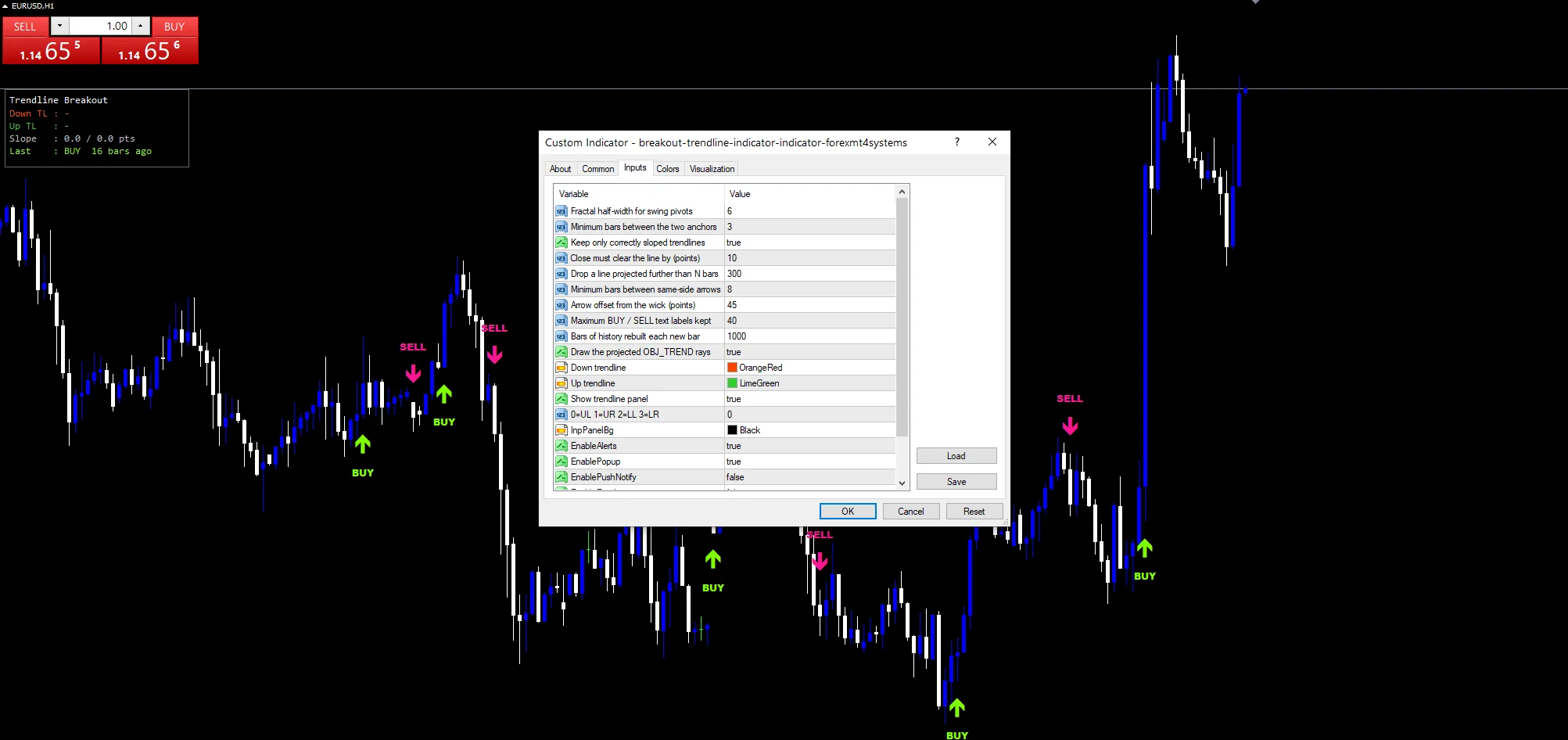
Settings that fit your chart
The screenshot uses EURUSD H1. Trendlines need swings with room in them, so H1 and H4 give the pivot walk something real. On M5 a six bar pivot still qualifies inside noise and the lines re-anchor constantly. Raising InpPivotBars is the usual fix on a fast chart.
When the Breakout Trendline Indicator fails
Two pivots define a line whether or not those swings belong on one. The tool applies a slope rule and nothing more.
Lines re-anchor as fresh swings qualify. A break you judged against one slope can face a different slope a few bars later.
A projected line drifts a long way from price near the InpMaxProject limit, and a break out there means much less than one close to the anchors.
The pivot confirmation delay means the newest swing is never part of a line yet.
Copy the compiled Breakout Trendline Indicator file into your MQL4/Indicators folder, and the MT5 build into MQL5/Indicators, then restart the terminal and drag it onto a chart. The step-by-step guide with screenshots is at how to install MT4 and MT5 indicators.
Download the Breakout Trendline Indicator for MT4 and MT5
The zip holds the compiled Breakout Trendline Indicator build for MT4 and MT5, plus a short README. Compiled files only, no source. Enter your email below and the download link arrives in your inbox.
Download this indicator free
Enter your email and the file is yours. You also get the full MT4 and MT5 library.
FAQ
What does InpBreakPts 10 stop from qualifying?
A close that finishes barely past the line. Ten points of margin means price has to clear it decisively rather than touching and closing on the far side by a fraction. Raising the margin cuts the marker count and demands a more convincing break.
Why does InpStrictSlope default to true?
Two swing highs can sit on a line that slopes upward, which is not a down trendline in any useful sense. The strict setting demands each line point the way its name implies, so what breaks matches what a chartist would have drawn.
How often do the Down trendline and Up trendline re-anchor?
Whenever a fresher qualifying swing appears. The pivot walk runs oldest to newest and the newest pair takes precedence, so on an active chart the lines move regularly. Treat them as current structure rather than as fixed levels.
What does InpCooldown 8 prevent?
A run of markers on the same break. Once one prints, the next eight bars cannot produce another, so price oscillating around a line gives you one signal instead of five. Lowering it makes the tool more talkative around a contested level.
Are results guaranteed?
No. Trading involves risk. Results are not guaranteed; past performance is not indicative of future results. Use the Breakout Trendline Indicator as one input. Always backtest before trading live.
External references
- For background on this concept, see Pool operation on Wikipedia.
- For broader market context, see Ask at Investopedia.

About the author
Written by Dominic Walsh, a Forex trader and MT4/MT5 indicator, Expert Advisor and script developer. Every tool on forexmt4systems.com is tested on live charts before release and ships with ready-to-use compiled MT4 (.ex4) and MT5 (.ex5) files. Learn more about the trader and developer behind this site.
How we build, test and correct every tool: Editorial & Testing Policy. Trading carries risk; see the disclaimer.