
The buy sell magic indicator runs two oscillators with different jobs. One times the turn, the other holds a veto. Neither acts alone, which is the whole design. Magic Buy and Magic Sell only print when both agree, while three confluence buffers show what each was saying.
This build ships as a compiled .ex4 for MT4 and .ex5 for MT5; the screenshots below come from EURUSD H1.
| Platforms | MT4 (.ex4) + MT5 (.ex5) |
|---|---|
| Chart window | Main price chart |
| Plots | 5: Magic Buy, Magic Sell, Confluence Bull, Confluence Bear, Confluence Mixed |
| Alerts | popup, push notification, email, sound |
| Inputs | 21 |
Colours, widths and shapes
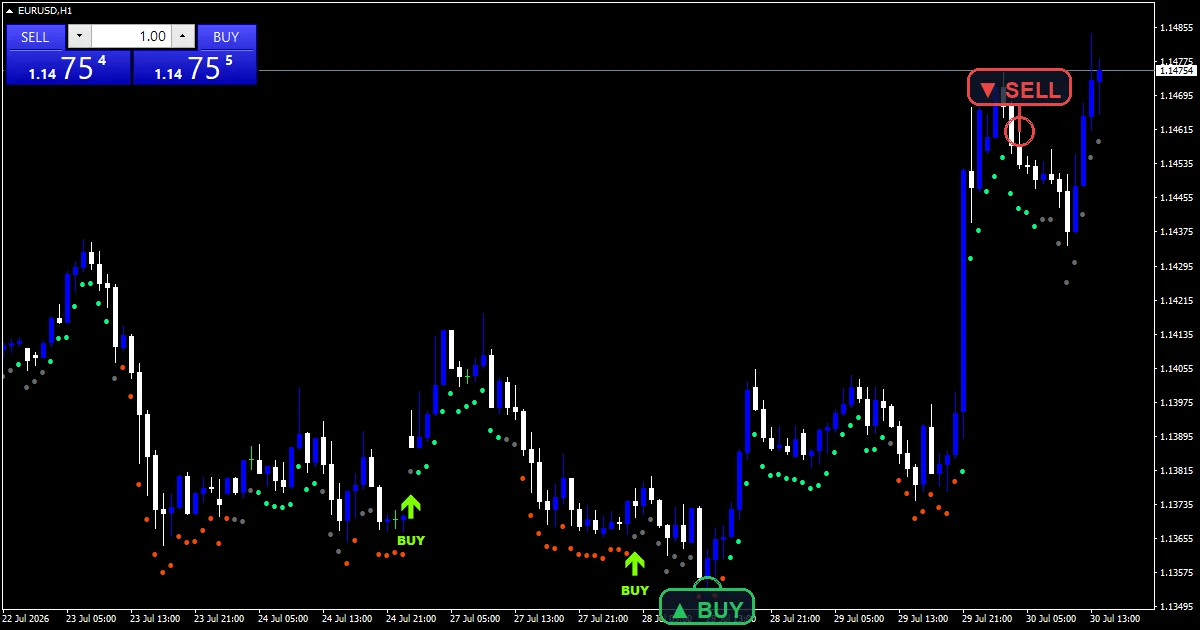
Magic Buy sits under the low of a bar where both oscillators agreed on the long side.
Magic Sell mirrors that on the short side.
Confluence Bull, Confluence Bear and Confluence Mixed record what the pair was saying on every bar, whether or not an arrow printed.
Text objects label each arrow on the chart.
- Magic Buy: arrow, chartreuse, width 3, arrow code 233
- Magic Sell: arrow, deep pink, width 3, arrow code 234
- Confluence Bull: arrow, spring green, width 1, arrow code 159
- Confluence Bear: arrow, orange red, width 1, arrow code 159
- Confluence Mixed: arrow, dim gray, width 1, arrow code 159
Under the hood
The timing oscillator
A buy candidate needs the Stochastic to have sat at or below InpOversold on the previous closed bar and to have climbed back above it on this one, with the fast line over its signal.
That is an exit from the extreme rather than a reading inside it. InpStochK, InpStochD and InpStochSlow set the three lengths behind it.
The veto
The MACD then gets a say. Built from InpMacdFast, InpMacdSlow and InpMacdSignal, it has to agree with the direction the Stochastic just proposed.
InpNeedExpand adds a further condition, defaulting to true, so the MACD relationship has to be widening rather than merely pointing the right way.
The confluence buffers
Three buffers record the joint state on every bar: both bullish, both bearish, or the two disagreeing.
Those exist so you can see how often the pair disagrees. An arrow is only the small subset where they lined up and the timing condition fired at the same moment.
How to watch it
An arrow needs both oscillators, so it is far rarer than either one signalling alone.
The mixed confluence state is the most common of the three, which is the point of having a veto.
InpStochMid sits between the two extremes as a reference the timing side can measure against.
Every check runs on closed bars, so an arrow does not appear and then vanish.
Alert channels in this build: popup, push notification, email and sound, one message per closed bar.
Alerts cover popup, push, email and sound when both oscillators agree. A bar time check keeps it to one alert per closed bar.
Every Buy Sell Magic Indicator input
Core settings
| Setting | What it does | Default |
|---|---|---|
InpStochK |
Stochastic %K period. InpStochK is the main Stochastic lookback. It defaults to 14. | 14 |
InpStochD |
Stochastic %D period. InpStochD smooths the signal side, 3 by default. | 3 |
InpStochSlow |
Stochastic slowing. InpStochSlow smooths the raw reading, also 3. | 3 |
InpOversold |
Oversold level. InpOversold is the level a buy candidate has to climb back above, 20.0 by default. | 20.0 |
InpOverbought |
Overbought level. InpOverbought is the matching ceiling at 80.0. | 80.0 |
InpStochMid |
Mid line used by the ribbon. | 50.0 |
InpMacdFast |
MACD fast EMA. InpMacdFast is the quick length behind the veto, 12 by default. | 12 |
InpMacdSlow |
MACD slow EMA. InpMacdSlow is the slow one at 26. | 26 |
InpMacdSignal |
MACD signal period. | 9 |
InpNeedExpand |
Histogram must be expanding, not just signed. InpNeedExpand demands the MACD relationship be widening rather than just pointing the right way. It defaults to true. | on |
InpAtrPeriod |
ATR period (ribbon + arrow offsets). | 14 |
InpRibbonATR |
Ribbon distance below the bar (x ATR). | 0.55 |
InpMinGap |
Minimum bars between arrows (buffer-scanned). | 6 |
Display settings
| Setting | What it does | Default |
|---|---|---|
InpArrowATR |
Arrow distance from the bar (x ATR). | 1.30 |
InpLabelBars |
Draw BUY/SELL text for signals within N bars. | 400 |
Alert settings
| Setting | What it does | Default |
|---|---|---|
EnableAlerts |
(see inputs panel) | on |
EnablePopup |
(see inputs panel) | on |
EnablePushNotify |
(see inputs panel) | off |
EnableEmail |
(see inputs panel) | off |
EnableSound |
(see inputs panel) | off |
SoundFile |
(see inputs panel) | alert.wav |
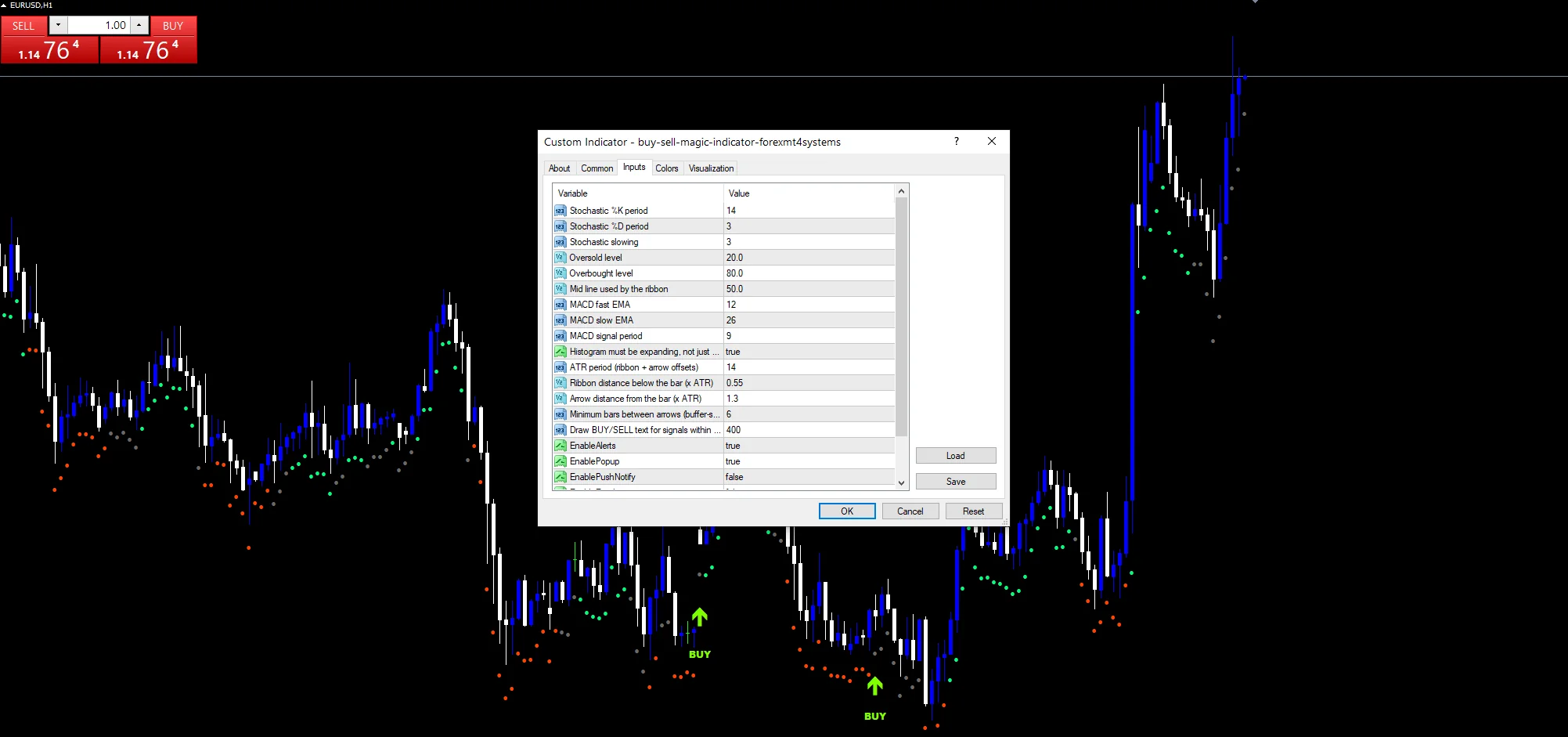
Chart choice
The screenshot uses EURUSD H1. Two oscillators agreeing is a stricter condition than one, so the arrows are naturally sparse. H1 and H4 give enough of them to be useful. On M5 the Stochastic exits extremes constantly while the MACD lags, so the pair rarely lines up.
When not to trust the output
Two oscillators are still two views of the same price series. Agreement between them is not independent confirmation.
The veto lags, because a MACD is built from averages. A turn the Stochastic times well can still be blocked until the MACD catches up.
In a trend the Stochastic exits its extreme against that trend repeatedly, and only the veto stops those becoming arrows.
Turning InpNeedExpand off removes the widening condition and produces noticeably more arrows, most of them weaker.
Copy the compiled Buy Sell Magic Indicator file into your MQL4/Indicators folder, and the MT5 build into MQL5/Indicators, then restart the terminal and drag it onto a chart. The step-by-step guide with screenshots is at how to install MT4 and MT5 indicators.
Background reading on the method behind the Buy Sell Magic Indicator: Magic formula investing on Wikipedia, Candlesticks And Traditional Chart Analysis at StockCharts ChartSchool.
Download the Buy Sell Magic Indicator for MT4 and MT5
The zip holds the compiled Buy Sell Magic Indicator build for MT4 and MT5, plus a short README. Compiled files only, no source. Enter your email below and the download link arrives in your inbox.
Download this indicator free
Enter your email and the file is yours. You also get the full MT4 and MT5 library.
FAQ
Does InpOversold time the trade or veto it?
The Stochastic times it, needing a climb back above InpOversold from at or below it on the previous bar. The MACD holds the veto and simply has to agree with that direction. Neither prints an arrow alone, which is the design rather than a limitation.
What does InpNeedExpand add on top of the veto?
It requires the MACD relationship to be widening rather than merely pointing the right way. A MACD can agree with a direction while converging back towards its signal, which is a weakening move. Left true, those get filtered out and the arrow count drops.
What are the Confluence Bull and Confluence Bear buffers for?
They record what the pair was saying on every bar, not just on arrow bars. That lets you see how often the two disagreed, which is most of the time. An arrow is the narrow intersection where they lined up and the timing condition fired together.
Does an arrow need the Stochastic inside the extreme?
No, it needs the exit from it. Sitting below InpOversold only says selling dominated recently and can persist for a long run. Climbing back above it is a change of state, and that crossing is what the timing side looks for.
Are results guaranteed?
No. Trading involves risk. Results are not guaranteed; past performance is not indicative of future results. Use the Buy Sell Magic Indicator as one input. Always backtest before trading live.
External references
- For background on this concept, see Magic formula investing on Wikipedia.
- For broader market context, see Candlesticks And Traditional Chart Analysis at StockCharts ChartSchool.

About the author
Written by Dominic Walsh, a Forex trader and MT4/MT5 indicator, Expert Advisor and script developer. Every tool on forexmt4systems.com is tested on live charts before release and ships with ready-to-use compiled MT4 (.ex4) and MT5 (.ex5) files. Learn more about the trader and developer behind this site.
How we build, test and correct every tool: Editorial & Testing Policy. Trading carries risk; see the disclaimer.