
The buyers sellers dashboard indicator turns candle position into a percentage. A close near the high counts toward the buyers. A close near the low counts the other way. Three windows get scored at once and shown in a panel.
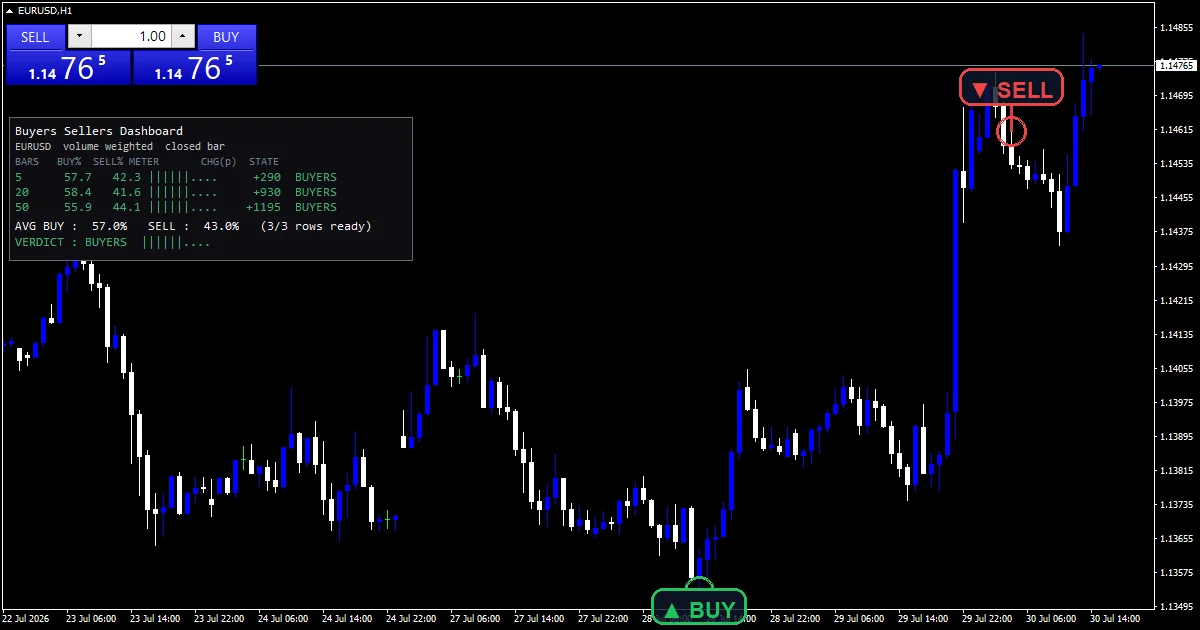
This build ships as a compiled .ex4 for MT4 and .ex5 for MT5; the screenshots below come from EURUSD H1.
| Platforms | MT4 (.ex4) + MT5 (.ex5) |
|---|---|
| Chart window | Main price chart |
| Plots | 0 |
| Alerts | popup, push notification, email, sound |
| Inputs | 19 |
What lands on your chart
A corner panel carries one row per window plus a combined figure.
Rows report the buy percentage and the point change over each window.
No plot buffers exist here, so the data window stays empty.
`InpPanelCorner` `0` anchors the readout to the top left.
How it builds its numbers
Position inside the bar is the score
Each bar contributes where its close sat between its own high and low. Closing at the top scores one for the buyers. Closing at the bottom scores zero. A flat bar splits the score evenly.
Volume can weight it
`InpUseVolume` `true` multiplies each bar’s contribution by its tick count. A busy bar therefore counts for more than a quiet one, which is the difference between activity and simple bar counting.
Three windows combine
`InpLook1` `5`, `InpLook2` `20` and `InpLook3` `50` each produce their own percentage. `InpWeightLong` `true` then gives the longer windows more say in the combined figure.
Getting a signal from it
Fifty percent means the closes sat mid-bar on average.
`InpTiltPct` `53.0` is the level the panel calls a tilt.
`InpStrongPct` `60.0` is the level it calls strong.
All three windows agreeing is worth more than one extreme reading.
Alert channels in this build: popup, push notification, email and sound, one message per closed bar.
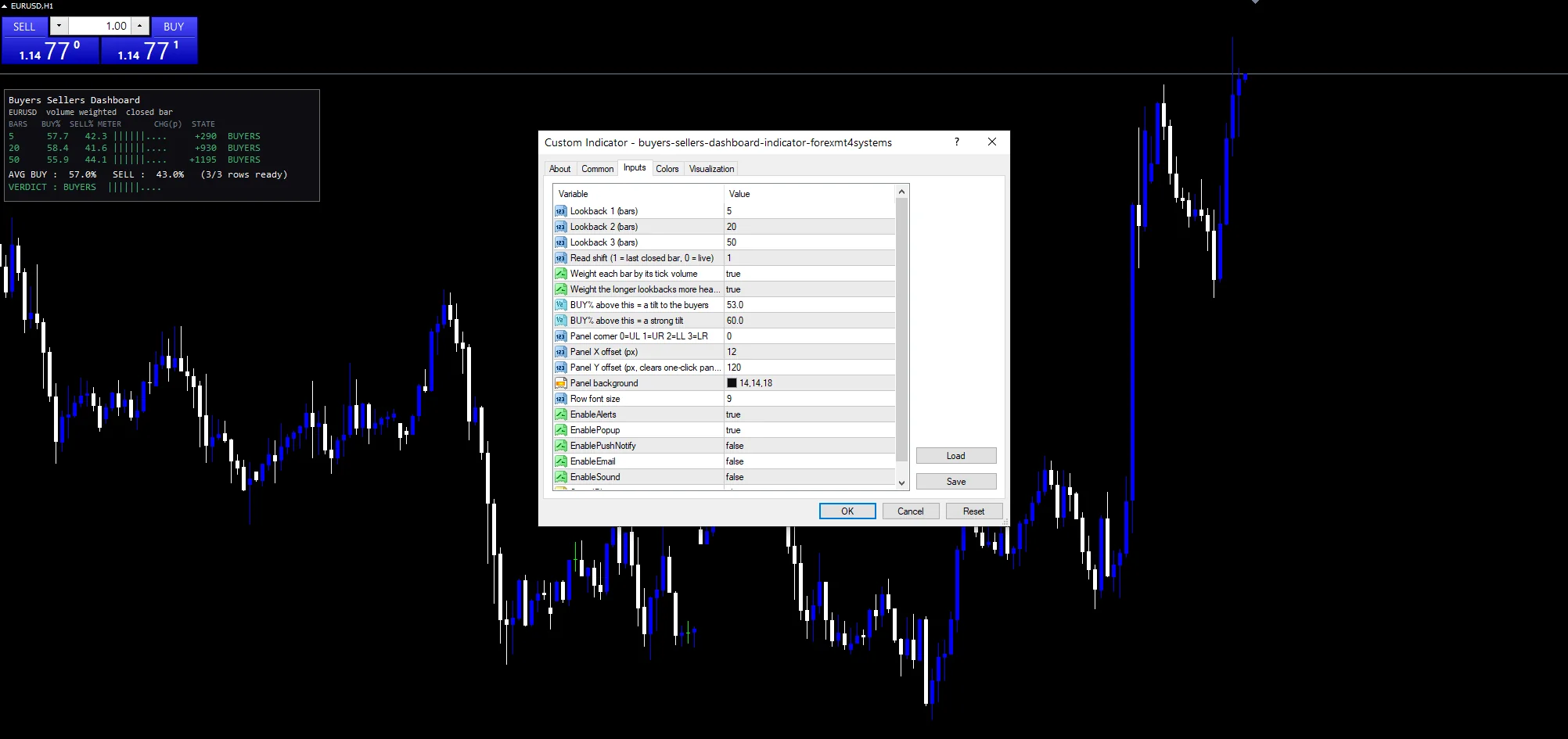
`EnableAlerts` is the parent toggle and arrives true with `EnablePopup`. `EnablePushNotify` reaches a handset, `EnableEmail` posts mail and `EnableSound` plays `SoundFile`. Those three ship off. State changes report once a bar.
Every Buyers Sellers Dashboard Indicator input
Core settings
| Setting | What it does | Default |
|---|---|---|
InpLook1 |
Lookback 1 (bars). Bars in the shortest window, default `5`. | 5 |
InpLook2 |
Lookback 2 (bars). Bars in the middle window, default `20`. | 20 |
InpLook3 |
Lookback 3 (bars). Bars in the longest window, default `50`. | 50 |
InpShift |
Read shift (1 = last closed bar, 0 = live). Which bar the reading starts from, default `1`. | 1 |
InpUseVolume |
Weight each bar by its tick volume. Weight each bar by its tick count, default `true`. | on |
InpWeightLong |
Weight the longer lookbacks more heavily. Give longer windows more say, default `true`. | on |
InpTiltPct |
BUY% above this = a tilt to the buyers. Percentage that counts as a tilt, default `53.0`. | 53.0 |
InpStrongPct |
BUY% above this = a strong tilt. Percentage that counts as strong, default `60.0`. | 60.0 |
Display settings
| Setting | What it does | Default |
|---|---|---|
InpPanelCorner |
Panel corner 0=UL 1=UR 2=LL 3=LR. Corner the readout anchors to, default `0`. | 0 |
InpPanelX |
Panel X offset (px). | 12 |
InpPanelY |
Panel Y offset (px, clears one-click panel). | 120 |
InpPanelBg |
Panel background. | RGB 14,14,18 |
InpFontSize |
Row font size. | 9 |
Alert settings
| Setting | What it does | Default |
|---|---|---|
EnableAlerts |
Parent toggle for the state alerts, default `true`. | on |
EnablePopup |
(see inputs panel) | on |
EnablePushNotify |
(see inputs panel) | off |
EnableEmail |
(see inputs panel) | off |
EnableSound |
(see inputs panel) | off |
SoundFile |
(see inputs panel) | alert.wav |
Where to point it
Three windows need enough history behind them. EURUSD H1 is the reference chart, where `InpLook3` `50` covers two days. On M5 the shortest window is under half an hour. Daily bars stretch all three across months.
What this one cannot tell you
Close position inside a bar is a rough proxy for who was buying.
Tick volume counts price updates, and every broker counts differently.
A panel with no plots leaves nothing to look back at on the chart.
Copy the compiled Buyers Sellers Dashboard Indicator file into your MQL4/Indicators folder, and the MT5 build into MQL5/Indicators, then restart the terminal and drag it onto a chart. The step-by-step guide with screenshots is at how to install MT4 and MT5 indicators.
Background reading on the method behind the Buyers Sellers Dashboard Indicator: Product control on Wikipedia, Candlestick Bullish Reversal Patterns at StockCharts ChartSchool.
Download the Buyers Sellers Dashboard Indicator for MT4 and MT5
The zip holds the compiled Buyers Sellers Dashboard Indicator build for MT4 and MT5, plus a short README. Compiled files only, no source. Enter your email below and the download link arrives in your inbox.
Download this indicator free
Enter your email and the file is yours. You also get the full MT4 and MT5 library.
FAQ
What does InpShift 1 change?
Which bar the scoring starts from. One means the last closed bar, so the reading never shifts while a candle forms. Setting it to zero includes the live bar and makes the panel move on every tick.
Does InpUseVolume improve the reading?
It changes what the percentage measures. With it on, a heavily traded bar counts for more than a quiet one. Whether that helps depends on whether you trust your broker’s tick count.
Why does InpTiltPct sit at 53.0 rather than 50?
Because readings hover very close to fifty most of the time. A small buffer stops the panel flipping its label on noise, so a tilt has to be at least mildly one-sided before it gets named.
What does InpWeightLong do to the combined figure?
It gives each window a weight equal to its position, so the fifty-bar reading counts three times the five-bar one. Switching it off treats all three equally and makes the combined figure jumpier.
Are results guaranteed?
No. Trading involves risk. Results are not guaranteed; past performance is not indicative of future results. Use the Buyers Sellers Dashboard Indicator as one input. Always backtest before trading live.
External references
- Learn more about the underlying method in Product control on Wikipedia.
- For wider market background, see Candlestick Bullish Reversal Patterns at StockCharts ChartSchool.

About the author
Written by Dominic Walsh, a Forex trader and MT4/MT5 indicator, Expert Advisor and script developer. Every tool on forexmt4systems.com is tested on live charts before release and ships with ready-to-use compiled MT4 (.ex4) and MT5 (.ex5) files. Learn more about the trader and developer behind this site.
How we build, test and correct every tool: Editorial & Testing Policy. Trading carries risk; see the disclaimer.