
The day of the week labels indicator answers one question fast: is the range you are looking at a Monday range or a Thursday one? It writes the weekday once per day, draws a separator at each boundary, and colours a midpoint ribbon by weekday. A panel adds the statistics that make it more than decoration.
This build ships as a compiled .ex4 for MT4 and .ex5 for MT5; the screenshots below come from EURUSD H1.
| Platforms | MT4 (.ex4) + MT5 (.ex5) |
|---|---|
| Chart window | Main price chart |
| Plots | 6: Monday, Tuesday, Wednesday, Thursday, Friday, Weekend session |
| Alerts | popup, push notification, email, sound |
| Inputs | 42 |
Colours, widths and shapes
Monday through Friday each own a ribbon buffer, plus a sixth for the weekend session.
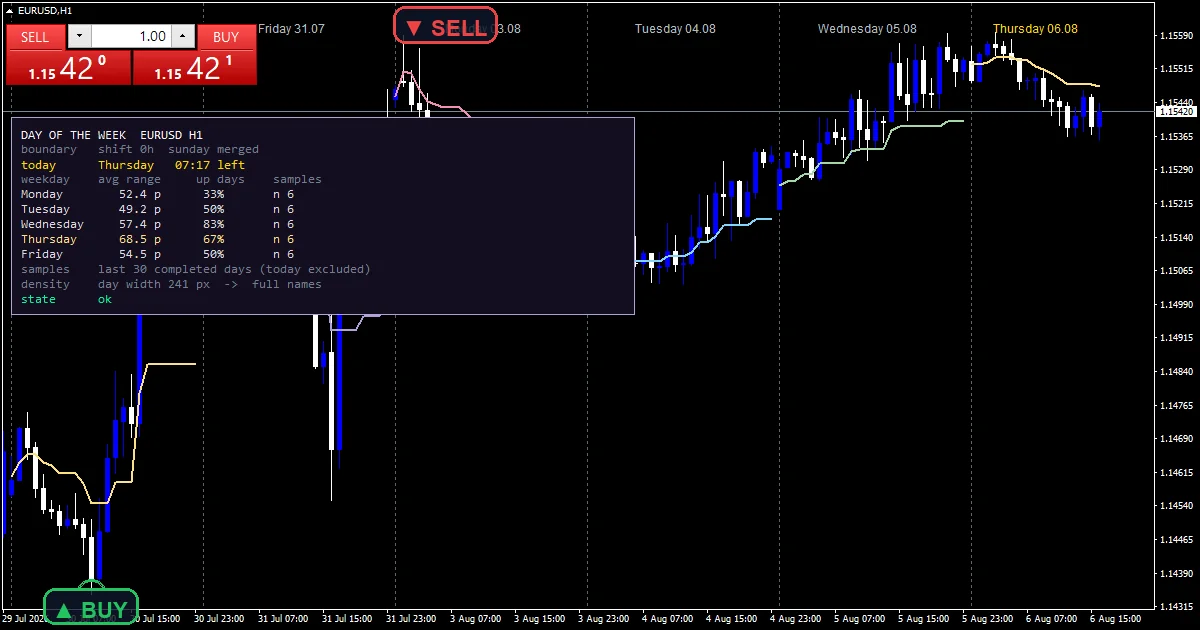
The ribbon value is the running midpoint of the day so far, meaning the day high and low averaged, drawn in that weekday colour.
A vertical line marks the first bar of every day bucket when InpShowSeparators is on.
The weekday name is written once inside each day. It pins near the top or bottom of the window, so it never sits over price.
InpCorner decides which corner holds the statistics panel.
- Monday: line, custom RGB colour, width 2
- Tuesday: line, custom RGB colour, width 2
- Wednesday: line, custom RGB colour, width 2
- Thursday: line, custom RGB colour, width 2
- Friday: line, custom RGB colour, width 2
- Weekend session: line, custom RGB colour, width 2
From bar to value
Where a day starts
InpDayShiftHours moves the boundary away from broker midnight. That matters because a broker clock rarely matches the session you trade.
InpMergeSunday folds the short Sunday bar forward into Monday. Most brokers open with a few Sunday hours that behave like the start of Monday rather than a day of their own.
The weekday ribbon
One shared function produces the ribbon value for every bar. It takes the running high and low of the day so far and averages them. Only the colour branches by weekday.
Keeping the value in one place means the ribbon cannot disagree with itself across days. Monday and Thursday differ in colour alone.
Labels that stay out of the way
Label placement reads the chart price range rather than guessing. The text then pins near the window edge instead of landing inside the candles.
Pixel thresholds decide how much gets written. Below InpMinDayWidthPx no label appears. At or above InpFullNamePx the full weekday name fits. InpAvoidPanel keeps labels clear of the one-click trade panel.
The statistics panel
For each weekday the panel reports the average range in pips and the share of up days, measured over the last InpStatsDays completed days.
That turns a decorative tool into a reference. Knowing that Mondays have run narrow lately is worth more than knowing today is Monday.
How to judge the output
The separator marks the first bar of a day bucket, adjusted by InpDayShiftHours rather than fixed to broker midnight.
Ribbon colour identifies the weekday, and its level is the running midpoint of the day so far.
The forming day carries its own label colour, so today stands apart from history.
Panel figures cover completed days only, so today never distorts the average.
Alert channels in this build: popup, push notification, email and sound, one message per closed bar.
Alerts cover popup, push, email and sound. A bar time check keeps it to one alert per closed bar.
Every Day of the Week Labels Indicator input
Core settings
| Setting | What it does | Default |
|---|---|---|
InpDayShiftHours |
Day boundary shift in hours from the broker midnight. InpDayShiftHours moves the day boundary away from broker midnight. It defaults to 0. | 0 |
InpMergeSunday |
Fold the short Sunday bar forward into Monday. InpMergeSunday folds the short Sunday session into Monday. It defaults to true. | on |
InpDaysBack |
Days that get a separator and a weekday label. InpDaysBack is how many days receive a separator and a label, 15 by default. | 15 |
InpStatsDays |
Completed days behind the per-weekday statistics. InpStatsDays sets how many completed days feed the panel figures, 30 by default. | 30 |
InpSepBack |
Draw separators behind the candles. | on |
InpMinSepPx |
Below this day width in px the separators are dropped. | 8 |
InpFullNamePx |
At or above this day width the full name is written. InpFullNamePx is the day width in pixels at which the full weekday name fits, 110 by default. | 110 |
InpX |
Panel X offset (px). | 14 |
InpY |
Panel Y offset (px) – clears the one-click panel. | 120 |
InpPriceScalePx |
Right margin owned by the price scale, in pixels. | 62 |
InpOneClickWpx |
Width of the one-click trade panel zone, top-left. | 260 |
InpOneClickHpx |
Height of the one-click trade panel zone, top-left. | 100 |
Display settings: Day boundary
| Setting | What it does | Default |
|---|---|---|
InpMaxBars |
Chart bars scanned while the day buckets are built. InpMaxBars caps the bars scanned while day buckets are built, 5000 by default. | 5000 |
Display settings: Separators
| Setting | What it does | Default |
|---|---|---|
InpShowSeparators |
Vertical line on the first bar of every day. InpShowSeparators draws the vertical line at each boundary and defaults to true. | on |
InpSepColor |
Day separator colour. | RGB 86,101,115 |
InpSepStyle |
Day separator line style. | STYLE_DOT |
InpSepWidth |
Day separator line width. | 1 |
Display settings: Weekday labels
| Setting | What it does | Default |
|---|---|---|
InpShowLabels |
Write the weekday once per day. | on |
InpLabelAtTop |
Place labels at the top of the window (false = bottom). | on |
InpShowDate |
Append the date to the full weekday name. | on |
InpLabelInset |
Label inset from the window edge, as a fraction. | 0.04 |
InpLabelFontSize |
Weekday label font size. | 9 |
InpLabelFont |
Weekday label font. | Arial |
InpLabelColor |
Weekday label colour. | RGB 176,190,197 |
InpTodayLabelColor |
Colour of the label on the forming day. | gold |
InpMinDayWidthPx |
Below this day width in px no label is written. InpMinDayWidthPx is the width below which no label gets written at all, 38 by default. | 38 |
Display settings: Weekday ribbon
| Setting | What it does | Default |
|---|---|---|
InpShowRibbon |
Colour the running day midpoint by weekday. InpShowRibbon colours the running day midpoint by weekday. It defaults to true. | on |
Display settings: Readout panel
| Setting | What it does | Default |
|---|---|---|
InpShowPanel |
Show the per-weekday statistics panel. InpShowPanel draws the per-weekday statistics block, on by default. | on |
InpCorner |
Panel corner (0=UL 1=UR 2=LL 3=LR). | 0 |
InpFontSize |
Panel font size. | 9 |
InpFont |
Panel font (monospaced keeps the columns square). | Consolas |
InpPanelBg |
Panel background colour. | RGB 20,14,32 |
InpBorderColor |
Panel border colour. | RGB 179,157,219 |
InpTextColor |
Panel body text colour. | gainsboro |
InpLabelEdgePadPx |
Padding kept clear at the chart edges, in pixels. | 10 |
InpAvoidPanel |
Keep the weekday labels clear of the info panel. | on |
Alert settings
| Setting | What it does | Default |
|---|---|---|
EnableAlerts |
Master alert switch. | on |
EnablePopup |
Terminal popup alert. | on |
EnablePushNotify |
Push notification to the MetaQuotes ID. | off |
EnableEmail |
E-mail alert (Tools > Options > Email). | off |
EnableSound |
Play a sound file when a new day starts. | off |
SoundFile |
Sound file in the terminal Sounds folder. | alert.wav |
What to run it on
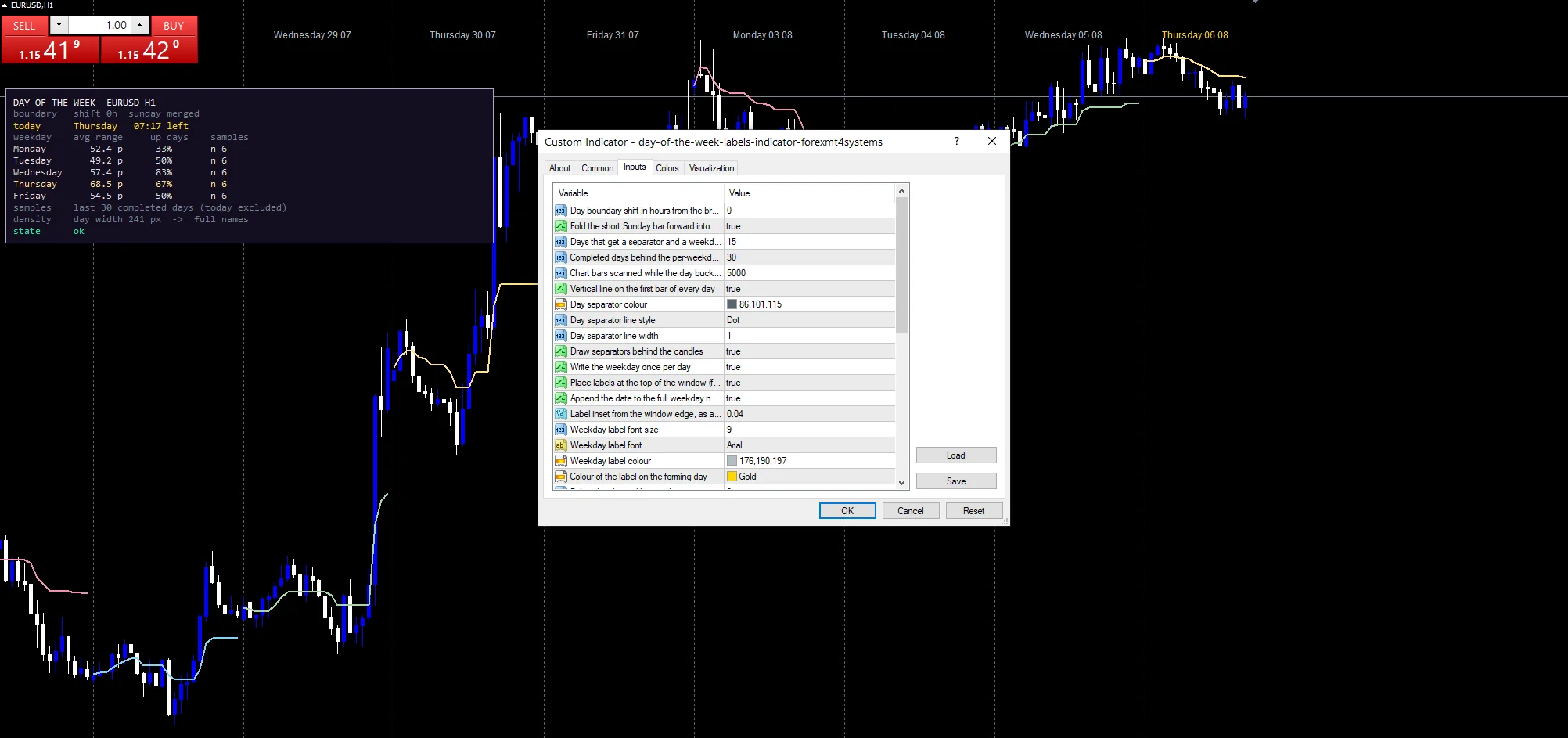
The screenshot uses EURUSD H1. Day boundaries only mean something intraday, so M5 through H1 is where this belongs. On H4 a day holds six bars and the labels crowd together. On daily charts every bar is its own day and the tool has nothing left to add.
The honest limits
Day boundaries follow the broker clock. Two brokers in different server timezones will split the same week differently unless you set InpDayShiftHours to match.
Average range per weekday over InpStatsDays is a small sample. Thirty completed days gives about six of each weekday. That is thin evidence for any pattern.
Zoom out far enough and the labels stop appearing, since the pixel thresholds drop them once a day gets narrow.
The ribbon is a midpoint, not a signal. It says where the middle of the day sits and nothing about direction.
Copy the compiled Day of the Week Labels Indicator file into your MQL4/Indicators folder, and the MT5 build into MQL5/Indicators, then restart the terminal and drag it onto a chart. The step-by-step guide with screenshots is at how to install MT4 and MT5 indicators.
Background reading on the method behind the Day of the Week Labels Indicator: Tail risk parity on Wikipedia, Percent Above Moving Average at StockCharts ChartSchool.
Download the Day of the Week Labels Indicator for MT4 and MT5
The zip holds the compiled Day of the Week Labels Indicator build for MT4 and MT5, plus a short README. Compiled files only, no source. Enter your email below and the download link arrives in your inbox.
Download this indicator free
Enter your email and the file is yours. You also get the full MT4 and MT5 library.
FAQ
Why does InpMergeSunday default to true?
Most brokers open with a few Sunday hours. Those hours trade like the start of Monday rather than a session of their own. Folding them forward stops a three bar Sunday from showing up as a full day in the separators, the labels and the panel.
What does the weekday ribbon actually plot?
The running midpoint of the day so far. It takes the day high and the day low and averages them, updating as the day develops. One shared function produces that value for every bar. Only the colour changes by weekday, so Monday and Thursday differ in look alone.
How many days does InpStatsDays 30 really sample per weekday?
About six each. Thirty completed days spread across five weekdays leaves a small sample. Treat the average range and the up-day share as a rough guide, not an edge. Raising InpStatsDays gives steadier figures over a longer history.
Why do the labels disappear when I zoom out?
Pixel thresholds decide what fits. Below InpMinDayWidthPx no label gets written, and the full weekday name only appears once the day is at least InpFullNamePx wide. That keeps a zoomed out chart readable instead of overlapping text.
Are results guaranteed?
No. Trading involves risk. Results are not guaranteed; past performance is not indicative of future results. Use the Day of the Week Labels Indicator as one input. Always backtest before trading live.
External references
- For background on this concept, see Tail risk parity on Wikipedia.
- For broader market context, see Percent Above Moving Average at StockCharts ChartSchool.

About the author
Written by Dominic Walsh, a Forex trader and MT4/MT5 indicator, Expert Advisor and script developer. Every tool on forexmt4systems.com is tested on live charts before release and ships with ready-to-use compiled MT4 (.ex4) and MT5 (.ex5) files. Learn more about the trader and developer behind this site.
How we build, test and correct every tool: Editorial & Testing Policy. Trading carries risk; see the disclaimer.