
The doda donchian indicator separates the picture from the trigger. Two Donchian edges show the range, exactly as you would expect. The signal, though, comes from the gold midline, which is a plain 20-bar average rather than the halfway point between the edges.
This build ships as a compiled .ex4 for MT4 and .ex5 for MT5; the screenshots below come from EURUSD H1.
| Platforms | MT4 (.ex4) + MT5 (.ex5) |
|---|---|
| Chart window | Main price chart |
| Plots | 5: DodaUpper, DodaLower, DodaMid, BuySignal, SellSignal |
| Alerts | popup |
| Inputs | 5 |
Everything visible
DodaUpper is the dodger blue line at the highest high of the window.
DodaLower is the crimson line at the lowest low.
DodaMid is the gold line, a simple average at `MidPeriod` bars.
BuySignal and SellSignal mark a close crossing that midline.
- DodaUpper: line, dodger blue, width 2
- DodaLower: line, crimson, width 2
- DodaMid: line, gold, width 2
- BuySignal: arrow, lime, width 2, arrow code 233
- SellSignal: arrow, red, width 2, arrow code 234
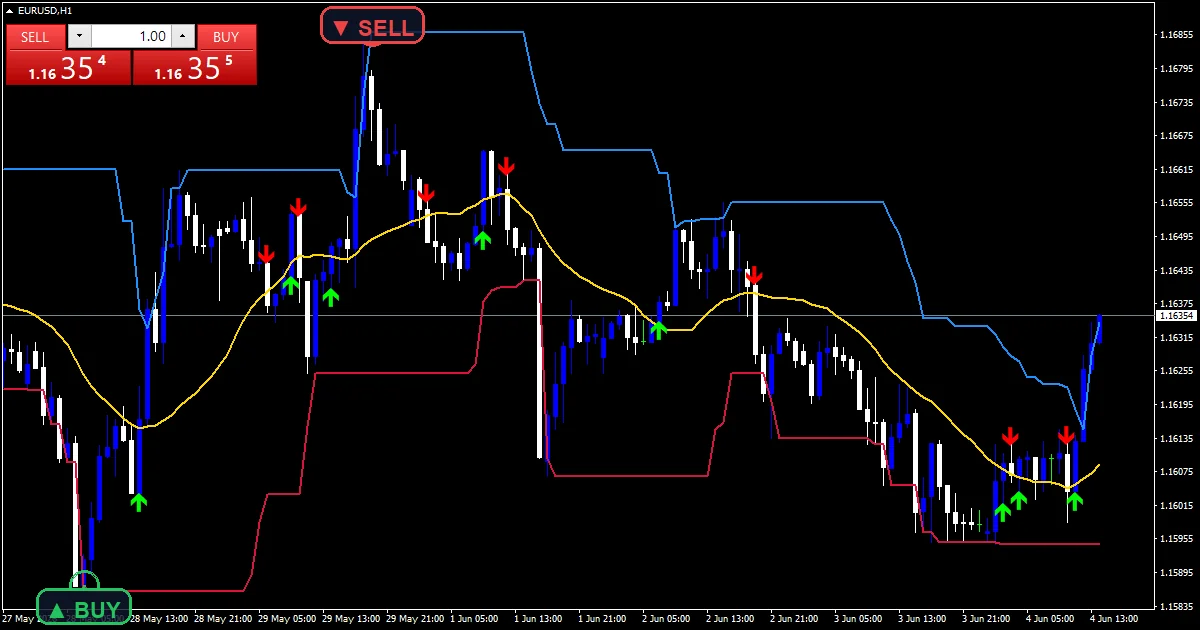
Working it out
Building the two edges
iHighest and iLowest scan `DonchianPeriod` `20` bars, starting one bar back. The current bar stays out of its own channel. Both edges then hold their value until a new extreme arrives or the old one ages out.
A separate midline
iMA supplies a simple average of the close at `MidPeriod` `20`. That is not the same as the midpoint between the two edges. An average follows where price spent its time, while a midpoint only follows the two extremes.
The crossing test
cross_up needs the previous close at or below the previous midline value and the current close above the current one. Comparing each close against the midline of its own bar keeps the test honest as the average moves.
Putting it to work
The two edges tell you the range and the gold line tells you the balance.
A crossing near the middle of a wide channel means less than one near an edge.
Both edges holding flat means the last twenty bars set no new extreme.
Lengthen `MidPeriod` alone for fewer crossings inside the same channel.
Alert channels in this build: popup, one message per closed bar.
`EnableAlerts` ships on and raises a terminal popup on a midline crossing, with `AlertPrefix` in front of the text. This build has no push, email or sound channel. The guard permits one message per closed bar.
Every Doda Donchian Indicator input
Core settings
| Setting | What it does | Default |
|---|---|---|
DonchianPeriod |
Donchian channel period. Bars in the channel, default `20`. | 20 |
MidPeriod |
SMA period for middle line. Bars in the midline average, default `20`. | 20 |
Display settings
| Setting | What it does | Default |
|---|---|---|
ArrowGapPoints |
Arrow gap in points. Mark distance from the candle in points, default `10`. | 10 |
Alert settings
| Setting | What it does | Default |
|---|---|---|
EnableAlerts |
Enable alerts on signal. Popup on a midline crossing, default `true`. | on |
AlertPrefix |
Alert prefix. Text at the front of the alert message, default `Doda-Donchian`. | Doda-Donchian |

Best home for this one
A channel needs swings, which is why the reference note calls for H1 and above. EURUSD H1 is the reference chart, where twenty bars covers most of a day. On M5 the edges barely separate. On H4 the channel describes a week and crossings turn into occasional events.
Known limits
A midline crossing has nothing to do with the channel edges, despite sharing a chart.
In a range price crosses the average repeatedly with no follow-through.
Both periods default to 20, which hides the fact that they measure different things.
Copy the compiled Doda Donchian Indicator file into your MQL4/Indicators folder, and the MT5 build into MQL5/Indicators, then restart the terminal and drag it onto a chart. The step-by-step guide with screenshots is at how to install MT4 and MT5 indicators.
Background reading on the method behind the Doda Donchian Indicator: Donchian Trading Guidelines at StockCharts ChartSchool, Effective exchange rate index on Wikipedia.
Download the Doda Donchian Indicator for MT4 and MT5
The zip holds the compiled Doda Donchian Indicator build for MT4 and MT5, plus a short README. Compiled files only, no source. Enter your email below and the download link arrives in your inbox.
Download this indicator free
Enter your email and the file is yours. You also get the full MT4 and MT5 library.
FAQ
Is DodaMid the midpoint of the channel?
No, and that surprises people. It is a simple average of the close over `MidPeriod` `20` bars. The midpoint between the two edges would only follow the extremes, while an average follows where price actually spent its time.
Why does the DodaUpper edge skip this bar?
So the bar can sit outside its own channel. iHighest and iLowest start their scan one bar back. Without that step the upper edge would always include the current high, and the picture would be less useful.
What does AlertPrefix do?
It puts a label at the front of the popup text, defaulting to Doda-Donchian. That matters when several tools alert on the same terminal, since the message otherwise gives you no clue which one fired.
Should MidPeriod match DonchianPeriod?
It does by default, but there is no reason it must. Lengthening `MidPeriod` alone gives fewer crossings inside the same channel. Shortening it makes the gold line follow price more closely and produces many more marks.
Are results guaranteed?
No. Trading involves risk. Results are not guaranteed; past performance is not indicative of future results. Use the Doda Donchian Indicator as one input. Always backtest before trading live.
Category: this is part of our Volatility collection. Next, plainly, yet, browse more Volatility for MetaTrader, or explore every MT4 indicator and MT5 indicator on the site.
External references
- For background on this concept, see Donchian Trading Guidelines at StockCharts ChartSchool.
- For broader market context, see Effective exchange rate index on Wikipedia.

About the author
Written by Dominic Walsh, a Forex trader and MT4/MT5 indicator, Expert Advisor and script developer. Every tool on forexmt4systems.com is tested on live charts before release and ships with ready-to-use compiled MT4 (.ex4) and MT5 (.ex5) files. Learn more about the trader and developer behind this site.
How we build, test and correct every tool: Editorial & Testing Policy. Trading carries risk; see the disclaimer.