
The marvin non repaint indicator asks two different questions before it marks a bar. A smoothed Heikin-Ashi pair must flip colour, and Williams %R must be turning from the right zone. Momentum alone gives too many marks. A candle flip alone gives too many as well. Together they thin out.
This build ships as a compiled .ex4 for MT4 and .ex5 for MT5; the screenshots below come from EURUSD H1.
| Platforms | MT4 (.ex4) + MT5 (.ex5) |
|---|---|
| Chart window | Main price chart |
| Plots | 4: Marvin BUY, Marvin SELL, Marvin Trend, Marvin Signal |
| Alerts | popup, push notification, email, sound |
| Inputs | 13 |
What gets drawn, and where
Marvin Trend is the dodger blue line carrying the internal candle close.
Marvin Signal is the orange line carrying the internal candle open.
Marvin BUY and Marvin SELL place lime and red arrows on a confirmed flip.
Arrows sit `ArrowOffsetPts` `8.0` points from the bar.
- Marvin BUY: arrow, lime, width 2, arrow code 233
- Marvin SELL: arrow, red, width 2, arrow code 234
- Marvin Trend: line, dodger blue, width 2
- Marvin Signal: line, orange, width 1
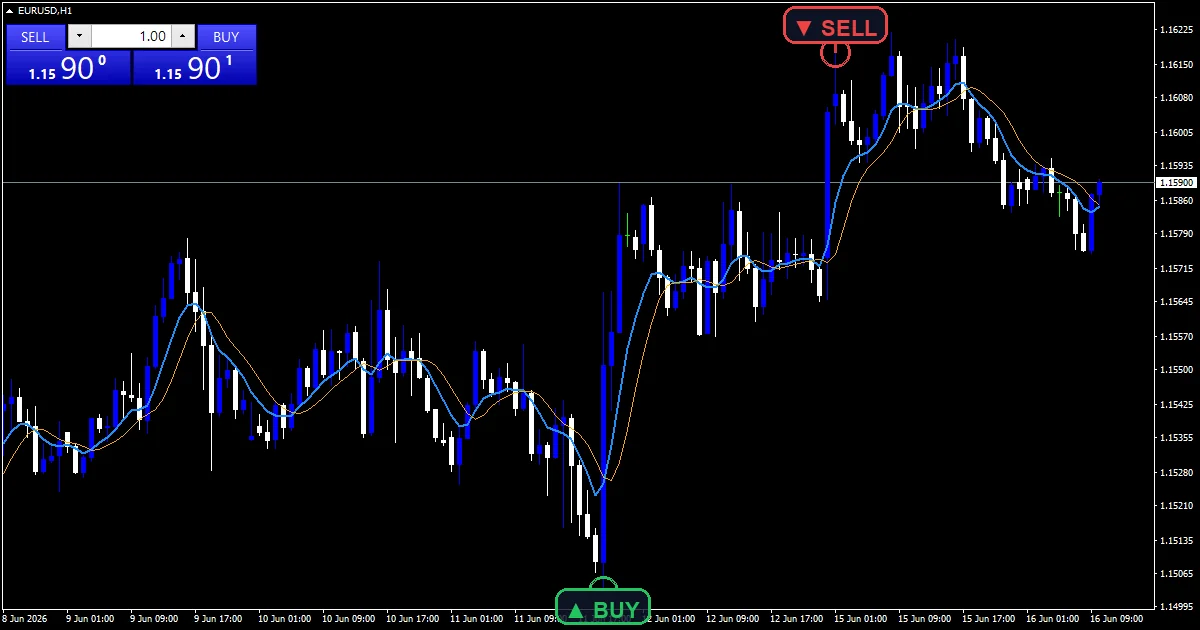
How the MARVIN NON REPAINT Indicator does its maths
Smoothing the candles
The internal pair runs through an exponential smoothing at `HASmoothPeriod` `6` bars. Plotting close and open as two lines lets you see the flip as a crossing rather than as a colour change. Blue above orange means the pair reads bullish.
Confirming with Williams %R
iWPR supplies the reading at `WPRPeriod` `14`. wprBuyOK needs the value above `WPRBuyLevel` and rising from below. wprSellOK needs it below `WPRSellLevel` and falling. So the flip has to come with momentum moving out of a zone, not into one.
Confirmation and cooldown
`ConfirmationBars` `1` sets how many same-direction candles must end at the signal bar. `CooldownBars` `3` then blocks another mark in the same direction for three bars. Both tests read completed bars only.
What it is telling you
The crossing of blue and orange is the candle flip made visible.
A mark means the flip also had Williams %R turning behind it.
Gaps between marks are often the cooldown rather than a lack of setups.
Raise `ConfirmationBars` when flips reverse a bar later.
Alert channels in this build: popup, push notification, email and sound, one message per closed bar.
`EnableAlerts` starts live, with the popup and the sound channel already true. `EnablePushNotify` and `EnableEmail` start false. `SoundFile` picks the clip. Tests read completed bars, and the guard permits one entry message per bar.
Every MARVIN NON REPAINT Indicator input
Core settings
| Setting | What it does | Default |
|---|---|---|
HASmoothPeriod |
HA smoothing EMA period. Smoothing length on the internal candles, default `6`. | 6 |
WPRPeriod |
Williams %R period for momentum confirm. Williams %R length, default `14`. | 14 |
WPRBuyLevel |
WPR rises above this for BUY. Level %R must rise above for a buy, default `-70`. | -70 |
WPRSellLevel |
WPR falls below this for SELL. Level %R must fall below for a sell, default `-30`. | -30 |
ConfirmationBars |
closed-bar confirmation count. Same-direction candles required, default `1`. | 1 |
CooldownBars |
min bars between same-direction signals. Bars enforced between same-direction marks, default `3`. | 3 |
Display settings
| Setting | What it does | Default |
|---|---|---|
ArrowOffsetPts |
arrow distance from bar in points. Mark distance from the bar in points, default `8.0`. | 8.0 |
Alert settings
| Setting | What it does | Default |
|---|---|---|
EnableAlerts |
master alert switch. Master switch over the entry alerts, default `true`. | on |
EnablePopup |
popup alert. Terminal dialog when an entry prints, default `true`. | on |
EnablePushNotify |
push to mobile MT4. Mobile push when an entry prints, default `false`. | off |
EnableEmail |
email alert. Mail delivery when an entry prints, default `false`. | off |
EnableSound |
sound alert. Sound playback when an entry prints, default `true`. | on |
SoundFile |
Wav file used by the sound channel, default `alert.wav`. | alert.wav |

Markets that suit it
Smoothed candles plus a momentum turn suit charts where moves last a while. EURUSD H1 is the reference chart. There `HASmoothPeriod` at `6` covers six hours of smoothing. On M5 the pair flips often and `CooldownBars` matters most. On H4 the marks turn scarce.
Where it lets you down
Smoothing on top of Heikin-Ashi averages price twice, so the flip lags the candle that caused it.
Williams %R can turn briefly inside a trend and satisfy the test without a real reversal.
`CooldownBars` `3` can hide a valid second entry during a fast move.
Copy the compiled MARVIN NON REPAINT Indicator file into your MQL4/Indicators folder, and the MT5 build into MQL5/Indicators, then restart the terminal and drag it onto a chart. The step-by-step guide with screenshots is at how to install MT4 and MT5 indicators.
Download the MARVIN NON REPAINT Indicator for MT4 and MT5
The zip holds the compiled MARVIN NON REPAINT Indicator build for MT4 and MT5, plus a short README. Compiled files only, no source. Enter your email below and the download link arrives in your inbox.
Download this indicator free
Enter your email and the file is yours. You also get the full MT4 and MT5 library.
FAQ
What do WPRBuyLevel and WPRSellLevel mean?
They are Williams %R thresholds, and %R runs from zero down to minus 100. A buy needs the reading above `-70` and rising, which means it is climbing out of the lower zone. A sell needs it below `-30` and falling out of the upper zone.
Why smooth the candles with HASmoothPeriod?
To cut the number of flips. Raw Heikin-Ashi candles already average two bars, and a six-bar smoothing on top removes most single-bar colour changes. The cost is lag, which is why the momentum test has to agree as well.
What do the Marvin Trend and Marvin Signal plots show?
The internal candle close and open, drawn as two lines. Blue above orange is a bullish pair and the reverse is bearish. Watching them cross is a clearer way to see the flip than trying to judge candle colour on a busy chart.
How long does CooldownBars block a second mark?
Three bars in the same direction by default. On H1 that is three hours. It exists because a flip near a threshold often repeats, and without the gap the chart would carry three marks for what is really one event.
Are results guaranteed?
No. Trading involves risk. Results are not guaranteed; past performance is not indicative of future results. Use the MARVIN NON REPAINT Indicator as one input. Always backtest before trading live.
Category: this is part of our Signal and Forecast collection. Browse more Signal and Forecast for MetaTrader, or explore every MT4 indicator and MT5 indicator on the site.
External references
- The core method is documented in Online portfolio selection on Wikipedia.
- Additional market context is at The Traders Journal By Gatis Roze at StockCharts ChartSchool.

About the author
Written by Dominic Walsh, a Forex trader and MT4/MT5 indicator, Expert Advisor and script developer. Every tool on forexmt4systems.com is tested on live charts before release and ships with ready-to-use compiled MT4 (.ex4) and MT5 (.ex5) files. Learn more about the trader and developer behind this site.
How we build, test and correct every tool: Editorial & Testing Policy. Trading carries risk; see the disclaimer.