
A higher-timeframe stochastic shows where the bigger swing stands while you trade a smaller chart. This MTF stochastic indicator reads a 14, 3, 3 stochastic from the H4 chart, draws it under your chart bar by bar, and marks crosses of its two lines that start near an extreme.
This build ships as a compiled .ex4 for MT4 and .ex5 for MT5; the screenshots below come from EURUSD H1.
| Platforms | MT4 (.ex4) + MT5 (.ex5) |
|---|---|
| Chart window | Separate window (levels 70 / 50 / 30) |
| Plots | 4: MTF %K, MTF %D, Buy, Sell |
| Alerts | popup, push notification, email, sound |
| Inputs | 13 |
What appears on the chart
Two lines and two marks in a pane.
`MTF %K` traces dodger blue at width 2.
`MTF %D` traces orange at width 1.
`Buy` flags an up-cross in lime.
`Sell` flags a down-cross in red.
Guides sit at 30, 50 and 70.
- MTF %K: line, dodger blue, width 2
- MTF %D: line, orange, width 1
- Buy: arrow, lime, width 2, arrow code 233
- Sell: arrow, red, width 2, arrow code 234
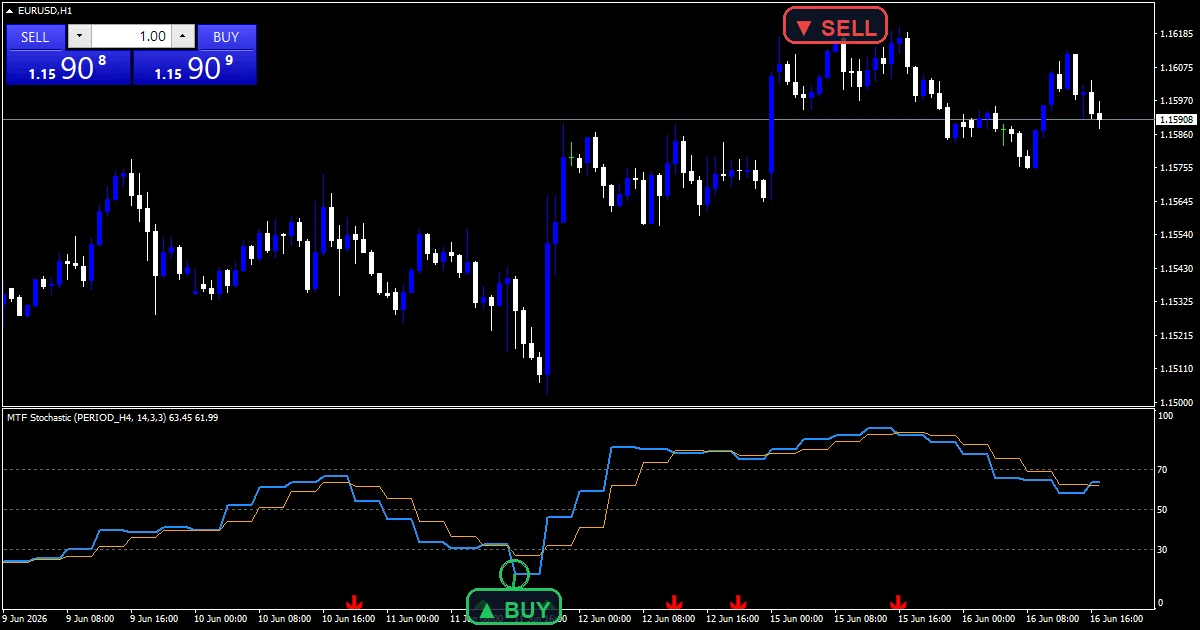
How a value appears
The source chart
`InpHigherTF` `PERIOD_H4` supplies the stochastic. Each bar on your chart shows the H4 value covering its time.
The lines
`InpKPeriod` `14` sets %K, `InpSlowing` `3` smooths it, and `InpDPeriod` `3` averages it into %D.
The cross
A buy needs %K to cross above %D with either line under 35 just before. A sell mirrors that above 65.
Getting a signal from it
The pane moves in steps, one per H4 bar.
Lines low in the pane mean the H4 swing is stretched down.
A lime mark means the lines crossed up near the floor.
A red mark means they crossed down near the ceiling.
Crosses in the middle print nothing.
`InpArrowOffsetPts` `30` sets the mark gap.
Alert channels in this build: popup, push notification, email and sound, one message per closed bar.
An extreme cross of the two H4 lines sends a message naming the side. `EnableAlerts` is the gate; a popup is on from the start, and the phone, email and speaker routes stay switched off.
Every MTF Stochastic Indicator input
Core settings
| Setting | What it does | Default |
|---|---|---|
InpHigherTF |
Higher timeframe for the stochastic. Chart the stochastic comes from, `PERIOD_H4`. | PERIOD_H4 |
InpKPeriod |
%K lookback length. %K window, `14`. | 14 |
InpDPeriod |
%D smoothing length. %D smoothing, `3`. | 3 |
InpSlowing |
Slowing on %K. %K slowing, `3`. | 3 |
InpUpperLevel |
Overbought reference. Top reference, `70.0`. | 70.0 |
InpLowerLevel |
Oversold reference. Bottom reference, `30.0`. | 30.0 |
Display settings
| Setting | What it does | Default |
|---|---|---|
InpArrowOffsetPts |
Arrow distance from price (points). Mark gap in points, `30`. | 30 |
Alert settings
| Setting | What it does | Default |
|---|---|---|
EnableAlerts |
Switch for cross messages, `true`. | on |
EnablePopup |
Popup, `true`. | on |
EnablePushNotify |
(see inputs panel) | off |
EnableEmail |
(see inputs panel) | off |
EnableSound |
Speaker, `false`. | off |
SoundFile |
(see inputs panel) | alert.wav |

Where to point it
The H4 source suits M15 and H1 charts best. EURUSD H1 is the reference chart, with a few marks a week. On M5 each H4 step spans forty-eight bars. Set the source to D1 when you trade H4.
What to be wary of
The current H4 bar is still forming.
Several chart bars share one H4 value.
Stochastics stay pinned in strong trends.
Only a popup reports by default.
Copy the compiled MTF Stochastic Indicator file into your MQL4/Indicators folder, and the MT5 build into MQL5/Indicators, then restart the terminal and drag it onto a chart. The step-by-step guide with screenshots is at how to install MT4 and MT5 indicators.
Background reading on the method behind the MTF Stochastic Indicator: Stochastic oscillator on Wikipedia, Multiple Time Frame Analysis at BabyPips.
Download the MTF Stochastic Indicator for MT4 and MT5
The zip holds the compiled MTF Stochastic Indicator build for MT4 and MT5, plus a short README. Compiled files only, no source. Enter your email below and the download link arrives in your inbox.
Download this indicator free
Enter your email and the file is yours. You also get the full MT4 and MT5 library.
FAQ
Why does MTF %K move in steps?
Every bar on your chart shows the value of the H4 bar covering its time. Four hourly bars share one H4 value, so the line forms flat steps rather than a smooth curve.
How near InpLowerLevel must a cross start for a Buy?
Within five points of it. Either line must sit below 35 on the bar before the cross when the lower level is 30, which keeps mid-range crosses off the chart.
Can InpHigherTF be set lower than the chart?
It can, but that defeats the purpose. The pane is meant to show a slower swing, so pick a source at least one step above the chart you trade.
Why can a recent MTF %K cross still change?
The newest H4 bar is still forming, so its stochastic moves until it closes. Marks on bars covered by a finished H4 bar stay fixed from then on.
Are results guaranteed?
No. Trading involves risk. Results are not guaranteed; past performance is not indicative of future results. Use the MTF Stochastic Indicator as one input. Always backtest before trading live.
Category: this is part of our Oscillators collection. Browse more Oscillators for MetaTrader, or explore every MT4 indicator and MT5 indicator on the site.
External references
- For background on this concept, see Product control on Wikipedia.
- For broader market context, see TRIX at StockCharts ChartSchool.

About the author
Written by Dominic Walsh, a Forex trader and MT4/MT5 indicator, Expert Advisor and script developer. Every tool on forexmt4systems.com is tested on live charts before release and ships with ready-to-use compiled MT4 (.ex4) and MT5 (.ex5) files. Learn more about the trader and developer behind this site.
How we build, test and correct every tool: Editorial & Testing Policy. Trading carries risk; see the disclaimer.