
Aroon asks how long ago the last high and the last low happened. A fresh high keeps Aroon Up near 100; a stale one lets it decay. The new aroon up and down indicator draws both lines, a scaled oscillator between them, and marks threshold breaks and line crosses.
This build ships as a compiled .ex4 for MT4 and .ex5 for MT5; the screenshots below come from EURUSD H1.
| Platforms | MT4 (.ex4) + MT5 (.ex5) |
|---|---|
| Chart window | Separate window (levels 30 / 50 / 70) |
| Plots | 5: Aroon Up, Aroon Down, Aroon Oscillator, Buy Cross, Sell Cross |
| Alerts | popup, push notification, email, sound |
| Inputs | 10 |
What appears on the chart
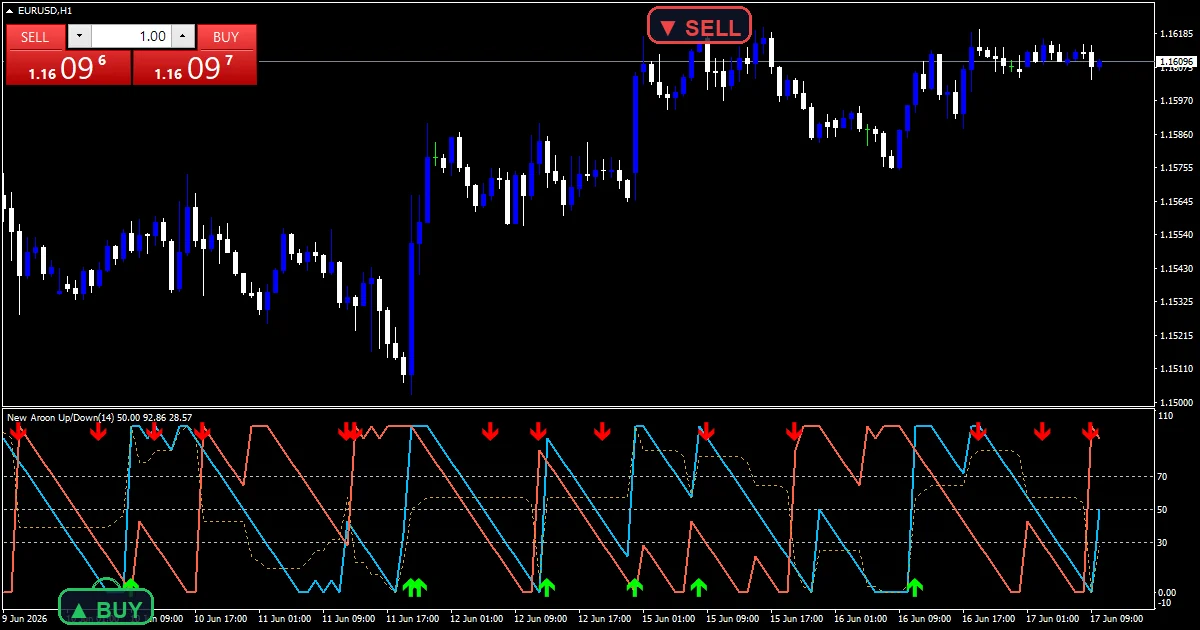
Three lines and two marks in a pane.
`Aroon Up` traces deep sky blue at width 2.
`Aroon Down` traces tomato at width 2.
`Aroon Oscillator` traces goldenrod, scaled into 0 to 100.
`Buy Cross` prints lime with arrow 233.
`Sell Cross` prints red with arrow 234.
- Aroon Up: line, deep sky blue // aroon up, width 2
- Aroon Down: line, tomato // aroon down, width 2
- Aroon Oscillator: line, goldenrod // aroon oscillator (scaled 0..100 from -100..100)
- Buy Cross: arrow, lime // buy marker, width 2, arrow code 233
- Sell Cross: arrow, red // sell marker, width 2, arrow code 234
Working through the maths
The two lines
`InpPeriod` `14` bars are searched for the highest high and lowest low. Each line falls from 100 toward 0 as its extreme ages.
The oscillator
Up minus Down runs from minus 100 to plus 100. This build halves it and adds 50 so it shares the same pane.
The marks
A buy prints when Aroon Up climbs through `InpUpperLevel` `70.0`, or when Up crosses above Down while over 50. Sells use `InpLowerLevel` `30.0` and the mirror cross.
How to watch it
Up near 100 means a fresh high.
Down near 100 means a fresh low.
Crossing lines mean the leadership changed.
The oscillator above 50 favours up.
`InpUseOscCross` `true` adds the cross marks.
Warm-up needs about sixteen bars.
Alert channels in this build: popup, push notification, email and sound, one message per closed bar.
Buy and sell crosses report through `InpEnableAlerts`. The popup and the sound playing `InpSoundFile` are active from the start; mobile and email are not.
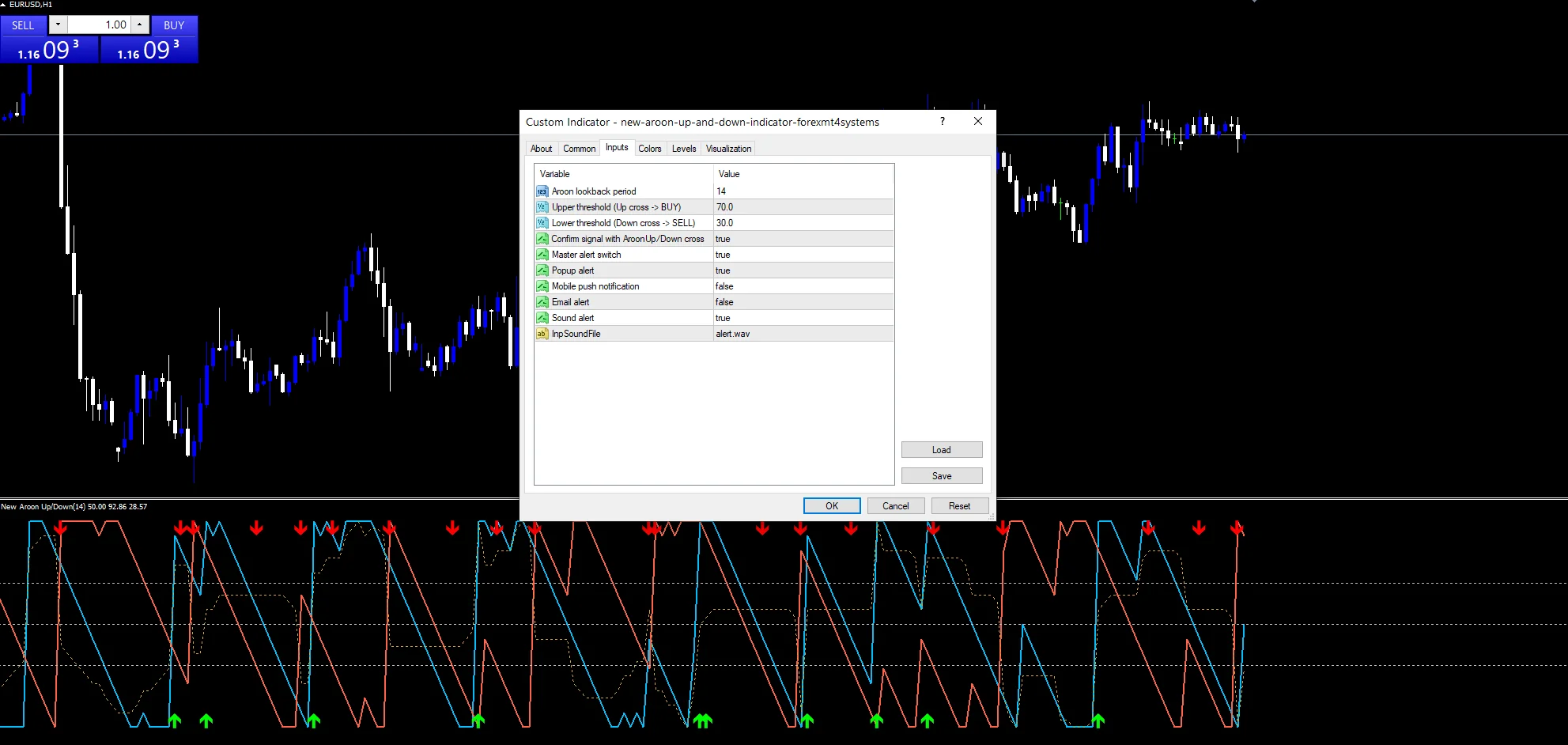
Every New Aroon Up and Down Indicator input
Core settings
| Setting | What it does | Default |
|---|---|---|
InpPeriod |
Aroon lookback period. Bars searched for highs and lows, `14`. | 14 |
InpUpperLevel |
Upper threshold (Up cross -> BUY). Up threshold for buys, `70.0`. | 70.0 |
InpLowerLevel |
Lower threshold (Down cross -> SELL). Down threshold for sells, `30.0`. | 30.0 |
InpUseOscCross |
Confirm signal with AroonUp/Down cross. Also mark line crosses, `true`. | on |
Alert settings
| Setting | What it does | Default |
|---|---|---|
InpEnableAlerts |
Master alert switch. Master alert switch, `true`. | on |
InpEnablePopup |
Popup alert. Popup, `true`. | on |
InpEnablePush |
Mobile push notification. Mobile route, `false`. | off |
InpEnableEmail |
Email alert. Email route, `false`. | off |
InpEnableSound |
Sound alert. Sound, ships on, `true`. | on |
InpSoundFile |
Sound clip, `”alert.wav”`. | alert.wav |
Placing it well
Aroon reacts to new extremes, so it suits trending charts. EURUSD H1 is the reference chart, where the lines swap often. On M15 marks come in bunches. On D1 a cross marks a real change in leadership.
The rough edges
In ranges the lines swap constantly.
Two rules produce overlapping marks.
A single spike resets a line to 100.
The sound route ships on.
Copy the compiled New Aroon Up and Down Indicator file into your MQL4/Indicators folder, and the MT5 build into MQL5/Indicators, then restart the terminal and drag it onto a chart. The step-by-step guide with screenshots is at how to install MT4 and MT5 indicators.
Download the New Aroon Up and Down Indicator for MT4 and MT5
The zip holds the compiled New Aroon Up and Down Indicator build for MT4 and MT5, plus a short README. Compiled files only, no source. Enter your email below and the download link arrives in your inbox.
Download this indicator free
Enter your email and the file is yours. You also get the full MT4 and MT5 library.
FAQ
What does Aroon Up at 100 mean?
The highest high of the last fourteen bars happened on the current bar. Each bar that passes without a new high takes about seven points off the reading.
Why does the Aroon Oscillator sit between 0 and 100?
Up minus Down normally runs from minus 100 to plus 100. This build halves it and adds 50 so it can share the pane with the two lines.
What does InpUseOscCross add to the marks?
A second buy rule: Aroon Up crossing above Aroon Down while above 50. Switch it off and only threshold crosses of 70 and 30 print.
Why does a Sell Cross use InpLowerLevel 30.0?
In this build the sell rule watches Aroon Down falling through 30, as well as the mirrored line cross. It flags lows that have gone stale.
Are results guaranteed?
No. Trading involves risk. Results are not guaranteed; past performance is not indicative of future results. Use the New Aroon Up and Down Indicator as one input. Always backtest before trading live.
Category: this is part of our Oscillators collection. Browse more Oscillators for MetaTrader, or explore every MT4 indicator and MT5 indicator on the site.
External references
- The core method is documented in Lock-up period on Wikipedia.
- Additional market context is at Aroon at StockCharts ChartSchool.

About the author
Written by Dominic Walsh, a Forex trader and MT4/MT5 indicator, Expert Advisor and script developer. Every tool on forexmt4systems.com is tested on live charts before release and ships with ready-to-use compiled MT4 (.ex4) and MT5 (.ex5) files. Learn more about the trader and developer behind this site.
How we build, test and correct every tool: Editorial & Testing Policy. Trading carries risk; see the disclaimer.