
The non repaint binary options indicator plots CALL and PUT arrows on a closed bar. It fires once RSI, a Stochastic reading and an EMA filter all agree. CALL fires on the low side, and PUT fires on the high side. Every check runs on bars that have already closed.
This build ships as a compiled .ex4 for MT4 and .ex5 for MT5; the screenshots below come from EURUSD H1.
| Platforms | MT4 (.ex4) + MT5 (.ex5) |
|---|---|
| Chart window | Main price chart |
| Plots | 3: CALL, PUT, Trend EMA |
| Alerts | popup, push notification, email, sound |
| Inputs | 14 |
Plots this indicator declares
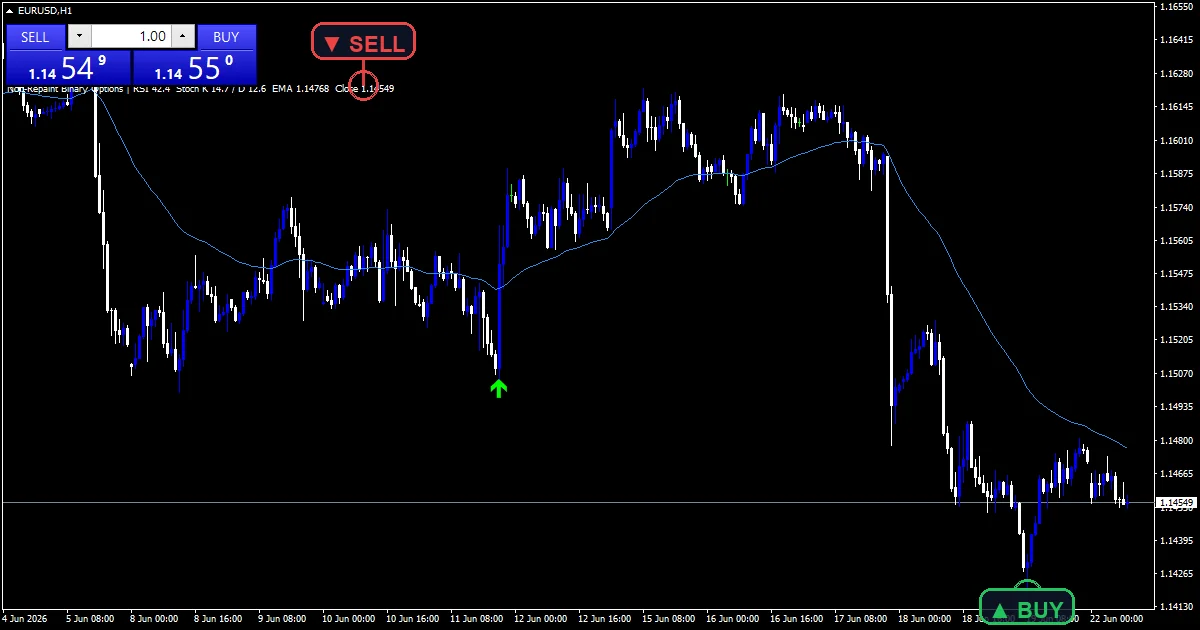
CALL (lime, code 233) sits below the low once the low-side checks agree.
PUT (red, code 234) sits above the high once the high-side checks agree.
Trend EMA (blue line) plots the TrendEmaPeriod average both sides check against.
- CALL: arrow, lime, width 2, arrow code 233
- PUT: arrow, red, width 2, arrow code 234
- Trend EMA: line, dodger blue, width 1
What feeds each plot
RSI, Stochastic and the trend line
The code builds three series once, across the whole chart. RsiPeriod drives a Wilder-style RSI. StochK sets the raw %K window, and StochD smooths %K into %D.
TrendEmaPeriod seeds an EMA at the oldest bar, then smooths it forward. All three series get built before any signal check runs.
CALL and PUT confluence
A CALL needs three things at once. RSI must cross up out of oversold. %K must sit above %D. Price must close near or above the Trend EMA.
A PUT mirrors that on the high side. CooldownBars then blocks a repeat signal on the same side until that many bars pass.
Warm-up before any arrow appears
The code works out a warm-up length from the three lookbacks it needs. It takes the largest of RsiPeriod, TrendEmaPeriod and StochK plus StochD, each padded by a couple of bars.
SetIndexDrawBegin then hides CALL and PUT from every bar before that point. That stops an arrow from appearing on a bar where the RSI, Stochastic or Trend EMA reading was not fully built yet.
Reading it correctly
A lime CALL needs three checks to align. RSI crosses up out of oversold, %K sits above %D, and price closes near the Trend EMA.
A red PUT flips all three: RSI crossing down, %K below %D, and price near or below the line.
Every series gets built oldest to newest first. A signal only prints on a bar that has already closed.
No arrow can appear before the warm-up length passes. That length grows with whichever input, RsiPeriod, TrendEmaPeriod or StochK plus StochD, needs the most history.
Alert channels in this build: popup, push notification, email and sound, one message per closed bar.
Alerts cover popup, push, email and sound. They fire once per closed bar, and the message reports the RSI reading behind each signal.
Every Non repaint binary options Indicator input
Core settings
| Setting | What it does | Default |
|---|---|---|
RsiPeriod |
RsiPeriod sets the RSI lookback for both sides. It defaults to 14. | 14 |
RsiOverbought |
RsiOverbought is the PUT trigger level. It defaults to 65.0. | 65.0 |
RsiOversold |
RsiOversold is the CALL trigger level. It defaults to 35.0. | 35.0 |
StochK |
StochK sets the raw %K window. It defaults to 5. A wider window smooths the raw %K reading, at the cost of a slower reaction to a fresh swing. | 5 |
StochD |
StochD smooths %K into %D. It defaults to 3. | 3 |
TrendEmaPeriod |
TrendEmaPeriod sets the trend line length. It defaults to 50. | 50 |
CooldownBars |
CooldownBars spaces repeat signals apart. It defaults to 4. | 4 |
Display settings
| Setting | What it does | Default |
|---|---|---|
ArrowOffsetPts |
ArrowOffsetPts is a cosmetic gap, 12 by default, that clears the candle wicks. | 12 |
Alert settings
| Setting | What it does | Default |
|---|---|---|
EnableAlerts |
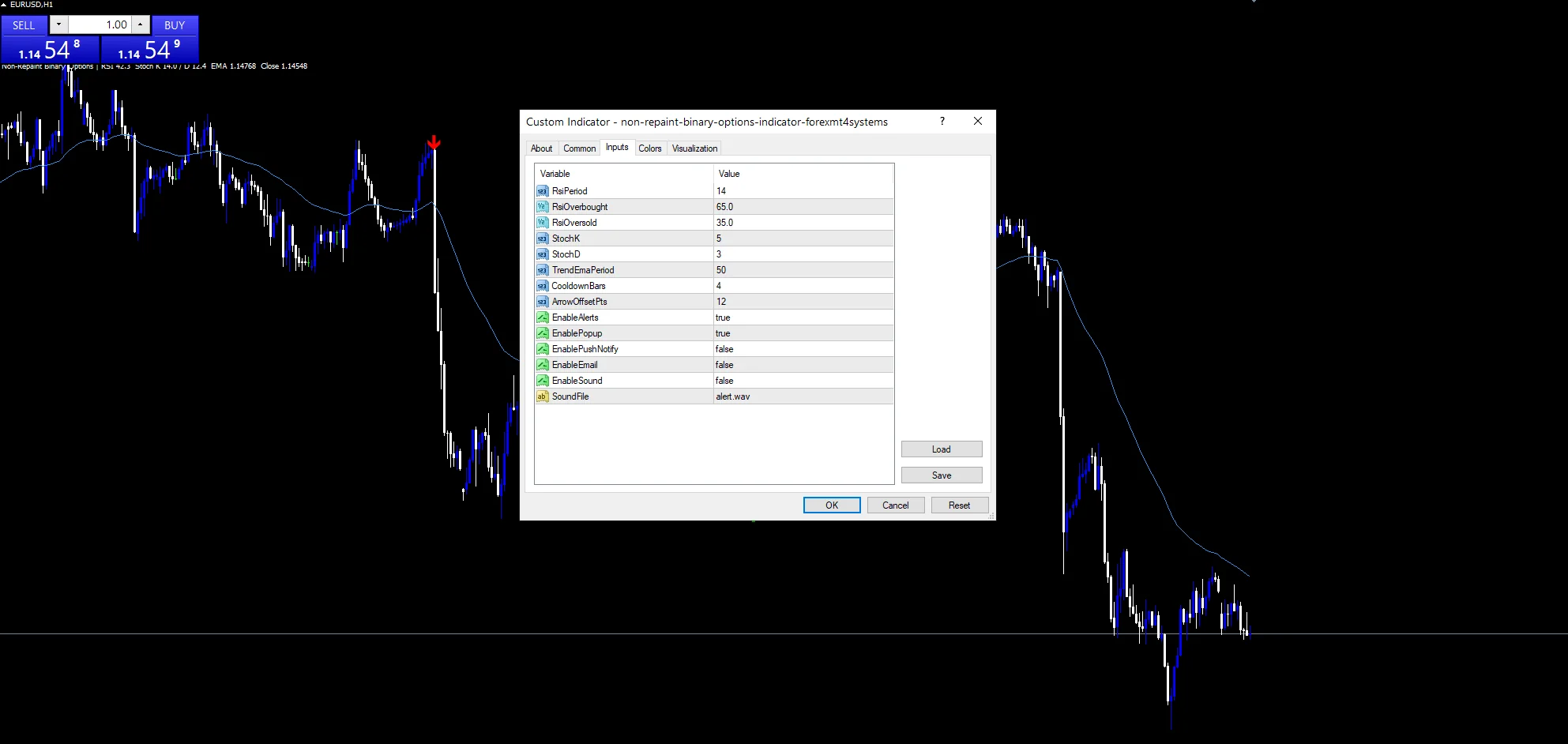
(see inputs panel) | on |
EnablePopup |
(see inputs panel) | on |
EnablePushNotify |
(see inputs panel) | off |
EnableEmail |
(see inputs panel) | off |
EnableSound |
(see inputs panel) | off |
SoundFile |
(see inputs panel) | alert.wav |
Home chart
The screenshot runs on EURUSD H1. The default settings settle into a steady rhythm there, without firing on every RSI wiggle. The same three-way check works on other majors and other timeframes. Traders who want faster signals can shorten StochK or TrendEmaPeriod, at the cost of more noise on a quiet chart.
What it will not tell you
In a strong trend, RSI can sit pinned near an extreme for a long stretch. It never crosses back, so a real extreme can pass with no signal.
The Stochastic check reacts fast to noise. A signal can print right before price stalls, not reverses, in a choppy session.
All three helper series get rebuilt across the whole chart on the first run. That is fine for a normal chart history, but a very long history can make the first calculation pass noticeably heavier than later ticks.
Copy the compiled Non repaint binary options Indicator file into your MQL4/Indicators folder, and the MT5 build into MQL5/Indicators, then restart the terminal and drag it onto a chart. The step-by-step guide with screenshots is at how to install MT4 and MT5 indicators.
Background reading on the method behind the Non repaint binary options Indicator: Options Price Reporting Authority on Wikipedia, ienvelopes (ENVELOPES) at the MQL5 Documentation.
Download the Non repaint binary options Indicator for MT4 and MT5
The zip holds the compiled Non repaint binary options Indicator build for MT4 and MT5, plus a short README. Compiled files only, no source. Enter your email below and the download link arrives in your inbox.
Download this indicator free
Enter your email and the file is yours. You also get the full MT4 and MT5 library.
FAQ
How is the CALL signal different from the PUT signal on this indicator?
A CALL needs the prior bar’s RSI at or below RsiOversold, crossing back above it, with %K above %D and price near the Trend EMA. A PUT mirrors that on the high side using RsiOverbought instead. Both sides share the same Stochastic and Trend EMA logic, only the RSI level and the direction of the cross differ between them.
What does StochD change if I raise it from the default of 3?
StochD smooths the raw %K reading into %D. Raising it past 3 makes %D lag %K by more bars. That slows down how often %K crosses %D, which can delay both signal checks.
Why does the Trend EMA use a point band instead of a plain close comparison?
The code checks close against the Trend EMA plus or minus a small band, not a bare greater-than test. That band gives price a little room near the line, instead of demanding a clean break every bar. That band is fixed in the code rather than tied to any input, so it behaves the same way regardless of which TrendEmaPeriod is chosen.
Does CooldownBars apply separately to CALL and PUT signals?
Yes. The code tracks the last CALL bar and the last PUT bar apart. CooldownBars, 4 by default, gates each side on its own. A fresh CALL can still fire soon after a PUT.
Why does the CALL arrow never appear on the first few hundred bars of history?
The code needs a warm-up length before any reading is trustworthy. That length is the largest of RsiPeriod, TrendEmaPeriod, or StochK plus StochD, each with a small buffer added. SetIndexDrawBegin hides both CALL and PUT before that point, so the earliest bars on a fresh chart stay blank by design, not by error.
Are results guaranteed?
No. Trading involves risk. Results are not guaranteed; past performance is not indicative of future results. Use the Non repaint binary options Indicator as one input. Always backtest before trading live.
Category: this is part of our Signal and Forecast collection. Browse more Signal and Forecast for MetaTrader, or explore every MT4 indicator and MT5 indicator on the site.
External references
- Learn more about the underlying method in Options Price Reporting Authority on Wikipedia.
- For wider market background, see ienvelopes (ENVELOPES) at the MQL5 Documentation.

About the author
Written by Dominic Walsh, a Forex trader and MT4/MT5 indicator, Expert Advisor and script developer. Every tool on forexmt4systems.com is tested on live charts before release and ships with ready-to-use compiled MT4 (.ex4) and MT5 (.ex5) files. Learn more about the trader and developer behind this site.
How we build, test and correct every tool: Editorial & Testing Policy. Trading carries risk; see the disclaimer.