
Yellow arrows stand out on any chart theme. The non repaint yellow arrow indicator prints them only when three things agree on a closed bar: a 21-bar weighted average sloping the same way, price at least a quarter range beyond it, and tick volume above its average.
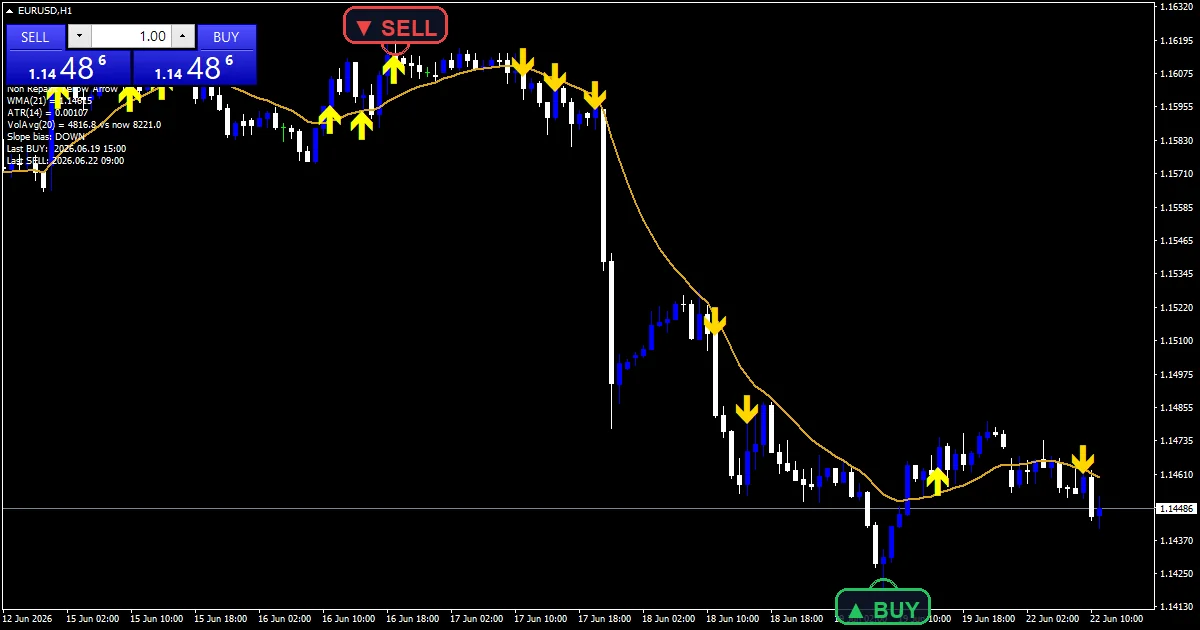
This build ships as a compiled .ex4 for MT4 and .ex5 for MT5; the screenshots below come from EURUSD H1.
| Platforms | MT4 (.ex4) + MT5 (.ex5) |
|---|---|
| Chart window | Main price chart |
| Plots | 3: TrendWMA, Yellow Arrow BUY, Yellow Arrow SELL |
| Alerts | popup, push notification, email, sound |
| Inputs | 16 |
Plots this indicator declares
One line and yellow marks on price.
`TrendWMA` traces goldenrod at width 2.
`Yellow Arrow BUY` prints yellow at width 4.
`Yellow Arrow SELL` prints gold at width 4.
A diagnostic panel shows each check.
`InpArrowOffsetPts` `18` sets the gap.
- TrendWMA: line, goldenrod, width 2
- Yellow Arrow BUY: arrow, yellow, width 4, arrow code 233
- Yellow Arrow SELL: arrow, gold, width 4, arrow code 234
What the code actually computes
Slope
`InpWMAPeriod` `21` gives a weighted average. It must be higher than `InpSlopeBars` `2` bars ago for a buy.
Push
The close must sit above the average by at least `InpATRPushMult` `0.25` of an `InpATRPeriod` `14` range.
Volume
Tick volume must reach `InpVolMult` `1.10` times its `InpVolPeriod` `20` bar average. `InpCooldownBars` `4` spaces same-side arrows.
Interpreting what you see
A yellow up arrow means slope, push and volume agree up.
A gold down arrow means they agree down.
The panel shows which check failed.
Arrows repeat less often after a cooldown.
`InpConfirmBars` `1` keeps to closed bars.
Warm-up needs about twenty-five bars.
Alert channels in this build: popup, push notification, email and sound, one message per closed bar.
Yellow arrows report once per closed bar. `InpEnableAlerts` is the master switch; the popup, phone route and sound playing `InpSoundFile` start on, and email does not.
Every Non Repaint Yellow Arrow Indicator input
Core settings
| Setting | What it does | Default |
|---|---|---|
InpWMAPeriod |
Trend WMA period. Trend average length, `21`. | 21 |
InpATRPeriod |
ATR period (momentum filter). Range window, `14`. | 14 |
InpVolPeriod |
Tick-volume average lookback. Volume average window, `20`. | 20 |
InpVolMult |
Volume must exceed avg * this multiplier. Volume needed versus average, `1.10`. | 1.10 |
InpSlopeBars |
Bars used to confirm WMA slope flip. Bars back for the slope, `2`. | 2 |
InpConfirmBars |
Closed-bar confirmation (>=1). Closed-bar confirmation, `1`. | 1 |
InpCooldownBars |
Min bars between same-side arrows. Bars between same-side arrows, `4`. | 4 |
Display settings
| Setting | What it does | Default |
|---|---|---|
InpArrowOffsetPts |
Arrow offset from H/L in points. | 18 |
InpShowDiagnostic |
Diagnostic Comment() panel. Show the check panel, `true`. | on |
Alert settings
| Setting | What it does | Default |
|---|---|---|
InpATRPushMult |
Min (price-WMA)/ATR magnitude for signal. Smallest push past the line, `0.25`. | 0.25 |
InpEnableAlerts |
Master alert switch. | on |
InpEnablePopup |
Popup alert. | on |
InpEnablePushNotify |
Push to mobile MT4. Phone route, ships on, `true`. | on |
InpEnableEmail |
Email alert. | off |
InpEnableSound |
Sound alert. | on |
InpSoundFile |
Sound .wav file. | alert.wav |

Where to point it
Three agreeing checks suit trending sessions. On the hourly EURUSD screenshot, arrows cluster in strong moves. On M15 the volume check matters most, while on H4 arrows mark the stronger pushes.
What it will not tell you
Arrows cluster late in strong moves.
Tick volume only approximates participation.
A quarter range is a modest push.
Phone and sound routes ship on.
Copy the compiled Non Repaint Yellow Arrow Indicator file into your MQL4/Indicators folder, and the MT5 build into MQL5/Indicators, then restart the terminal and drag it onto a chart. The step-by-step guide with screenshots is at how to install MT4 and MT5 indicators.
Background reading on the method behind the Non Repaint Yellow Arrow Indicator: Linearly Weighted Moving Average at Investopedia, Volume (finance) on Wikipedia.
Download the Non Repaint Yellow Arrow Indicator for MT4 and MT5
The zip holds the compiled Non Repaint Yellow Arrow Indicator build for MT4 and MT5, plus a short README. Compiled files only, no source. Enter your email below and the download link arrives in your inbox.
Download this indicator free
Enter your email and the file is yours. You also get the full MT4 and MT5 library.
FAQ
What does InpATRPushMult 0.25 require?
The close must sit at least a quarter of the 14-bar average range beyond the weighted average. Price hugging the line gets no yellow arrow.
Why is the Yellow Arrow BUY printed at width 4?
Width 4 makes the arrow easy to see on any background, including light chart themes where thin marks tend to disappear. It changes nothing about when arrows print.
What does InpShowDiagnostic display?
A small panel listing the slope, push and volume readings on the latest bar. It shows at a glance which of the three checks is holding back a signal.
Can a Yellow Arrow BUY repaint later?
No. All three checks use closed bars, and `InpConfirmBars` keeps the forming bar out of the test. Once an arrow prints, later ticks cannot remove it.
Are results guaranteed?
No. Trading involves risk. Results are not guaranteed; past performance is not indicative of future results. Use the Non Repaint Yellow Arrow Indicator as one input. Always backtest before trading live.
Category: this is part of our Signal and Forecast collection. Browse more Signal and Forecast for MetaTrader, or explore every MT4 indicator and MT5 indicator on the site.
External references
- The core method is documented in Yellow strip on Wikipedia.
- Additional market context is at Heikinashi at Investopedia.

About the author
Written by Dominic Walsh, a Forex trader and MT4/MT5 indicator, Expert Advisor and script developer. Every tool on forexmt4systems.com is tested on live charts before release and ships with ready-to-use compiled MT4 (.ex4) and MT5 (.ex5) files. Learn more about the trader and developer behind this site.
How we build, test and correct every tool: Editorial & Testing Policy. Trading carries risk; see the disclaimer.