
The range volume profile indicator does more than draw a profile. It bins `LookbackBars` of history into `PriceBins` rows, finds the busiest price, and then watches for a breakout that arrives with unusual volume behind it. Three conditions have to line up for a mark.
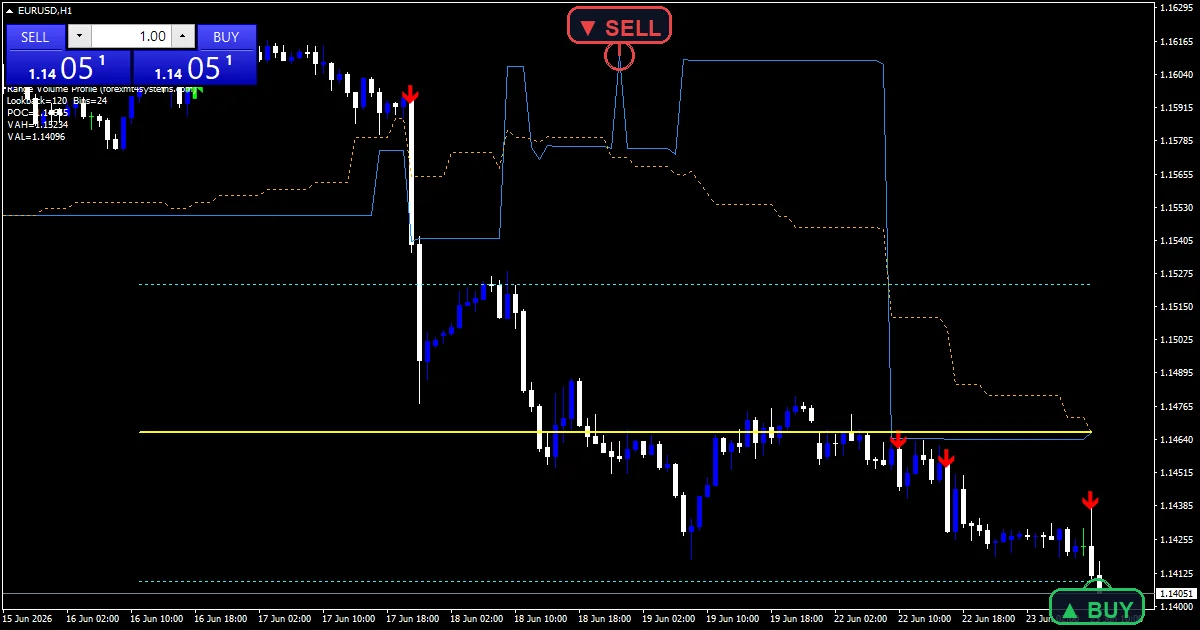
This build ships as a compiled .ex4 for MT4 and .ex5 for MT5; the screenshots below come from EURUSD H1.
| Platforms | MT4 (.ex4) + MT5 (.ex5) |
|---|---|
| Chart window | Main price chart |
| Plots | 4: POC, Value Area Mid, RVP Buy, RVP Sell |
| Alerts | popup, push notification, email, sound |
| Inputs | 15 |
What the file declares
POC is the dodger blue line at the busiest price row.
Value Area Mid is the orange line between the two value area edges.
RVP Buy and RVP Sell mark a breakout carrying a volume spike.
OBJ_TREND rays carry the point of control and value area edges.
- POC: line, dodger blue, width 1
- Value Area Mid: line, orange, width 1
- RVP Buy: arrow, lime, width 2, arrow code 233
- RVP Sell: arrow, red, width 2, arrow code 234
Working it out
Building the profile
The code scans `LookbackBars` `120` bars and splits their range into `PriceBins` `24` rows. Each bar adds its volume to the rows it covered. The fullest row becomes the point of control.
Testing for a spike
avgVol averages volume over `SignalPeriod` `20` bars. volSpike needs the current figure at or above that average times `VolumeSpikeMult` `1.6`. An ordinary bar never clears it.
Combining three conditions
A buy needs the spike, a close above the recent high across `SignalPeriod` bars, and a close above the point of control. `CooldownBars` `6` then blocks a second same-direction mark for six bars.
Reading it correctly
The blue line marks where the last 120 bars traded most heavily.
A mark means a breakout arrived with unusual activity behind it.
Without the spike condition the breakout produces nothing.
The profile moves as older bars drop out of the lookback.
Alert channels in this build: popup, push notification, email and sound, one message per closed bar.
`EnableAlerts` starts on with `EnablePopup`, `EnablePushNotify` and `EnableSound` all true, while `EnableEmail` begins false. `SoundFile` picks the clip. The break test reads closed bars, one message per bar.
Every Range Volume Profile Indicator input
Core settings
| Setting | What it does | Default |
|---|---|---|
LookbackBars |
Volume profile lookback (bars). Bars in the profile, default `120`. | 120 |
PriceBins |
Number of price bins. Price rows the range is split into, default `24`. | 24 |
SignalPeriod |
Lookback for signal pivots. Bars behind the average volume and the recent extreme, default `20`. | 20 |
VolumeSpikeMult |
Volume must exceed avg by this multiple. How far current volume must exceed that average, default `1.6`. | 1.6 |
CooldownBars |
Min bars between same-direction signals. Bars kept between same-direction marks, default `6`. | 6 |
ObjPrefix |
Object prefix. Prefix on every object name, default `RVP_`. | RVP_ |
Display settings
| Setting | What it does | Default |
|---|---|---|
POCColor |
Point of Control color. Point of control colour, default yellow. | yellow |
VAHColor |
Value Area High color. Value area high colour, default aqua. | aqua |
VALColor |
Value Area Low color. | aqua |
Alert settings
| Setting | What it does | Default |
|---|---|---|
EnableAlerts |
Master alert switch. Master switch for the spike break alerts, default `true`. | on |
EnablePopup |
Popup alert. Terminal dialog on a spike break, default `true`. | on |
EnablePushNotify |
Push notification. Phone push on a spike break, default `true`. | on |
EnableEmail |
Email alert. Mail delivery on a spike break, default `false`. | off |
EnableSound |
Sound alert. Sound playback on a spike break, default `true`. | on |
SoundFile |
Sound file name. Wav clip for the profile alert, default `alert.wav`. | alert.wav |

Where the defaults make sense
A profile needs enough bars to fill its rows. EURUSD H1 is the reference chart, where `LookbackBars` at `120` covers five days across twenty-four rows. On M5 the same count covers ten hours and the rows fill densely. On H4 the profile turns coarse.
The limits
Tick volume differs between brokers, so the spike threshold is not portable.
Twenty-four rows over five days is a coarse profile compared with a session one.
Three conditions on one bar means a real breakout can miss on the volume test alone.
Copy the compiled Range Volume Profile Indicator file into your MQL4/Indicators folder, and the MT5 build into MQL5/Indicators, then restart the terminal and drag it onto a chart. The step-by-step guide with screenshots is at how to install MT4 and MT5 indicators.
Related on forexmt4systems.com: Range Trading Strategy.
Download the Range Volume Profile Indicator for MT4 and MT5
The zip holds the compiled Range Volume Profile Indicator build for MT4 and MT5, plus a short README. Compiled files only, no source. Enter your email below and the download link arrives in your inbox.
Download this indicator free
Enter your email and the file is yours. You also get the full MT4 and MT5 library.
FAQ
What does VolumeSpikeMult at 1.6 require?
Current volume at or above 1.6 times the `SignalPeriod` `20` bar average. That is a real jump rather than a busy bar. Ordinary trade never clears it, which is why the marks stay rare.
Why must the close also clear the POC?
So a breakout that happens below the busiest price does not count as bullish. Requiring the close above the point of control keeps buy marks to breaks that also left the heaviest trading behind them.
Is PriceBins at 24 enough detail?
It is coarse for a five-day profile. Twenty-four rows across `LookbackBars` `120` gives wide bands. Raising it sharpens the point of control, at the cost of a noisier profile with thinly filled rows.
What does CooldownBars stop?
A run of marks during one extended breakout. Volume often stays elevated for several bars after a spike, and each could satisfy all three tests. Six bars between same-direction marks keeps that to one signal.
Are results guaranteed?
No. Trading involves risk. Results are not guaranteed; past performance is not indicative of future results. Use the Range Volume Profile Indicator as one input. Always backtest before trading live.
Category: this is part of our Volume collection. Browse more Volume for MetaTrader, or explore every MT4 indicator and MT5 indicator on the site.
External references
- The core method is documented in Negative volume index on Wikipedia.
- Additional market context is at Stockcharts Ad Volume Percent at StockCharts ChartSchool.

About the author
Written by Dominic Walsh, a Forex trader and MT4/MT5 indicator, Expert Advisor and script developer. Every tool on forexmt4systems.com is tested on live charts before release and ships with ready-to-use compiled MT4 (.ex4) and MT5 (.ex5) files. Learn more about the trader and developer behind this site.
How we build, test and correct every tool: Editorial & Testing Policy. Trading carries risk; see the disclaimer.