
A hammer in the middle of nowhere means little; a hammer at a recent low means more. The reversal candlestick pattern indicator detects five classic reversal shapes, each with its own switch, and counts them only when they form near the recent swing high or low. Its messages ship switched off.
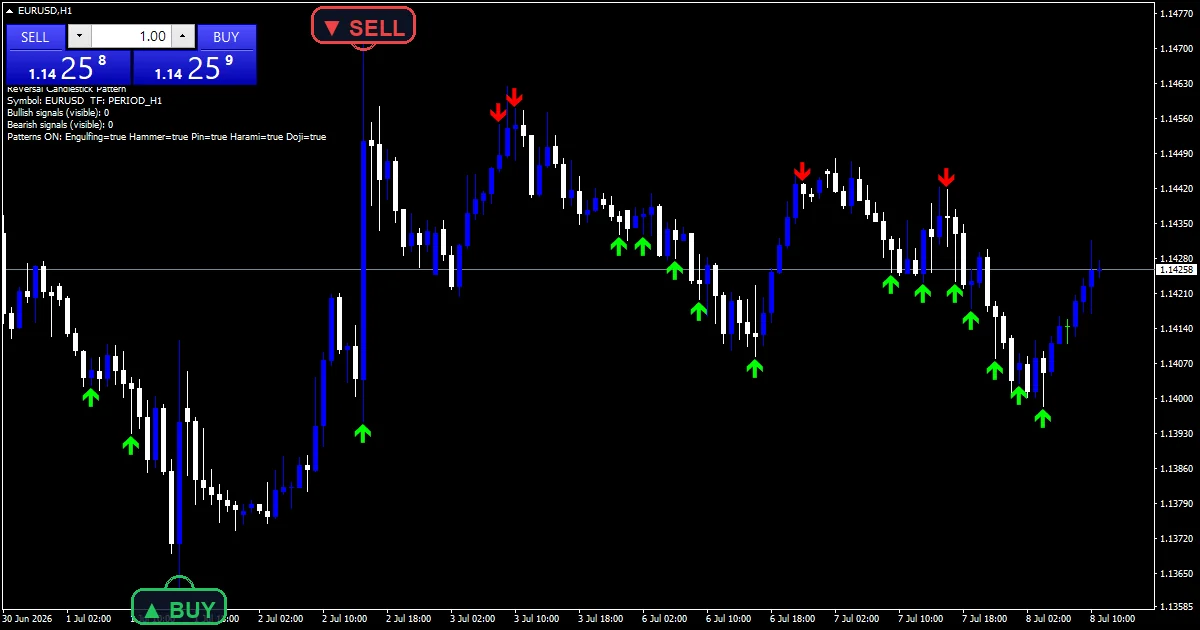
This build ships as a compiled .ex4 for MT4 and .ex5 for MT5; the screenshots below come from EURUSD H1.
| Platforms | MT4 (.ex4) + MT5 (.ex5) |
|---|---|
| Chart window | Main price chart |
| Plots | 2: Bullish Reversal, Bearish Reversal |
| Alerts | popup, push notification, email, sound |
| Inputs | 15 |
Output you can see
Two marks, drawn on price.
`Bullish Reversal` prints lime with arrow 233.
`Bearish Reversal` prints red with arrow 234.
A status panel lists which shapes are on.
`ArrowGapPoints` `20` sets the mark gap.
No lines are drawn.
- Bullish Reversal: arrow, lime, width 2, arrow code 233
- Bearish Reversal: arrow, red, width 2, arrow code 234
What the build works out
Five shapes
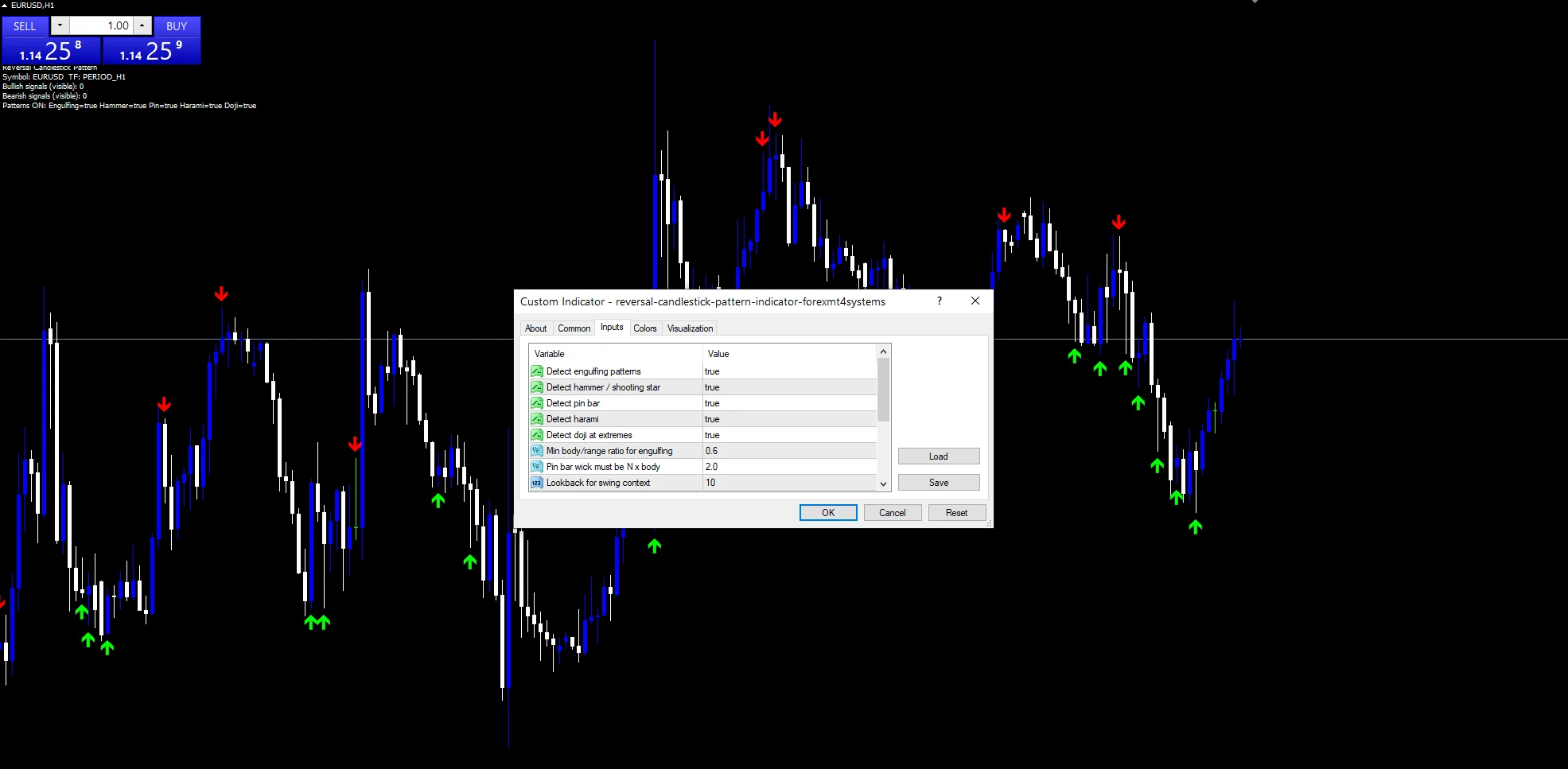
`DetectEngulfing`, `DetectHammer`, `DetectPinBar`, `DetectHarami` and `DetectDoji` each switch one pattern on or off. All five start on.
Shape rules
`MinBodyRatio` `0.6` sets how big an engulfing body must be. `PinBarWickRatio` `2.0` asks a pin bar’s wick to reach twice its body.
Context
`SwingLookback` `10` finds the recent low and high. A bullish shape counts only near that low, and a bearish one only near that high.
What the plots are telling you
A mark means a shape formed at a swing extreme.
The panel shows which shapes are active.
Switching shapes off reduces the marks.
Context matters more than the shape itself.
Marks confirm on the closed candle.
Warm-up needs about twelve bars.
Alert channels in this build: popup, push notification, email and sound, one message per closed bar.
A shape forming at a recent extreme is what the messages cover, but `EnableAlerts` ships false, so nothing goes out until you switch it on. Behind it, the popup and the speaker route playing `SoundFile` are ready; push and email are off.
Every Reversal Candlestick Pattern Indicator input
Core settings
| Setting | What it does | Default |
|---|---|---|
DetectEngulfing |
Detect engulfing patterns. Look for engulfing bars, `true`. | on |
DetectHammer |
Detect hammer / shooting star. Look for hammers and shooting stars, `true`. | on |
DetectPinBar |
Detect pin bar. Look for pin bars, `true`. | on |
DetectHarami |
Detect harami. Look for harami pairs, `true`. | on |
DetectDoji |
Detect doji at extremes. Look for dojis at extremes, `true`. | on |
MinBodyRatio |
Min body/range ratio for engulfing. Body share for an engulfing bar, `0.6`. | 0.6 |
PinBarWickRatio |
Pin bar wick must be N x body. Wick size relative to body, `2.0`. | 2.0 |
SwingLookback |
Lookback for swing context. Bars that set the recent extremes, `10`. | 10 |
Display settings
| Setting | What it does | Default |
|---|---|---|
ArrowGapPoints |
Arrow gap from candle in points. | 20 |
Alert settings
| Setting | What it does | Default |
|---|---|---|
EnableAlerts |
Master alert switch. Master switch, ships off, `false`. | off |
EnablePopup |
Popup alert. | on |
EnablePushNotify |
Push to mobile. | off |
EnableEmail |
Email alert. | off |
EnableSound |
Sound alert. Speaker route under that switch, `true`. | on |
SoundFile |
(see inputs panel) | alert.wav |
Where it works best
Five shapes at recent extremes appear often on hourly bars. EURUSD H1 is the reference chart. On M5 the shapes are mostly noise. On D1 they are the textbook candlestick setups.
When it misleads
Five shapes together produce many marks.
A ten-bar swing is a short context.
Dojis and haramis are weak on their own.
Messages ship off, so nothing reports by default.
Copy the compiled Reversal Candlestick Pattern Indicator file into your MQL4/Indicators folder, and the MT5 build into MQL5/Indicators, then restart the terminal and drag it onto a chart. The step-by-step guide with screenshots is at how to install MT4 and MT5 indicators.
Download the Reversal Candlestick Pattern Indicator for MT4 and MT5
The zip holds the compiled Reversal Candlestick Pattern Indicator build for MT4 and MT5, plus a short README. Compiled files only, no source. Enter your email below and the download link arrives in your inbox.
Download this indicator free
Enter your email and the file is yours. You also get the full MT4 and MT5 library.
FAQ
Why are the five-shape EnableAlerts messages off at first?
Five shapes produce many marks, and a message for each would be constant. The master switch starts off so you choose to hear them rather than having to silence them.
What does SwingLookback 10 add to a Bullish Reversal?
Context. The shape must form near the lowest low of the last ten bars, so a hammer in the middle of a range is ignored.
Can I keep only DetectEngulfing on?
Yes. Every shape has its own switch, and turning the other four off leaves only engulfing bars. Those are the strongest of the five, so the chart gets far fewer, firmer marks.
What does PinBarWickRatio 2.0 require?
A wick at least twice the length of the candle’s body, pointing away from the turn. Shorter wicks describe ordinary candles rather than rejections, so they are skipped.
Are results guaranteed?
No. Trading involves risk. Results are not guaranteed; past performance is not indicative of future results. Use the Reversal Candlestick Pattern Indicator as one input. Always backtest before trading live.
Category: this is part of our Candle Sticks collection. Browse more Candle Sticks for MetaTrader, or explore every MT4 indicator and MT5 indicator on the site.
External references
- For background on this concept, see Hogscraper candlestick on Wikipedia.
- For broader market context, see Economic Indicators at StockCharts ChartSchool.

About the author
Written by Dominic Walsh, a Forex trader and MT4/MT5 indicator, Expert Advisor and script developer. Every tool on forexmt4systems.com is tested on live charts before release and ships with ready-to-use compiled MT4 (.ex4) and MT5 (.ex5) files. Learn more about the trader and developer behind this site.
How we build, test and correct every tool: Editorial & Testing Policy. Trading carries risk; see the disclaimer.