
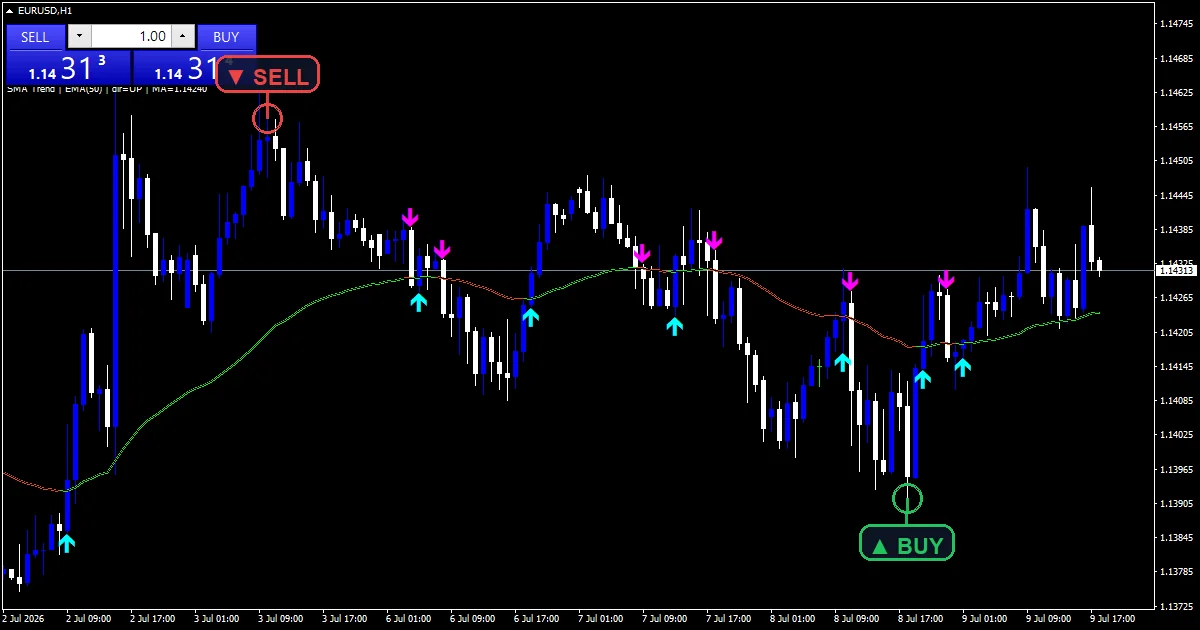
The sma trend indicator plots one moving average and colours it by which way it is heading. Lime while rising, orange red while falling, with an arrow on the bar where the direction changes. One detail is worth knowing before you install it: the method input ships set to EMA rather than SMA, despite what the name suggests.
This build ships as a compiled .ex4 for MT4 and .ex5 for MT5.
| Platforms | MT4 (.ex4) + MT5 (.ex5) |
|---|---|
| Chart window | Main price chart |
| Plots | 4: SMA Trend Up, SMA Trend Down, SMA Trend BUY, SMA Trend SELL |
| Alerts | popup, push notification, email, sound |
| Inputs | 10 |
What the file declares
SMA Trend Up draws the average in lime for every bar where its slope points upward.
The same line switches to SMA Trend Down in orange red once the slope turns.
An aqua SMA Trend BUY arrow sits beneath the bar where direction flips upward.
SMA Trend SELL places a magenta arrow above the bar on a downward flip.
- SMA Trend Up: line, lime, width 2
- SMA Trend Down: line, orange red, width 2
- SMA Trend BUY: arrow, aqua, width 2, arrow code 233
- SMA Trend SELL: arrow, magenta, width 2, arrow code 234
What the formula does
Two methods, one line
`MAMethodSel` picks the maths. At `0` the code sums `MAPeriod` closes and divides, a plain simple average. At `1`, the default, it uses alpha as 2.0 / (MAPeriod + 1.0) and runs the exponential recursion instead. Both write to MaBuf, so everything downstream behaves identically whichever you choose.
Recording direction as a state
DirBuf holds 1.0 while MaBuf rises against the previous bar and minus 1.0 while it falls. The interesting case is neither: when the two values are equal, DirBuf carries forward the previous bar’s state rather than resetting. That keeps a flat patch from clearing the trend read and producing a false flip on the next tick up.
Splitting the line and marking the flip
UpLine and DnLine both receive MaBuf, and the code writes the previous bar’s value into the opposite buffer at a junction so the coloured line has no gap. flipUp then needs DirBuf[i] positive while DirBuf[i + 1] sat at or below zero. `NonRepaint`, on by default, confirms that flip only on closed bars.
Reading the result
Colour is the trend read and the arrow is the change. The colour tells you more of the time.
A flip after a long stretch of one colour carries more weight than one following a few mixed bars.
Because the direction state carries through flat bars, the line does not flicker during a pause.
The arrows use aqua and magenta rather than the line colours, so they stand apart from it.
Alert channels in this build: popup, push notification, email and sound, one message per closed bar.
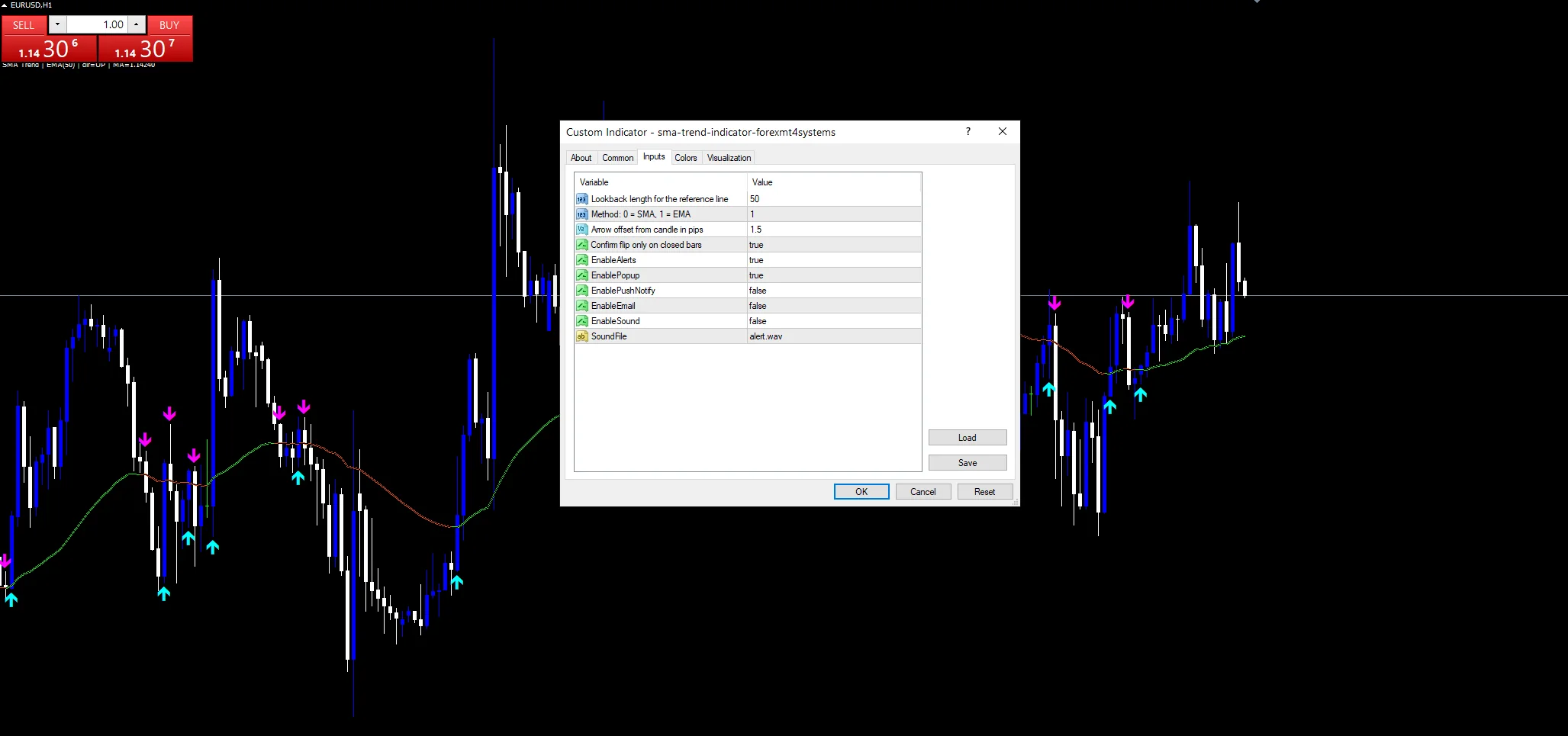
Four channels sit beneath `EnableAlerts`: popup, push notification, email and sound, with `SoundFile` naming the clip. Popup starts enabled. The alert group is labelled once per closed bar, which pairs with `NonRepaint` keeping the flip itself tied to settled data.
Every Sma trend Indicator input
Core settings
| Setting | What it does | Default |
|---|---|---|
MAPeriod |
Lookback length for the reference line. Length of the average, default `50`. This matters more than the method for how often the line flips. | 50 |
MAMethodSel |
Method: 0 = SMA, 1 = EMA. Method choice, `0` for SMA and `1` for EMA. It ships at `1`, so the default line is exponential despite the tool’s name. | 1 |
NonRepaint |
Confirm flip only on closed bars. On by default, confirming a flip only on closed bars. Turning it off gives earlier arrows that can disappear. | on |
Display settings
| Setting | What it does | Default |
|---|---|---|
ArrowGapPips |
Arrow offset from candle in pips. Distance between candle and arrow, default `1.5` pips. | 1.5 |
Alert settings
| Setting | What it does | Default |
|---|---|---|
EnableAlerts |
(see inputs panel) | on |
EnablePopup |
(see inputs panel) | on |
EnablePushNotify |
(see inputs panel) | off |
EnableEmail |
(see inputs panel) | off |
EnableSound |
(see inputs panel) | off |
SoundFile |
(see inputs panel) | alert.wav |
Where to run it
A 50-period average is a general trend reference that travels well across the majors, metals and indices. On H1 it covers about two days and flips a few times a week. Drop to M5 and the flips come often enough that the colour matters more than the arrows. The daily chart turns a flip into a genuine event that may happen a handful of times a year.
When it misleads
A slope flip is a lagging signal by construction. The average has to turn before the colour does, and the average turns after price.
In a range the line drifts almost flat, and small changes flip the colour back and forth despite the carry-forward rule.
The name says SMA while the default computes an EMA, which will confuse anyone comparing this line against a standard SMA on the same chart.
Copy the compiled Sma trend Indicator file into your MQL4/Indicators folder, and the MT5 build into MQL5/Indicators, then restart the terminal and drag it onto a chart. The step-by-step guide with screenshots is at how to install MT4 and MT5 indicators.
Download the Sma trend Indicator for MT4 and MT5
The zip holds the compiled Sma trend Indicator build for MT4 and MT5, plus a short README. Compiled files only, no source. Enter your email below and the download link arrives in your inbox.
Download this indicator free
Enter your email and the file is yours. You also get the full MT4 and MT5 library.
FAQ
Does MAMethodSel really default to EMA?
Yes. The input takes `0` for SMA and `1` for EMA, and it ships at `1`. So out of the box the tool named SMA Trend plots an exponential average. Set it to `0` if you want the simple average the name implies. Neither is wrong, but the mismatch is worth knowing before you compare it against another line.
What does NonRepaint do to the arrows?
It requires the direction flip to confirm on a closed bar before an arrow prints. With it on, which is the default, a printed arrow stays where it printed. Turning it off lets an arrow appear on the forming bar, which arrives sooner and can vanish if the slope reverses before the close.
Why does MAPeriod’s line keep its colour through flat bars?
Because DirBuf carries the previous state when MaBuf matches its own prior value exactly. Without that rule, a single flat bar would clear the direction and the very next tick upward would register as a fresh flip. The carry-forward keeps a pause from generating a false signal.
How does MAPeriod change the flip frequency?
Directly. At `50` the average is slow enough that its slope only turns on a real shift. Shorten it toward 20 and the line tracks price closely, flipping several times a day on H1. Lengthen it toward 100 or 200 and flips become rare, which suits a background trend filter.
Are results guaranteed?
No. Trading involves risk. Results are not guaranteed; past performance is not indicative of future results. Use the Sma trend Indicator as one input. Always backtest before trading live.
Category: this is part of our Trend collection. Browse more Trend for MetaTrader, or explore every MT4 indicator and MT5 indicator on the site.
External references
- For background on this concept, see Shareholder yield on Wikipedia.
- For broader market context, see the investing glossary at Investor.gov.

About the author
Written by Dominic Walsh, a Forex trader and MT4/MT5 indicator, Expert Advisor and script developer. Every tool on forexmt4systems.com is tested on live charts before release and ships with ready-to-use compiled MT4 (.ex4) and MT5 (.ex5) files. Learn more about the trader and developer behind this site.
How we build, test and correct every tool: Editorial & Testing Policy. Trading carries risk; see the disclaimer.