
The sma crossover indicator builds both averages itself rather than calling the terminal. That choice buys one useful thing. `MaMethod` switches all four smoothing types through the same code path. So you can compare a simple pair against an exponential pair, with nothing else changed.
This build ships as a compiled .ex4 for MT4 and .ex5 for MT5.
| Platforms | MT4 (.ex4) + MT5 (.ex5) |
|---|---|
| Chart window | Main price chart |
| Plots | 4: Fast MA, Slow MA, Buy, Sell |
| Alerts | popup, push notification, email, sound |
| Inputs | 10 |
What the build actually draws
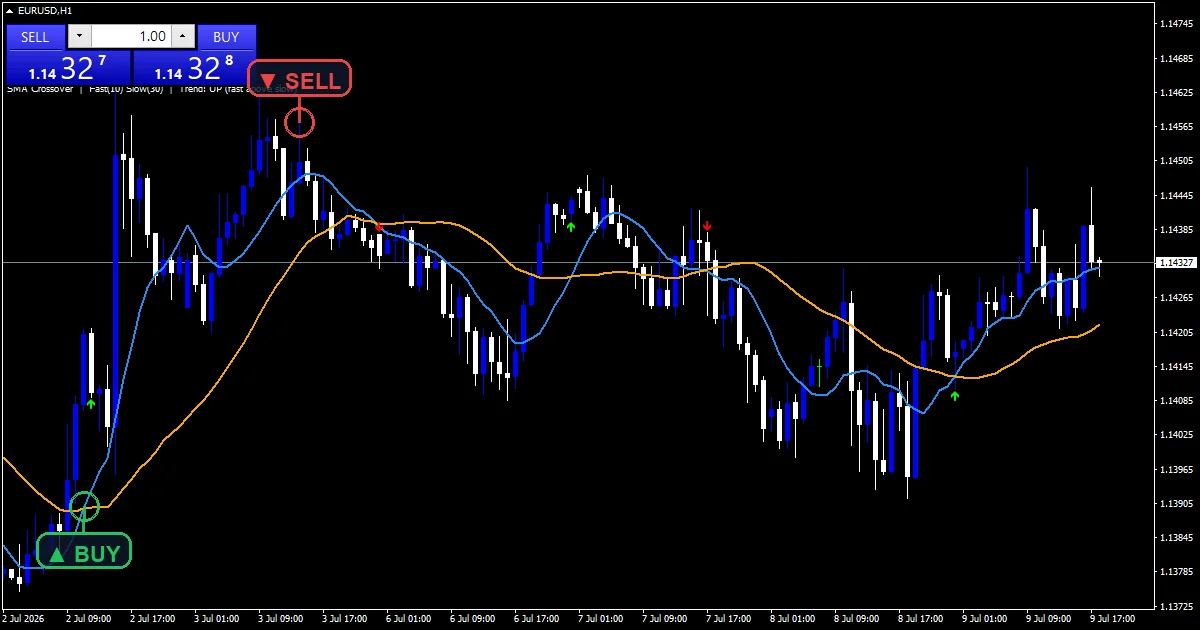
Fast MA is the dodger blue line at `FastPeriod` `10` bars.
Slow MA is the orange line at `SlowPeriod` `30` bars.
Buy drops a lime arrow where blue crosses above orange.
Sell puts a red arrow above the bar for the reverse.
- Fast MA: line, dodger blue, width 2
- Slow MA: line, orange, width 2
- Buy: arrow, lime, arrow code 233
- Sell: arrow, red, arrow code 234
Behind the plots
Two ways to average
Recursive methods use a single constant k. For an exponential average k takes 2 over period plus one. For a smoothed average it takes 1 over period. Each bar then blends the new price with the previous value using that constant.
Weighted and simple windows
A linear weighted average walks the window. It weights each bar by period minus its position, so the newest bar counts most. A simple average weights every bar the same. Both divide by the total weight, which keeps the result on the price scale.
Marking the crossing
crossUp needs the fast buffer above the slow one now and at or below it on the previous bar. crossDown mirrors that. gap takes `ArrowGap` `10.0` times Point, which places the mark clear of the candle.
How to use what it draws
Switching `MaMethod` changes when crossings happen, sometimes by several bars.
A simple pair reacts slowest and gives the fewest crossings.
Linear weighting sits between simple and exponential in responsiveness.
Compare methods on the same chart before settling on one.
Alert channels in this build: popup, push notification, email and sound, one message per closed bar.
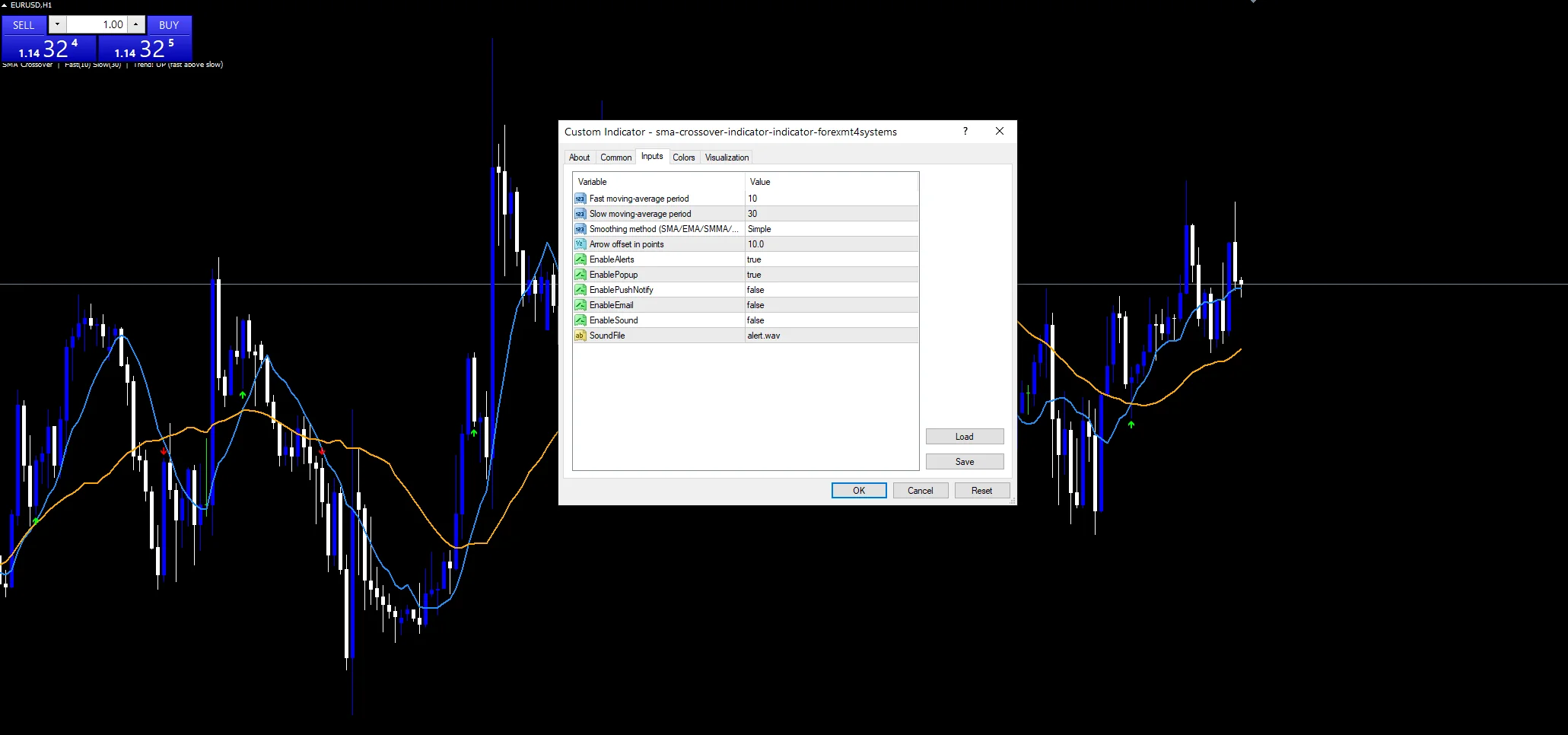
`EnableAlerts` ships on and `EnablePopup` carries the message. `EnablePushNotify`, `EnableEmail` and `EnableSound` stay off by default. `SoundFile` names the clip. The cross test reads completed bars, so one message follows each closed bar.
Every Sma Crossover Indicator input
Core settings
| Setting | What it does | Default |
|---|---|---|
FastPeriod |
Fast moving-average period. Fast average length, default `10`. | 10 |
SlowPeriod |
Slow moving-average period. Slow average length, default `30`. | 30 |
MaMethod |
Smoothing method (SMA/EMA/SMMA/LWMA). Smoothing type, default MODE_SMA. The other choices are exponential, smoothed and linear weighted. | MODE_SMA |
Display settings
| Setting | What it does | Default |
|---|---|---|
ArrowGap |
Arrow offset in points. Arrow offset in points, default `10.0`. | 10.0 |
Alert settings
| Setting | What it does | Default |
|---|---|---|
EnableAlerts |
Switches the cross alerts on as a group, default `true`. | on |
EnablePopup |
Raises the terminal dialog on a cross, default `true`. | on |
EnablePushNotify |
Sends the cross to the MetaTrader mobile app, default `false`. | off |
EnableEmail |
Mails the cross through the terminal, default `false`. | off |
EnableSound |
Plays a file when a cross prints, default `false`. | off |
SoundFile |
Name of the wav file the cross alert uses, default `alert.wav`. | alert.wav |
Suitable markets
Any crossing pair suits trends and struggles in ranges. This one is no exception. On M15 a 10 and 30 pair crosses several times a session. On H1 and H4 the pair separates for longer stretches. Pick the smoothing to match: simple for patience, exponential for speed.
When it is unreliable
Crossings lag by construction, whichever smoothing method you choose.
A range produces crossings in both directions with no move behind either.
Changing `MaMethod` after tuning the periods can move every signal, so tune them together.
Copy the compiled Sma Crossover Indicator file into your MQL4/Indicators folder, and the MT5 build into MQL5/Indicators, then restart the terminal and drag it onto a chart. The step-by-step guide with screenshots is at how to install MT4 and MT5 indicators.
Background reading on the method behind the Sma Crossover Indicator: Shareholder benefit on Wikipedia, trading advisories at the CFTC.
Download the Sma Crossover Indicator for MT4 and MT5
The zip holds the compiled Sma Crossover Indicator build for MT4 and MT5, plus a short README. Compiled files only, no source. Enter your email below and the download link arrives in your inbox.
Download this indicator free
Enter your email and the file is yours. You also get the full MT4 and MT5 library.
FAQ
What does MaMethod change about the lines?
How the window is weighted. MODE_SMA treats every bar equally. The exponential and smoothed settings run a recursion with a single constant. Linear weighting counts recent bars more heavily inside a fixed window. All four use the same `FastPeriod` and `SlowPeriod`.
Why does MaMethod need its own averages?
So all four methods share one code path and one crossing test. It also means the buffers hold the values the crossing test reads, rather than fetching them again. The numbers match the terminal averages either way.
How is ArrowGap measured?
In points, at `10.0` by default. The code multiplies by Point, so on a five-digit feed that is one pip below the low or above the high. Raise it on instruments with large candles where the mark sits too close to the bar.
Does FastPeriod at 10 suit M15?
It gives a busy chart. Ten M15 bars is two and a half hours, so the fast line follows price closely and crosses often. Traders on that timeframe usually stretch both periods or switch `MaMethod` to a slower setting.
Are results guaranteed?
No. Trading involves risk. Results are not guaranteed; past performance is not indicative of future results. Use the Sma Crossover Indicator as one input. Always backtest before trading live.
Category: this is part of our Trend collection. Browse more Trend for MetaTrader, or explore every MT4 indicator and MT5 indicator on the site.
External references
- The core method is documented in Shareholder benefit on Wikipedia.
- Additional market context is at trading advisories at the CFTC.

About the author
Written by Dominic Walsh, a Forex trader and MT4/MT5 indicator, Expert Advisor and script developer. Every tool on forexmt4systems.com is tested on live charts before release and ships with ready-to-use compiled MT4 (.ex4) and MT5 (.ex5) files. Learn more about the trader and developer behind this site.
How we build, test and correct every tool: Editorial & Testing Policy. Trading carries risk; see the disclaimer.