
A step line only moves when price pushes a full step away, so it ignores small noise. The step channel momentum trend indicator builds that line from 1.5 average ranges, measures how far the close sits from it, and turns the result into a 0 to 100 oscillator with a signal line.
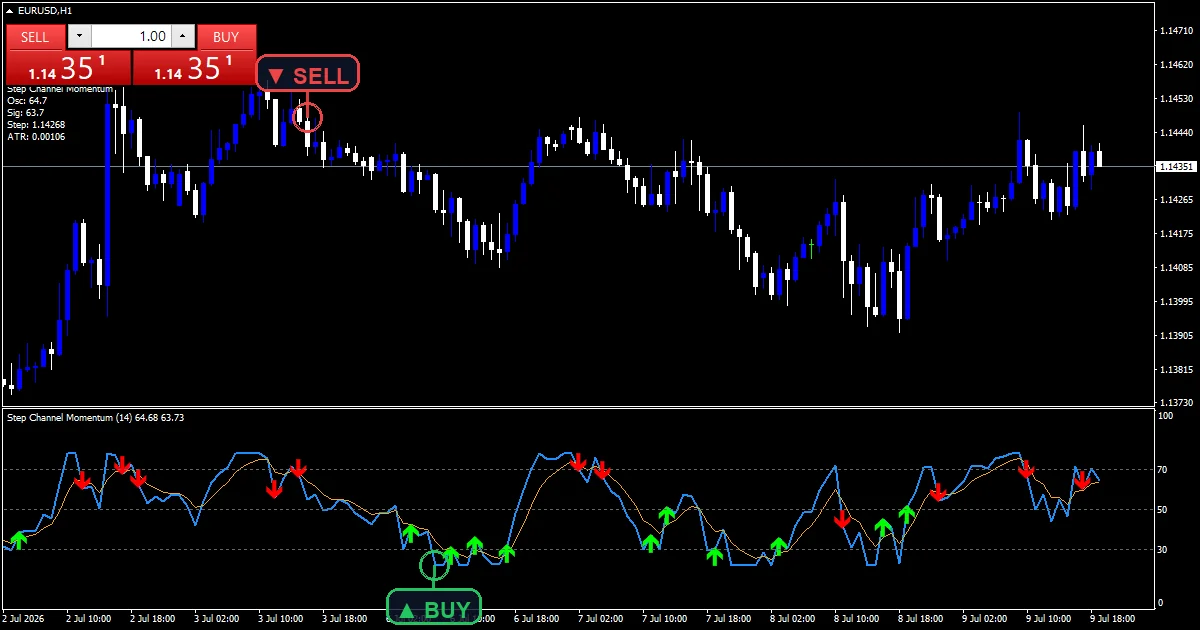
This build ships as a compiled .ex4 for MT4 and .ex5 for MT5; the screenshots below come from EURUSD H1.
| Platforms | MT4 (.ex4) + MT5 (.ex5) |
|---|---|
| Chart window | Separate window (levels 30 / 50 / 70) |
| Plots | 4: StepMomentum, Signal, Buy, Sell |
| Alerts | popup, push notification, email, sound |
| Inputs | 12 |
What the Step Channel Momentum Trend Indicator shows
An oscillator, its signal and marks below price.
`StepMomentum` runs dodger blue at width 2.
`Signal` runs orange.
`Buy` sits just under the line.
`Sell` sits just over it.
Horizontal guides mark 30, 50 and 70.
- StepMomentum: line, dodger blue, width 2
- Signal: line, orange, width 1
- Buy: arrow, lime, width 2, arrow code 233
- Sell: arrow, red, width 2, arrow code 234
How each value gets built
Step line
`ChannelPeriod` `14` sets the average range. The step moves only when the close runs more than `AtrMult` `1.5` ranges beyond it.
Oscillator
The build divides the distance from the step by the step size, multiplies it by `Sensitivity` `28.0`, and adds 50.
Signal and marks
`SignalPeriod` `5` smooths the oscillator. A climb back through `OverSold` `30.0` prints a buy; a drop under `OverBought` `70.0` prints a sell.
How to read it
Readings near 80 mean price runs well above the step.
Readings near 20 mean it runs well below.
Around 50 means price sits on the step.
The orange line smooths the reading.
Marks flag exits from the extremes.
Warm-up needs about twenty bars.
Alert channels in this build: popup, push notification, email and sound, one message per closed bar.
Zone exits report once per closed bar under `EnableAlerts`; the pop-up is the one route on by default.
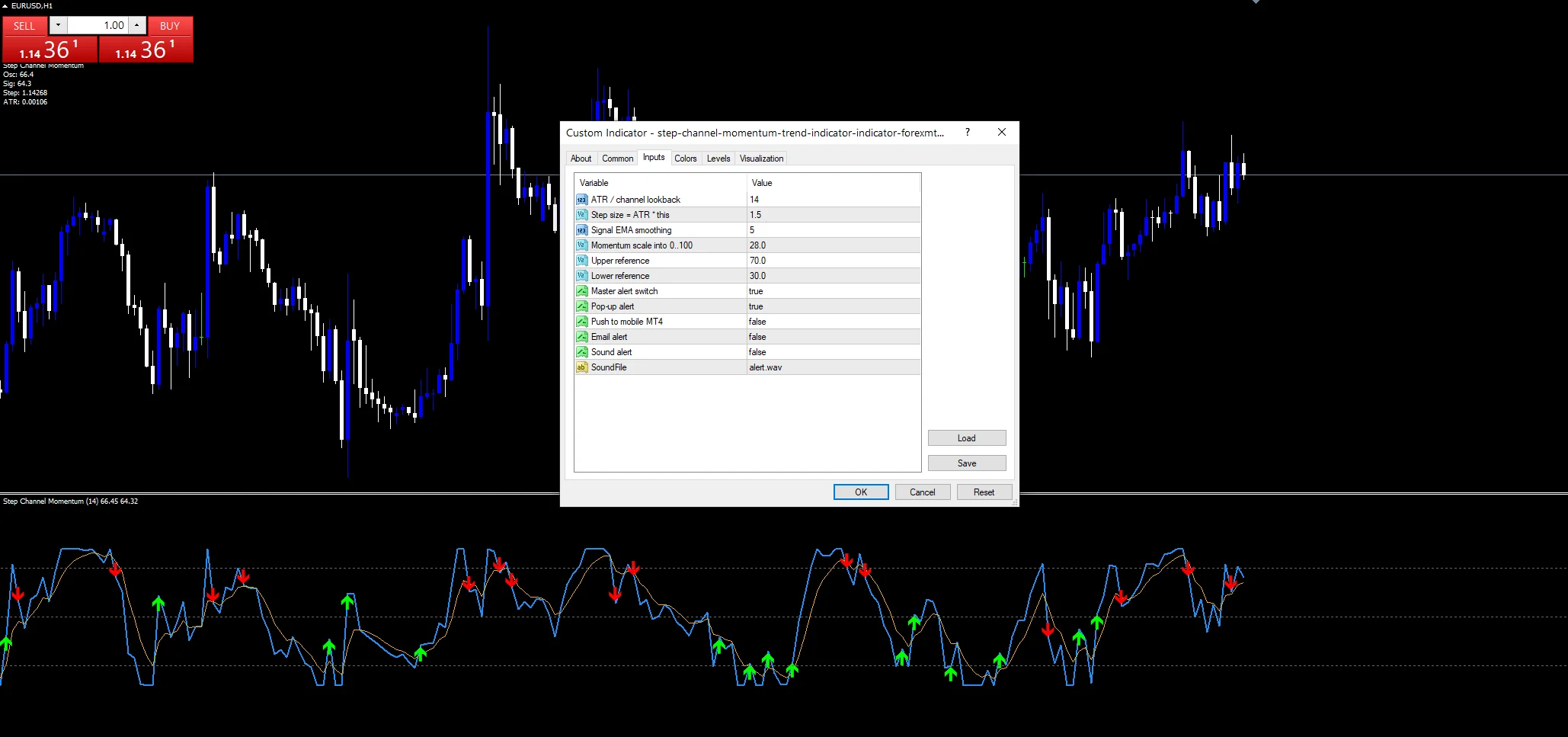
Every Step Channel Momentum Trend Indicator input
Core settings
| Setting | What it does | Default |
|---|---|---|
ChannelPeriod |
ATR / channel lookback. Range window for the step, `14`. | 14 |
AtrMult |
Step size = ATR * this. Step size in ranges, `1.5`. | 1.5 |
SignalPeriod |
Signal EMA smoothing. Signal smoothing, `5`. | 5 |
Sensitivity |
Momentum scale into 0..100. Scale into 0 to 100, `28.0`. | 28.0 |
OverBought |
Upper reference. Upper reference, `70.0`. | 70.0 |
OverSold |
Lower reference. Lower reference, `30.0`. | 30.0 |
Alert settings
| Setting | What it does | Default |
|---|---|---|
EnableAlerts |
Master alert switch. Master alert switch, `true`. | on |
EnablePopup |
Pop-up alert. Pop-up, `true`. | on |
EnablePush |
Push to mobile MT4. Phone route, `false`. | off |
EnableEmail |
Email alert. | off |
EnableSound |
Sound alert. Speaker, `false`. | off |
SoundFile |
(see inputs panel) | alert.wav |
Where the defaults make sense
A step of 1.5 ranges suits hourly charts. The hourly EURUSD screenshot shows several zone exits a week. On M15 lower `AtrMult` for quicker steps. On D1 exits mark swing turns.
Where the logic runs out
Step jumps make the reading lurch.
Zone exits come after the peak.
Sensitivity decides how often the zones get reached.
Pop-ups are the only route on at first.
Copy the compiled Step Channel Momentum Trend Indicator file into your MQL4/Indicators folder, and the MT5 build into MQL5/Indicators, then restart the terminal and drag it onto a chart. The step-by-step guide with screenshots is at how to install MT4 and MT5 indicators.
Download the Step Channel Momentum Trend Indicator for MT4 and MT5
The zip holds the compiled Step Channel Momentum Trend Indicator build for MT4 and MT5, plus a short README. Compiled files only, no source. Enter your email below and the download link arrives in your inbox.
Download this indicator free
Enter your email and the file is yours. You also get the full MT4 and MT5 library.
FAQ
What does AtrMult 1.5 decide?
How far price must run before the step line moves. At one and a half average ranges, the step ignores ordinary swings and only follows real pushes.
How does Sensitivity 28.0 scale the StepMomentum line?
It multiplies the distance from the step, measured in step sizes, before adding 50. A higher value pushes readings toward the edges more often, so zone exits come more frequently.
Which OverSold crossing gives a StepMomentum Buy?
The oscillator climbing from below 30 to 30 or above. The mark flags price recovering from a stretch well below its step line, drawn a little under the oscillator.
Why does the StepMomentum reading lurch at times?
When the step line jumps to a new level, the distance from it changes at once. The oscillator then moves sharply on that single bar before settling again.
Are results guaranteed?
No. Trading involves risk. Results are not guaranteed; past performance is not indicative of future results. Use the Step Channel Momentum Trend Indicator as one input. Always backtest before trading live.
Category: this is part of our Oscillators collection. Browse more Oscillators for MetaTrader, or explore every MT4 indicator and MT5 indicator on the site.
External references
- For background on this concept, see Stockjobber on Wikipedia.
- For broader market context, see Fibonacciretracement at Investopedia.

About the author
Written by Dominic Walsh, a Forex trader and MT4/MT5 indicator, Expert Advisor and script developer. Every tool on forexmt4systems.com is tested on live charts before release and ships with ready-to-use compiled MT4 (.ex4) and MT5 (.ex5) files. Learn more about the trader and developer behind this site.
How we build, test and correct every tool: Editorial & Testing Policy. Trading carries risk; see the disclaimer.