
The stochastic crossover alert indicator exists for one event: the moment %K crosses %D. Cross Up and Cross Down mark that bar inside the pane. OnlyInZones decides whether every cross counts or just the ones happening at an extreme.
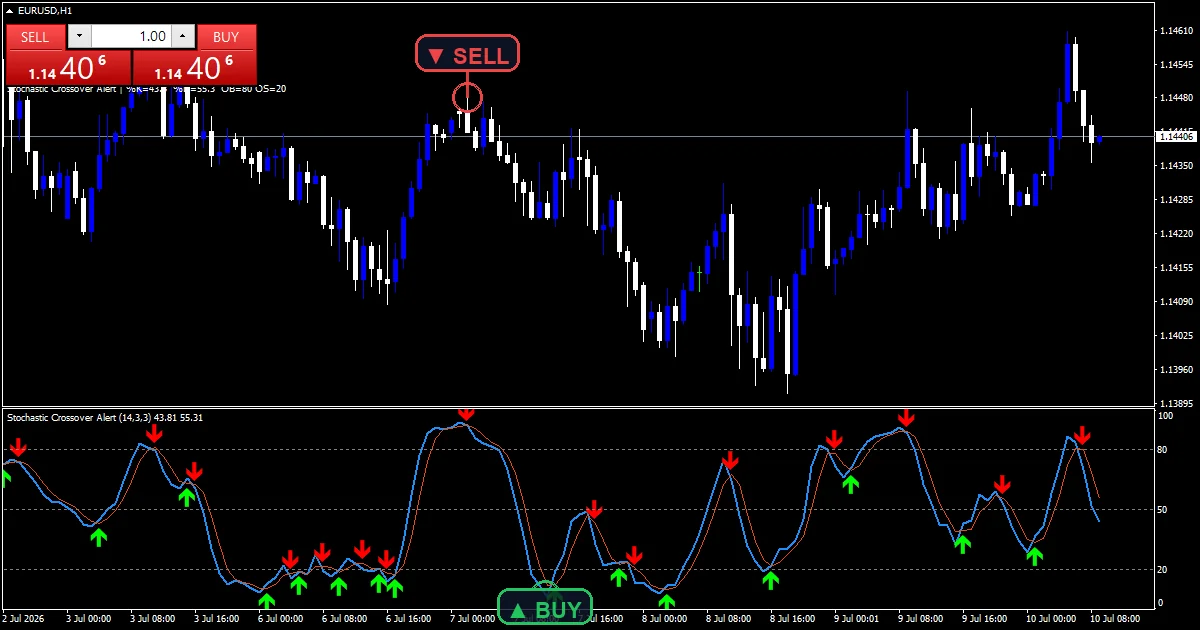
This build ships as a compiled .ex4 for MT4 and .ex5 for MT5; the screenshots below come from EURUSD H1.
| Platforms | MT4 (.ex4) + MT5 (.ex5) |
|---|---|
| Chart window | Separate window (levels 20 / 50 / 80) |
| Plots | 4: %K, %D, Cross Up, Cross Down |
| Alerts | popup, push notification, email, sound |
| Inputs | 12 |
Which plots exist
%K (blue) is the smoothed raw reading over KPeriod bars.
%D (orange red) averages %K again over DPeriod.
Cross Up (lime, code 233) prints six units below %D on an upward cross.
Cross Down (red, code 234) prints six units above %D on the downward one.
Levels cross the pane at 20, 50 and 80, matching OverSold and OverBought with a midline.
- %K: line, dodger blue, width 2
- %D: line, orange red, width 1
- Cross Up: arrow, lime, width 2, arrow code 233
- Cross Down: arrow, red, width 2, arrow code 234
How it builds its numbers
Building the reading by hand
This build does not call the platform routine. It scans KPeriod bars for the highest high and lowest low itself, then places the close inside that range as a percentage.
A flat range would divide by zero, so the code returns 50 in that case. Slowing then averages the raw figures and DPeriod averages the result again.
Detecting the cross
Two comparisons do it. An upward cross needs %K at or below %D one bar back and above it now, and the downward case mirrors that exactly.
Both readings come from bars that have already printed, so a cross cannot appear and then vanish.
Restricting crosses to the extremes
OnlyInZones defaults to false, which marks every cross wherever it happens. Set it true and a cross only counts while the reading sits past OverBought or OverSold.
That single switch changes the character of the tool completely. Left off you get frequent marks including many near the midline; switched on you get far fewer.
Reading it on a live chart
Marks clustering near the 50 line are the ones OnlyInZones would remove.
An upward cross below 20 is the classic long side reading for this family.
Both markers sit a fixed six units from %D, so they track the signal line rather than price.
A flat stretch at 50 usually means the KPeriod range collapsed rather than the market balancing.
Alert channels in this build: popup, push notification, email and sound, one message per closed bar.
Alerts cover popup, push, email and sound on each cross. A bar time check keeps it to one alert per closed bar.
Every Stochastic crossover alert Indicator input
Core settings
| Setting | What it does | Default |
|---|---|---|
KPeriod |
%K lookback. KPeriod sets the high to low window the close gets measured against. It defaults to 14. | 14 |
Slowing |
%K smoothing. Slowing averages the raw figures before they reach %K, 3 by default. | 3 |
DPeriod |
%D signal smoothing. DPeriod averages %K into %D, also 3. Raising it delays every cross. | 3 |
OverBought |
upper reference. OverBought is the upper reference at 80.0, and OnlyInZones uses it as the ceiling test. | 80.0 |
OverSold |
lower reference. OverSold is the lower reference at 20.0 for the same purpose. | 20.0 |
OnlyInZones |
require cross inside OB/OS zones. OnlyInZones restricts marks to crosses at an extreme. It defaults to false, so everything gets marked. | off |
Alert settings
| Setting | What it does | Default |
|---|---|---|
EnableAlerts |
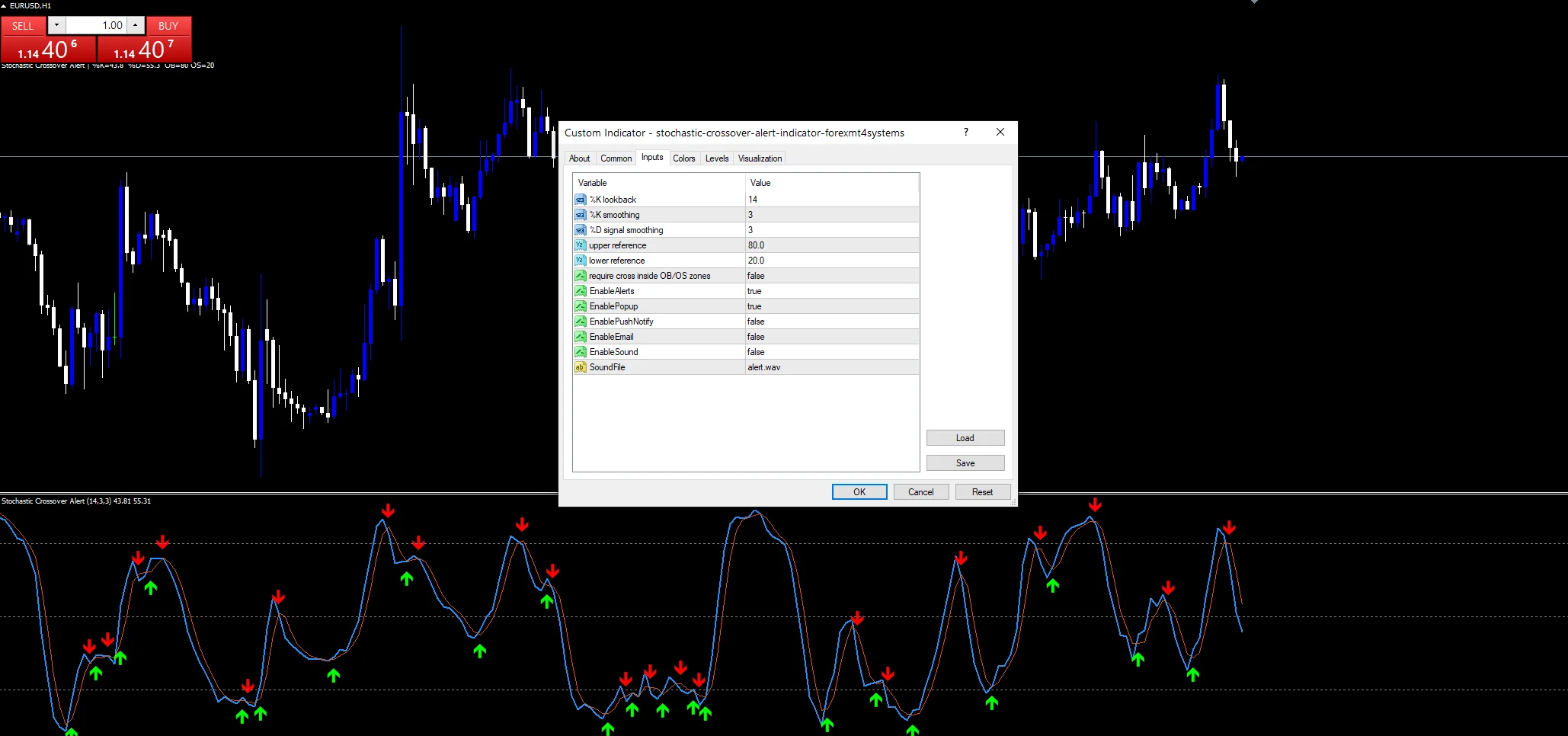
(see inputs panel) | on |
EnablePopup |
(see inputs panel) | on |
EnablePushNotify |
(see inputs panel) | off |
EnableEmail |
(see inputs panel) | off |
EnableSound |
(see inputs panel) | off |
SoundFile |
(see inputs panel) | alert.wav |
Where it earns its keep
The screenshot uses EURUSD H1. A 14, 3, 3 setup on H1 crosses several times a session, which is a lot of marks with OnlyInZones off. H4 and daily give fewer and cleaner ones. On M5 and below, switching OnlyInZones on is close to essential or the pane fills up.
When to distrust it
Crosses near the midline carry almost no information, and the default settings mark all of them.
A trend holds the reading at one end for long runs, so the crosses against it keep printing while price continues.
Restricting to the zones cuts the noise and also delays every mark, because the reading has to reach an extreme first.
The six unit offset is fixed in the code, so on a busy pane the markers can sit on top of the level lines.
Copy the compiled Stochastic crossover alert Indicator file into your MQL4/Indicators folder, and the MT5 build into MQL5/Indicators, then restart the terminal and drag it onto a chart. The step-by-step guide with screenshots is at how to install MT4 and MT5 indicators.
Background reading on the method behind the Stochastic crossover alert Indicator: Thematic investing on Wikipedia, Candlestick at Investopedia.
Download the Stochastic crossover alert Indicator for MT4 and MT5
The zip holds the compiled Stochastic crossover alert Indicator build for MT4 and MT5, plus a short README. Compiled files only, no source. Enter your email below and the download link arrives in your inbox.
Download this indicator free
Enter your email and the file is yours. You also get the full MT4 and MT5 library.
FAQ
What changes if I switch OnlyInZones to true?
A cross then only counts while the reading sits above OverBought or below OverSold. Everything near the midline stops getting marked. The number of arrows drops sharply, and the ones remaining all happen at an extreme rather than anywhere in the range.
Why do the markers sit near %D rather than on the candles?
Both arrow buffers live in the pane, not on the price chart. The code places them six units either side of the %D value, so they travel with the signal line. That keeps each mark next to the cross that produced it.
Does this call the built-in MT4 stochastic?
No. It scans KPeriod bars for the highest high and lowest low itself, places the close inside that range, then applies Slowing and DPeriod as plain averages. The result matches the standard formula, but every step happens in this file.
What happens when the KPeriod range is completely flat?
Dividing by a zero range would fail, so the code returns 50 for that bar instead. A flat stretch sitting exactly on the midline is usually this fallback rather than a market genuinely balanced between its high and low.
Are results guaranteed?
No. Trading involves risk. Results are not guaranteed; past performance is not indicative of future results. Use the Stochastic crossover alert Indicator as one input. Always backtest before trading live.
Category: this is part of our Oscillators collection. Browse more Oscillators for MetaTrader, or explore every MT4 indicator and MT5 indicator on the site.
External references
- Learn more about the underlying method in Thematic investing on Wikipedia.
- For wider market background, see Candlestick at Investopedia.

About the author
Written by Dominic Walsh, a Forex trader and MT4/MT5 indicator, Expert Advisor and script developer. Every tool on forexmt4systems.com is tested on live charts before release and ships with ready-to-use compiled MT4 (.ex4) and MT5 (.ex5) files. Learn more about the trader and developer behind this site.
How we build, test and correct every tool: Editorial & Testing Policy. Trading carries risk; see the disclaimer.