
The tma centered bands indicator wraps a triangular moving average in bands sized by ATR. TMA Mid runs through the candles with Upper Band and Lower Band either side. CenteredMode is the input that matters most, because it decides whether the average repaints.
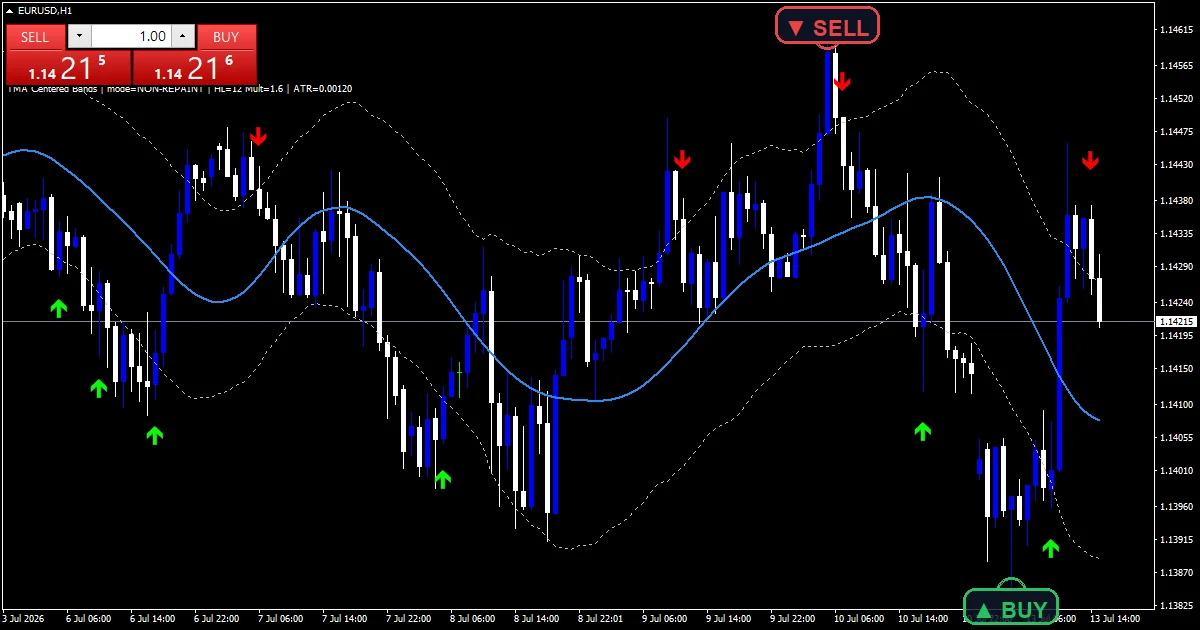
This build ships as a compiled .ex4 for MT4 and .ex5 for MT5; the screenshots below come from EURUSD H1.
| Platforms | MT4 (.ex4) + MT5 (.ex5) |
|---|---|
| Chart window | Main price chart |
| Plots | 5: TMA Mid, Upper Band, Lower Band, Buy, Sell |
| Alerts | popup, push notification, email, sound |
| Inputs | 12 |
On the chart: plots and colours
TMA Mid (blue) is the triangular average of the bar midpoints.
Upper Band and Lower Band (silver) sit BandMult ATRs above and below it.
Buy (lime, code 233) and Sell (red, code 234) mark the signal bars, offset from the candle by a fraction of ATR.
- TMA Mid: line, dodger blue, width 2
- Upper Band: line, silver, width 1
- Lower Band: line, silver, width 1
- Buy: arrow, lime, width 2, arrow code 233
- Sell: arrow, red, width 2, arrow code 234
How it builds its numbers
The triangular weighting
Weights rise to a peak at the centre of the window and fall away on both sides. HalfLength sets how far that window reaches, so the full span is double HalfLength plus one.
Each bar contributes its midpoint, meaning the high and low averaged, multiplied by its weight. The result is a smoother line than a simple average of the same span.
Repainting, and the switch that avoids it
An authentic triangular average is centred, meaning it reads bars on both sides of the one it plots. That is mathematically correct and it repaints, because the bars to the right have not happened yet.
CenteredMode defaults to false for that reason. Left off, the calculation uses only bars already printed. Switch it on and you get the textbook centred version, along with a line that shifts as new bars arrive.
Band width and arrow spacing
Band distance comes from a Wilder smoothed true range over AtrPeriod bars, multiplied by BandMult. Both bands widen as volatility rises and pull in when it settles.
ArrowOffsetATR spaces a marker from its candle as a fraction of that same ATR, so the gap scales with the market instead of staying fixed in points.
What to look for
Price reaching a band means it has stretched BandMult ATRs from the smoothed midpoint.
TMA Mid turns later than a simple average, since the triangular weighting concentrates on the middle of the window.
SignalCooldownBars spaces the markers, so a busy stretch produces fewer than the raw rules would give.
With CenteredMode off, the most recent part of the line is built from fewer bars than the rest.
Alert channels in this build: popup, push notification, email and sound, one message per closed bar.
Alerts cover popup, push, email and sound, with the file named by AlertSound. A bar time check keeps it to one alert per closed bar.
Every TMA Centered Bands Indicator input
Core settings
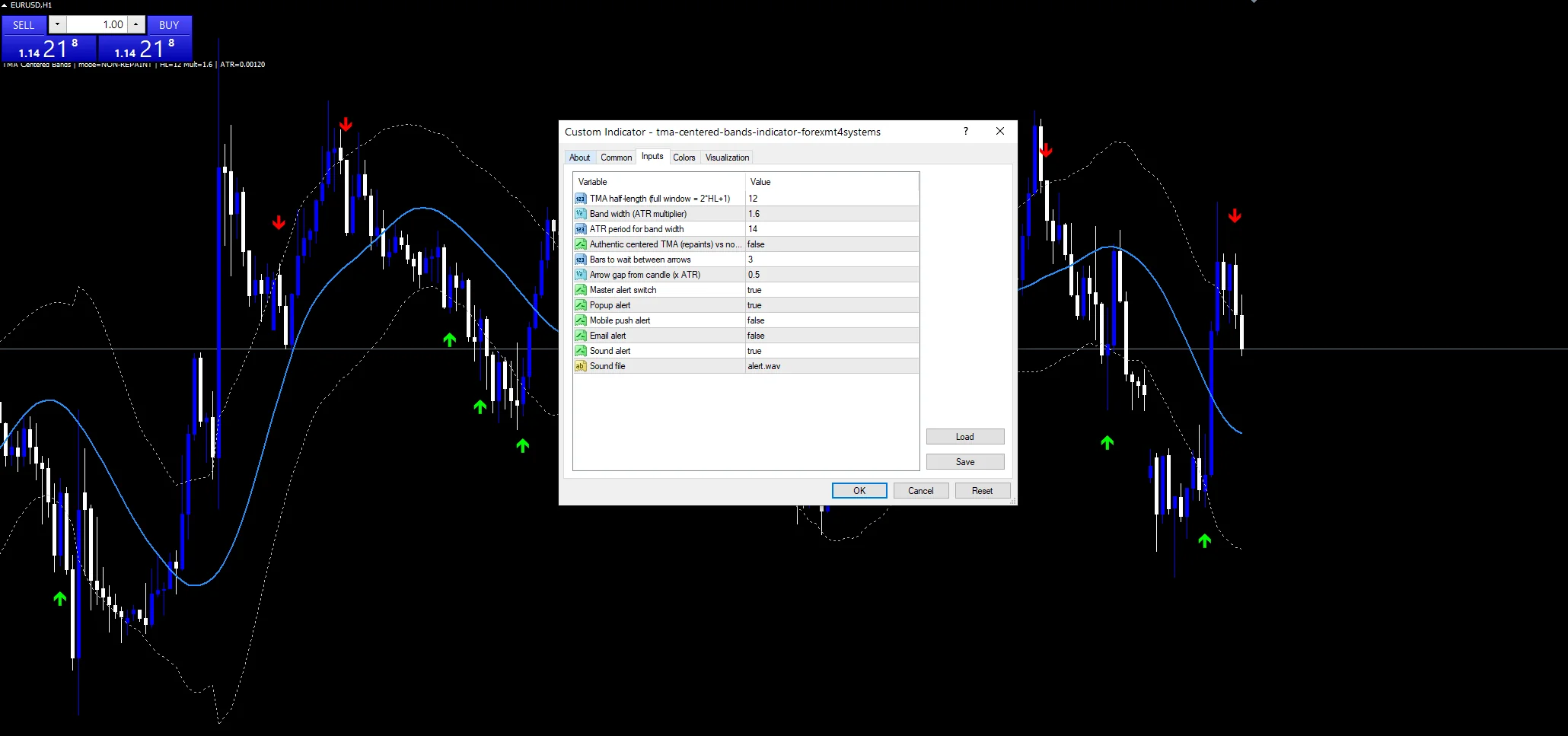
| Setting | What it does | Default |
|---|---|---|
HalfLength |
TMA half-length (full window = 2*HL+1). HalfLength sets the reach either side of the centre, 12 by default, giving a 25 bar window in total. | 12 |
BandMult |
Band width (ATR multiplier). BandMult multiplies ATR to set band distance. It defaults to 1.6, so widen it towards 2.5 for fewer touches. | 1.6 |
AtrPeriod |
ATR period for band width. AtrPeriod is the true range window behind the bands, 14 by default. | 14 |
CenteredMode |
Authentic centered TMA (repaints) vs non-repaint. CenteredMode picks the authentic centred average, which repaints, over the non-repaint version. It defaults to false. | off |
SignalCooldownBars |
Bars to wait between arrows. SignalCooldownBars is the minimum gap between markers, 3 by default. | 3 |
Display settings
| Setting | What it does | Default |
|---|---|---|
ArrowOffsetATR |
Arrow gap from candle (x ATR). ArrowOffsetATR spaces a marker from its candle as a fraction of ATR, 0.5 by default. | 0.5 |
Alert settings
| Setting | What it does | Default |
|---|---|---|
EnableAlerts |
Master alert switch. | on |
EnablePopup |
Popup alert. | on |
EnablePushNotify |
Mobile push alert. | off |
EnableEmail |
Email alert. | off |
EnableSound |
Sound alert. | on |
AlertSound |
Sound file. AlertSound names the file played from the MT4 Sounds folder and defaults to alert.wav. | alert.wav |
Picking the right chart
The screenshot uses EURUSD H1. A 25 bar triangular window on H1 covers roughly a day, which suits pairs rotating around an intraday mean. On H4 the same window stretches across a week and the bands turn slow. Below M15 the smoothing helps, but the bands react to almost every candle.
Where it comes unstuck
With CenteredMode on the line repaints, and any backtest built on that version will flatter itself badly.
With CenteredMode off the newest values rest on half a window, so the right hand end of the line is less reliable than the rest.
Bands sized from ATR widen after a fast move rather than before one, so they sit widest once the market has already turned dangerous.
A triangular average lags more than a simple one of the same span, because the weight sits in the middle of the window.
Copy the compiled TMA Centered Bands Indicator file into your MQL4/Indicators folder, and the MT5 build into MQL5/Indicators, then restart the terminal and drag it onto a chart. The step-by-step guide with screenshots is at how to install MT4 and MT5 indicators.
Download the TMA Centered Bands Indicator for MT4 and MT5
The zip holds the compiled TMA Centered Bands Indicator build for MT4 and MT5, plus a short README. Compiled files only, no source. Enter your email below and the download link arrives in your inbox.
Download this indicator free
Enter your email and the file is yours. You also get the full MT4 and MT5 library.
FAQ
Does CenteredMode make the TMA Mid line repaint?
Yes, and deliberately so. The authentic centred average reads bars on both sides of the one it plots, so its most recent values keep changing as new bars arrive. That is why the input defaults to false, which restricts the calculation to bars already printed.
What window does HalfLength 12 actually produce?
Twenty five bars: twelve either side of the centre plus the centre itself. Weights peak in the middle and fall away towards both ends. Raising HalfLength widens the span and smooths the line further, at the cost of a later turn.
Why do the bands use ATR instead of standard deviation?
ATR measures the true range of each bar, gaps included, while standard deviation measures how far closes scatter around their mean. Sizing from ATR keeps BandMult meaningful across symbols and timeframes without retuning for each one.
What does ArrowOffsetATR 0.5 mean in points?
It depends on the market. The gap is half the current ATR reading, so on a quiet EURUSD hour it is small and during a volatile session it grows. Fixing the offset in points instead would make markers crowd the candles on some symbols and float away on others.
Are results guaranteed?
No. Trading involves risk. Results are not guaranteed; past performance is not indicative of future results. Use the TMA Centered Bands Indicator as one input. Always backtest before trading live.
Category: this is part of our Signal and Forecast collection. Browse more Signal and Forecast for MetaTrader, or explore every MT4 indicator and MT5 indicator on the site.
External references
- For background on this concept, see Currency overlay on Wikipedia.
- For broader market context, see Equivolume at StockCharts ChartSchool.

About the author
Written by Dominic Walsh, a Forex trader and MT4/MT5 indicator, Expert Advisor and script developer. Every tool on forexmt4systems.com is tested on live charts before release and ships with ready-to-use compiled MT4 (.ex4) and MT5 (.ex5) files. Learn more about the trader and developer behind this site.
How we build, test and correct every tool: Editorial & Testing Policy. Trading carries risk; see the disclaimer.