
Drawing trend lines by hand means choosing which swings to join. The trend line channel indicator makes that choice by rule: it joins the two most recent swing highs into an upper line and the two most recent swing lows into a lower line, extends both, and marks a close that breaks out.
This build ships as a compiled .ex4 for MT4 and .ex5 for MT5; the screenshots below come from EURUSD H1.
| Platforms | MT4 (.ex4) + MT5 (.ex5) |
|---|---|
| Chart window | Main price chart |
| Plots | 2: TLC Buy Break, TLC Sell Break |
| Alerts | popup, push notification, email, sound |
| Inputs | 15 |
What the Trend Line Channel Indicator renders
Three rays and two marks on price.
`UpperColor` `clrTomato` draws the upper line.
`LowerColor` `clrDodgerBlue` draws the lower line.
`MidColor` `clrGoldenrod` draws the midline.
`TLC Buy Break` prints lime with arrow 233.
`TLC Sell Break` prints red with arrow 234.
- TLC Buy Break: arrow, lime, arrow code 233
- TLC Sell Break: arrow, red, arrow code 234

How the Trend Line Channel Indicator does its maths
The swings
`FractalLength` `3` bars on each side confirm a swing. Only the two newest highs and two newest lows feed the lines.
The lines
Each line runs through its two swings and, with `ExtendRight` on, continues past them. `ShowMidline` adds a line halfway between.
The break
A close above the upper line, after a close at or below it, prints a buy. `CooldownBars` `3` spaces same-side marks.
Making it useful
Converging lines form a wedge.
Parallel lines form a true channel.
The lines redraw when a new swing confirms.
Marks only count breaks after the newest swing.
`ArrowATRmult` `0.6` sets the mark gap.
The forming bar never gets a mark.
Alert channels in this build: popup, push notification, email and sound, one message per closed bar.
Channel breaks report through `EnableAlerts`, one per closed bar. The popup is the channel live from the start; mobile, email and sound need switching on.
Every Trend Line Channel Indicator input
Core settings
| Setting | What it does | Default |
|---|---|---|
FractalLength |
bars each side that confirm a swing pivot. Bars on each side of a swing, `3`. | 3 |
ATRPeriod |
ATR length for arrow offset. Range window for the mark gap, `14`. | 14 |
CooldownBars |
min bars between arrows of same type. Wait between same-side marks, `3`. | 3 |
ExtendRight |
extend channel lines to the right (ray). Extend the lines as rays, `true`. | on |
Display settings
| Setting | What it does | Default |
|---|---|---|
ArrowATRmult |
arrow distance from bar as ATR multiple. Mark gap in ranges, `0.6`. | 0.6 |
ShowMidline |
draw parallel channel midline. Draw the midline, `true`. | on |
UpperColor |
resistance line colour. Upper line colour, `clrTomato`. | tomato |
LowerColor |
support line colour. Lower line colour, `clrDodgerBlue`. | dodger blue |
MidColor |
midline colour. Midline colour, `clrGoldenrod`. | goldenrod |
Alert settings
| Setting | What it does | Default |
|---|---|---|
EnableAlerts |
Switch for break messages, `true`. | on |
EnablePopup |
(see inputs panel) | on |
EnablePushNotify |
(see inputs panel) | off |
EnableEmail |
(see inputs panel) | off |
EnableSound |
(see inputs panel) | off |
SoundFile |
(see inputs panel) | alert.wav |
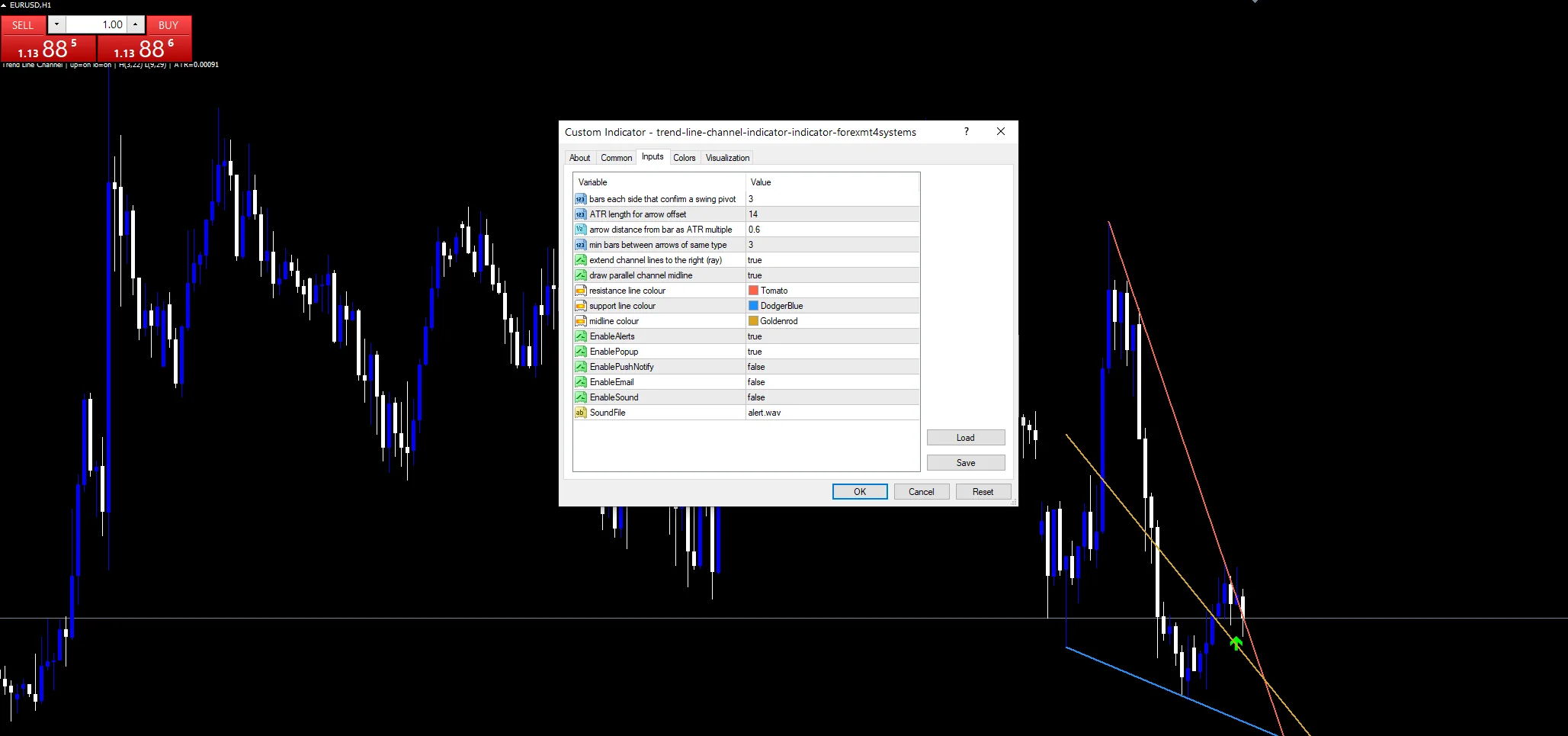
Choosing where it lives
Two-swing lines suit charts with clear structure. EURUSD H1 is the reference chart, where a new channel forms every day or two. On M15 the lines redraw often. On D1 they match the lines most traders draw by hand.
What it will not tell you
Two swings define a line, but not a strong one.
The channel moves each time a swing confirms.
Breaks of steep lines come quickly and often fail.
The popup is the only route on at first.
Copy the compiled Trend Line Channel Indicator file into your MQL4/Indicators folder, and the MT5 build into MQL5/Indicators, then restart the terminal and drag it onto a chart. The step-by-step guide with screenshots is at how to install MT4 and MT5 indicators.
Download the Trend Line Channel Indicator for MT4 and MT5
The zip holds the compiled Trend Line Channel Indicator build for MT4 and MT5, plus a short README. Compiled files only, no source. Enter your email below and the download link arrives in your inbox.
Download this indicator free
Enter your email and the file is yours. You also get the full MT4 and MT5 library.
FAQ
Which swings does FractalLength 3 join?
The two most recent confirmed swing highs for the upper line, and the two most recent swing lows for the lower one. A swing needs three lower highs, or higher lows, on each side.
Why does the channel redraw?
When a new swing confirms, it replaces the older of the two used for that line. The line then runs through the newest pair, so the whole channel can tilt at once.
When does TLC Buy Break print?
On a closed bar that closes above the upper line after the bar before closed at or below it. The test starts after the newest swing, so older crossings never get a mark.
What does ShowMidline add to the channel?
A goldenrod line halfway between the upper and lower swings. It shows the channel’s centre, which price often visits during a range, and it moves with the channel whenever a swing confirms.
Are results guaranteed?
No. Trading involves risk. Results are not guaranteed; past performance is not indicative of future results. Use the Trend Line Channel Indicator as one input. Always backtest before trading live.
Category: this is part of our Trend collection. Browse more Trend for MetaTrader, or explore every MT4 indicator and MT5 indicator on the site.
External references
- The core method is documented in Foreign exchange certificate on Wikipedia.
- Additional market context is at Nyse Equity Indices at StockCharts ChartSchool.

About the author
Written by Dominic Walsh, a Forex trader and MT4/MT5 indicator, Expert Advisor and script developer. Every tool on forexmt4systems.com is tested on live charts before release and ships with ready-to-use compiled MT4 (.ex4) and MT5 (.ex5) files. Learn more about the trader and developer behind this site.
How we build, test and correct every tool: Editorial & Testing Policy. Trading carries risk; see the disclaimer.