
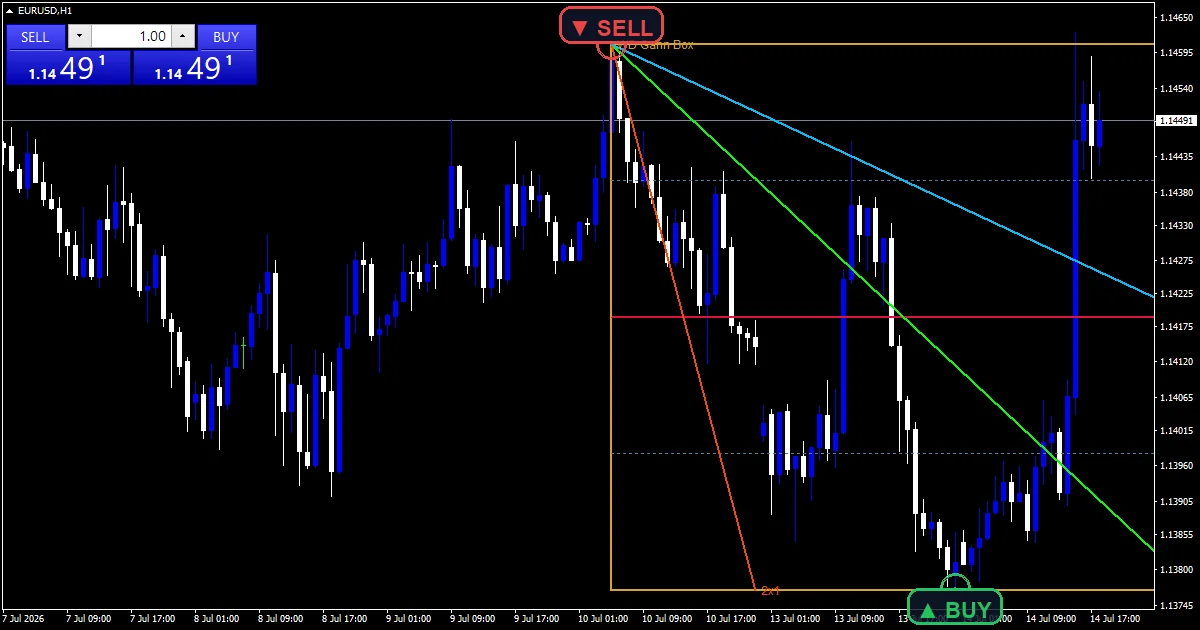
The wd gann box indicator draws objects rather than buffers. It hunts back `Lookback` bars for the most extreme confirmed swing high and swing low, frames them in a box, then divides that range into quarters. Three fan angles run from the anchor across the box.
This build ships as a compiled .ex4 for MT4 and .ex5 for MT5; the screenshots below come from EURUSD H1.
| Platforms | MT4 (.ex4) + MT5 (.ex5) |
|---|---|
| Chart window | Main price chart |
| Plots | 0 |
| Alerts | popup, push notification, email, sound |
| Inputs | 20 |
Plots this indicator declares
An OBJ_RECTANGLE spans the two anchor swings, outlined in `ClrBox`.
The 50 percent midline draws in `ClrMid`, with 25 and 75 percent in `ClrQuarter`.
Three OBJ_TREND fan angles run in `Clr1x1`, `Clr2x1` and `Clr1x2`.
OBJ_TEXT labels name each level when `ShowLabels` is on.
What the code actually computes
Finding the anchors
A swing needs `Fractal` `5` bars on each side that fail to beat it. Across `Lookback` `150` bars the code keeps the single highest confirmed high and the single lowest confirmed low. Those two prices frame everything else.
Dividing the range
range takes the high anchor minus the low anchor. The quarter levels then sit at 25, 50 and 75 percent of it, measured up from the low. Those three plus the two edges give five prices in all.
Setting the direction
upTrend compares which anchor came later in time. A low that formed after the high means the box reads upward. The fan angles start from the appropriate corner, and `ProjectBars` `30` extends the right edge forward.
Reading the result
The box frames the largest confirmed swing inside the lookback window.
The 50 percent line is the level most traders watch first.
Fan angles are geometric constructions rather than fitted lines.
A fresh extreme redraws the whole box, so treat the levels as provisional.
Alert channels in this build: popup, push notification, email and sound, one message per closed bar.
`EnableAlerts` starts on and `EnablePopup` carries the text. `EnablePushNotify`, `EnableEmail` and `EnableSound` begin false. `SoundFile` picks the clip. The midline test reads two completed closes, and the guard allows one message per bar.
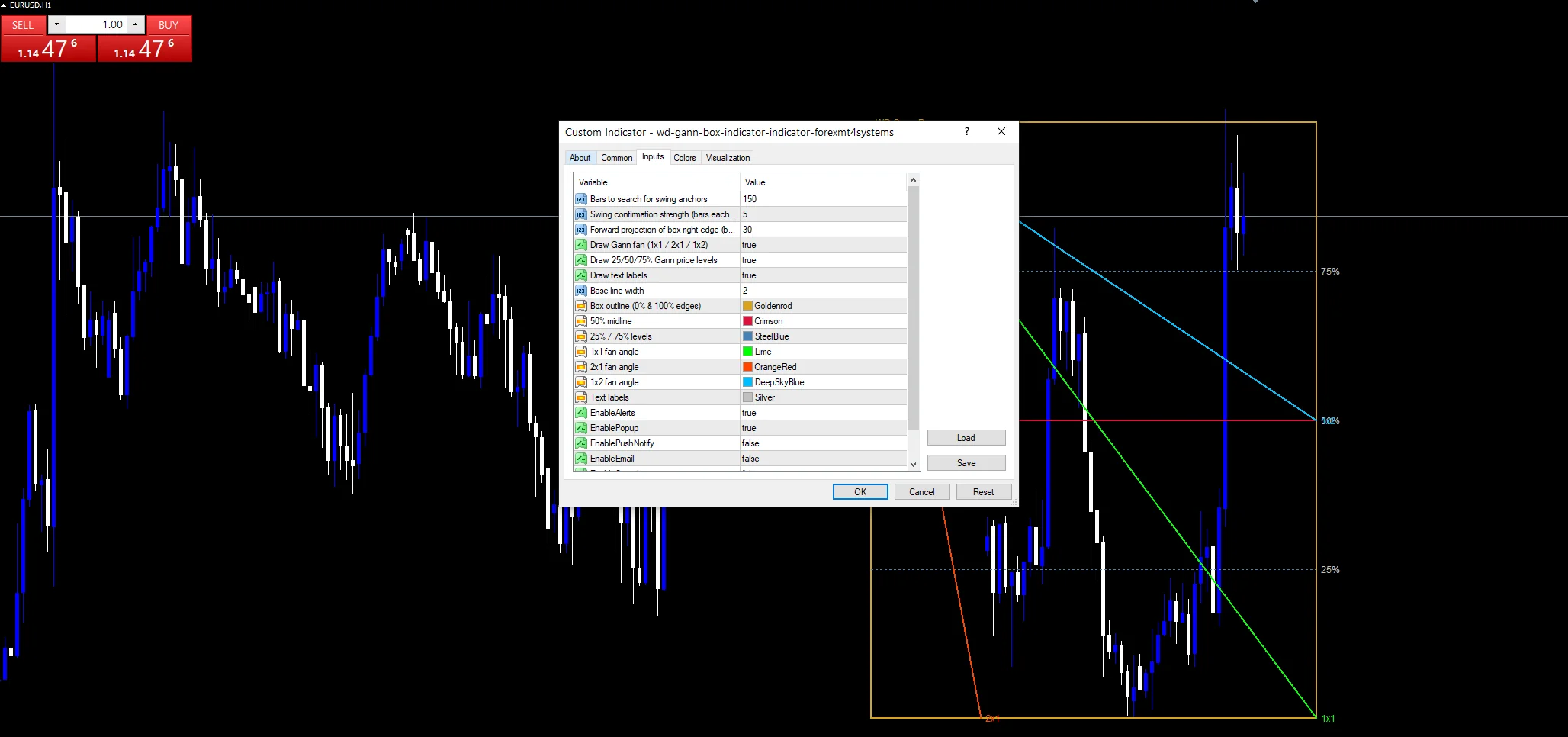
Every WD Gann Box Indicator input
Core settings
| Setting | What it does | Default |
|---|---|---|
Lookback |
Bars to search for swing anchors. Bars searched for the anchor swings, default `150`. | 150 |
Fractal |
Swing confirmation strength (bars each side). Bars each side of a confirmed swing, default `5`. | 5 |
ProjectBars |
Forward projection of box right edge (bars). Bars the box extends past the last candle, default `30`. | 30 |
Display settings
| Setting | What it does | Default |
|---|---|---|
ShowFan |
Draw Gann fan (1×1 / 2×1 / 1×2). Draws the three fan angles, default `true`. | on |
ShowLevels |
Draw 25/50/75% Gann price levels. Draws the 25, 50 and 75 percent levels, default `true`. | on |
ShowLabels |
Draw text labels. Draws the text labels, default `true`. | on |
LineWidth |
Base line width. Base line width, default `2`. | 2 |
ClrBox |
Box outline (0% & 100% edges). Box outline colour, default goldenrod. | goldenrod |
ClrMid |
50% midline. Midline colour, default crimson. | crimson |
ClrQuarter |
25% / 75% levels. Quarter level colour, default steel blue. | steel blue |
Clr1x1 |
1×1 fan angle. | lime |
Clr2x1 |
2×1 fan angle. | orange red |
Clr1x2 |
1×2 fan angle. | deep sky blue |
ClrLabel |
Text labels. | silver |
Alert settings
| Setting | What it does | Default |
|---|---|---|
EnableAlerts |
Master switch for the midline cross alerts, default `true`. | on |
EnablePopup |
Terminal dialog on a midline cross, default `true`. | on |
EnablePushNotify |
Phone push on a midline cross, default `false`. | off |
EnableEmail |
Mail delivery on a midline cross, default `false`. | off |
EnableSound |
Sound playback on a midline cross, default `false`. | off |
SoundFile |
Wav clip for the box alert, default `alert.wav`. | alert.wav |
Fitting the settings to a market
A box wants a swing large enough to divide meaningfully. EURUSD H1 is the reference chart, where `Lookback` at `150` covers about six days. On M5 the box spans half a day and redraws often. On H4 and daily the anchors hold for weeks and the levels settle.
When it misleads
The box depends entirely on two anchor bars, so one new extreme moves everything.
Fan angles come from geometry rather than from price behaviour, and they scale with the chart.
`Fractal` `5` confirms late, so the anchors are always at least five bars old.
Copy the compiled WD Gann Box Indicator file into your MQL4/Indicators folder, and the MT5 build into MQL5/Indicators, then restart the terminal and drag it onto a chart. The step-by-step guide with screenshots is at how to install MT4 and MT5 indicators.
Background reading on the method behind the WD Gann Box Indicator: U.S. Dollar Index on Wikipedia, Aroon at StockCharts ChartSchool.
Download the WD Gann Box Indicator for MT4 and MT5
The zip holds the compiled WD Gann Box Indicator build for MT4 and MT5, plus a short README. Compiled files only, no source. Enter your email below and the download link arrives in your inbox.
Download this indicator free
Enter your email and the file is yours. You also get the full MT4 and MT5 library.
FAQ
How does Lookback pick the two anchors?
It searches back 150 bars for confirmed swings, then keeps the single highest high and the single lowest low among them. Those two prices define the box. A fresh extreme inside the window replaces one anchor and redraws everything.
What do the ShowFan angles represent?
Three fixed slopes drawn from the anchor corner: one unit of price per unit of time, twice that, and half. They are geometric constructions from the original method rather than lines fitted to price.
Which level does the alert watch?
The 50 percent midline. Two completed closes get compared against it, and a crossing fires the message. Quarter levels and box edges are there for reference, and neither carries an alert of its own.
What does ProjectBars at 30 extend?
The right edge of the box and the fan angles, thirty bars past the last candle. That gives the levels somewhere to sit while price is still developing. It changes nothing about the anchors or the prices themselves.
Are results guaranteed?
No. Trading involves risk. Results are not guaranteed; past performance is not indicative of future results. Use the WD Gann Box Indicator as one input. Always backtest before trading live.
Category: this is part of our Signal and Forecast collection. Browse more Signal and Forecast for MetaTrader, or explore every MT4 indicator and MT5 indicator on the site.
External references
- The core method is documented in U.S. Dollar Index on Wikipedia.
- Additional market context is at Aroon at StockCharts ChartSchool.

About the author
Written by Dominic Walsh, a Forex trader and MT4/MT5 indicator, Expert Advisor and script developer. Every tool on forexmt4systems.com is tested on live charts before release and ships with ready-to-use compiled MT4 (.ex4) and MT5 (.ex5) files. Learn more about the trader and developer behind this site.
How we build, test and correct every tool: Editorial & Testing Policy. Trading carries risk; see the disclaimer.