
The wave reversal indicator draws swing legs and then judges them. A new swing low that undercuts the previous one, while RSI reads higher than it did there, is divergence. The reading also has to sit below `InpOversold`. Both conditions decide whether a leg earns a mark.
This build ships as a compiled .ex4 for MT4 and .ex5 for MT5; the screenshots below come from EURUSD H1.
| Platforms | MT4 (.ex4) + MT5 (.ex5) |
|---|---|
| Chart window | Main price chart |
| Plots | 3: Wave Leg, Wave Buy, Wave Sell |
| Alerts | popup, push notification, email, sound |
| Inputs | 12 |
Drawn output, plot by plot
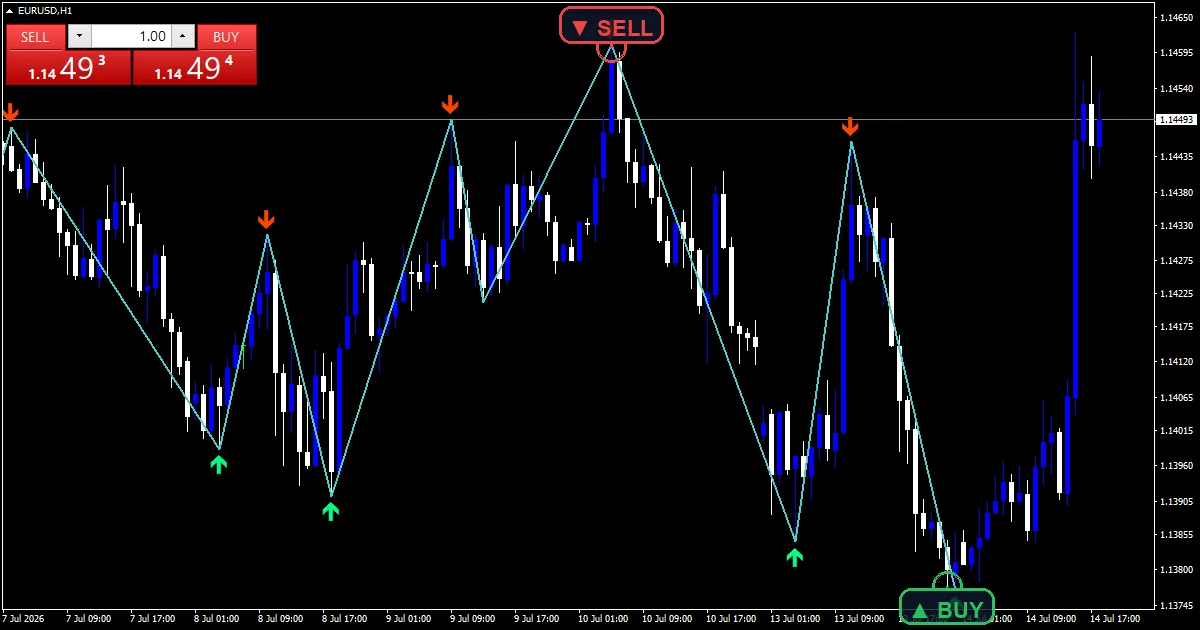
Wave Leg is the medium turquoise section line joining confirmed swings.
Wave Buy places a spring green arrow at a qualifying swing low.
Wave Sell places an orange red arrow at a qualifying swing high.
Marks sit `InpArrowGapPoints` `20` from the wick.
- Wave Leg: section, medium turquoise, width 2
- Wave Buy: arrow, spring green, width 2, arrow code 233
- Wave Sell: arrow, orange red, width 2, arrow code 234
Following the source
Building the legs
A swing needs `InpDepth` `6` bars on each side that fail to beat it. Confirmed swings alternate, and each replaces the previous entry when a more extreme one appears on the same side.
Testing for divergence
diverg needs the new swing low below the previous one while iRSI at `InpRsiPeriod` `14` reads higher than it did at that earlier swing. The sell case reverses both comparisons.
Adding a bias gate
A buy also needs the reading below `InpOversold` `45.0`. A sell needs it above `InpOverbought` `55.0`. `InpMinBarsBetween` `5` then blocks a second mark on the same side within five bars.
Reading the result
The turquoise line shows which swings the divergence test compared.
Both conditions have to hold, so a divergence in the middle of the range prints nothing.
Marks arrive `InpDepth` bars after the swing they describe.
Widening the gap between the two bias levels makes marks rarer.
Alert channels in this build: popup, push notification, email and sound, one message per closed bar.
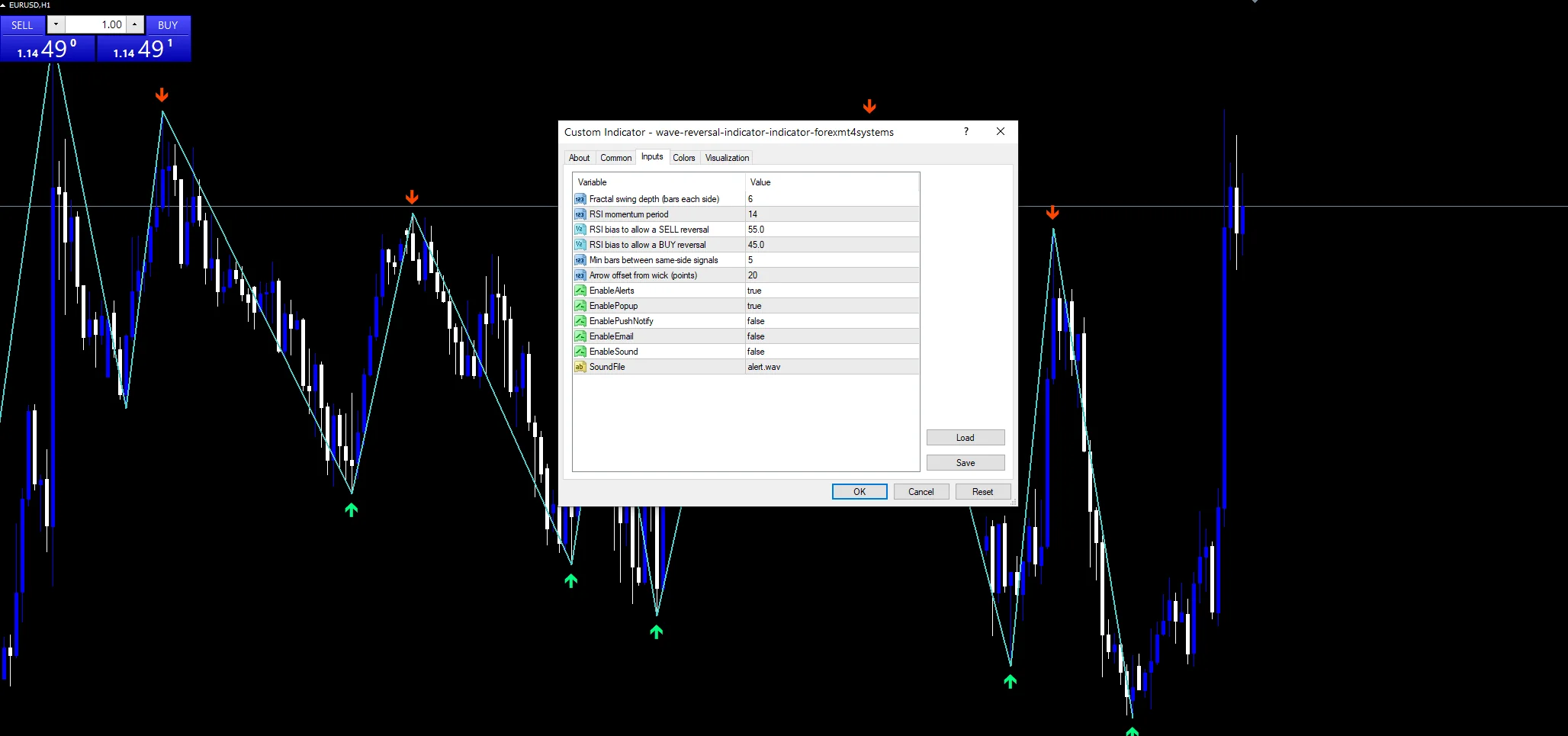
The alert block sits behind `EnableAlerts`, which starts on, and `EnablePopup` carries the message. `EnablePushNotify`, `EnableEmail` and `EnableSound` all begin false. `SoundFile` picks the clip. Swings confirm on closed bars, one message per bar.
Every Wave Reversal Indicator input
Core settings
| Setting | What it does | Default |
|---|---|---|
InpDepth |
Fractal swing depth (bars each side). Bars each side of a swing, default `6`. | 6 |
InpRsiPeriod |
RSI momentum period. Length of the momentum reading, default `14`. | 14 |
InpOverbought |
RSI bias to allow a SELL reversal. Level a sell reversal needs the reading above, default `55.0`. | 55.0 |
InpOversold |
RSI bias to allow a BUY reversal. Level a buy reversal needs the reading below, default `45.0`. | 45.0 |
InpMinBarsBetween |
Min bars between same-side signals. Bars kept between same-side marks, default `5`. | 5 |
Display settings
| Setting | What it does | Default |
|---|---|---|
InpArrowGapPoints |
Arrow offset from wick (points). Mark distance from the wick in points, default `20`. | 20 |
Alert settings
| Setting | What it does | Default |
|---|---|---|
EnableAlerts |
Master switch for the leg reversal alerts, default `true`. | on |
EnablePopup |
Terminal dialog on a leg reversal, default `true`. | on |
EnablePushNotify |
Phone push on a leg reversal, default `false`. | off |
EnableEmail |
Mail delivery on a leg reversal, default `false`. | off |
EnableSound |
Sound playback on a leg reversal, default `false`. | off |
SoundFile |
Wav clip for the reversal alert, default `alert.wav`. | alert.wav |
Suitable charts
Swing legs need a market that turns rather than drifts. EURUSD H1 is the reference chart, where `InpDepth` at `6` picks swings lasting most of a session. On M5 the legs come fast and most divergences are tiny. On H4 each leg spans days and a mark is a genuine event.
Where it disappoints
Divergence marks disagreement, which a trend can produce repeatedly without turning.
The bias levels sit at 45 and 55, close enough to the middle that they block little.
Six bars of confirmation means every mark lands well after the swing itself.
Copy the compiled Wave Reversal Indicator file into your MQL4/Indicators folder, and the MT5 build into MQL5/Indicators, then restart the terminal and drag it onto a chart. The step-by-step guide with screenshots is at how to install MT4 and MT5 indicators.
Download the Wave Reversal Indicator for MT4 and MT5
The zip holds the compiled Wave Reversal Indicator build for MT4 and MT5, plus a short README. Compiled files only, no source. Enter your email below and the download link arrives in your inbox.
Download this indicator free
Enter your email and the file is yours. You also get the full MT4 and MT5 library.
FAQ
How much does InpOversold at 45.0 block?
It stops a bullish divergence printing while the reading sits high. A buy needs the value below 45 at the swing. That level is close to the middle, so it blocks less than a stricter setting like 35 would.
How does the Wave Leg line get built?
From confirmed swings joined as sections. A swing needs `InpDepth` `6` bars on each side that fail to beat it. When a more extreme swing forms on the same side, it replaces the previous entry rather than adding one.
What does the Wave Buy divergence compare?
It compares the new swing against the previous same-side swing, on both price and the reading. A lower low with a higher reading is bullish disagreement. The sell case wants a higher high with a lower reading.
Why does InpMinBarsBetween exist?
Because swings can cluster during a choppy stretch, and each one may pass both tests. Five bars between same-side marks keeps a single wobble from producing three arrows that all describe the same thing.
Are results guaranteed?
No. Trading involves risk. Results are not guaranteed; past performance is not indicative of future results. Use the Wave Reversal Indicator as one input. Always backtest before trading live.
Category: this is part of our Signal and Forecast collection. Browse more Signal and Forecast for MetaTrader, or explore every MT4 indicator and MT5 indicator on the site.
External references
- The core method is documented in Tripartite Agreement of 1936 on Wikipedia.
- Additional market context is at Technical Indicators at StockCharts ChartSchool.

About the author
Written by Dominic Walsh, a Forex trader and MT4/MT5 indicator, Expert Advisor and script developer. Every tool on forexmt4systems.com is tested on live charts before release and ships with ready-to-use compiled MT4 (.ex4) and MT5 (.ex5) files. Learn more about the trader and developer behind this site.
How we build, test and correct every tool: Editorial & Testing Policy. Trading carries risk; see the disclaimer.